

USD BRep is a standalone C++ and Python library for NURBS-based boundary representation solid modeling, with native import and export of BRep data to and from OpenUSD. It was released as v1.0.0 on October 8, 2026. The library stores exact CAD-style solids inside OpenUSD—you still tessellate for rendering, but the NURBS geometry stays in the file for downstream CAD, simulation, or editing.
What usd-brep is meant to solve in USD workflows
USD BRep bridges the gap between CAD solid modeling and OpenUSD scene pipelines. CAD systems store geometry as NURBS curves and surfaces bounded by topological edges, loops, and faces—boundary representation. USD BRep adds an omniSolid schema for BRep data, a kernel for NURBS-based modeling operations (primitives, Booleans, fillets), and import/export functions that write exact geometry into USD attributes.
The library wraps its kernel in two interfaces: usd_brep for Python (CPython 3.12 on Windows and Linux) and C++ headers for direct integration. It ships Boolean union/difference/intersection/merge operators, fillets (constant-radius, variable-radius, chamfer), and tessellation. An OpenCASCADE staging layer exists in the source tree.
Who should evaluate it
Clone the repository if you author or import CAD parts inside USD stages, write Python automation for solid construction, or build C++ tools that need exact geometry alongside USD's transform and material stacks. The wheel is available for CPython 3.12 on Linux and Windows.
Readers who only need polygon meshes for rendering, are not running CPython 3.12 on Linux or Windows, or require production-ready CAD reliability without validating outputs themselves should defer adoption until a later release addresses the documented known issues.
Platform, language, and dependency checks before cloning
The prebuilt Python wheel targets CPython 3.12 on Windows (x86-64) and Linux (x86-64, aarch64). Windows also needs the Microsoft Visual C++ Redistributable. The wheel bundles its own OpenUSD runtime—no separate USD installation—and nothing is added to the pxr namespace.
Building from source requires Git with Git LFS (the repository tracks USD assets, STEP, IGES, and JT fixtures as large binaries), a C++ toolchain (Visual Studio 2019 or 2022 with the MSVC v142 build tools and Windows SDK on Windows; build-essential on Linux), and the packaged premake, OpenUSD, Python 3.12, pybind11, and repo tools fetched automatically via Packman. macOS development is documented only for Apple Silicon and defaults to a kernel-only build without OpenUSD unless you stage local dependencies manually.
Minimal smoke tests for Python and C++ users
After installing the wheel with pip install usd-brep, validate the import and core API:
import usd_brep
box = usd_brep.create_box((0, 0, 0), 10, 10, 10)
volume = usd_brep.compute_volume(box)
print(f"Box volume: {volume}")
For a source build on Linux, run:
./prebuild.sh
./repo.sh build
./repo.sh test
The prebuild step is mandatory: it stages the omniSolid schema plugin resources in _build/schema/omniSolid/resources, which USD runtime requires to recognize BRep attributes. Skipping prebuild means USD cannot load the schema. Tests run with:
./tests.sh linux-x86_64
The repository ships a Python GUI (tools/smlib_gui) that you can run with uv run --locked --group gui python tools/scripts/smlib_gui.py after a successful build. See tools/smlib_gui/README.md for additional smoke-test and troubleshooting commands. The Examples directory holds runnable compositions organized by API layer.
How the library fits into a USD asset pipeline
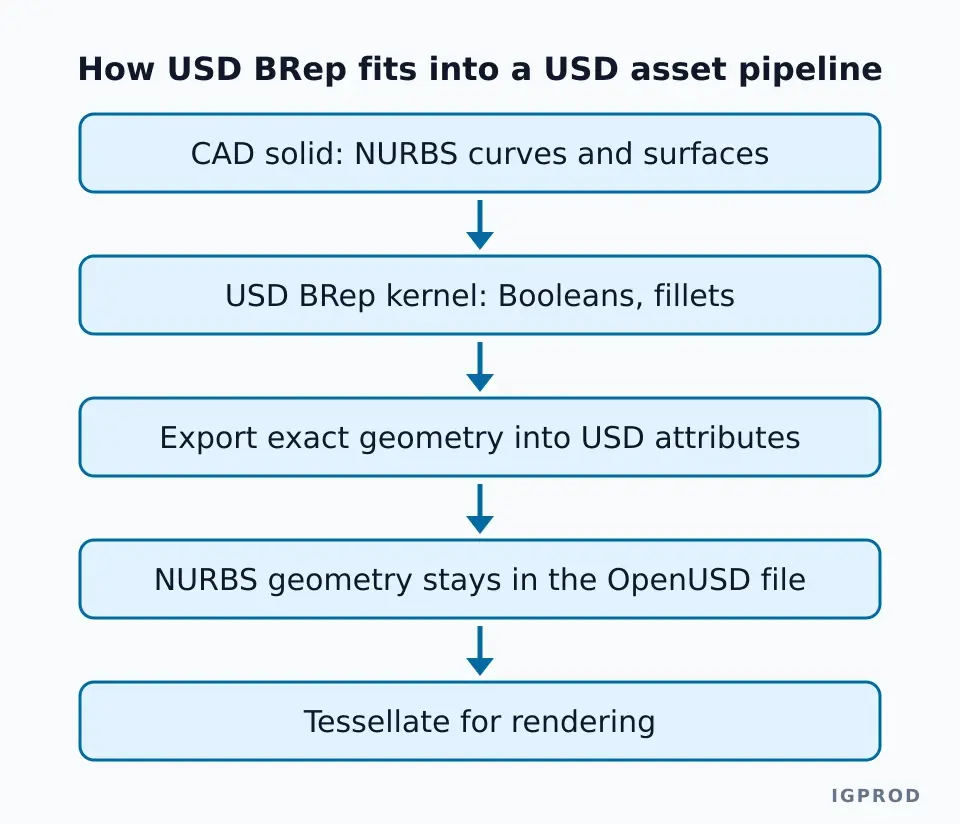
In Python, import usd_brep before opening any stage with pxr so the omniSolid schema plugin registers. Otherwise, USD ignores it and treats BRep attributes as custom data. Construct a solid with primitives (usd_brep.create_box, create_cylinder, create_cone), Boolean-combine them (boolean_difference, boolean_union), apply fillets (circular_fillet, chamfer_fillet), compute volume (compute_volume), and export to USD (usd_brep.usd.export_brep). Boolean operations consume their input Breps; call brep_copy first if you need the original later. Fillet functions such as circular_fillet and chamfer_fillet mutate the Brep handle in place.
C++ callers use the UsdBrepData namespace, build a UsdBrepBuilder, load arrays with BrepReadFromUsdStage, and write with BrepWriteToUsdStage. The UsdBrep namespace exposes NURBS evaluators (EvalNurbsSurface, EvalNurbsCurve3d), surface-domain queries (GetSurfaceDomain, ComputeTrimmedDomain), inverse projection, and topology iterators (UsdBrepIterator, UsdBrepTopologyQueries).
Integration boundaries: what USD BRep does not replace
USD BRep stores BRep data in USD stages but does not replace OpenUSD itself, USD's mesh and transform layers, or tessellation/rendering workflows. You still tessellate BReps to polygons for rendering or export them to formats that downstream tools can read. The v1.0.0 known issues include healing false-positives, tessellation winding errors near fillets, and interoperability gaps with some OCCT-based exporters—validation of imported CAD-derived data remains the caller's responsibility.
Adoption risks: API maturity, maintenance, and interoperability
The v1.0.0 release (October 8, 2026) is the first public version. NVIDIA Omniverse published it under Apache License 2.0; the repository scripts repo.sh, repo.bat, and tools/repoman/repoman_bootstrapper.py use the MIT License. The project is not accepting contributions; issues and bug reports are welcome through the GitHub tracker. The repository's known-issues file lists ten categories of bugs, including remove_fillet reporting success without removing anything, heal_brep silently failing on periodic surfaces, tessellation winding inside-out triangles next to fillets, area/volume inaccuracy for rational-circle trim curves, and import crashes for malformed BrepArray topology.
Before integrating USD BRep, validate outputs: run is_manifold_solid() on healed Breps, and check volume() after calling remove_fillet (which can report success without removing anything). Pre-validate imported USD files with brep_validator_cli/validate_usd.sh --brep-only or nvidia_usd_validate. The validator scripts in the release package expect a source checkout and will exit with error codes when run from the installed package; install usd-brep[validation] or call python brep_validator_cli/validate_usd.py with a Python 3.12 environment that has pxr and usd_validation_nvidia available. The documented inside-out triangle risk near fillets suggests checking tessellated outputs against expectations before passing them downstream.
Interoperability with other NURBS exporters is incomplete: BrepArrays written by OCCT-based UsdSolid exporters can carry UV trim curves that import incorrectly, causing faces to tessellate wrong or the Brep to be skipped. BrepArrays authored by USD BRep itself are not affected.
IGPROD reviewed the v1.0.0 repository documentation and known issues but did not independently build or test the library. The library is suitable to evaluate for experimental CAD/USD integration, internal tooling, and research prototypes; teams should validate outputs and track the known-issues file before each new release.
Another open-source library we covered, for TypeScript and SQL: Reylo, which imports SQL files into TypeScript with full type inference.
Frequently asked questions
Why does opening a USD stage fail to recognize omniSolid BRep attributes?
You opened a USD stage with pxr.Usd.Stage.Open before importing usd_brep. USD schema plugins must be registered before the first stage is opened. Import usd_brep at the top of your script, or set PXR_PLUGINPATH_NAME to the omniSolid resources directory before starting Python.
How do I fix inside-out triangles after circular_fillet?
Pass surface_angle_tolerance_deg=15 to tessellate(). The known-issues file documents that this parameter avoided every observed case of incorrect triangle winding next to fillets on cylinders and cones.
What happens if I reuse a Brep after a Boolean operation?
Boolean functions (boolean_difference, boolean_union, boolean_intersection) consume both input Breps. The documentation states the input Breps must not be reused. Call brep_copy on any Brep you need to preserve before passing it to a Boolean operation or an in-place mutator.
Can I build usd-brep on macOS for production use?
macOS builds are documented only for Apple Silicon and default to a Python/kernel configuration without OpenUSD. You can stage local OpenUSD dependencies with tools/scripts/setup-macos-local-deps.sh, but Packman does not publish macOS OpenUSD or Python packages. The repository notes that macOS support is for local development.
Next step
Install the wheel with pip install usd-brep (CPython 3.12, Linux/Windows) or clone the repository and run ./prebuild.sh then ./repo.sh build. Read KNOWN_ISSUES.md before integrating it.
Verification status: Supported by official documentation only under the conditions below; not reproduced in a test environment by IGPROD. Checked 2026-10-14.
Applies to: Omniverse USD BRep v1.0.0.
Conditions:
- Git and Git LFS are required for large binary fixtures in the source checkout.
- Linux source builds require build-essential.
- OpenUSD, Python 3.12, pybind11, premake, and repo tools are pulled by Packman when building.
- Run prebuild before building a fresh checkout or after deleting _build.
- Use ./repo.sh on Linux and macOS, and ./repo.bat on Windows.
- Windows C++ builds require Visual Studio 2019 or 2022 with the MSVC C++ toolset.
- Windows C++ builds also require the Windows SDK.
- Windows binaries require the Microsoft Visual C++ Redistributable.
- macOS local development is documented for Apple Silicon only.
- The project is currently not accepting contributions.

Leave a comment
Your email address will not be published. Required fields are marked *