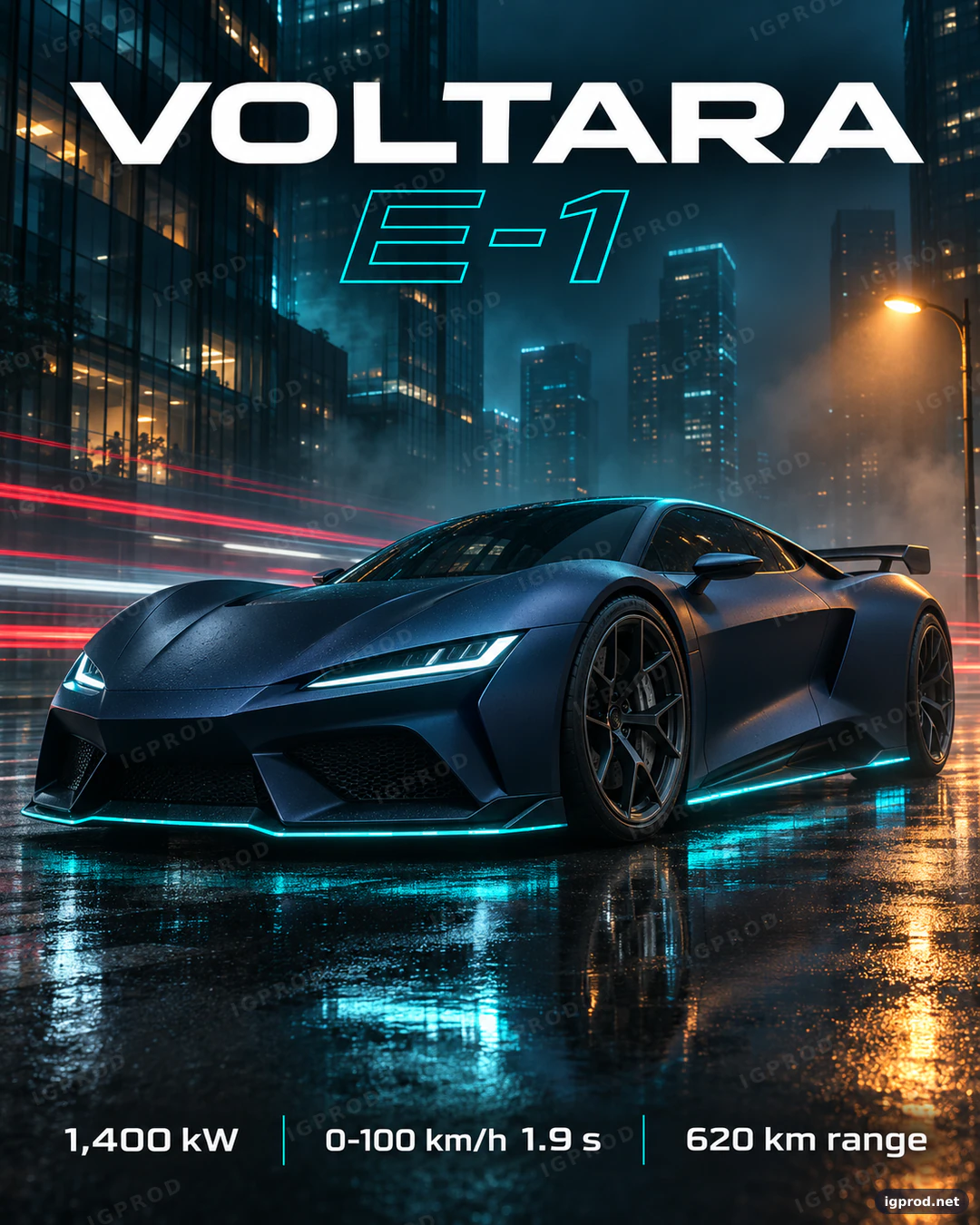
This cinematic car prompt turns a fictional electric hypercar into a campaign poster: a matte midnight-blue coupe on a wet city street at night, cyan light strips, light trails and a clean spec line at the bottom. It is written the way a photographer briefs a shoot, one line per decision, so you can swap the car, the city or the colors without losing the look. We ran it once in OpenAI's image model; the image below is that first result, unedited apart from the IGPROD watermark.
What the image shows
OpenAI's image model returned one portrait image of 1122 × 1402 pixels, which is a 4:5 frame. Every piece of text came out exactly as written: "VOLTARA" in wide white capitals across the top, "E-1" below it in cyan outline letters (slanted, which the prompt did not ask for), and the bottom line "1,400 kW | 0-100 km/h 1.9 s | 620 km range" with thin cyan dividers.
The car is a matte midnight-blue coupe seen from a low front three-quarter angle, facing left, with beads of rain on the paint. Cyan strips glow along the front splitter and the side skirt, and slim cyan-white headlights match them. The street is wet and mirrors the car, red and white light trails streak past on the left, mist hangs between dark glass towers with warm lit windows, and an amber streetlight on the right throws an orange reflection on the asphalt. No badge, no number plate and no other car is visible.
Two details differ from the prompt. The rear diffuser strip cannot be seen from this angle, and the model added a large rear wing that the prompt never mentioned. The car also sits just below the middle of the frame rather than filling the lower half, and its reflection fills the bottom of the poster.
Why this car prompt works
The first line sets the job and the frame. "Cinematic electric hypercar advertising poster, vertical 4:5" tells the model it is making an ad, not a snapshot, and fixes the shape before anything else. A tall frame suits phone screens and social feeds, and it leaves room above the car for the title.
A fictional name in quotes. "VOLTARA E-1" gives the model letters to print without copying a real badge, and the Avoid line backs it up with "real car brands or badges". Quotation marks tell the model that these exact characters must appear.
Things, not adjectives. The Scene and Background lines list physical details: wet asphalt, red and white light trails, mist, glass towers with a few lit windows. Reflections on wet ground are what make night car photography look expensive, so the prompt asks for them directly instead of saying "epic" or "stunning".
A three-light setup. A cyan rim light on the roofline, a softbox above the hood and an amber streetlight on the right follow the same logic as a studio shoot: one light draws the shape, one shows the paint, one adds warmth. Cool and warm light on opposite sides create the teal and amber contrast that the Style line names again.
Typography as a layout. Every text element has a place, a weight and exact words: the brand across the top, the model name below it, three specs at the bottom separated by thin lines. Short, quoted text with a clear position is what image models render most reliably.
Camera language. "Ground level", "35 mm lens", "sharp focus on the front wheel and headlight" and "motion blur in the light trails only" decide the angle and where the eye lands. Without them, models often fall back to a flat side view.
An Avoid line for the usual failures. Badges, plate text, other cars in focus, warped wheels and misspelled words are the common faults of AI car images, so the prompt names them once, at the end.
The cinematic car prompt, ready to copy
Create a cinematic electric hypercar advertising poster, vertical 4:5 (1080x1350).
Subject: a fictional two-door electric hypercar called "VOLTARA E-1" in matte midnight-blue paint, with thin cyan light strips along the front splitter, the side skirts and the rear diffuser; low front three-quarter view, facing left, filling the lower half of the poster.
Scene: a wet city street at night after rain; the asphalt mirrors the car and its cyan lights; long red and white light trails from passing traffic streak behind it; fine mist hangs in the air.
Background: dark glass towers fading into blue haze, with a few warm windows lit.
Lighting: a cool cyan rim light tracing the roofline, a soft overhead softbox on the hood, and a warm amber glow from a streetlight on the far right.
Typography: "VOLTARA" in wide, bold, white extended sans-serif capitals across the top; "E-1" in thin cyan outline letters right below it; at the bottom, three specs separated by thin vertical lines: "1,400 kW", "0-100 km/h 1.9 s", "620 km range".
Camera: shot at ground level with a 35 mm lens, sharp focus on the front wheel and headlight, gentle motion blur in the light trails only.
Style: high-end automotive campaign photography, cinematic teal and amber color grade, crisp edges, strong visual hierarchy.
Avoid: real car brands or badges, people, license plate text, other cars in focus, distorted wheels, misspelled text.
Paste it as it is into ChatGPT's image generation or another image model. To make it yours, change the quoted names and the three specs first, then one line at a time, so you can see what each line does. If you call OpenAI's model through its API instead, the image generation guide lists the sizes and options it accepts.
Three ways to change the car poster
- Golden hour instead of night: replace the Scene line with "an empty coastal road at golden hour, low sun behind the car, warm haze over the sea" and change the Lighting line to "warm backlight from the low sun, soft fill from the front". Keep the typography as it is.
- Another body style: change only the Subject line, for example to "a fictional electric grand tourer with four seats and a long hood", and keep the rest. The poster keeps its look while the car changes.
- A new color story: swap "matte midnight-blue" and "cyan" for "pearl white" and "amber", then change the color grade in the Style line to "warm amber and graphite". Paint, light strips and grade must agree, or the poster looks unplanned.
Check the result before you use it
- Read every character. Brand, model name and the three specs: numbers and units are where image models slip most often.
- Look for real badges. Zoom in on the grille, the wheels and the rear. Anything that resembles a real car maker's logo has to go.
- Check the wheels and the light strips. Wheels should be round with even spokes, and each light strip should run continuously along the body.
- Check the frame. If the tool returns a different ratio than 4:5, crop it and keep a clear margin around the title and the specs.
Frequently asked questions
Does this prompt work in Gemini (Nano Banana)?
The prompt is plain text with no settings tied to one model, so you can paste it into Gemini's image model too. We ran it only in OpenAI's model, so expect a different car shape, light and text placement there.
Why use a fictional car name?
It gives the model text to render and keeps real trademarks out of the image. Use your own brand name in the quotes when you make a poster for a real product.
Can I use the image in an ad?
Check the text and the shapes for anything that looks like a real brand, and read the terms of the image tool you use, before any commercial use.
More image prompts
For other car looks, see the lime sports car poster prompt with its three detail panels and the magenta race car poster prompt with a row of stats. Every prompt we tested is in IGPROD image prompts.
Leave a comment
Your email address will not be published. Required fields are marked *