
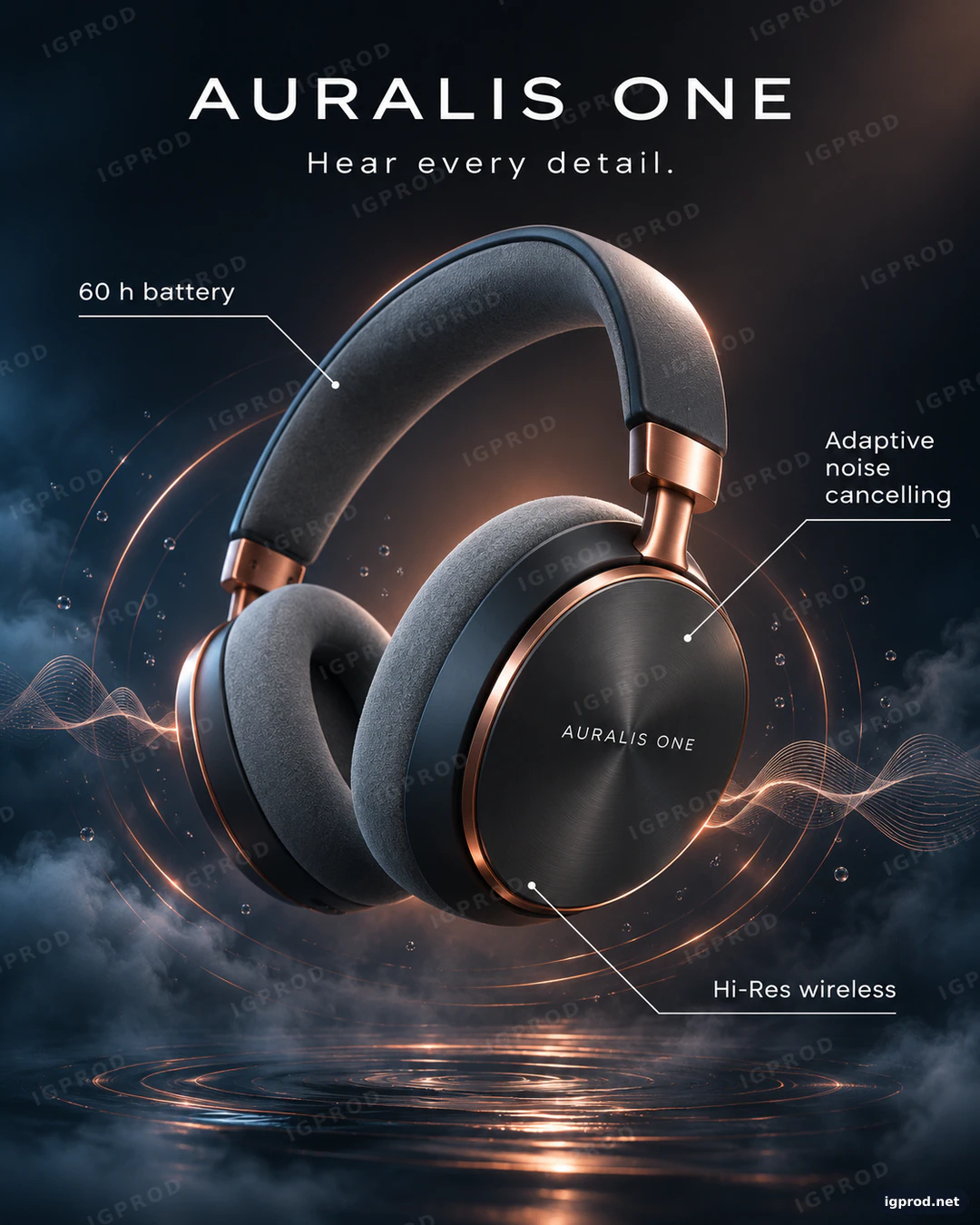
This product photography prompt builds a launch ad for a fictional pair of wireless headphones: matte graphite ear cups, brushed copper hinges, copper light rings and sound waves moving through dark vapor, and three thin callout labels. It reads like a studio brief, one line per decision, so you can swap the product or the colors and keep the premium look. We ran it once in OpenAI's image model; the image below is that first result, unedited apart from the IGPROD watermark.
What the image shows
OpenAI's image model returned one portrait image of 1122 × 1402 pixels, which is a 4:5 frame. All text is spelled as written: "AURALIS ONE" in wide-spaced white capitals at the top, "Hear every detail." below it, and the three labels "60 h battery", "Adaptive noise cancelling" and "Hi-Res wireless", each joined to the headphones by a thin white line that ends in a small dot.
The headphones float in the center at a slight angle, with the right ear cup turned toward the viewer. That cup has a dark brushed-metal face circled by a copper ring, the hinges are brushed copper, and the ear cushions and the headband are covered in soft gray fabric. Thin copper rings of light circle the ear cups, fine copper sound-wave lines run out to both edges of the frame, and blue-gray vapor with small floating droplets fills the lower half. The background runs from midnight blue to black, with a warm copper glow behind the headband. There are no hands, no cables and no second pair.
Three details go beyond the prompt. The model printed "AURALIS ONE" a second time, in small letters on the ear cup. It turned the vapor into a dark water surface with copper ripples at the bottom of the frame. And the "60 h battery" line points at the headband, because the prompt never said where each line should land.
Why this product photography prompt works
One product, one pose. "One pair", "floating at a slight angle" and "the right ear cup turned toward the viewer" decide the pose before the model can. Turning one cup to the camera shows its face, which is where premium headphones carry their design.
Materials, named one by one. Matte graphite, brushed copper and gray memory foam are three different surfaces, and each one catches light in its own way. Naming them is what makes the result look like a product photo and not a generic 3D render.
An effect that explains the product. Sound cannot be photographed, so the Effect line shows it: rings of light and sound-wave ripples spreading from the ear cups. The vapor and the droplets give those rings something to light up.
Light that follows the metal. A hard key light from the upper right, a copper rim on every metal edge and a soft blue fill from the left set warm against cool. The same copper repeats in the hinges, the rings and the background glow, so the palette holds together.
Callouts in the prompt. Feature labels are usually added later in design software. Here they are part of the Graphics line, with exact words in quotes and thin connector lines, so the image comes out ready to post.
Negative space on purpose. "Generous negative space" around the title keeps the top of the frame calm, which is what makes the layout read as premium instead of crowded.
An Avoid line for the usual failures. Hands, extra headphones, tangled cables, warped ear cups and a cartoon look are the common ways an AI headphones image goes wrong, so the prompt rules them out once, at the end.
The headphones ad prompt, ready to copy
Create a premium wireless headphones launch ad, vertical 4:5 (1080x1350).
Subject: one pair of over-ear headphones of a fictional brand "AURALIS ONE" in matte graphite with brushed copper hinges and soft gray memory-foam ear cushions, floating at a slight angle in the center, the right ear cup turned toward the viewer.
Effect: thin rings of copper light and fine sound-wave ripples expand from the ear cups through dark water vapor; tiny suspended droplets catch the light.
Background: a deep midnight-blue to black radial gradient with a faint copper glow behind the headphones.
Lighting: hard key light from the upper right, copper rim light on every metal edge, a soft blue fill from the left, realistic reflections on the brushed metal.
Graphics: three thin white connector lines from the headphones to three small labels: "60 h battery", "Adaptive noise cancelling", "Hi-Res wireless".
Typography: "AURALIS ONE" in clean white sans-serif at the top and a small tagline "Hear every detail." below it, with generous negative space.
Style: high-end tech product photography, editorial, minimal, razor-sharp detail.
Avoid: people, hands, real brand logos, extra headphones, tangled cables, warped ear cups, cartoon look, misspelled text.
Paste it as it is into ChatGPT's image generation or another image model. Change the quoted brand, the tagline and the three labels first; they are the parts a client asks to change. If you work through OpenAI's API, the image generation guide lists the sizes and quality options it accepts.
Three ways to change the headphones ad
- Pin each label to a part: rewrite the Graphics line so every line has a target, for example a line from the left ear cup to "60 h battery", one from the right ear cup to "Adaptive noise cancelling" and one from the right hinge to "Hi-Res wireless".
- A light version: change the finish to "matte white with brushed silver hinges", the background to "a pale gray to white gradient" and the rim light to "a soft silver rim light". Keep the Effect line, with the rings in soft gray.
- Earbuds instead of headphones: replace the Subject line with "one pair of wireless earbuds of a fictional brand "AURALIS ONE" floating above their open charging case", and keep the rest. The rings and the labels work for any audio product.
Check the result before you use it
- Read the labels. Numbers and units such as "60 h" are where image models slip most often.
- Follow the connector lines. Each line should start at a sensible part of the headphones and end at its own label, with no line crossing another.
- Check the symmetry. Both hinges, both cushions and both sides of the headband should match, and the ear cups should be round, not oval.
- Search for real logos. Zoom in on the ear cups and the headband. Anything that looks like a real audio brand's mark has to go.
Frequently asked questions
Does this prompt work in Gemini (Nano Banana)?
The prompt is plain text, so you can paste it into Gemini's image model too. We ran it only in OpenAI's model, so expect different shapes, light and text placement there. Several of our earlier prompts, such as the copper smartphone poster, were made in Nano Banana if you want to compare the two models.
Can I put my own product in this prompt?
Yes. Describe your product in the Subject line with its real colors and materials, and keep the Effect, Lighting and Typography lines. For an exact likeness of a product you already sell, edit a photo of it instead of generating it from text.
Why does the model add text I did not ask for?
Models copy what they have seen in real ads, and real headphones carry their brand on the ear cup. Add "no text on the product" to the Avoid line if you want the name only in the title.
More product prompts
The copper smartphone launch poster prompt uses the same copper-on-dark palette for three phones, and the chrome comet logo mark prompt was also made in OpenAI's image model. Every prompt we tested is in IGPROD image prompts.
Leave a comment
Your email address will not be published. Required fields are marked *