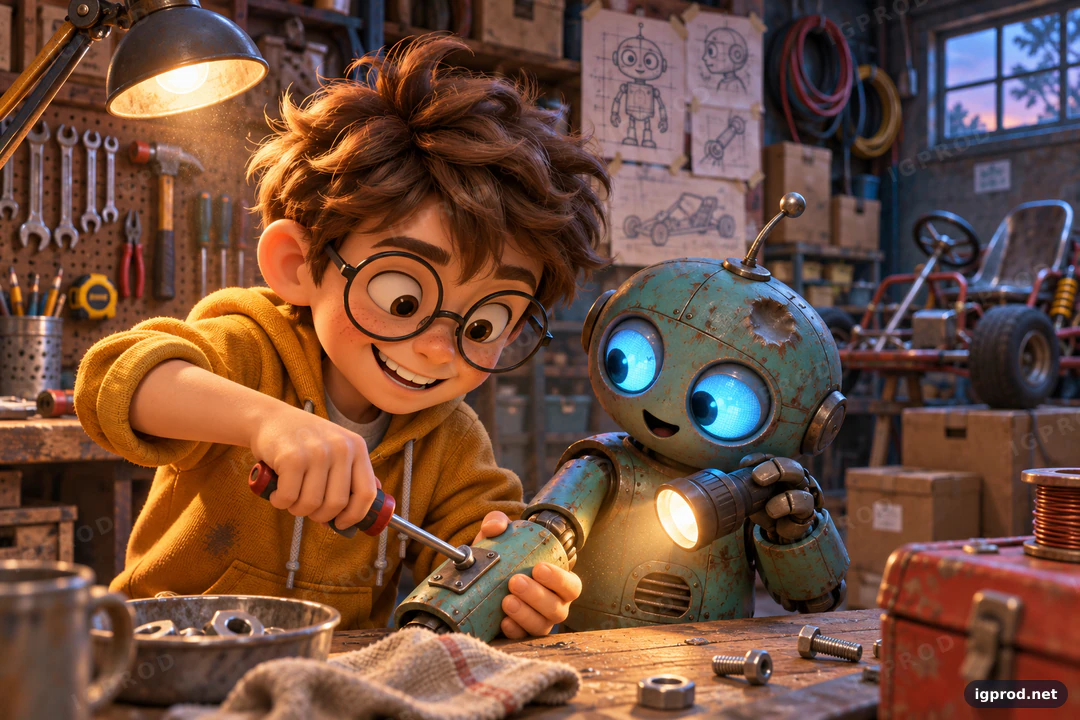
This 3D cartoon prompt describes one frame of an animated feature that does not exist: a boy inventor with big round glasses fixing the arm of his small teal robot in a cluttered garage at dusk. It is built like a shot list, with separate lines for the characters, the action, the set, the light and the camera. We ran it once in OpenAI's image model; the image below is that first result, unedited apart from the IGPROD watermark.
What the image shows
OpenAI's image model returned one landscape image of 1536 × 1024 pixels, which is a 3:2 frame. On the left, a boy with messy brown hair, freckles, big round glasses and a mustard-yellow hoodie grins as he turns a screwdriver on a bolt in the robot's forearm. On the right, the robot leans in to watch: a round teal body with rust spots, a dent on its head, one antenna, a small smile and two large glowing blue eyes. It holds a flashlight that lights up the work.
Behind them, a pegboard holds wrenches, pliers, a hammer and screwdrivers under a desk lamp, and robot sketches and a go-kart drawing are taped to the wall. Coils of wire hang on the back wall, cardboard boxes are stacked in the corners, and a half-built go-kart stands in the back on the right. A small window shows a pink and purple dusk sky. On the bench in front, there is a bowl of nuts, loose bolts, a cloth, a mug and a red toolbox.
The light matches the brief: warm lamp light on the boy's face, a blue glow from the robot's eyes and the window, and specks of dust shining near the lamp. One small difference: a few labels on the boxes and a small sign on the wall carry marks that look like text, although the prompt asked for no text. They are too small to read in the full image.
Why this 3D cartoon prompt works
"3D animated film still". Asking for a frame from a film, not just a "3D cartoon", brings the lighting, the depth and the finished set of a feature film instead of a single figure on a plain background.
Characters described as designs. Big round glasses, messy hair and a mustard hoodie for the boy; a dented teal body, glowing blue eyes and one antenna for the robot. Each feature is simple enough to read at a glance, which is how animated characters are designed.
A separate Action line. The boy tightening a bolt and the robot holding the flashlight tell a small story about trust between them. Putting the action in its own line keeps the model from drawing two characters standing side by side.
A set full of props. The pegboard, the sketches on the wall and the half-built go-kart make the garage feel used. They also hint at who the boy is before you read any caption.
Three light sources with three jobs. The warm lamp lights the face, the cool window sets the time of day and the robot's eyes add a color that belongs to the robot alone. That warm and cool mix is a signature of animated films.
Style words without a studio name. "Soft skin shading", "expressive cartoon proportions" and "detailed metal, fabric and wood textures" describe the look. The Avoid line keeps out existing cartoon characters and studio names, so the result stays original.
The 3D cartoon prompt, ready to copy
Create a 3D animated film still, horizontal 3:2 (1536x1024).
Subject: a ten-year-old boy inventor with big round glasses, messy brown hair and a mustard-yellow hoodie with rolled-up sleeves, and his small round robot friend with a dented teal metal body, big glowing blue eyes and one antenna.
Action: the boy grins as he tightens a bolt on the robot's arm with a screwdriver, while the robot holds a flashlight for him and watches with curious eyes.
Background: a cozy, cluttered garage workshop: a pegboard wall of tools, cardboard boxes, coils of wire, a desk lamp, robot sketches pinned to the wall, a half-built go-kart in the back.
Lighting: warm golden light from the desk lamp on the boy's face, cool blue dusk light from a small window, a soft blue glow from the robot's eyes, dust in the air catching the light.
Camera: eye level with the boy, 35mm lens, shallow depth of field.
Style: high-end 3D animated feature film look, soft skin shading, expressive cartoon proportions (big head, big eyes), detailed metal, fabric and wood textures, cinematic composition.
Avoid: women or girls, text, logos, existing cartoon characters, studio names, weapons, extra fingers, creepy realistic faces.
Paste it as it is into ChatGPT's image generation or another image model. Change the characters first and keep the Lighting and Camera lines, which carry most of the film look. If you call OpenAI's model through its API, the image generation guide lists the sizes and quality options it accepts.
Three ways to change the 3D cartoon
- A space mission: move the scene to "the cockpit of a small homemade rocket, the robot as co-pilot, stars through the window", and change the Action line to "the boy pressing a big red launch button".
- A grandfather and grandson: replace the robot with "his grandfather in a flat cap and a cardigan" and the action with "both fixing an old bicycle together".
- A daytime scene: change the Lighting line to "bright morning sun through the open garage door, soft shadows", for a cheerful poster or a children's book cover.
Turn the still into a character sheet
If you like the robot or the boy and want to use them again, ask the same model for a character sheet in a second prompt: "the same character, front view, side view and back view, plain light gray background, same proportions and colors". Describe the character with the exact words of the first prompt, so the design stays the same.
Keep each character's key features short and fixed: glasses, hair, hoodie color for the boy; body color, eye color and antenna for the robot. Repeating those words in every new prompt is the simplest way to keep a cartoon character recognizable across images.
Check the result before you use it
- Count the fingers. Cartoon hands often get four or six fingers. Zoom in on the hand that holds the screwdriver and the robot's hand on the flashlight.
- Look for fake text. Labels on boxes, signs and tools can turn into made-up letters. Add "no labels, no signs" to the Avoid line or clean them up afterwards.
- Compare with famous characters. If the boy or the robot looks like a character from a known film, change the colors or the shape.
- Check the tool in the hand. The screwdriver should touch the bolt and the boy's grip should look natural.
Frequently asked questions
Should I write "Pixar style" in a 3D cartoon prompt?
You do not need to. Describing the light, the proportions and the textures gets the look, and it keeps your image from copying a studio's characters, which matters if you want to use the image in your own project.
Does this prompt work in Gemini (Nano Banana)?
The prompt is plain text, so you can paste it into Gemini's image model too. We ran it only in OpenAI's model, so the characters and the workshop will look different there.
How do I make it a YouTube thumbnail?
Keep the 16:9 shape close to this 3:2 frame by asking for "horizontal 16:9 (1280x720)", move the characters to the right half and leave the left half calmer for your title text.
More image prompts
For another illustrated look, see the synthwave puzzle box packaging prompt, and for an animal photo, the river otter image prompt. Every prompt we tested is in IGPROD image prompts.
Leave a comment
Your email address will not be published. Required fields are marked *