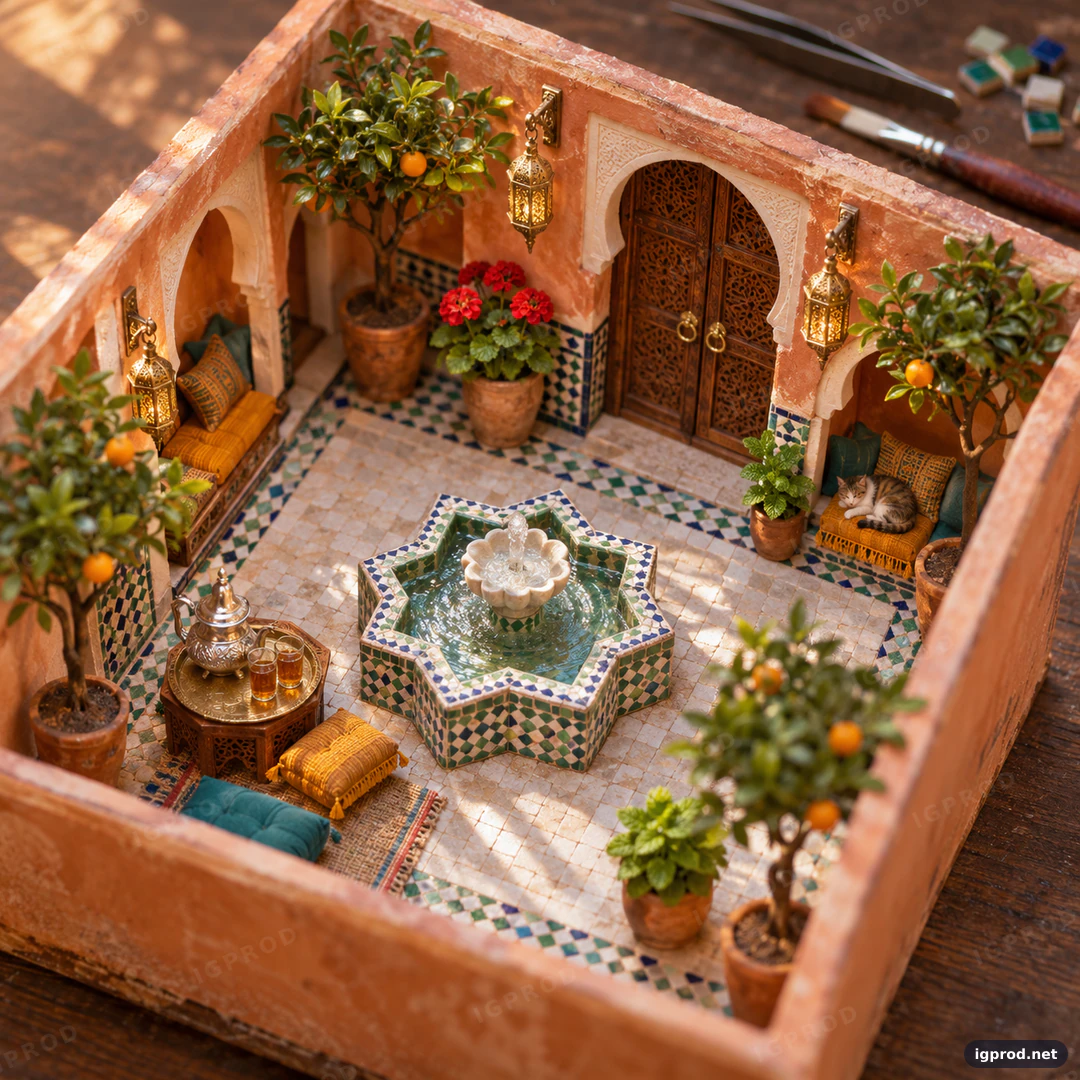
This miniature prompt asks for a photo of a handmade scale model: a riad courtyard about the size of a shoebox, with a tiled fountain, orange trees, carved doors and a cat asleep on a cushion, sitting on a workbench next to the maker's tools. The trick is to describe a real object on a real table, not a "cute small house". We ran it once in OpenAI's image model; the image below is that first result, unedited apart from the IGPROD watermark.
What the image shows
OpenAI's image model returned one square image of 1254 × 1254 pixels. We look down at an angle into an open box with thick walls of warm terracotta plaster. In the middle, a fountain shaped like an eight-pointed star is covered in green, blue and white zellige tiles, with a white scalloped basin and a small jet of water. Low sunlight from the upper left throws leaf shadows across the floor tiles.
Four small orange trees in clay pots stand near the corners. At the back, carved wooden double doors with brass ring handles sit under a white horseshoe arch, between two brass lanterns. Arched alcoves on both sides hold saffron and teal cushions, and in the right alcove a tabby cat sleeps curled up. On the left, a silver teapot and two glasses of tea stand on a brass tray on a small carved table, with potted mint and red geraniums around the courtyard.
The box sits on a dark wooden workbench, and in the top right corner a pair of tweezers, a paintbrush and a few loose mosaic tiles wait beside it. Two details differ from the prompt: the model made the box open on all four sides at the top, like a real diorama, and the fountain became a star shape that we did not ask for. Both suit the scene. There are no people and no text, as the Avoid line asked.
Why this miniature prompt works
"A photo of a handmade miniature diorama". The first line says the subject is a physical model photographed by a camera. That is what gives the plaster its rough texture and the tiles their tiny gaps, instead of a smooth 3D render.
A real size. "About the size of a shoebox" sets the scale. The model then sizes everything to match: the tea glasses, the lanterns and the cat all look a few centimeters tall.
Details a maker would build. Zellige tiles, brass lanterns, cushions, mint, geraniums and a tea tray are the small objects a model maker adds one by one. Listing them in their own Details line gives the model a set to dress, not just "a courtyard".
The workbench sells the scale. Tweezers, a paintbrush and loose tiles next to the box tell your eye how small the model is. Without them, the courtyard could pass for a real one.
Macro camera words. "85mm macro lens" and "tilt-shift shallow depth of field" make only the center sharp and blur the edges, which is how real photos of miniatures look.
An Avoid line for the style and the content. "Plastic toy look" and "cartoon style" keep the materials real. Mosques, minarets and religious symbols are left out on purpose, so the courtyard stays a home.
The miniature prompt, ready to copy
Create a photo of a handmade miniature diorama, square 1:1 (1024x1024).
Subject: a tiny traditional riad courtyard about the size of a shoebox, seen from above at a 45-degree angle: a central tiled fountain with real-looking water, a small orange tree in each corner, carved cedar-wood doors, horseshoe arches and walls of warm terracotta plaster.
Details: zellige mosaic tiles in green, blue and white on the fountain and the floor border; brass lanterns; low cushions in saffron and teal; potted mint and red geraniums; a tiny wooden tray with a silver teapot and small tea glasses; a cat asleep on a cushion.
Background: the diorama sits on a dark walnut workbench, with a pair of tweezers, a small paintbrush and a few loose mosaic tiles beside it, out of focus.
Lighting: soft warm daylight from the upper left like late afternoon sun, gentle shadows inside the arches, small highlights on the fountain water.
Camera: 85mm macro lens, tilt-shift shallow depth of field so only the fountain and the nearest arches are sharp.
Style: macro photograph of a real scale model, true-to-life materials (plaster, wood, glazed tile), warm and inviting.
Avoid: people, text, logos, mosques, minarets or any religious building or symbol, plastic toy look, cartoon style.
Paste it as it is into ChatGPT's image generation or another image model. To keep the result looking like a real model, change the room first and leave the Camera and Background lines as they are. If you call OpenAI's model through its API, the image generation guide lists the sizes and quality options it accepts.
Three ways to change the miniature
- A tiny coffee shop: replace the courtyard with "a corner coffee shop with a wooden counter, an espresso machine, chalkboard menus with no text and three small tables", and keep the workbench.
- A mountain cabin in winter: ask for "a log cabin on a snowy rock, pine trees, warm light in the windows, cotton snow on the roof", and change the light to "cool morning daylight".
- A night version of the riad: keep the Subject and Details lines and change the Lighting line to "night, the lanterns lit, warm light on the tiles, a dark blue sky above the box".
Tips for miniature and diorama prompts
Name the base the model stands on, such as a workbench, a shelf or a hand, and add one or two tools or everyday objects next to it. These give the viewer a scale they already know.
Ask for natural materials by name: plaster, wood, glazed tile, moss, paper. Words like "realistic" help less than the names of the things the model is made of. Finally, keep the camera above the model at an angle; a straight side view loses the depth that makes dioramas fun to look at.
Check the result before you use it
- Count the corners. The prompt asks for an orange tree in each corner; check that the trees and pots are whole and not merged into walls.
- Look at the water. The fountain water should sit flat inside the basin and reflect the light the same way as the tiles.
- Check the cat. Animals in small scenes can lose a leg or an ear. Zoom in before you post the image.
- Look for fake writing. Labels on pots and tiles can turn into made-up letters. Add "no labels" to the Avoid line if you see them.
Frequently asked questions
What is the difference between a miniature and a tilt-shift prompt?
A miniature prompt describes a real small model, as here. A tilt-shift prompt makes a real, full-size place look like a model by blurring the top and bottom of a photo taken from high up. This prompt uses both: a real model, photographed with a tilt-shift look.
Does this prompt work in Gemini (Nano Banana)?
The prompt is plain text, so you can paste it into Gemini's image model too. We ran it only in OpenAI's model, so the fountain, the trees and the colors will look different there.
Can I make a miniature of my own house?
Yes. Describe your house room by room in the Subject and Details lines: the shape, the colors, the furniture and one pet or object that makes it yours. Keep the workbench and the camera lines.
More image prompts
For another 3D object built from small details, see the synthwave puzzle box packaging prompt, and for a close photo of an animal, the river otter image prompt. Every prompt we tested is in IGPROD image prompts.

Leave a comment
Your email address will not be published. Required fields are marked *