

Nginx Proxy Manager logs show a Docker gateway (172.18.0.1), Cloudflare address, or proxy IP instead of real visitors. The address is lost when Docker bridge masquerading replaces the source, when Cloudflare proxies the request, or when an upstream load balancer forwards traffic without a client-IP header. Fix it by identifying which layer sees the wrong address, then configuring that component to read the correct header from a trusted source.
Trace the request to find where the address is lost
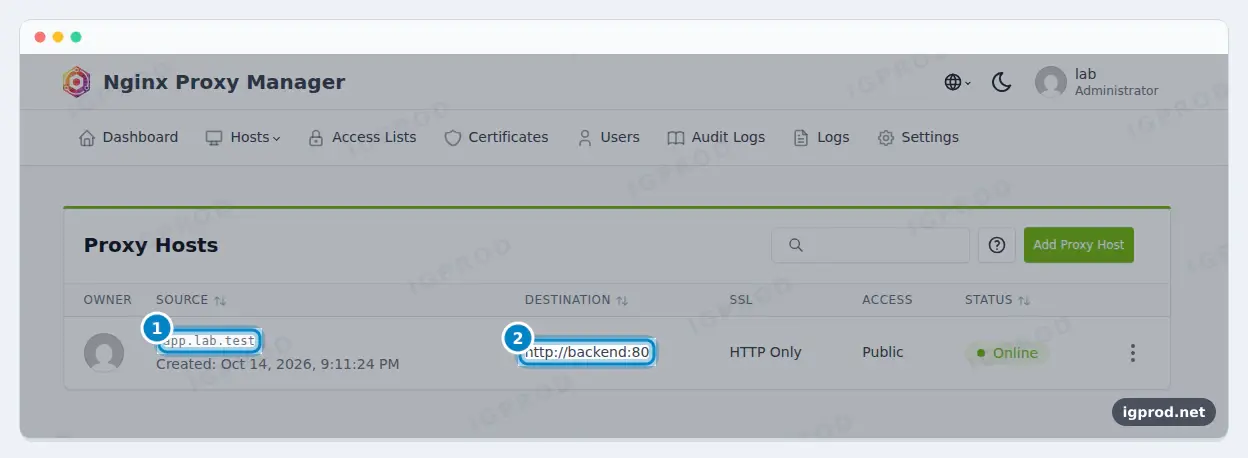
Check Nginx Proxy Manager's access log first.
docker exec your-npm-container tail -n 10 /data/logs/proxy-host-1_access.logDocker bridge networking uses masquerading, and published ports forward connections through the gateway.
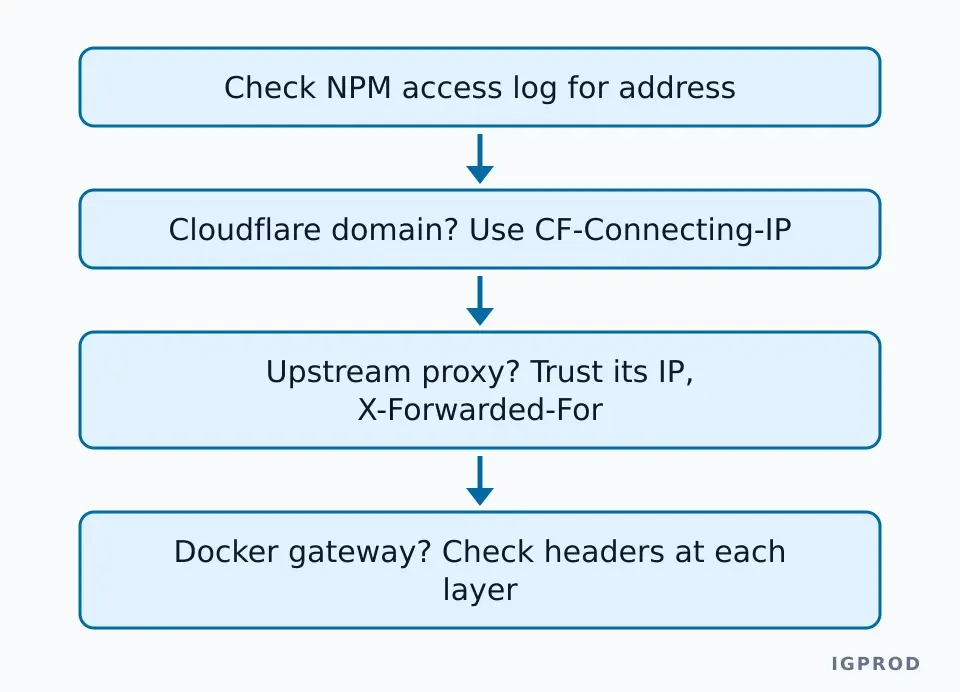
If the log shows a visitor address, the problem is downstream. If it shows a gateway, Cloudflare IP, or another proxy, trace the path:
- Direct from internet → NPM: expect a public address unless Docker itself substituted the gateway
- Cloudflare → NPM: expect a Cloudflare egress address; visitor IP is in
CF-Connecting-IP - Load balancer → NPM: expect the balancer address; visitor IP should be in
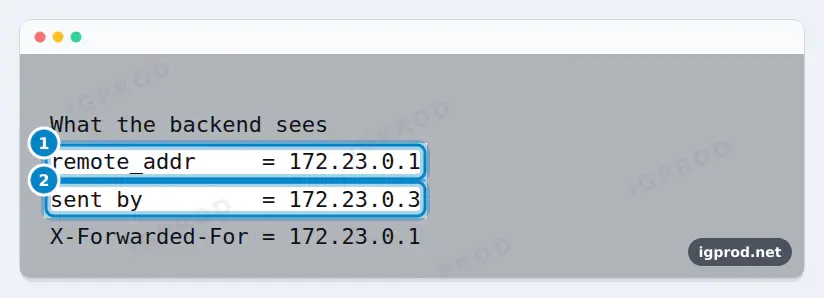
X-Forwarded-For - NPM → backend: backend sees NPM's container IP; visitor IP is in
X-Real-IPorX-Forwarded-For
Check the backend's view by adding a temporary test response:
server {
  listen 80;
  default_type text/plain;
  return 200 "remote_addr=$remote_addr\nX-Real-IP=$http_x_real_ip\nX-Forwarded-For=$http_x_forwarded_for\n";
}
Compare the address at each hop. The following sections cover Cloudflare-proxied requests, upstream reverse proxies sending X-Forwarded-For, and backend application configuration. Cloudflare Tunnel client-IP handling is described in the existing tunnel guide; this article does not duplicate that procedure.
Understand which proxies NPM trusts and why that matters
IGPROD's lab observed the following in /etc/nginx/nginx.conf for NPM 2.16.0:
set_real_ip_from 10.0.0.0/8;
set_real_ip_from 172.16.0.0/12;
set_real_ip_from 192.168.0.0/16;

real_ip_header X-Real-IP;
real_ip_recursive on;
NPM also includes generated Cloudflare and CloudFront ranges in /etc/nginx/conf.d/include/ip_ranges.conf. Any request arriving from an address in those ranges can supply an X-Real-IP header, and NPM will log and forward that value. A container or service that reaches NPM from 172.16.0.0/12 can spoof the header.
Verify the active configuration:
docker exec your-npm-container nginx -T | \
  grep -E 'set_real_ip_from|real_ip_header|real_ip_recursive'
When configuring backends, trust only NPM's specific container address (for example, 172.23.0.3/32), not the entire Docker subnet.
Configure NPM to read CF-Connecting-IP for Cloudflare-proxied domains
Cloudflare documentation states that when traffic is proxied through Cloudflare, the visitor address appears in the CF-Connecting-IP header. Cloudflare recommends using Nginx's ngx_http_realip_module with that header. This procedure is documentation-based; IGPROD did not test Cloudflare-proxied traffic or verify the resulting client address in NPM logs.
In Nginx Proxy Manager 2.16.0, configure the proxy host:
- Add the following in the custom Nginx configuration field:
real_ip_header CF-Connecting-IP; real_ip_recursive on; - Click Save.
Confirm range fetching is enabled. Check your Docker Compose file for:
environment:
  IP_RANGES_FETCH_ENABLED: 'true'
IGPROD's lab confirmed that NPM 2.16.0 fetches Cloudflare and CloudFront ranges at startup and generates set_real_ip_from entries when this variable is true. If the variable is absent or was recently changed, recreate the container:
docker compose up -d --force-recreate <npm-service-name>Replace <npm-service-name> with the service name from your compose.yaml (for example, app or npm).
Do not add set_real_ip_from 0.0.0.0/0; because it allows any client to spoof the header. Rely on NPM's fetched Cloudflare ranges and prevent untrusted private sources from reaching NPM directly.
Handle an upstream reverse proxy that sends X-Forwarded-For
The proxy must sanitize or correctly append the header; real_ip_recursive on does not authenticate the chain by itself.
- Determine the upstream proxy's IP. For a Docker container, use:
docker network inspect your-network \ --format '{{range .Containers}}{{.Name}}={{.IPv4Address}} {{end}}' - Add:Replace <upstream-proxy-ip> with the specific address or smallest CIDR that includes only the trusted proxy.
set_real_ip_from <upstream-proxy-ip>; real_ip_header X-Forwarded-For; real_ip_recursive on; - Click Save.
Do not trust a Docker gateway or broad subnet.
The real_ip_recursive on directive tells Nginx to walk the X-Forwarded-For chain from right to left and select the last address that does not match a trusted source. A malicious client can inject a fake address at the start of the chain; the directive only helps if the trusted proxy correctly appends the real client address at the end.
What headers NPM sends to backends
IGPROD's lab observed:
proxy_set_header X-Real-IP $remote_addr;
proxy_set_header X-Forwarded-For $proxy_add_x_forwarded_for;
The $proxy_add_x_forwarded_for variable appends NPM's $remote_addr to any X-Forwarded-For the client sent. If a client sends X-Forwarded-For: 203.0.113.9 and NPM sees 172.18.0.1, the backend receives X-Forwarded-For: 203.0.113.9, 172.18.0.1. Backends that blindly trust X-Forwarded-For accept the spoofed address.
Make backends read the forwarded header from NPM
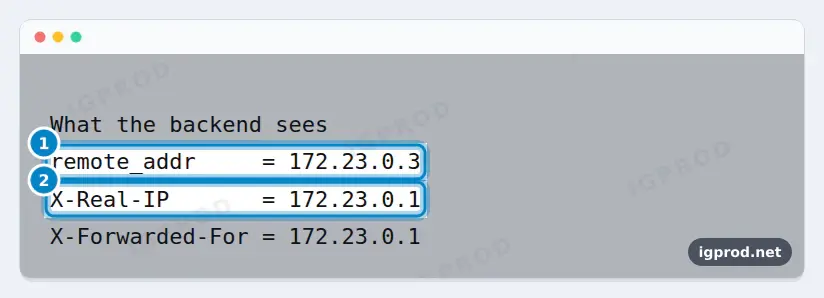
If your backend application logs NPM's container address, configure the application to trust NPM and read X-Real-IP or X-Forwarded-For.
- Find NPM's container IP.
- For a backend Nginx server, IGPROD's lab tested:Replace
set_real_ip_from <NPM-container-IP>/32; real_ip_header X-Real-IP; real_ip_recursive on;<NPM-container-IP>with the address from step 1. Trust the /32 address, not the Docker subnet. - Test and reload:
docker exec backend-container nginx -t
docker exec backend-container nginx -s reload
IGPROD's lab confirmed this made the backend's $remote_addr match the address NPM recorded. A forged X-Real-IP sent directly to the backend was ignored. It did not stop a forged X-Real-IP that NPM itself accepted from the 172.16.0.0/12 range.
For other applications, consult the reverse-proxy or trusted-proxy documentation. The principle is the same: tell the application to trust NPM's address and read the forwarded client-IP header.
Prevent fail2ban from banning the proxy instead of attackers
Fail2ban reads log files and bans addresses that exceed a threshold. Fix NPM's real-IP configuration first using the procedures above, then verify that the access log shows real client addresses before enabling jails that target NPM logs. The jail's filter regex and ban action must be verified separately; IGPROD did not test a fail2ban deployment.
Recognize when PROXY protocol is required
HTTP headers like X-Forwarded-For and CF-Connecting-IP are application-layer solutions. PROXY protocol is a transport-layer alternative that prepends client connection information to the TCP stream before any HTTP data.
| Mechanism | Layer | Trust requirement | NPM compatibility |
|---|---|---|---|
| X-Forwarded-For | HTTP header | Trusted upstream adds header | Supported with real_ip_header |
| CF-Connecting-IP | HTTP header | Traffic from Cloudflare IPs | Supported with real_ip_header |
| PROXY protocol | TCP transport | Both sender and receiver must agree | Not tested by IGPROD |
Nginx requires proxy_protocol on the listener, and the upstream must send PROXY protocol v1 or v2. Enabling it on one end without the other breaks all connections. IGPROD did not verify NPM's PROXY protocol compatibility or configuration procedure.
Match your symptom to the correct fix
NPM logs a Docker gateway like 172.18.0.1

Docker bridge masquerading or port-forwarding substituted the gateway. Check whether an upstream proxy adds a client-IP header. If not, use Cloudflare or another upstream proxy that provides the header, then configure NPM to read it. Alternatively, run NPM with host networking on Linux or move to a topology that preserves source addresses.
Access lists block the wrong addresses
Access lists compare $remote_addr to the rules. Fix the real-IP configuration first, verify $remote_addr in the logs, then test the list.
Application sees NPM's IP instead of the visitor
Configure the application to trust NPM's container address and read X-Real-IP or X-Forwarded-For as shown above.
Validate the configuration and check resulting logs
After saving the proxy host in NPM 2.16.0, test syntax:
docker exec your-npm-container nginx -tIf you changed the main nginx.conf or environment variables, restart or recreate:
docker restart your-npm-container
# or
docker compose up -d --force-recreate <npm-service-name>
Make a test request and inspect the log:
docker exec your-npm-container tail -n 5 /data/logs/proxy-host-1_access.logVerify which trusted ranges and real-IP header are active:
docker exec your-npm-container nginx -T | \
  grep -E 'set_real_ip_from|real_ip_header|real_ip_recursive'
The lab confirmed NPM's default trusted ranges, headers sent to backends, and the backend fix using set_real_ip_from with NPM's container address. Docker Desktop, Synology, a real LAN or internet client, Cloudflare-proxied traffic, Cloudflare Tunnel, PROXY protocol, application-specific trusted-proxy settings, and fail2ban deployment were not tested.
Frequently asked questions
How do I preserve the real IP when Nginx Proxy Manager is behind Cloudflare?
Cloudflare documentation states that the visitor address is in CF-Connecting-IP. Add real_ip_header CF-Connecting-IP; in the proxy host's Advanced configuration and verify that IP_RANGES_FETCH_ENABLED is true so NPM fetches Cloudflare ranges at startup. IGPROD did not test Cloudflare-proxied traffic or verify the resulting client address in NPM logs.
What if I use X-Forwarded-For instead of X-Real-IP?
Set real_ip_header X-Forwarded-For;, real_ip_recursive on;, and set_real_ip_from <upstream-proxy-ip>; with the specific address or smallest CIDR that includes only the trusted proxy. Recursive parsing walks the chain from right to left and selects the last non-trusted address, but it does not authenticate the header. The upstream proxy must sanitize or correctly append the client address.
Why shouldn't I trust the entire Docker subnet?
NPM 2.16.0 already trusts 172.16.0.0/12 globally. Any container that can reach NPM from within that range can supply a spoofed X-Real-IP header. Backends should trust only NPM's specific container address (for example, 172.23.0.3/32). Firewall or Docker network rules should block direct access from untrusted sources.
Does enabling PROXY protocol on the NPM listener break existing connections?
Yes, if the upstream does not send the PROXY protocol header. Both sender and receiver must agree. Nginx expects a PROXY protocol header at the start of every connection when proxy_protocol is enabled. If the upstream sends plain HTTP, Nginx rejects the connection.
Next step
If you use Cloudflare Tunnel to expose containers on a Synology NAS, configure tunnel ingress rules and container networking for secure remote access.
Verification status: Tested by IGPROD in a disposable hands-on lab. Checked 2026-10-14.
Applies to: 1.5.12.
Test environment: Nginx Proxy Manager 2.16.0 on Docker Engine 29.2.1 (x86_64) with Docker Compose v2.29.7, with internet access, 2026-10-14. The commands and outputs shown come from that lab; other steps were not run there.
Related guides
- miniProxy: what it is and how to run it with Docker: a forward web proxy, the opposite job of a reverse proxy.
Sources:
- How to get the real IP address in the clients · NginxProxyManager nginx-proxy-manager · Discussion …
- developers.cloudflare.com/support/troubleshooting/restoring-visitor-ips/restoring-original-visitor-…
- Module ngxhttprealipmodule (nginx.org)
- Bridge network driver (docs.docker.com)
- Networking on Docker Desktop (docs.docker.com)
- Real IP addresses in the log? · Issue #3267 · NginxProxyManager/nginx-proxy-manager (github.com)

Leave a comment
Your email address will not be published. Required fields are marked *