
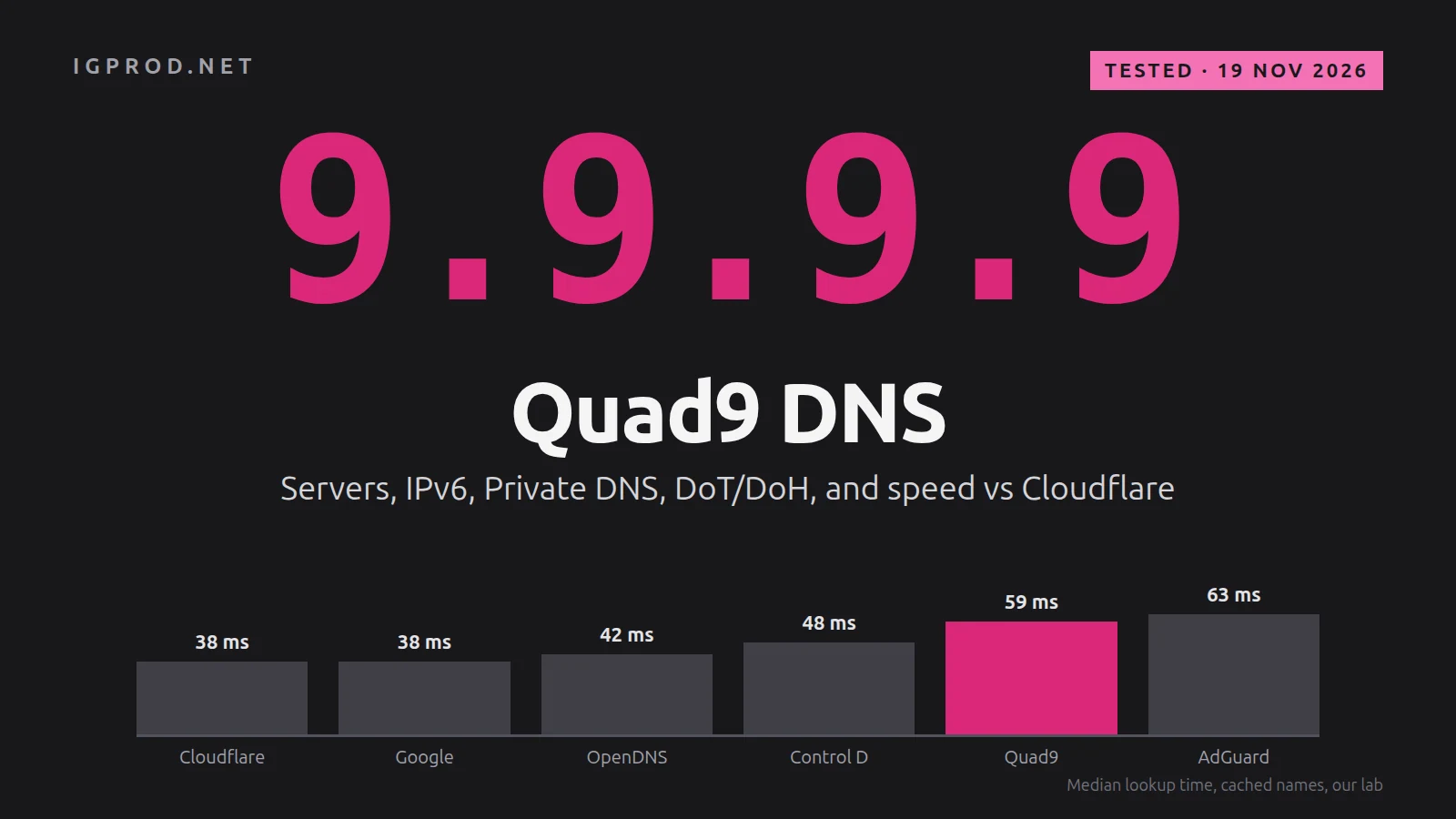
Quad9 is a free public DNS service at 9.9.9.9. It is run by a non-profit foundation in Switzerland, blocks domains that threat-intelligence feeds list for malware and phishing, validates DNSSEC, and does not store your IP address. This guide lists every Quad9 server address (IPv4, IPv6, DNS over HTTPS and DNS over TLS), shows which one to choose, sets Quad9 up on Linux, Android, iPhone, Mac, Windows and routers, and compares it with Cloudflare, Google and three other public resolvers on speed and features.
One date matters: on 22 October 2026, Quad9 announced that it will stop serving users in France on Tuesday 24 November 2026. If you are in France, the section on France below shows how to find every device and server that uses it.
Test lab, 19 November 2026: an Ubuntu 26.04.1 LTS server with systemd 259, dig 9.20.24, kdig 3.5.3 (Knot DNS) and curl 8.18.0. Every output and screenshot below comes from it. The lab network had no IPv6 route, so we read Quad9's IPv6 addresses from its own DNS records and did not query them over IPv6.
Quick answer: set up Quad9 in two minutes
In plain words: DNS is the internet's phone book. When you type a site's name, your device asks a DNS server for that site's address. Quad9 is a DNS server you can choose instead of your internet provider's: it refuses to give out the address of sites known to spread malware, and it does not keep your IP address.
| Device | What to set |
|---|---|
| Android 9 and later | Settings, Private DNS, Private DNS provider hostname: dns.quad9.net |
| iPhone, iPad, Mac | Install Quad9's DNS over HTTPS profile from docs.quad9.net, with Safari |
| Windows 11 | Settings, Network & internet, your connection, DNS server assignment, Manual: 9.9.9.9 and 149.112.112.112, DNS over HTTPS on |
| Linux (systemd-resolved) | A file with DNS=9.9.9.9#dns.quad9.net ... and DNSOverTLS=yes, shown below |
| Router | DNS 1: 9.9.9.9, DNS 2: 149.112.112.112 |
| Check | Open on.quad9.net: it should say "Yes, you ARE using quad9" |
Each line has a full, tested section below. The words this guide uses:
- Resolver: the DNS server that finds addresses for you (Quad9, Cloudflare, Google or your provider).
- DNS over TLS (DoT) and DNS over HTTPS (DoH): DNS sent through an encrypted connection, so your network cannot read or change it.
- DNSSEC: signatures that prove an answer comes from the domain's owner.
- ECS: passing a part of your IP address on, so that big sites pick a server near you.
- NXDOMAIN means "this name does not exist"; SERVFAIL means the resolver would not give an answer, for example because its signatures were wrong.
Quad9 DNS server addresses: IPv4, IPv6, DoH and DoT
Quad9 runs three services, each with two IPv4 and two IPv6 addresses. All of them validate DNSSEC. They differ in malware blocking and in ECS, which passes a part of your IP address on to websites' DNS servers (explained below).
| Service | IPv4 | IPv6 | DNS over HTTPS | DNS over TLS, Private DNS |
|---|---|---|---|---|
| Recommended (Secured): malware blocking, DNSSEC | 9.9.9.9, 149.112.112.112 | 2620:fe::fe, 2620:fe::9 | https://dns.quad9.net/dns-query | dns.quad9.net |
| Malware blocking, DNSSEC, ECS | 9.9.9.11, 149.112.112.11 | 2620:fe::11, 2620:fe::fe:11 | https://dns11.quad9.net/dns-query | dns11.quad9.net |
| No blocking, DNSSEC | 9.9.9.10, 149.112.112.10 | 2620:fe::10, 2620:fe::fe:10 | https://dns10.quad9.net/dns-query | dns10.quad9.net |
All six IPv4 addresses answered our queries, and Quad9's own DNS records give the same pairs:
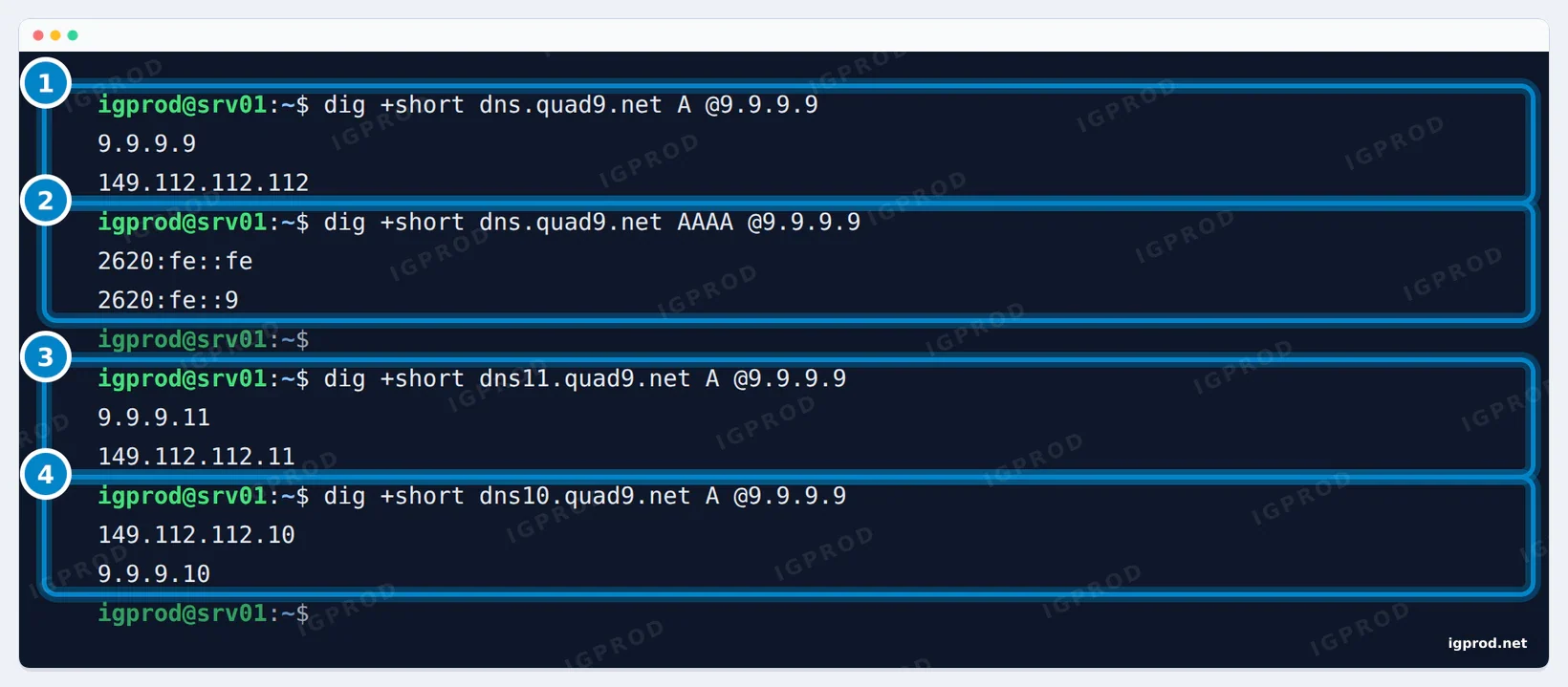
149.112.112.112 is not a different service: it is the second address of the recommended service, so your device has another one to ask when the first does not answer. Quad9 asks you to enter all the addresses of the service you choose. Do not mix services (9.9.9.9 with 9.9.9.10) or providers (9.9.9.9 with 8.8.8.8): a device can use either address at any time, so the blocking would work only part of the time.
Quad9 also answers on 9.9.9.12, a service without blocking but with ECS, which its iPhone and Mac profiles offer. In our test it did not block, validated DNSSEC and passed on our address range.
Which Quad9 address to use: 9.9.9.9, 9.9.9.11 or 9.9.9.10
Malware blocking
Quad9 blocks domains that its threat-intelligence partners list for malware, phishing and similar threats. We used isitblocked.org, a test domain on Quad9's block list:
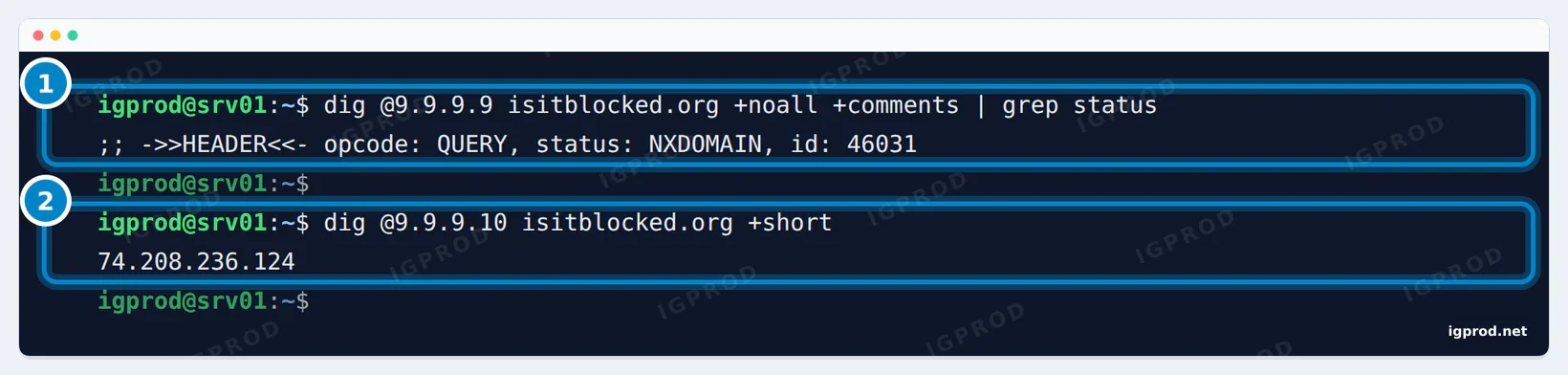
9.9.9.9, 149.112.112.112 and 9.9.9.11 answered NXDOMAIN ("this name does not exist"). 9.9.9.10 and 9.9.9.12 returned the real address, 74.208.236.124, and so did Cloudflare (1.1.1.1), Google (8.8.8.8) and AdGuard DNS (94.140.14.14); Cloudflare's malware-blocking 1.1.1.2 answered NOERROR too. Other filtering resolvers do not list this test domain, so it says nothing about their own blocking.
Blocked or missing? Read the dig answer
A blocked name and a name that does not exist both return NXDOMAIN, which makes a block easy to miss. Quad9 marks its blocked answers with an Extended DNS Error (EDE): 15 (Blocked), 16 (Censored) or 17 (Filtered). dig prints it:
$ dig @9.9.9.9 isitblocked.org A | grep -E 'status|EDE|flags:'
;; ->>HEADER<<- opcode: QUERY, status: NXDOMAIN, id: 20928
;; flags: qr rd ad; QUERY: 1, ANSWER: 0, AUTHORITY: 0, ADDITIONAL: 1
; EDNS: version: 0, flags:; udp: 1232
; EDE: 17 (Filtered)
For a name that really does not exist, there is no EDE line:
$ dig @9.9.9.9 no-such-name-igq9-19nov.org A | grep -E 'status|EDE|flags:'
;; ->>HEADER<<- opcode: QUERY, status: NXDOMAIN, id: 10111
;; flags: qr rd ra; QUERY: 1, ANSWER: 0, AUTHORITY: 1, ADDITIONAL: 1
; EDNS: version: 0, flags:; udp: 512
Two more differences showed in our test: the blocked answer has no ra flag, and no authority record, where a real NXDOMAIN carries the SOA record of the zone (AUTHORITY: 1). If Quad9 blocks a domain you need, look it up with the domain search on quad9.net, which shows the threat feed that listed it, and use 9.9.9.10 on that device until the listing is fixed.
DNSSEC on every Quad9 address
DNSSEC lets a resolver check that an answer was signed by the domain's owner and not changed on the way. Since 15 June 2026, Quad9 validates DNSSEC on every address, 9.9.9.10 and 9.9.9.12 included. dnssec-failed.org is a test domain with broken signatures:
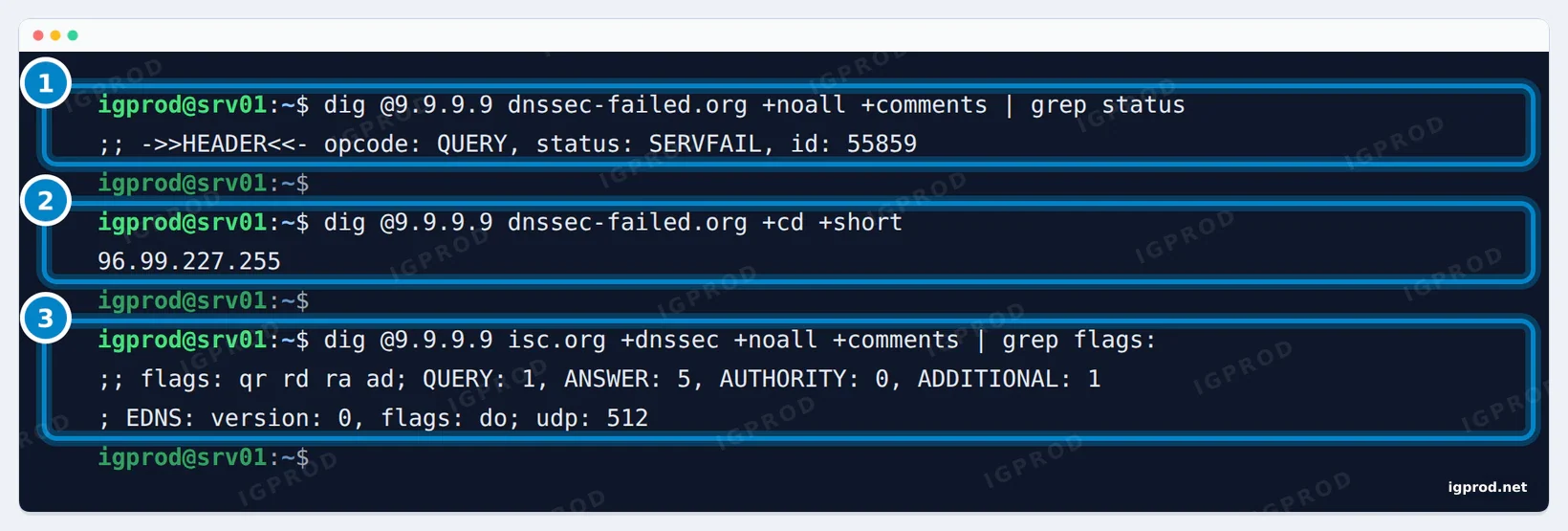
+cd (checking disabled) the record comes back, so the signatures caused the failure. 3: a correctly signed domain gets the ad (authenticated data) flag.9.9.9.9, 9.9.9.11, 9.9.9.10 and 9.9.9.12 all answered SERVFAIL, like Cloudflare and Google. Quad9's profile list for iPhone and Mac still describes 9.9.9.10 and 9.9.9.12 as "No DNSSEC"; our test shows that both validate now.
ECS: 9.9.9.11 passes on part of your IP address
EDNS Client Subnet (ECS) passes the start of your IP address, a /24 network in our test, to the DNS server of the site you look up. Large sites and CDNs use it to send you to a server near you. 9.9.9.9 and 9.9.9.10 do not send it, which is better for privacy. o-o.myaddr.l.google.com is a Google name whose answer shows what Google's DNS servers received:
dig @9.9.9.11 o-o.myaddr.l.google.com TXT +short9.9.9.11 and 9.9.9.12 sent an edns0-client-subnet line with our /24, and so did Google's 8.8.8.8. 9.9.9.9, 9.9.9.10 and Cloudflare's 1.1.1.1 sent nothing. Use 9.9.9.11 only if a streaming or download service sends you to a distant server with 9.9.9.9. It does not make lookups faster: in our speed test it answered cached names 2 to 4 ms slower than 9.9.9.9.
| You want | Use |
|---|---|
| Malware blocking and privacy (most people) | 9.9.9.9 and 149.112.112.112 |
| Malware blocking, and CDNs that see your area | 9.9.9.11 and 149.112.112.11 |
| No blocking: another filter decides, or you are testing a block | 9.9.9.10 and 149.112.112.10 |
Quad9 vs Cloudflare vs Google: speed and features, measured
How we measured
Our script asks seven public resolvers the same questions with dig over UDP, one query at a time and in a new random order for each name, so that every resolver is measured at the same moment. Cached names: 20 popular sites, asked five times; the first round only fills the resolvers' caches and is not counted. Uncached names: 30 random names under sslip.io that nobody had asked before, so each resolver had to ask sslip.io's own servers. We ran it three times on 19 November 2026, at 09:39, 09:41 and 09:55 UTC, from our lab's internet connection.
Median lookup time in milliseconds, runs 1 / 2 / 3:
| Resolver | Cached names | Uncached names |
|---|---|---|
| Quad9 9.9.9.9 | 59 / 59 / 59 | 84 / 88 / 92.5 |
| Quad9 ECS 9.9.9.11 | 61 / 63 / 63 | 107 / 88 / 88 |
| Cloudflare 1.1.1.1 | 38 / 37 / 38 | 97 / 97 / 101 |
| Google 8.8.8.8 | 38 / 42 / 38 | 84 / 82 / 84 |
| AdGuard 94.140.14.14 | 63 / 63 / 63 | 302.5 / 365.5 / 287.5 |
| OpenDNS 208.67.222.222 | 42 / 42 / 46 | 84 / 85 / 84 |
| Control D 76.76.2.0 | 50 / 48 / 46 | 92 / 92 / 92 |
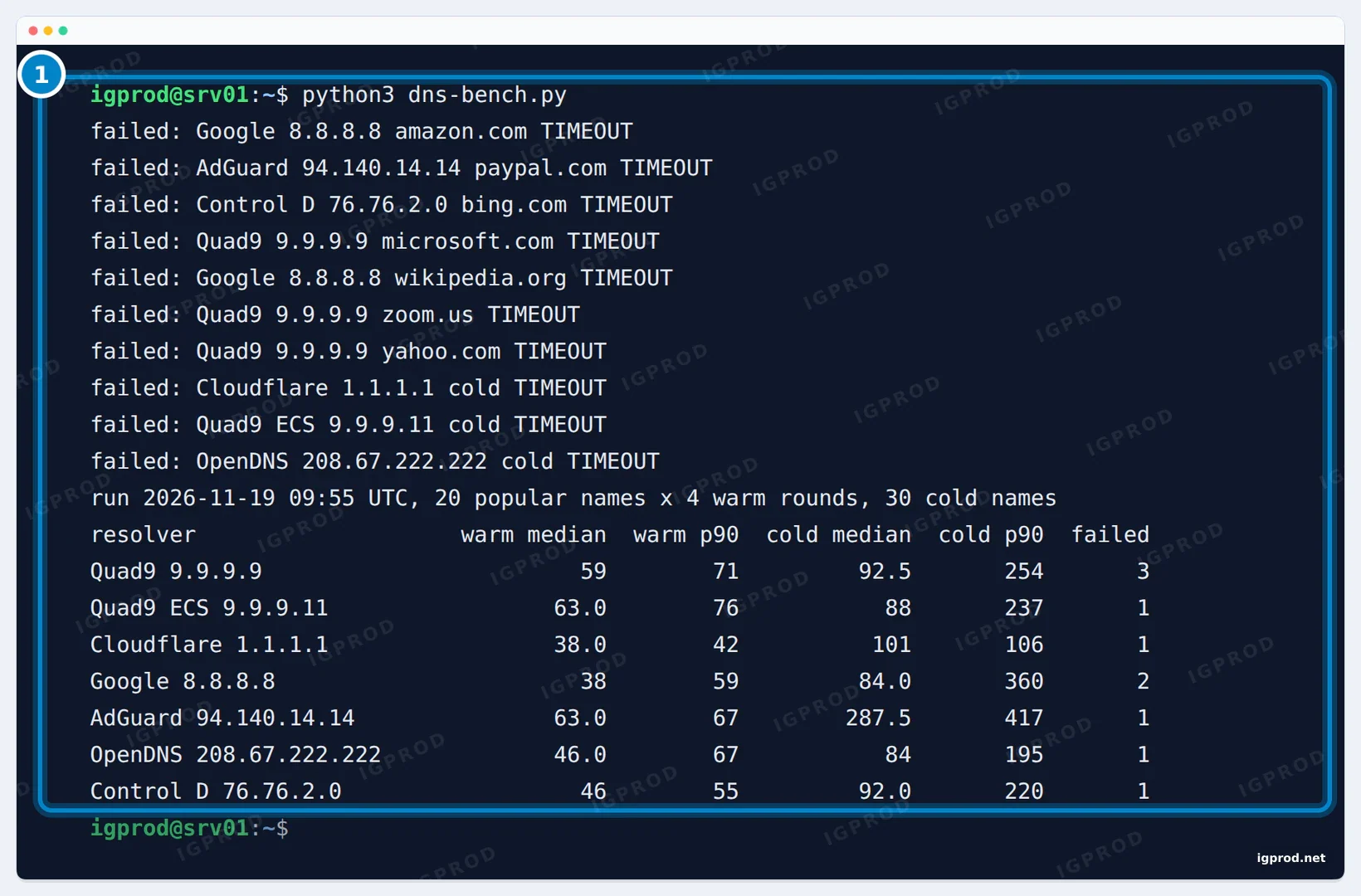
What the numbers say
From our connection, Cloudflare (37 to 38 ms) and Google (38 to 42 ms) were the quickest on cached names, with OpenDNS close behind (42 to 46 ms). Quad9 took 59 ms in all three runs. Popular names are almost always cached, so this is the case you meet most. For uncached names, Quad9 (84 to 92.5 ms) was close to Google (82 to 84 ms) and OpenDNS (84 to 85 ms), and faster than Cloudflare (97 to 101 ms) in every run. AdGuard DNS was slow only on uncached names, at 287.5 to 365.5 ms. Each resolver lost 0 to 4 queries per run to timeouts on our line; the script counts them and leaves them out of the medians.
A difference of 20 ms per lookup is hard to notice in a browser, which keeps the answers it already has. The ranking also depends on where you are: each of these networks answers from its nearest site, and the nearest site differs from one city to the next. Measure from your own connection with the script below.
Run the speed test yourself
Install dig (sudo apt install bind9-dnsutils on Ubuntu and Debian), save the script as dns-bench.py and run python3 dns-bench.py. One run takes about three minutes. Edit the R dictionary at the top to add other resolvers, such as your router or your internet provider's DNS.
#!/usr/bin/env python3
# Recorded resolver timing for the Quad9 guide (19 Nov 2026). dig over UDP, one query at a time, resolvers interleaved
# so every resolver sees the same moment. "warm" = popular names asked 5 times (the answer is in the resolver's cache
# after the first round); "cold" = a fresh random name under sslip.io each time (never cached: the resolver must ask
# sslip.io's own servers). Prints medians and 90th percentiles in ms; failures are counted, not hidden.
import random, re, statistics, string, subprocess, sys, time
R = {'Quad9 9.9.9.9': '9.9.9.9', 'Quad9 ECS 9.9.9.11': '9.9.9.11', 'Cloudflare 1.1.1.1': '1.1.1.1', 'Google 8.8.8.8': '8.8.8.8',
     'AdGuard 94.140.14.14': '94.140.14.14', 'OpenDNS 208.67.222.222': '208.67.222.222', 'Control D 76.76.2.0': '76.76.2.0'}
POPULAR = ['google.com', 'youtube.com', 'facebook.com', 'wikipedia.org', 'amazon.com', 'instagram.com', 'reddit.com',
           'netflix.com', 'microsoft.com', 'apple.com', 'github.com', 'linkedin.com', 'yahoo.com', 'bing.com', 'tiktok.com',
           'whatsapp.com', 'cloudflare.com', 'zoom.us', 'twitch.tv', 'paypal.com']
def ask(server, name):
    out = subprocess.run(['dig', f'@{server}', name, 'A', '+tries=1', '+time=3', '+noall', '+comments', '+stats'],
                         capture_output=True, text=True).stdout
    m, s = re.search(r'Query time: (\d+) msec', out), re.search(r'status: (\w+)', out)
    return (int(m.group(1)) if m else None), (s.group(1) if s else 'TIMEOUT')
res = {k: {'warm': [], 'cold': [], 'fail': 0} for k in R}
names = list(R)
for rnd in range(5):
    for n in POPULAR:
        random.shuffle(names)
        for k in names:
            t, st = ask(R[k], n)
            if t is None or st not in ('NOERROR',): res[k]['fail'] += 1; print(f'failed: {k} {n} {st}', file=sys.stderr)
            elif rnd > 0: res[k]['warm'].append(t)
        time.sleep(0.05)
for i in range(30):
    label = ''.join(random.choices(string.ascii_lowercase, k=10))
    random.shuffle(names)
    for k in names:
        t, st = ask(R[k], f'{label}-{k.split()[0].lower()}-10-0-0-{i % 250 + 1}.sslip.io')
        if t is None or st != 'NOERROR': res[k]['fail'] += 1; print(f'failed: {k} cold {st}', file=sys.stderr)
        else: res[k]['cold'].append(t)
    time.sleep(0.1)
p90 = lambda xs: sorted(xs)[int(len(xs) * 0.9) - 1] if xs else None
print(f'run {time.strftime("%Y-%m-%d %H:%M UTC", time.gmtime())}, {len(POPULAR)} popular names x 4 warm rounds, 30 cold names')
print(f'{"resolver":26} {"warm median":>12} {"warm p90":>9} {"cold median":>12} {"cold p90":>9} {"failed":>7}')
for k in R:
    w, c = res[k]['warm'], res[k]['cold']
    print(f'{k:26} {statistics.median(w) if w else "-":>12} {p90(w) or "-":>9} {statistics.median(c) if c else "-":>12} {p90(c) or "-":>9} {res[k]["fail"]:>7}')
Quad9, Cloudflare and Google side by side
| Quad9 9.9.9.9 | Cloudflare 1.1.1.1 | Google 8.8.8.8 | |
|---|---|---|---|
| Blocks malicious domains | Yes | No (1.1.1.2 does) | No |
| DNSSEC validation (tested) | Yes | Yes | Yes |
| Passes your /24 to websites' DNS servers (ECS, tested) | No (9.9.9.11 does) | No | Yes |
| Median lookup, cached names (our lab) | 59 ms | 37 to 38 ms | 38 to 42 ms |
| Median lookup, uncached names (our lab) | 84 to 92.5 ms | 97 to 101 ms | 82 to 84 ms |
| Private DNS hostname (Android) | dns.quad9.net | one.one.one.one | dns.google |
| Run by | Quad9 Foundation, Switzerland (non-profit) | Cloudflare, United States | Google, United States |
Choose Quad9 for malware blocking without ECS, from a non-profit that does not store IP addresses. Choose Cloudflare's 1.1.1.1 if cached speed matters most to you. Its addresses with malware blocking are 1.1.1.2 and 1.0.0.2: Cloudflare documents that filter, our Quad9 test domain is not on its list, and we did not time them. Google was quickest on uncached names, but it passes your /24 on.
Quad9 DNS over HTTPS, DNS over TLS and DNS over QUIC
Plain DNS travels unencrypted on port 53, so your network and your internet provider can read the names you look up and change the answers. Quad9 offers three encrypted ways: DNS over TLS (DoT) on TCP port 853, which Android's Private DNS uses; DNS over HTTPS (DoH) on port 443, which browsers and Windows 11 use; and DNS over QUIC (DoQ) on UDP port 853. kdig, from the knot-dnsutils package, tests all three:
sudo apt install knot-dnsutils
kdig @9.9.9.9 +tls-ca +tls-hostname=dns.quad9.net example.com
kdig @dns.quad9.net +https example.com
kdig @9.9.9.9 +quic +tls-ca +tls-hostname=dns.quad9.net example.com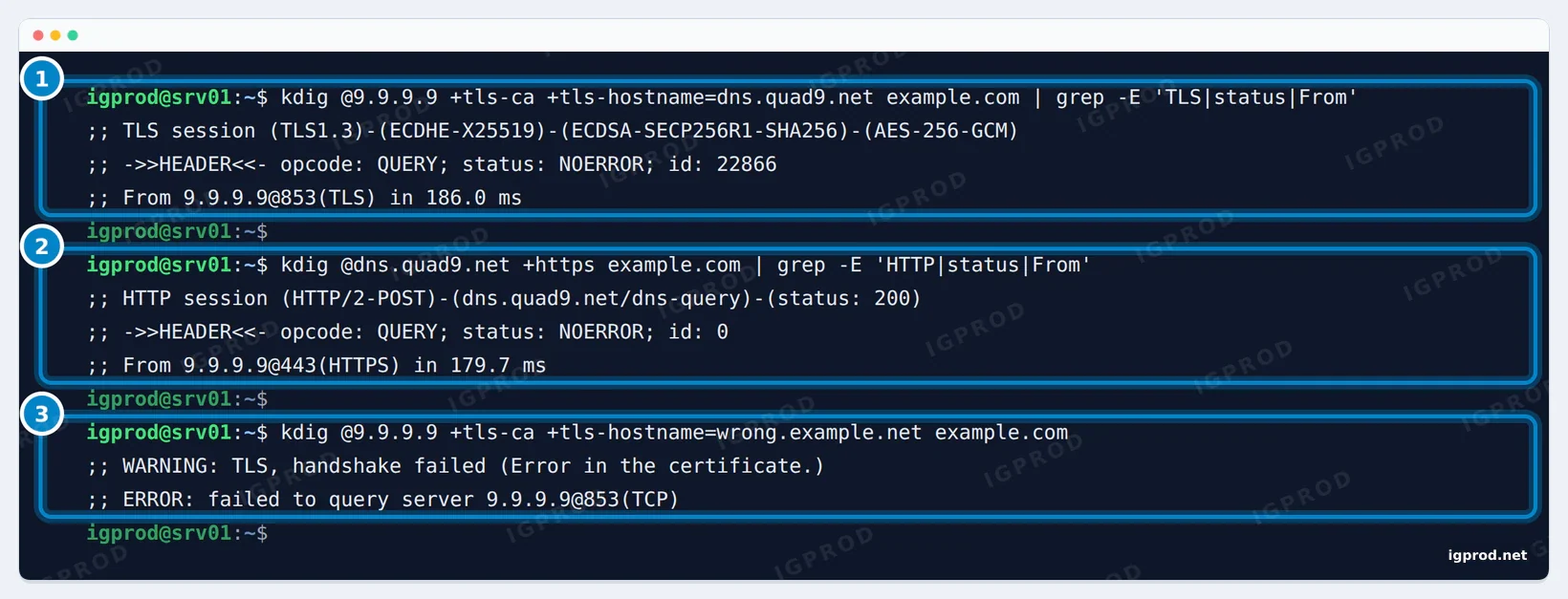
DoT and DoH both used TLS 1.3, and the DoH query went over HTTP/2. The certificate check is what stops someone on the network from answering in Quad9's place: with a wrong name, kdig refused to go on. DNS over QUIC answered too (output shortened):
$ kdig @9.9.9.9 +quic +tls-ca +tls-hostname=dns.quad9.net example.com A
;; QUIC session (QUICv1)-(TLS1.3)-(ECDHE-X25519)-(ECDSA-SECP256R1-SHA256)-(AES-256-GCM)
;; ->>HEADER<<- opcode: QUERY; status: NOERROR; id: 0
;; Version: 0; flags: ; UDP size: 1232 B; ext-rcode: NOERROR
;; From 9.9.9.9@853(QUIC) in 227.7 ms
Programs built on curl can use Quad9's DoH directly:
$ curl -sS --doh-url https://dns.quad9.net/dns-query -o /dev/null -w "HTTP %{http_code}, connected to %{remote_ip}\n" https://example.com/
HTTP 200, connected to 104.20.23.154
Set up Quad9 on Linux with DNS over TLS (systemd-resolved)
Ubuntu and Fedora resolve names through systemd-resolved. On Ubuntu, /etc/resolv.conf links to its local stub at 127.0.0.53, so every program follows its settings: readlink /etc/resolv.conf shows ../run/systemd/resolve/stub-resolv.conf. A drop-in file sends every lookup to Quad9 over DNS over TLS, and package upgrades leave it alone.
The configuration
sudo mkdir -p /etc/systemd/resolved.conf.d
sudo tee /etc/systemd/resolved.conf.d/quad9.conf > /dev/null <<'EOF'
[Resolve]
DNS=9.9.9.9#dns.quad9.net 149.112.112.112#dns.quad9.net 2620:fe::fe#dns.quad9.net 2620:fe::9#dns.quad9.net
DNSOverTLS=yes
Domains=~.
EOF
sudo systemctl restart systemd-resolved
resolvectl status
resolvectl query example.com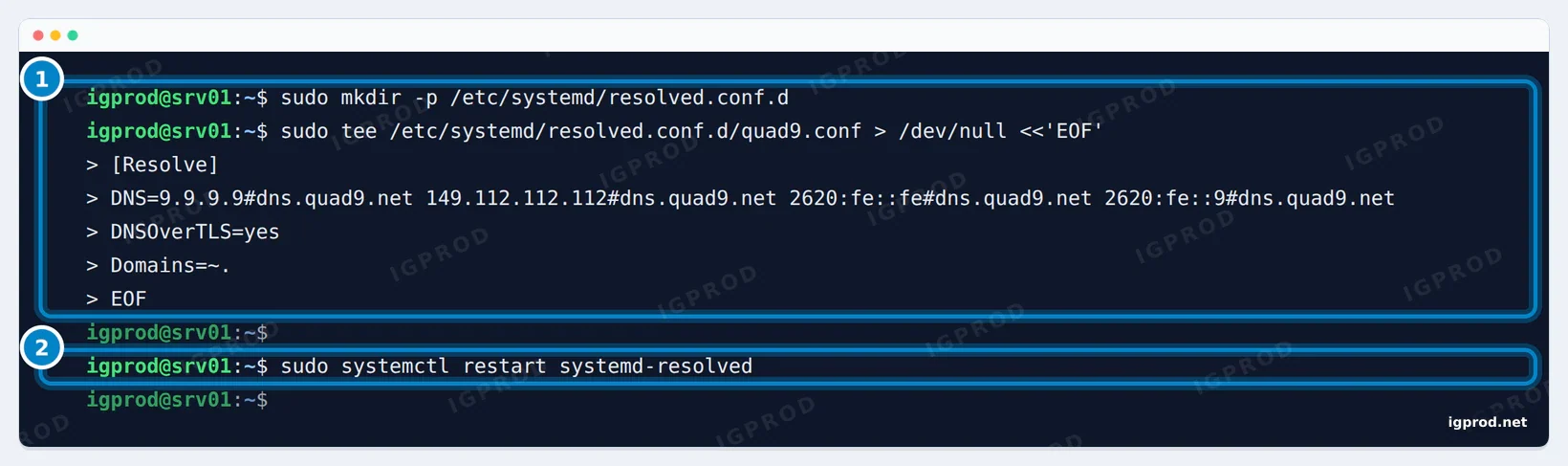
DNS=lists Quad9's four addresses. The name after#is the name resolved checks in the server's TLS certificate.DNSOverTLS=yesis strict: if TLS to Quad9 fails, lookups fail. Withopportunistic, resolved falls back to plain DNS and cannot authenticate the server, which the systemd documentation warns leaves it open to downgrade and man-in-the-middle attacks.Domains=~.makes resolved prefer these servers for every domain. It matters because, as the comment in Ubuntu's own/etc/systemd/resolved.confsays,DNS=alone does not stop resolved from also asking, in parallel, the DNS servers that your network sets on each link (by DHCP, for example). The tcpdump test below shows whether anything still leaves unencrypted.
Our lab had no IPv6 route, and resolved still worked with the IPv6 addresses in the list: it moves on to the next server when one fails. Without IPv6, you can leave them out.
Check that it works
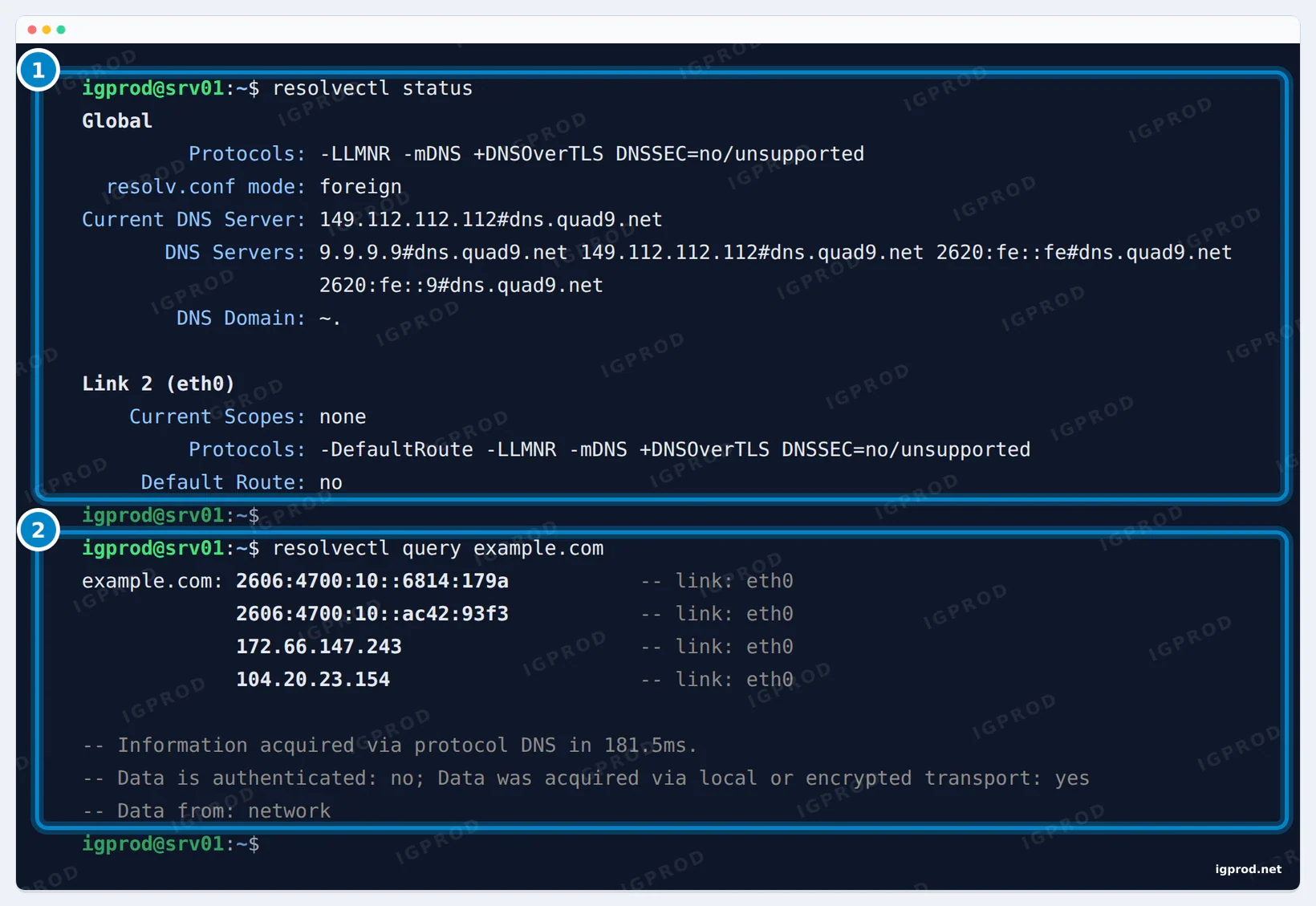
+DNSOverTLS, Quad9's four addresses with their TLS name, and the server in use. 2: the answer came over an encrypted transport.DNSSEC=no/unsupported is Ubuntu's default: resolved does not check signatures itself, Quad9 does. That is also why the answer says Data is authenticated: no. The line that matters is Data was acquired via local or encrypted transport: yes.
Then watch the wire. tcpdump shows every DNS packet while two new names are looked up (replace eth0 with your interface, from ip -br link):
sudo timeout 10 tcpdump -nqt -i eth0 -c 8 'port 53 or port 853' 2>/dev/null & sleep 1; getent hosts wikipedia.org github.com; wait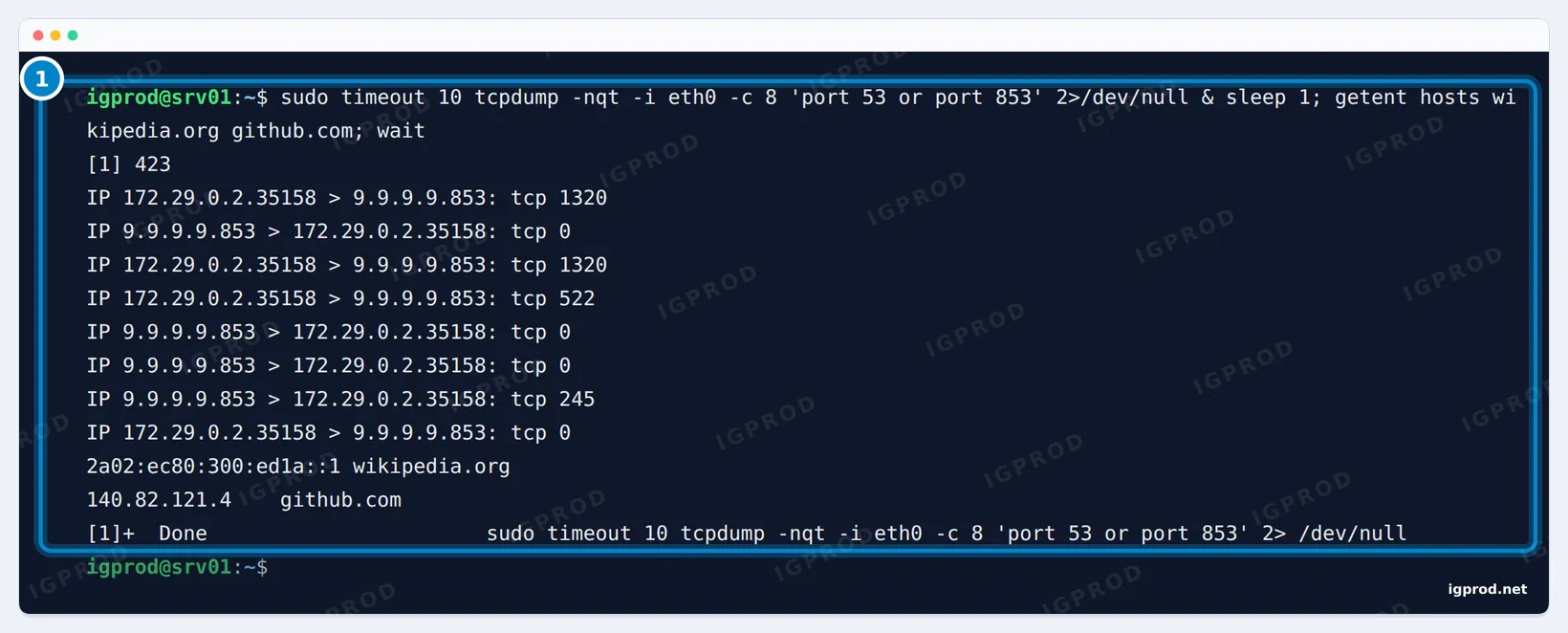
Our link had no DNS servers of its own (Current Scopes: none under the link in resolvectl status). If your link lists some and you see packets on port 53, stop DHCP from setting DNS on that link: on Ubuntu Server, netplan's dhcp4-overrides and dhcp6-overrides take use-dns: false.
Blocking and DNSSEC through systemd-resolved
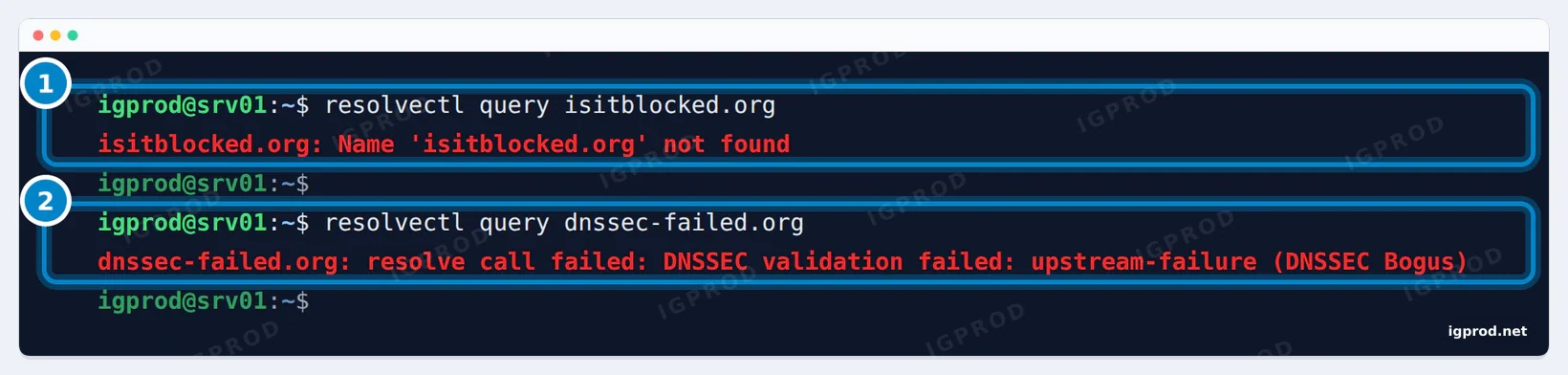
resolved passes Quad9's verdicts on to your programs. The text in parentheses is Quad9's extended error: our first run said Signature Expired, the run in the screenshot DNSSEC Bogus.
Strict mode: no fallback to plain DNS
To see what strict mode does when TLS fails, we put a wrong server name in the file:
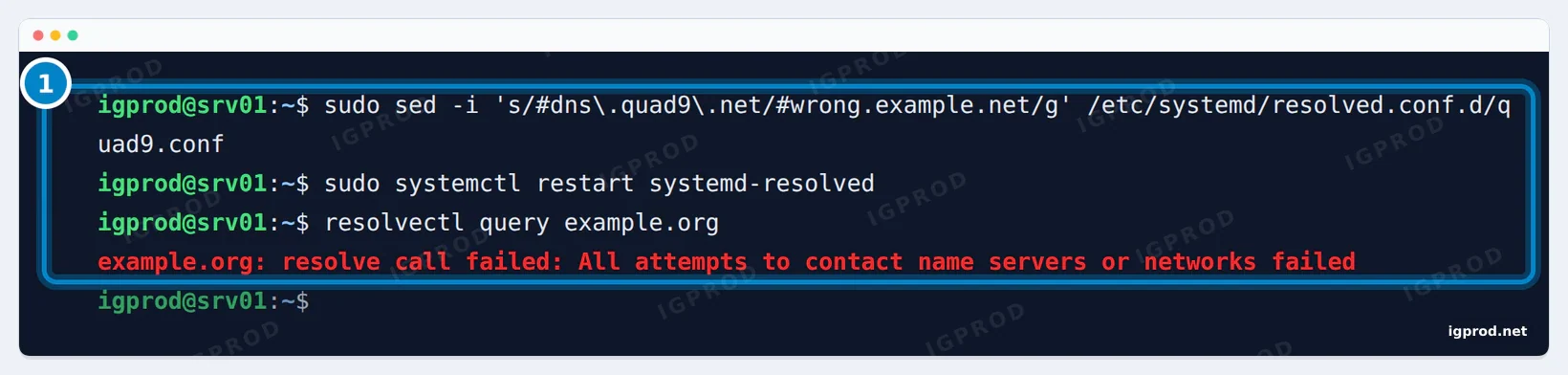
resolved did not send the lookup without encryption, and a network that blocks port 853 gets the same treatment: lookups fail instead of leaking. Put the right name back and check again:
sudo sed -i 's/#wrong\.example\.net/#dns.quad9.net/g' /etc/systemd/resolved.conf.d/quad9.conf
sudo systemctl restart systemd-resolved
resolvectl query example.org
The answer then said "Data was acquired via local or encrypted transport: yes" again. To remove Quad9 from the server, delete the file and restart resolved: sudo rm /etc/systemd/resolved.conf.d/quad9.conf, then sudo systemctl restart systemd-resolved.
Quad9 Private DNS on Android
Android 9 and later encrypt DNS with Private DNS, which uses DNS over TLS:
- Open Settings and search for Private DNS (on a Pixel: Network & internet, Private DNS; on a Samsung: Connections, More connection settings, Private DNS).
- Choose Private DNS provider hostname.
- Type
dns.quad9.netand tap Save. - Open on.quad9.net in your browser. It should say "Yes, you ARE using quad9".
For the other services, type dns11.quad9.net (ECS) or dns10.quad9.net (no blocking). The field takes a hostname, so 9.9.9.9 does not work there. The setting applies to Wi-Fi and mobile data alike.
Two things stop Android from using it. A VPN app uses its own DNS: set Quad9's addresses in the VPN app's custom DNS setting instead. And Private DNS does not work while the Quad9 Connect app is installed and enabled. If a Wi-Fi network blocks port 853, Android shows "Private DNS server cannot be accessed": set Private DNS to Automatic while you use that network. Our guide to setting DNS on Android covers Wi-Fi addresses and mobile data in more detail.
Quad9 on iPhone, iPad and Mac
iOS 14 and later, and macOS 11 Big Sur and later, take encrypted DNS from a configuration profile. Quad9 publishes eight on docs.quad9.net: one for each of 9.9.9.9, 9.9.9.10, 9.9.9.11 and 9.9.9.12, over HTTPS or over TLS. Take the HTTPS profile for 9.9.9.9 (Quad9_Secured_DNS_over_HTTPS_20260119.mobileconfig) unless you have a reason not to: Quad9 recommends DNS over HTTPS for most people, because some Wi-Fi networks block the DNS over TLS port.
On an iPhone or iPad:
- Open docs.quad9.net in Safari, go to Setup Guides, iOS 14 and later (Encrypted), and tap the profile. Allow the download.
- Open Settings, tap Profile Downloaded and select the Quad9 profile.
- Tap Install, enter your passcode, then tap Install twice more. iOS warns that your network traffic may be filtered or monitored by the DNS server: that server is now Quad9.
- Tap Done and open on.quad9.net to check.
On a Mac, download the profile with Safari (Quad9 says it must be Safari), open it from Downloads, then open System Settings, Profile Downloaded, and install it the same way.
We checked the HTTPS profile before writing this: it sets DNSProtocol to HTTPS with the ServerURL https://dns.quad9.net/dns-query, and it is signed with the certificate "Apple Distribution: CleanerDNS (D22MR889S9)", valid until 20 January 2027. Download profiles only from docs.quad9.net, which also lists a SHA256 hash for each file.
- The profiles expire on 19 January 2027. The system then turns them off until you install a new one, so set a reminder a few days before.
- iCloud Private Relay and most VPN apps ignore the profile and use their own DNS. In a VPN app, set Quad9's addresses in its custom DNS setting instead.
- On a Wi-Fi network that blocks DNS over TLS, a TLS profile stops lookups: use the HTTPS profile, or turn the profile off on that network.
- Quad9 notes that the App Store, and dig and nslookup in a Mac's Terminal, do not use the profile's encrypted DNS.
- To remove the profile from an iPhone: Settings, General, VPN & Device Management, the Quad9 profile, Remove Profile.
Quad9 on Windows 11 and Windows 10
Windows 11 can use Quad9 with DNS over HTTPS from its settings:
- Open Settings, Network & internet, then Wi-Fi or Ethernet, and select your connection.
- Next to DNS server assignment, select Edit and choose Manual.
- Turn on IPv4. Preferred DNS:
9.9.9.9, with DNS over HTTPS On (automatic template). Alternate DNS:149.112.112.112, with DNS over HTTPS On (automatic template). Leave Fallback to plaintext off, so that Windows never sends these lookups unencrypted. - Turn on IPv6 only if your connection has IPv6, with
2620:fe::feand2620:fe::9. Quad9 warns that IPv6 DNS servers on a connection without IPv6 can make lookups fail. - Select Save, then open on.quad9.net to check.
Windows 10 has no DNS over HTTPS setting. Set the addresses in Control Panel, Network and Sharing Center, Change adapter settings: right-click your adapter, Properties, Internet Protocol Version 4 (TCP/IPv4), Properties, "Use the following DNS server addresses": 9.9.9.9 and 149.112.112.112.
Quad9 on your router and in browsers
Set Quad9 on the router, and every device that takes its settings from the router by DHCP follows. In the router's internet (WAN) or DHCP settings, enter 9.9.9.9 and 149.112.112.112, plus 2620:fe::fe and 2620:fe::9 if your connection has IPv6. Most home routers forward DNS unencrypted on port 53. pfSense, OPNsense, MikroTik RouterOS and IPFire can use DNS over TLS, and Quad9's documentation has a guide for each. If you run Pi-hole or AdGuard Home, set Quad9 as their upstream DNS server: they block ads, and Quad9 blocks malicious domains.
Browsers can skip the system's DNS and use their own DNS over HTTPS. Firefox turns it on by default in some countries (in the United States, with Cloudflare). To make a browser use Quad9, search its settings for "DNS over HTTPS" (Firefox) or "secure DNS" (Chrome, Edge, Brave), then either turn it off so that the browser follows the system, or choose a custom provider: https://dns.quad9.net/dns-query.
How to check that you use Quad9
Quad9 runs a page that answers differently depending on the resolver that looked it up. Open on.quad9.net on each device:
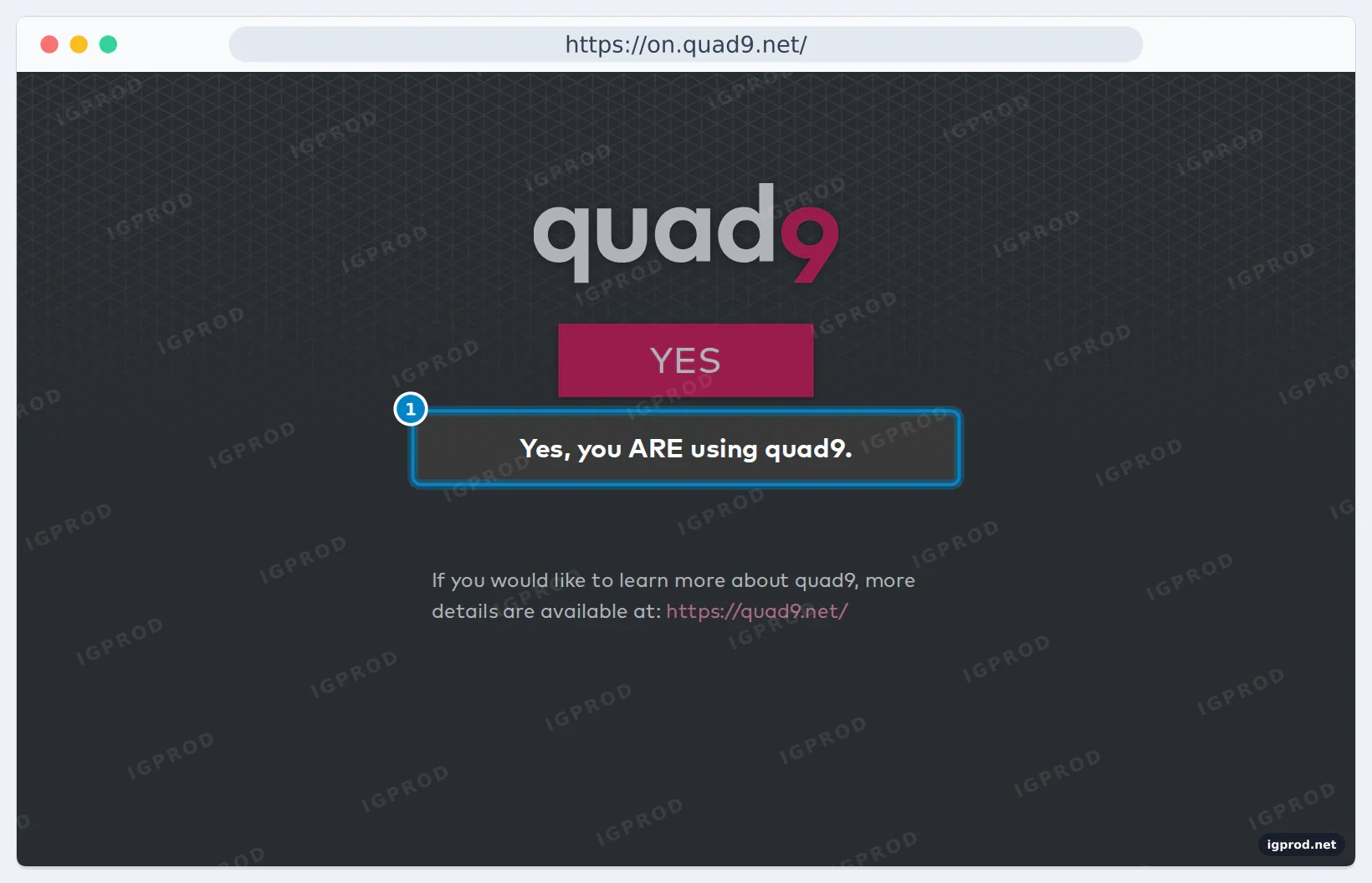
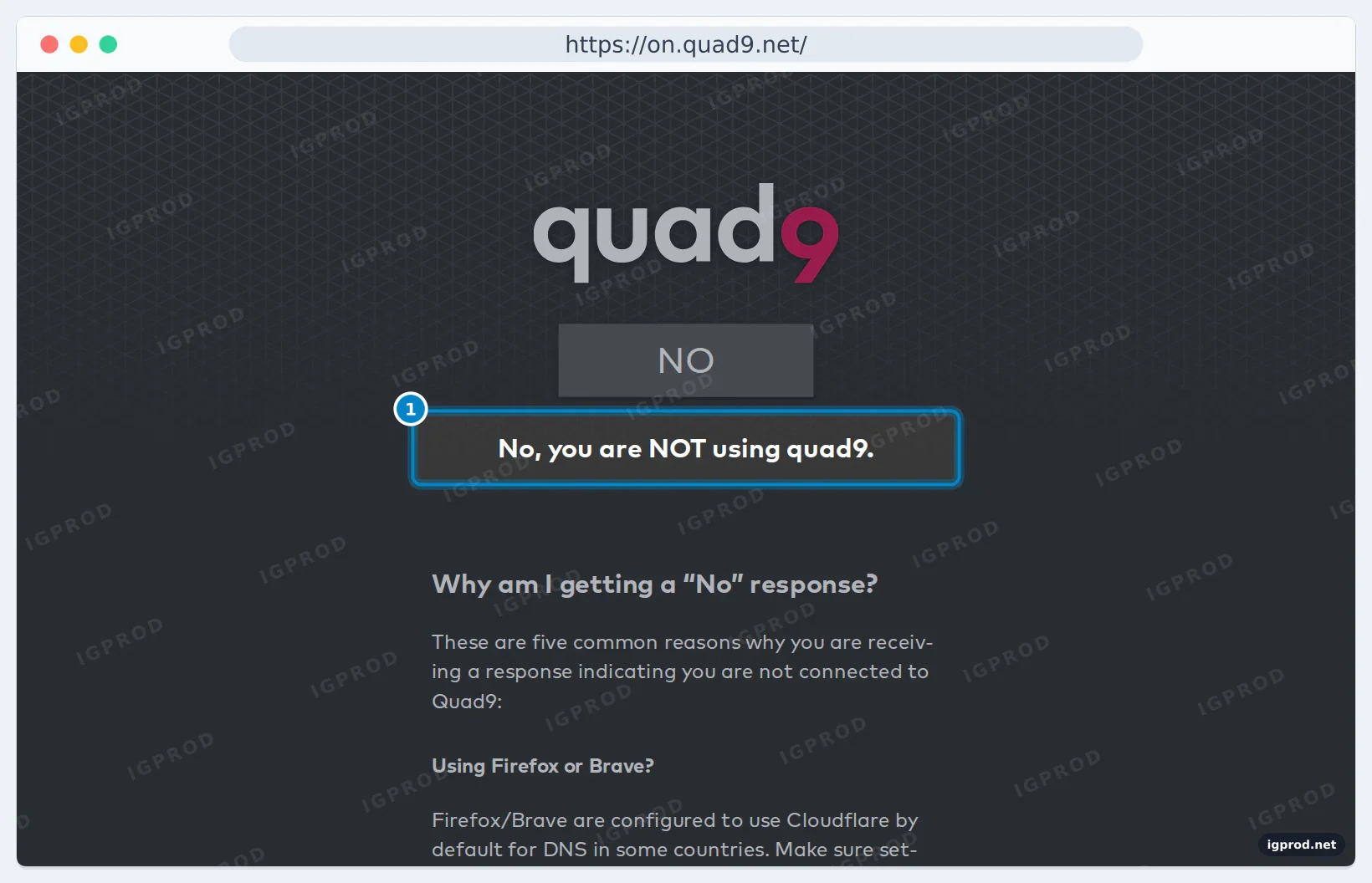
The page tests the DNS of the browser you open it in. If it says NO in one browser and YES in another on the same device, the first one uses its own DNS over HTTPS. In a terminal, the same name gets a different address when Quad9 resolves it, and Quad9's servers tell you which one answered:
dig @9.9.9.9 on.quad9.net +short
dig @1.1.1.1 on.quad9.net +short
dig @9.9.9.9 id.server TXT CH +short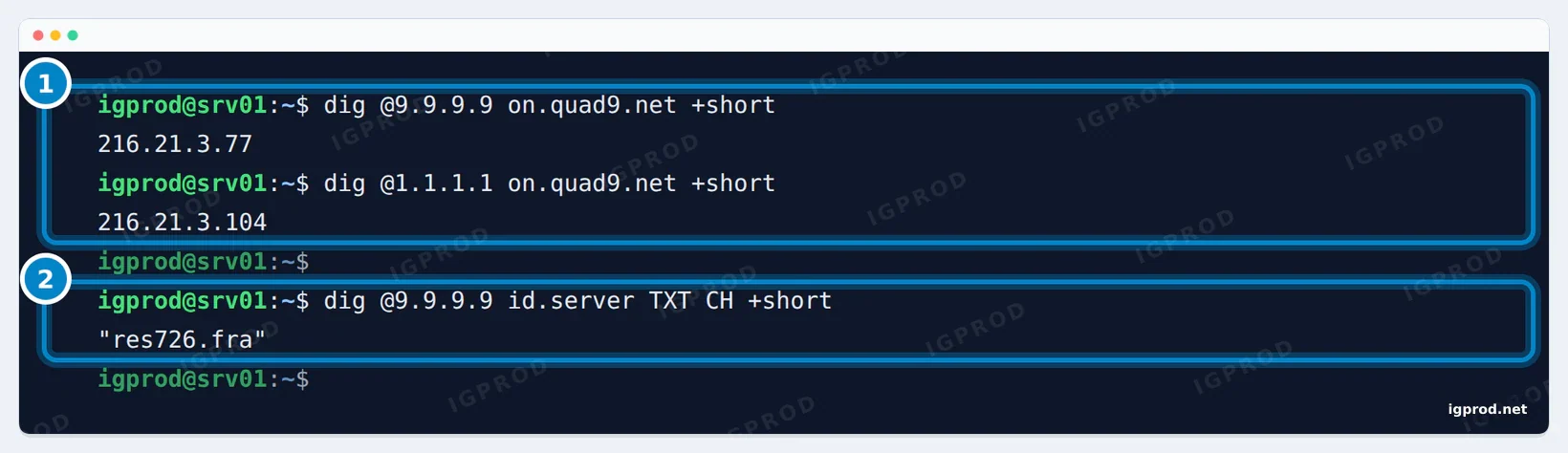
id.server names the Quad9 server that answered.216.21.3.77 means Quad9, 216.21.3.104 means another resolver. Without @, dig on.quad9.net +short asks your system's resolver, so 216.21.3.77 means that your system uses Quad9. id.server (and hostname.bind) names the Quad9 server that answered, with the airport code of its site after the dot: fra is Frankfurt. A distant site means slower answers, and the speed script shows how much.
Quad9 leaves France on 24 November 2026
On 21 October 2026, a French court ruled against Quad9 in a case brought by beIN, a sports broadcaster, which wants DNS resolvers to stop resolving a set of domain names used for sports streams. The next day Quad9 announced that it will withdraw its service from France as of Tuesday 24 November 2026. An appeal is pending. OpenDNS left France in 2024 after a similar court order.
Quad9's announcement does not say how lookups from France will stop, so if you are in France, switch before that date rather than wait for failures. The announcement only concerns France.
Find every place that uses Quad9
DNS settings hide in many places. On a Linux server, search /etc for Quad9's addresses and names:
$ sudo grep -rnE "9\.9\.9\.(9|10|11|12)|149\.112\.112\.|2620:fe::|quad9" /etc 2>/dev/null
/etc/systemd/resolved.conf.d/quad9.conf:2:DNS=9.9.9.9#dns.quad9.net 149.112.112.112#dns.quad9.net 2620:fe::fe#dns.quad9.net 2620:fe::9#dns.quad9.net
/etc/systemd/resolved.conf:23:# Quad9:      9.9.9.9#dns.quad9.net 149.112.112.112#dns.quad9.net 2620:fe::fe#dns.quad9.net 2620:fe::9#dns.quad9.net
The second hit is a comment in Ubuntu's own resolved.conf, which lists Quad9 among example servers; only the first is a setting. Then check:
resolvectl statuson each server, for the DNS servers really in use.- Docker's
/etc/docker/daemon.json("dns"), found by the search above, anddns:lines in Compose files outside/etc. - The router's internet (WAN) and DHCP DNS settings.
- The upstream DNS servers of Pi-hole or AdGuard Home.
- Phones: the Private DNS hostname on Android, the Quad9 profile on iPhones, iPads and Macs.
- Windows network adapters, the DNS over HTTPS setting of each browser, and the custom DNS of VPN apps.
What to switch to
Our speed test above gives the numbers. Cloudflare (1.1.1.1) and Google (8.8.8.8) were the fastest from our lab, and Cloudflare's 1.1.1.2 adds malware blocking; Google passes your /24 on to websites' DNS servers, Cloudflare does not. You can also run your own recursive resolver, such as Unbound, on a home server and stop depending on a public one. Whatever you choose, enter all of its addresses everywhere you had Quad9's.
Troubleshooting
on.quad9.net says NO, but the device is set to Quad9
The browser uses its own DNS over HTTPS (Firefox, or Chrome with a custom provider), or a VPN or iCloud Private Relay sends DNS elsewhere. Check the browser's DNS setting, then open the page in another browser.
resolve call failed: All attempts to contact name servers or networks failed
systemd-resolved, in strict DNS over TLS mode, could not open a TLS connection. Check the name after # (dns.quad9.net), then test port 853 with kdig @9.9.9.9 +tls-ca +tls-hostname=dns.quad9.net example.com. If the network blocks it, lookups stay down until you change networks or turn DNS over TLS off on purpose: that is the point of strict mode.
TLS, handshake failed (Error in the certificate.)
The TLS name does not match Quad9's certificate: use the name of the service, such as dns.quad9.net. If the name is right, a device on your network is intercepting TLS on port 853.
A website does not load: NXDOMAIN with EDE 17 (Filtered)
Quad9 blocked the domain. Look it up with the domain search on quad9.net. If the listing is a mistake, use 9.9.9.10 on that device until it is removed.
SERVFAIL for one domain only
Repeat the query with +cd. If the record comes back, the domain's DNSSEC signatures are broken: every validating resolver (Quad9, Cloudflare and Google in our test) fails it the same way, and only the domain's owner can fix it.
Android: Private DNS server cannot be accessed
The network blocks port 853, or a VPN or the Quad9 Connect app is in the way. Set Private DNS to Automatic on that network, close the VPN, or disable Quad9 Connect.
iPhone: no internet on one Wi-Fi network after installing the profile
That network blocks DNS over TLS. Install the HTTPS profile, which uses port 443 like web traffic, or turn the profile off on that network.
Quad9 is slower than Cloudflare for me
It was in our cached-name test too. Run the speed script from your connection, and check with id.server which Quad9 site answers you.
Frequently asked questions
Is Quad9 free?
Yes. Quad9 is a free public DNS service run by a Swiss non-profit foundation. There is no account to create: you enter its addresses and use it.
Does Quad9 log my IP address?
Quad9's privacy policy (version 1.1, 24 June 2026) says your IP address stays in memory only for the milliseconds it takes to answer, and is never written to storage. What Quad9 keeps are counters: numbers of queries per network prefix (no smaller than /24 for IPv4 and /56 for IPv6), network operator, region and query type, not a record per user.
Is Quad9 faster than Cloudflare?
Not from our lab for cached names: Cloudflare answered in 37 to 38 ms (median) and Quad9 in 59 ms. For names no one had asked before, Quad9 was faster: 84 to 92.5 ms against 97 to 101 ms. Run our script to measure from your connection.
What is 149.112.112.112?
Quad9's alternate IPv4 address for the same service as 9.9.9.9 (malware blocking and DNSSEC). Set both: if one does not answer, your device uses the other.
What are Quad9's IPv6 DNS addresses?
2620:fe::fe and 2620:fe::9 for the recommended service; 2620:fe::11 and 2620:fe::fe:11 for the service with ECS; 2620:fe::10 and 2620:fe::fe:10 for the service without blocking.
Does Quad9 block ads?
No. It blocks domains that threat-intelligence feeds list for malware, phishing and similar threats. For ads, use a blocker in the browser, or a network filter such as Pi-hole or AdGuard Home with Quad9 as its upstream.
Does Quad9 still work in France?
Until 24 November 2026. Quad9 announced that it will stop serving users in France from that day, after a French court ruling; an appeal is pending.
What is Quad9's Private DNS hostname?
dns.quad9.net, or dns11.quad9.net for the service with ECS and dns10.quad9.net for the service without blocking. Type it in Android's Private DNS provider hostname field.
Related guides
- Setting DNS on Android: Private DNS, Wi-Fi IPs, and mobile data
- Change Cloudflare Nameservers Without Breaking Self-Hosted Services
- Local HTTPS with mkcert: Fix NET::ERR_CERT_AUTHORITY_INVALID for Self-Hosted Apps and Synology
Sources
- Quad9: service addresses and features
- Quad9: Farewell, France
- Quad9 enables DNSSEC on all service endpoints
- Quad9 privacy policy
- Quad9 docs: iOS 14 and later (encrypted)
- Quad9 docs: macOS Big Sur and later (encrypted)
- Quad9 docs: Android 9 and later (encrypted)
- Quad9 docs: Windows 11 (encrypted)
- systemd: resolved.conf
- Cloudflare: 1.1.1.1 for Families

Leave a comment
Your email address will not be published. Required fields are marked *