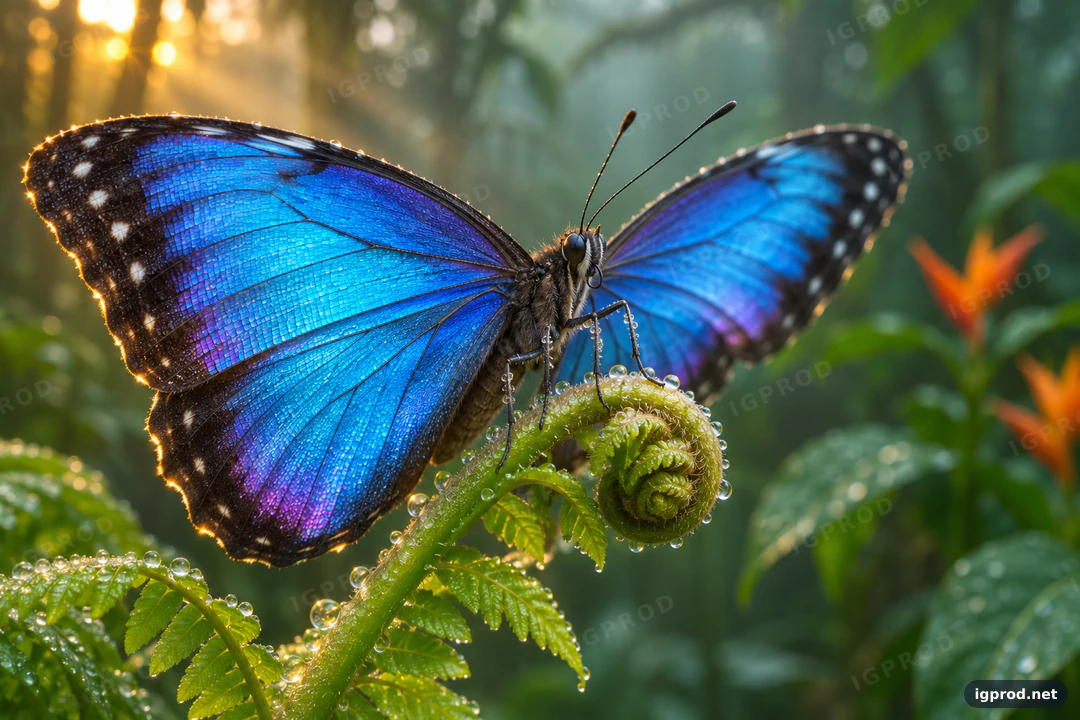
This butterfly prompt describes one macro photograph: a blue morpho with its wings open on the curled tip of a fern, in a misty rainforest at sunrise. Each line has one job, from the wing colors and the dew drops to the light, the lens and the things the model must leave out. We ran it once in OpenAI's image model on 25 November 2026, and the image below is that first result, not a pick from many tries.
What the image shows
OpenAI's image model returned one landscape image of 1536 × 1024 pixels, a 3:2 frame. The butterfly fills the left and the center, seen slightly from the side, with its wings open in a wide V. It grips a young fern frond whose tip curls into a tight spiral, and both the fern and the butterfly's legs are covered with round drops of dew.
The wings run from electric blue to violet near the body, with wide black edges and a row of white spots, and the texture of the scales shows like fine tiles across the blue. Low sun from the back left lights the edges of the wings in gold, exactly as the Lighting line asked. Behind the butterfly, rays of light cross the mist between tall trees, two orange flowers glow on the right, and the rest of the forest melts into green and teal blur.
One difference from a real blue morpho: the body came out thicker and furrier, closer to a moth's. The white spots on the far wing are also larger than on the near wing. Neither shows at a glance, but a butterfly expert would notice.
Why this butterfly prompt works
A named species. "Blue morpho" gives the model a known shape and color pattern. A plain "blue butterfly" leaves the wing shape, the edges and the markings to chance.
Color, edges and markings in one line. Electric-blue wings, wide black edges and a row of white spots describe the pattern the way a field guide does. The model drew all three.
A Detail line for the macro look. Dew drops, wing scales "like fine tiles" and the shimmer from blue to violet are what make a photo read as macro. Without them you get a pretty butterfly, not a close-up.
Backlight from a stated side. "Low golden sunrise light from behind on the left" puts a glowing rim on the wing edges, the signature of nature photography at dawn. The fill light from the front keeps the blue bright instead of turning it into a silhouette.
Real camera settings. A 100mm macro lens at f/4 with the focus on the head and the near wing tells the model what stays sharp and what turns into soft background, so the butterfly stands out from the forest.
An Avoid line for common mistakes. Extra wings or legs and mirrored patterns are typical flaws in AI butterflies. Naming them, along with text, watermarks and a cartoon look, keeps the result closer to a real photograph.
The butterfly prompt, ready to copy
Create a macro wildlife photograph, horizontal 3:2 (1536x1024).
Subject: a blue morpho butterfly resting with its wings open on the curled tip of a young fern frond. Iridescent electric-blue wings with wide black edges and a row of small white spots, slender black antennae with club tips.
Detail: tiny dew drops on the fern and on the butterfly's legs, individual wing scales visible like fine tiles along the wing edge, a faint shimmer where the blue turns to violet.
Background: a misty tropical rainforest at dawn, soft green and teal bokeh, two or three out-of-focus orange flowers on the right.
Lighting: low golden sunrise light from behind on the left, making the wing edges glow, soft fill light from the front, thin light rays through the mist.
Camera: 100mm macro lens at f/4, eye level with the butterfly, focus on the head and the near wing, shallow depth of field.
Style: award-winning nature macro photography, natural colors, high detail, crisp but not oversharpened.
Avoid: text, watermark, extra wings or legs, mirrored fake wing patterns, people, cartoon look.
Paste it as it is into ChatGPT's image generation or another image model. Change the species first and keep the Lighting and Camera lines, which carry most of the macro look. If you call OpenAI's model through its API, the image generation guide lists the sizes and options it accepts.
Three ways to change the butterfly
- Another species: write "a monarch butterfly, orange wings with black veins and white dots on the black edges" and swap the rainforest for "a meadow of purple flowers at sunrise".
- Wings closed: ask for "wings folded upright, showing the brown underside with round eyespots". A blue morpho really looks like that at rest, so the picture becomes a lesson in camouflage.
- A phone wallpaper: change the first line to "vertical 2:3 (1024x1536)", place the butterfly in the lower third and let the light rays fill the top, so the clock and the icons sit on calm space.
Why the blue looks so intense
The blue of a morpho does not come from a pigment. Tiny ridges on the wing scales reflect blue light, so the color shifts as the wing moves or the light changes. That is why the prompt asks for "iridescent" wings and a "shimmer where the blue turns to violet": those words describe how the real wings behave, and the model drew the violet near the body and the bright blue toward the edges.
The same idea helps with other shiny subjects. For beetles, hummingbirds or peacock feathers, describe the color change and the light direction rather than one flat color, and keep a dark background so the shine has something to stand out against.
Check the result before you use it
- Count the legs. Butterflies of the morpho's family stand on four legs; the front pair is small and folded against the body. Models often add, merge or bend legs in odd places.
- Compare the two wings. The spots and the black edges should match from left to right without looking copied. Different spot sizes, as in our image, are the most common flaw.
- Look at the antennae. They should be thin, with small clubs at the tips, and both should start from the head.
- Check the drops. Dew should sit on surfaces and follow gravity. Floating beads or drops in the air are a quick sign of an AI image.
Frequently asked questions
Which words make an AI image look like a macro photo?
A macro lens with a focal length (100mm is the classic), a wide aperture such as f/2.8 or f/4, a stated focus point, and small details that only show up close: dew drops, scales, hairs. Add a soft, blurred background so the subject stands apart.
Does this prompt work in Gemini (Nano Banana)?
The prompt is plain text, so you can paste it into Gemini's image model too. We ran it only in OpenAI's model, so the butterfly and the forest will look different there.
Can I use the image as a desktop wallpaper?
Yes. The 3:2 frame fits most laptop screens with a small crop, and the calm area on the right leaves room for desktop icons. For a phone, use the vertical version from the list above.
More image prompts
For another animal in natural light, see the river otter image prompt and the horse prompt, and for a landscape wallpaper, the northern lights wallpaper prompt. Every prompt we tested is in our prompt collection.

Leave a comment
Your email address will not be published. Required fields are marked *