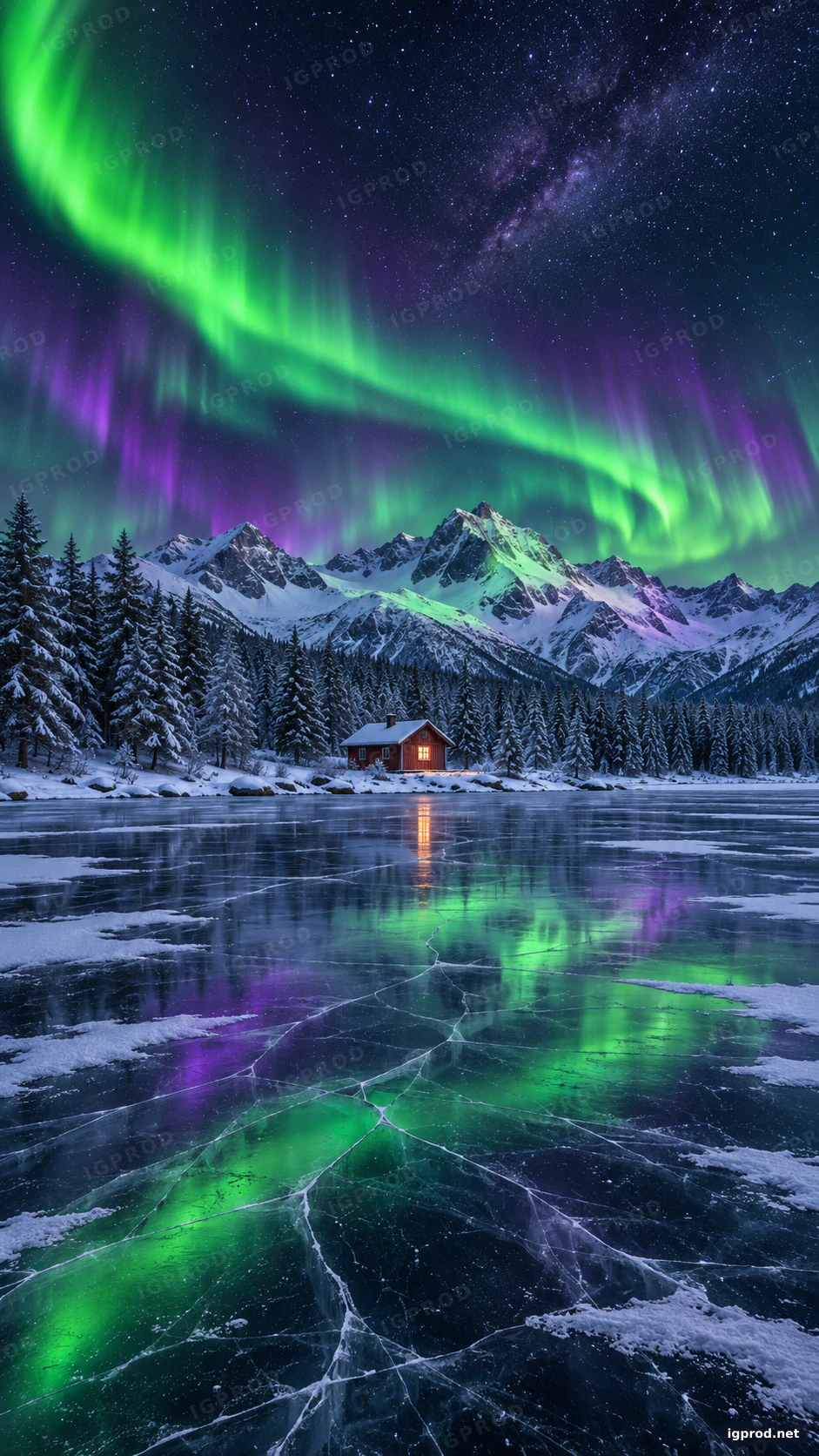
This wallpaper prompt asks for a night photograph made for a phone screen: green and violet northern lights over a frozen mountain lake, with one small red cabin glowing on the far shore. Every line of the prompt has a job, from the 9:16 frame to the space a lock screen clock needs. We ran it once in OpenAI's image model; the image below is that first result, unedited apart from the IGPROD watermark.
What the image shows
OpenAI's image model returned one portrait image of 941 × 1672 pixels, which is a 9:16 frame. A wide band of green aurora sweeps down from the top left corner and curves across the sky, with violet curtains hanging under it. Behind the lights, a dense field of stars and the faint glow of the Milky Way fill the top right.
In the middle of the frame, a ridge of snowy peaks catches the green and violet light, and a dark pine forest covered in snow runs along the shore. The red wooden cabin sits right on the center line, small against the mountains, with a warm orange window that throws a thin line of light across the ice. The lower half is all lake: clear black ice crossed by fine white cracks and patches of snow, with the aurora mirrored in green and violet.
One detail differs from the prompt. We asked for the upper third to stay mostly open sky, where a lock screen clock sits. The model put the brightest part of the aurora there instead, so the clock will sit over the green band. On a dark lock screen that still reads well, but it is not the empty area the Composition line asked for. There are no people, no animals and no text, as the Avoid line requested.
Why this wallpaper prompt works
The frame comes first. "4K phone wallpaper, vertical 9:16" tells the model the image is for a phone before it reads anything else, so it builds a tall picture with a subject in the middle instead of a wide landscape.
One small warm point in a cold scene. The red cabin with one lit window is tiny, but it is the only warm color in a picture of greens, violets and blues. That contrast is what makes the eye stop on it.
A foreground that leads the eye. Cracked black ice with patches of snow gives the bottom half texture and lines that run up toward the mountains. Without it, the lower part of a 9:16 wallpaper would be empty.
A real camera setup. "14mm wide-angle lens, f/2.8, 15-second long exposure on a tripod" is how night landscape photographers shoot the aurora. The model answers with pinpoint stars and smooth curtains of light instead of a painted sky.
A composition line for the lock screen. Even though the model did not keep the top third empty this time, the line still pushed the cabin below the center, where app icons and the clock will not cover it.
An Avoid line that protects the mood. No lens flare, no oversaturated neon colors and no people keep the image calm, which is what a wallpaper you look at fifty times a day needs.
The wallpaper prompt, ready to copy
Create a 4K phone wallpaper, vertical 9:16 (1080x1920).
Subject: green and violet northern lights rippling across the whole sky above a frozen mountain lake, with a small red wooden cabin and one warm lit window on the far shore.
Background: a snow-covered pine forest along the shore, sharp snowy peaks behind the cabin, dense stars and the faint Milky Way behind the aurora, the brightest green band curving from the top left toward the top right.
Foreground: clear black lake ice with fine white cracks and patches of thin snow, the aurora mirrored in the ice, leading the eye up toward the mountains.
Composition: keep the upper third mostly open sky with no hard detail, where a lock screen clock sits; the cabin small and slightly below the center.
Lighting: night just after blue hour, cool blue snow, green and violet glow on the ice and the mountain faces, one warm orange window light.
Camera: full-frame camera, 14mm wide-angle lens, f/2.8, 15-second long exposure on a tripod, crisp pinpoint stars.
Style: ultra-detailed landscape photograph, rich but natural color, clean and calm, premium wallpaper quality.
Avoid: people, animals, text, watermarks, logos, lens flare, oversaturated neon colors, religious buildings.
Paste it as it is into ChatGPT's image generation or another image model. If you want a clean area for the clock, run it again and repeat the Composition line in your own words, for example "the top 30% of the image is dark starry sky with no aurora". If you call OpenAI's model through its API, the image generation guide lists the sizes and quality options it accepts.
Three ways to change the wallpaper
- A desert night: replace the lake and the cabin with "sand dunes under the Milky Way, a single camp tent glowing orange" and remove the aurora from the Subject line. Keep the Camera line.
- A desktop version: change the first line to "horizontal 16:9 (1920x1080)" and move the cabin to the right third, so desktop icons on the left do not cover it.
- Another color of lights: ask for "red and pink aurora" for a rarer look, or "pale green aurora, very soft" for a darker, quieter screen that saves battery on OLED phones.
Make it fit your phone
Most phones today have screens taller than 9:16, close to 9:19.5. When you set this image as a wallpaper, the phone fills the screen by cutting a little from the left and right sides. That is why the prompt keeps the cabin in the middle: it survives the crop on any phone.
Before you use the image, zoom in on the cabin and the trees. If the window or the roof looks soft, upscale the image once with your phone's photo editor or another tool, then set it as the wallpaper. Keep the original file too, so you can crop it again for a new phone.
Check the result before you use it
- Look at the reflections. The aurora in the ice should follow the lights in the sky. If the colors in the ice do not match the sky, run the prompt again.
- Check the cabin. A real cabin has a straight roof line and a door that fits its walls. Small buildings are where image models make the most mistakes.
- Look for hidden text. Signs and patterns in the snow can turn into fake letters. Remove them, or add "no signs" to the Avoid line.
- Test it on the lock screen. Set it once and see where the clock and the widgets fall before you keep it.
Frequently asked questions
What size should a phone wallpaper prompt ask for?
Ask for a vertical 9:16 frame and name the use, as in "phone wallpaper". The model decides the exact pixel size; this run gave 941 × 1672. Upscale it if you want a sharper image on a large screen.
Does this prompt work in Gemini (Nano Banana)?
The prompt is plain text, so you can paste it into Gemini's image model too. We ran it only in OpenAI's model, so the lights, the mountains and the cabin will look different there.
How do I keep the clock area empty?
Say it twice in different words: in the Composition line and in the Avoid line, for example "aurora in the top 30% of the frame". Image models follow a rule better when it appears more than once.
More image prompts
For another photo of nature, see the horse prompt with an Arabian stallion in the Sahara, and for a night scene with strong light, the cinematic car prompt for a hypercar poster. Every prompt we tested is in IGPROD image prompts.

Leave a comment
Your email address will not be published. Required fields are marked *