

In this tutorial we’ll show you how to create your own multilingual maintenance page on Cloudflare and flip it on/off automatically using a single Bash script and Synology DSM Task Scheduler. This is the classic, predictable method: we bind/unbind Cloudflare Worker routes on a schedule .
Before you start (prerequisites)
- A Cloudflare zone for your domain (e.g. igprod.net).
- API access for automation:
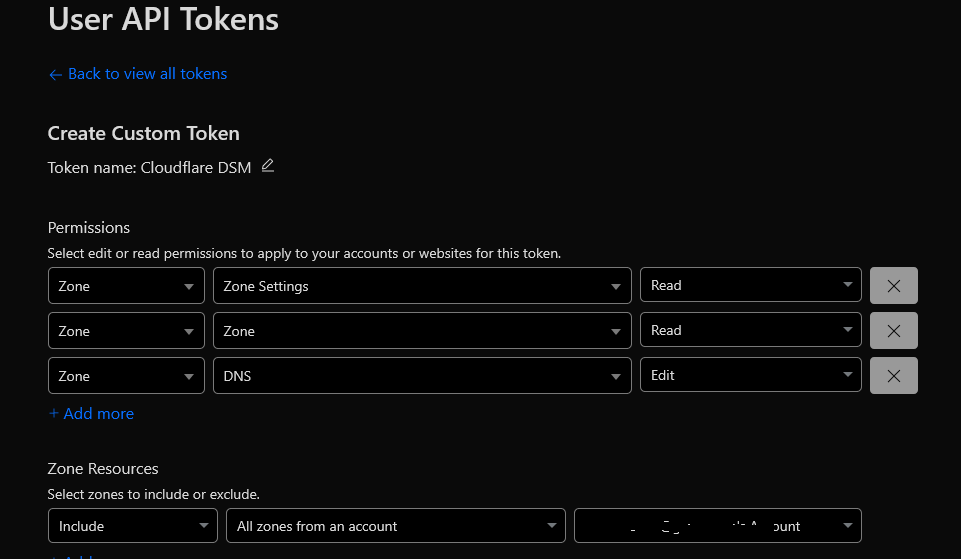
Alternative: account email + Global API Key (less secure).

- Synology NAS with DSM Task Scheduler and
curl.
Step 1 — Create the maintenance Worker
In Cloudflare, go to Workers & Pages → Create Application → Worker, name it maintenance.

Paste your multilingual HTML/JS bellow.
Download the code from Gist : https://gist.github.com/IGProd/b8f646a93c3d4f97f0673ab823a4245bClick Deploy to Production.

Note: You can customize the maintenance page to match your needs. Feel free to check our live demo page for reference.
Step 2 — Install the automation script on Synology
This step runs commands on the NAS. If SSH is not set up yet, see how to SSH into your Synology first.
We’ll use one Bash file (we’ll call it Script X) to bind/unbind Worker routes. Put the file at:
/volume1/docker/logs/cloudflare-maintenance.shMake it executable:
chmod +x /volume1/docker/logs/cloudflare-maintenance.shOpen the script and set the config block:
CF_API_TOKEN(recommended) orCF_EMAIL+CF_API_KEY(alternative)ZONE_IDfor your domainWORKER_NAME=maintenancePATTERNS=("yourdomainname.com/*" "www.yourdomainname.com/*")
Script X supports three commands :
down→ bind the routes to the Worker (maintenance ON)up→ delete the routes (maintenance OFF)status→ show a small ON/OFF table
#!/bin/bash
# cloudflare-maintenance.sh
set -euo pipefail
##### Config #####
CF_API_TOKEN="" # Prefer token if you have it
CF_EMAIL="Your_cloudflare_email" # use email + global key
CF_API_KEY="Your_Global_Api"
ZONE_ID="Your_Zone_ID"
WORKER_NAME="Your_Worker_Name"
PATTERNS=("yourdomainname.com/*" "www.yourdomainname.com/*")
STATE_DIR="/volume1/docker/logs/cf_routes"
mkdir -p "$STATE_DIR"
##################
ACTION=""
PLAIN=false
FORCE_EMOJI=false
FORCE_UTF8=false
LOGFILE=""
usage() {
cat <<EOF
Usage: $0 [--plain] [--utf8] [--emoji] [--log FILE] {down|up|status}
Defaults are DSM-safe (ASCII only).
down Bind worker '${WORKER_NAME}' to routes (maintenance ON)
up Delete those routes (maintenance OFF)
status Show current worker routes + table
Options:
--plain Force no color/no emoji (best for DSM)
--utf8 Allow Unicode symbols (use via SSH)
--emoji Also show emojis (requires --utf8 + UTF-8 locale/TTY)
--log F Append output to file F
EOF
exit 1
}
while [[ $# -gt 0 ]]; do
case "$1" in
--plain) PLAIN=true ;;
--emoji) FORCE_EMOJI=true ;;
--utf8) FORCE_UTF8=true ;;
--log) LOGFILE="${2:-}"; shift ;;
down|up|status) ACTION="$1" ;;
*) echo "Unknown arg: $1"; usage ;;
esac
shift
done
[[ -z "$ACTION" ]] && usage
# ----- TTY / Colors / Unicode decisions -----
is_tty=false; [[ -t 1 ]] && is_tty=true
WANT_COLOR=true
$PLAIN && WANT_COLOR=false
$is_tty || WANT_COLOR=false
[[ -n "${NO_COLOR:-}" ]] && WANT_COLOR=false
if $WANT_COLOR && command -v tput >/dev/null 2>&1 && [ "$(tput colors)" -ge 8 ]; then
C_GREEN="$(printf '\033[32m')"
C_RED="$(printf '\033[31m')"
C_BLUE="$(printf '\033[34m')"
C_RESET="$(printf '\033[0m')"
else
C_GREEN=""; C_RED=""; C_BLUE=""; C_RESET=""
fi
# Unicode on? (OFF by default for DSM)
USE_UTF8=false
if $FORCE_UTF8; then
CHRM="$(locale charmap 2>/dev/null || echo ASCII)"
[[ "$CHRM" == "UTF-8" ]] && USE_UTF8=true || USE_UTF8=false
fi
# Emojis?
USE_EMOJI=false
if $USE_UTF8 && $FORCE_EMOJI && $is_tty; then
USE_EMOJI=true
fi
# Tags & separators: ASCII by default (safe for DSM)
if $USE_UTF8; then
ARROW="→"
SEP="—"
else
ARROW=":" # avoid '>' because DSM shows >
SEP="-" # avoid Unicode em-dash
fi
if $USE_EMOJI; then
OK_TAG="✅"; ERR_TAG="❌"; INFO_TAG="🔧"
else
OK_TAG="[OK]"; ERR_TAG="[ERR]"; INFO_TAG="[*]"
fi
ts(){ date '+%Y-%m-%d %H:%M:%S'; }
log_line(){ # echo to stdout and optional file
if [[ -n "$LOGFILE" ]]; then
echo "$*" | tee -a "$LOGFILE"
else
echo "$*"
fi
}
info(){ log_line "$(ts) $INFO_TAG $C_BLUE$*$C_RESET"; }
ok(){ log_line "$(ts) $OK_TAG $C_GREEN$*$C_RESET"; }
err(){ log_line "$(ts) $ERR_TAG $C_RED$*$C_RESET"; }
hr(){ log_line "$(ts) ------------------------------------------------------------"; }
# ----- Cloudflare API helpers -----
api() {
local method="$1"; shift
local path="$1"; shift
local url="https://api.cloudflare.com/client/v4${path}"
if [[ -n "${CF_API_TOKEN}" ]]; then
curl -sS -X "$method" "$url" \
-H "Authorization: Bearer ${CF_API_TOKEN}" \
-H "Content-Type: application/json" "$@"
else
curl -sS -X "$method" "$url" \
-H "X-Auth-Email: ${CF_EMAIL}" \
-H "X-Auth-Key: ${CF_API_KEY}" \
-H "Content-Type: application/json" "$@"
fi
}
ok_json(){ # 0 if success:true
local json="$1"
if command -v jq >/dev/null 2>&1; then
[[ "$(echo "$json" | jq -r '.success')" == "true" ]]
else
echo "$json" | grep -q '"success"[[:space:]]*:[[:space:]]*true'
fi
}
id_file_for(){
local p="$1"
local fname; fname="$(echo "$p" | sed 's#[^A-Za-z0-9._-]#_#g').id"
echo "${STATE_DIR}/${fname}"
}
find_route_id(){
local pattern="$1"
local json; json="$(api GET "/zones/${ZONE_ID}/workers/routes")"
if command -v jq >/dev/null 2>&1; then
echo "$json" | jq -r --arg p "$pattern" '.result[]?|select(.pattern==$p)|.id' | head -n1
else
echo "$json" \
| tr '{' '\n' \
| grep -F "\"pattern\":\"$pattern\"" -B2 \
| sed -n 's/.*"id":"\([^"]\+\)".*/\1/p' | head -n1
fi
}
find_route_script(){
local pattern="$1"
local json; json="$(api GET "/zones/${ZONE_ID}/workers/routes")"
if command -v jq >/dev/null 2>&1; then
echo "$json" | jq -r --arg p "$pattern" '.result[]?|select(.pattern==$p)|.script' | head -n1
else
echo "$json" \
| tr '{' '\n' \
| grep -F "\"pattern\":\"$pattern\"" \
| sed -n 's/.*"script":"\([^"]\+\)".*/\1/p' | head -n1
fi
}
ensure_route(){
local pattern="$1"
local idfile; idfile="$(id_file_for "$pattern")"
local rid=""; [[ -f "$idfile" ]] && rid="$(cat "$idfile" || true)"
[[ -z "$rid" ]] && rid="$(find_route_id "$pattern" || true)"
# Build JSON body safely
local body; body="$(printf '{"pattern":"%s","script":"%s"}' "$pattern" "$WORKER_NAME")"
if [[ -n "$rid" ]]; then
local resp; resp="$(api PUT "/zones/${ZONE_ID}/workers/routes/${rid}" --data "$body")"
log_line "$(ts) Created/updated route: ${pattern} ${ARROW} ${rid}"
if ok_json "$resp"; then
ok "Request OK ${SEP} bound to '${WORKER_NAME}'"
echo "$rid" > "$idfile"
else
err "Cloudflare API NOT OK for ${pattern} (PUT)"
log_line "$resp"
exit 1
fi
else
local resp; resp="$(api POST "/zones/${ZONE_ID}/workers/routes" --data "$body")"
# Try to extract id (jq first, sed fallback)
local new_id=""
if command -v jq >/dev/null 2>&1; then
new_id="$(echo "$resp" | jq -r '.result.id // empty')"
else
new_id="$(printf '%s' "$resp" | tr -d '\n' | sed -n 's/.*"result":{[^}]*"id":"\([^"]*\)".*/\1/p')"
fi
log_line "$(ts) Created route: ${pattern} ${ARROW} ${new_id:-<unknown>}"
if ok_json "$resp"; then
ok "Request OK ${SEP} bound to '${WORKER_NAME}'"
# fallback: fetch id if empty
[[ -z "${new_id:-}" ]] && new_id="$(find_route_id "$pattern" || true)"
[[ -n "${new_id:-}" ]] && echo "$new_id" > "$idfile"
else
# If already exists (10020), switch to PUT on existing route
if echo "$resp" | grep -q '"code"[[:space:]]*:[[:space:]]*10020'; then
rid="$(find_route_id "$pattern" || true)"
if [[ -n "$rid" ]]; then
local resp2; resp2="$(api PUT "/zones/${ZONE_ID}/workers/routes/${rid}" --data "$body")"
log_line "$(ts) Existing route detected: ${pattern} ${ARROW} ${rid} (updating)"
if ok_json "$resp2"; then
ok "Request OK ${SEP} bound to '${WORKER_NAME}'"
echo "$rid" > "$idfile"
else
err "Failed to update existing route for ${pattern}"
log_line "$resp2"
exit 1
fi
else
err "Route exists but ID not found for ${pattern}"
log_line "$resp"
exit 1
fi
else
err "Failed to create route for ${pattern}"
log_line "$resp"
exit 1
fi
fi
fi
}
delete_route(){
local pattern="$1"
local idfile; idfile="$(id_file_for "$pattern")"
local rid=""; [[ -f "$idfile" ]] && rid="$(cat "$idfile" || true)"
[[ -z "$rid" ]] && rid="$(find_route_id "$pattern" || true)"
if [[ -n "$rid" ]]; then
local resp; resp="$(api DELETE "/zones/${ZONE_ID}/workers/routes/${rid}")"
if ok_json "$resp"; then
log_line "$(ts) Deleted route: ${pattern} (id ${rid})"
ok "Maintenance removed for ${pattern}"
rm -f "$idfile"
else
err "Failed to delete route for ${pattern} (id ${rid})"
log_line "$resp"
exit 1
fi
else
info "No route found for ${pattern} (nothing to delete)"
fi
}
status_routes(){
local json; json="$(api GET "/zones/${ZONE_ID}/workers/routes")"
info "Current Worker Routes:"; hr
if command -v jq >/dev/null 2>&1; then
echo "$json" | jq -r '.result[]| "\(.id)\t\(.pattern)\t: \(.script)"' \
| while read -r line; do log_line "$line"; done
else
echo "$json" \
| tr '{' '\n' \
| sed -n 's/.*"id":"\([^"]\+\)".*"pattern":"\([^"]\+\)".*"script":"\([^"]\+\)".*/\1\t\2\t: \3/p' \
| while read -r line; do log_line "$line"; done
fi
hr
}
# --------- Pretty ASCII status table (aligned) ---------
repeat(){ local n="$1" ch="$2"; printf "%*s" "$n" "" | tr ' ' "$ch"; }
print_status_table(){
# Build ON/OFF for each pattern
local -a STATUS=()
local p scr
for p in "${PATTERNS[@]}"; do
scr="$(find_route_script "$p" || true)"
if [[ "$scr" == "$WORKER_NAME" ]]; then STATUS+=("ON"); else STATUS+=("OFF"); fi
done
# Widths
local h1="Route" h2="Maintenance"
local w1=${#h1}; for p in "${PATTERNS[@]}"; do ((${#p} > w1)) && w1=${#p}; done
local w2=${#h2}
local border="+-$(repeat $w1 -)-+-$(repeat $w2 -)-+"
# No timestamps inside the table (clean in DSM)
log_line "$border"
log_line "$(printf '| %-*s | %-*s |' "$w1" "$h1" "$w2" "$h2")"
log_line "$border"
local i
for i in "${!PATTERNS[@]}"; do
log_line "$(printf '| %-*s | %-*s |' "$w1" "${PATTERNS[$i]}" "$w2" "${STATUS[$i]}")"
done
log_line "$border"
}
# ----- Actions -----
case "$ACTION" in
down)
info "Switching to MAINTENANCE (DOWN)..."; hr
for p in "${PATTERNS[@]}"; do ensure_route "$p"; hr; done
ok "DONE: Maintenance MODE is ON for: ${PATTERNS[*]}"
print_status_table
;;
up)
info "Restoring service (UP)..."; hr
for p in "${PATTERNS[@]}"; do delete_route "$p"; hr; done
ok "DONE: Maintenance MODE is OFF ${SEP} traffic goes to origin."
print_status_table
;;
status)
status_routes
print_status_table
;;
*)
usage ;;
esac
Step 3 — Test manually (quick sanity check)
- ON:
bash /volume1/docker/logs/cloudflare-maintenance.sh down - Visit
https://yourdomainname.comt→ you should see the maintenance page (HTTP503). - OFF:
bash /volume1/docker/logs/cloudflare-maintenance.sh up - Check routes any time:
bash .../cloudflare-maintenance.sh status
Step 4 — Schedule your window in Synology DSM
Open Control Panel → Task Scheduler and create two User-defined script tasks:

- IGProd-DOWN at 04:00
bash /volume1/docker/logs/cloudflare-maintenance.sh down - IGProd-UP at 06:00
bash /volume1/docker/logs/cloudflare-maintenance.sh up
Pick the time that matches your lowest traffic (we used 04:00–06:00 as an example). You can still run either task manually from DSM at any time.
Step 5 — SEO & user experience tips
- Return
503 Service Unavailableand include a shortRetry-Afterheader (e.g., 15 minutes). - Keep the page fast and self-contained (no external images). Multilingual text helps avoid confusion.
- Announce the window early (email/status page) and choose off-peak hours.
Troubleshooting
Error 10020 “route with the same pattern already exists”: there’s an older route still bound. Script X updates existing routes automatically, if needed, delete duplicates in Workers & Pages → Routes and run down again.
DSM task didn’t fire: re-check permissions of the user running the task, and confirm the schedule/timezone.
Maintenance page seems cached: ensure your Worker sends Cache-Control: no-store and purge cache if required.
FAQ
Do I need two routes? Yes — cover both the apex and www: igprod.net/* and www.igprod.net/*.
Can I trigger outside the schedule? Absolutely — click Run in DSM or execute the script manually.
Will this hurt SEO? Short, planned windows with 503 + Retry-After are safe and recommended.
Related guides
- Cloudflare Always Online alternative: show a saved copy of the site, not a maintenance page, when the server goes down without warning.

Leave a comment
Your email address will not be published. Required fields are marked *