This food photography prompt stacks a fictional double cheeseburger in mid-air, one ingredient at a time, over flames and glowing embers. Every layer is listed in order, so the model builds the burger the way a food stylist would on set, and the text is placed like a finished ad with a button at the bottom. We ran it once in OpenAI's image model; the image below is that first result, unedited apart from the IGPROD watermark.
What the image shows
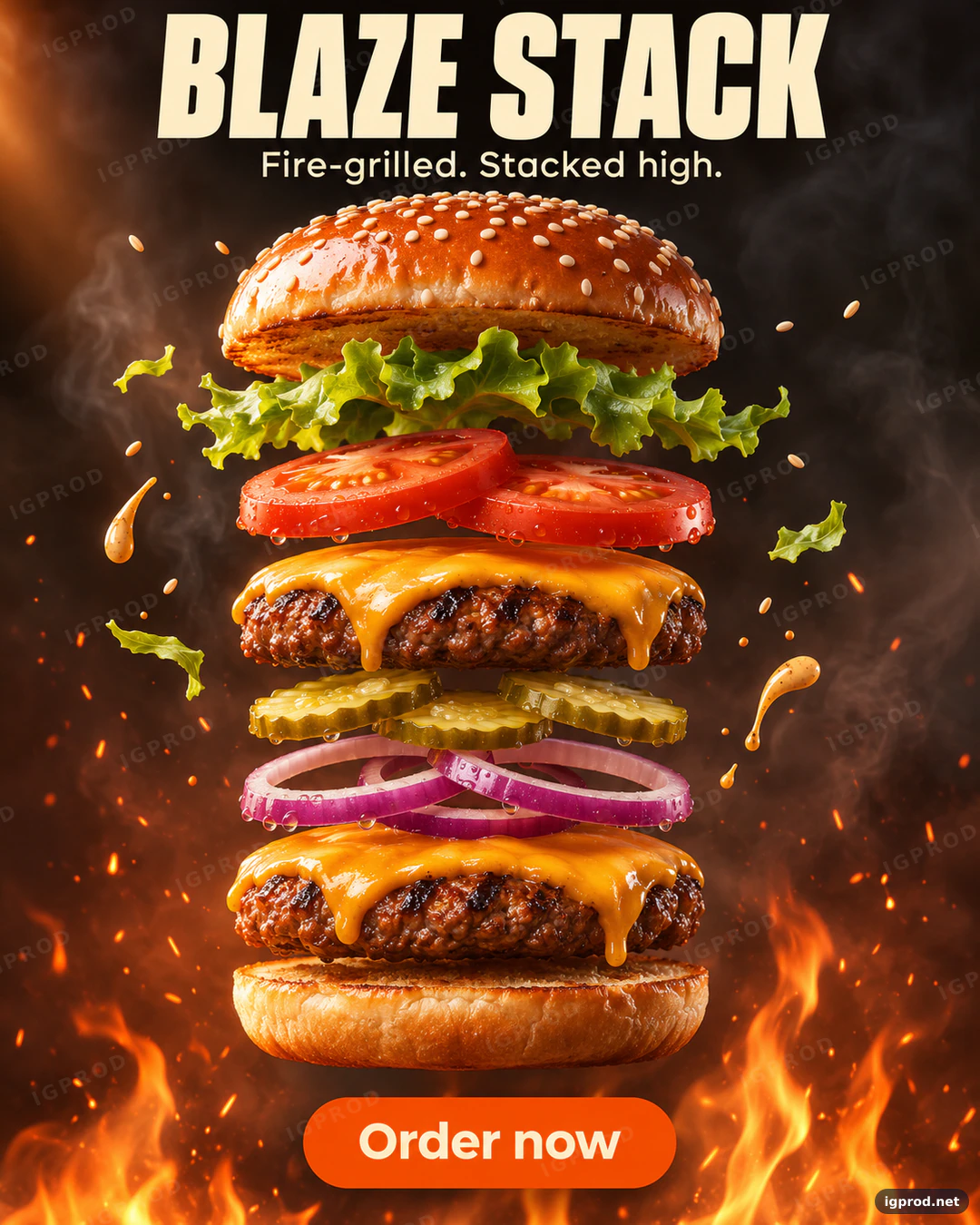
OpenAI's image model returned one portrait image of 1122 × 1402 pixels, which is a 4:5 frame. The text is exact: "BLAZE STACK" in heavy condensed cream capitals across the top, "Fire-grilled. Stacked high." in a clean sans-serif below it, and a rounded orange button reading "Order now" at the bottom.
The burger follows the prompt's order from top to bottom: a glossy sesame bun, wavy green lettuce, two tomato slices, cheddar melting over a grilled patty, three pickle slices, red onion rings, a second patty with cheddar and the toasted bottom bun. Each layer floats a short gap above the next, centered and level. Sesame seeds, a few torn lettuce pieces and three drops of creamy sauce hang in the air, sparks rise all around, and flames lick up from the bottom corners. The smoky charcoal background turns orange toward the bottom, and the melted cheese and the bun carry bright highlights. There are no hands, plates or logos.
Two details differ from the prompt. The model added fresh water drops on the tomatoes, the pickles and the onion, a common food-ad trick it was not asked for. And the flames sit in the corners rather than directly under the burger, which leaves a darker area for the button.
Why this burger prompt works
A recipe, not a description. The Subject line lists every layer from top to bottom, so the model does not invent or reorder ingredients. "Each layer floating a few centimeters above the next and perfectly aligned" turns the list into a clean exploded view.
Words that describe texture. Glossy, toasted, crisp, melting and flame-grilled each tell the model how a surface should look. Food photography sells texture, so these words do more work than "delicious" or "tasty".
Frozen action. Seeds, lettuce shreds and sauce drops "frozen in the air" add the motion of a high-speed shot without blurring the food. The flames and embers below give the floating stack a reason to rise.
Warm light from two sources. A warm key light from the left shapes the burger, and an orange rim light from the flames outlines it from below. "Crisp specular highlights on the bun and the melted cheese" asks for the shine that makes food look fresh.
A background that tells the story. A smoky charcoal gradient that turns orange at the bottom repeats the grill idea and keeps the busy burger readable against a dark, simple field.
Ad copy and a call to action. Title, slogan and an "Order now" button each get a style and a place. A button in the image makes it ready for a delivery app banner or a social ad.
An Avoid line for messy food. Burnt or messy food, plates, extra burgers and real restaurant brands are the usual problems, so the prompt names them once, at the end.
The burger ad prompt, ready to copy
Create a mouth-watering gourmet burger ad, vertical 4:5 (1080x1350).
Subject: a fictional double cheeseburger called "BLAZE STACK", deconstructed in mid-air; from top to bottom: a glossy toasted sesame bun, crisp lettuce, two tomato slices, melting cheddar over a flame-grilled beef patty, pickles, red onion rings, a second cheddar-topped patty and the bottom bun, each layer floating a few centimeters above the next and perfectly aligned.
Action: small flames and glowing embers rise from below; sesame seeds, lettuce shreds and drops of sauce hang frozen in the air.
Background: a smoky charcoal gradient that turns warm orange at the bottom.
Lighting: warm key light from the left, orange rim light from the flames, crisp specular highlights on the bun and the melted cheese.
Typography: "BLAZE STACK" in heavy condensed cream capitals at the top, the line "Fire-grilled. Stacked high." in a small clean sans-serif below it, and a rounded orange button reading "Order now" at the bottom.
Style: high-end food advertising photography, ultra-detailed textures, shallow depth of field.
Avoid: people, hands, real restaurant brands or logos, plates, extra burgers, burnt or messy food, misspelled text.
Paste it as it is into ChatGPT's image generation or another image model. To make it yours, change the layers first: the model follows the order you write. If you call OpenAI's model through its API, the image generation guide lists the sizes and quality options it accepts.
Three ways to change the burger ad
- A chicken burger: replace the two beef patties with "two crispy golden fried chicken fillets" and the cheddar with "spicy mayo dripping over the edges". Keep the rest of the order so the stack stays aligned.
- A clean daylight look: change the Action line to "fresh herbs and sesame seeds float around the burger", the background to "a warm cream backdrop" and the Lighting line to "soft daylight from a large window on the left". The ad turns from smoky to fresh.
- A menu board size: change the first line to "horizontal 16:9 (1920x1080)" and move the text to the left third: the name and the slogan on the left, the burger on the right, the button under the slogan.
Check the result before you use it
- Count the layers. Compare the stack with the Subject line: models sometimes merge two layers or add a third patty.
- Look at the cheese and the edges. Melted cheese should drip down, not float upward, and the patties should not show burnt black spots.
- Read the button. Short words like "Order now" usually render well, but check every letter and the button's shape.
- Keep the picture honest. If you use the image for a real menu, the burger you sell should look like the one in the ad.
Frequently asked questions
Does this prompt work in Gemini (Nano Banana)?
You can paste the same text into Gemini's image model. We ran it only in OpenAI's model, so the layers, the light and the text may come out differently there. Our earlier ice cream cup and chocolate bar ads were made in Nano Banana if you want to compare.
Why list the ingredients from top to bottom?
Image models follow the order of a list well. Writing the stack in reading order gives the model one clear sequence instead of a pile of ingredients to arrange.
Can I use this prompt for my restaurant?
Yes, with your own name in the quotes and your real ingredients in the Subject line. Check the image tool's terms before commercial use, and keep the picture close to what customers will get.
More food ad prompts
For sweet products, see the ice cream cup ad prompt and the fruit and nut chocolate bar ad prompt. Every prompt we tested is in IGPROD image prompts.
Leave a comment
Your email address will not be published. Required fields are marked *