A password or API key that reaches a Git commit stays in the repository's history after you delete the file. Anyone with a clone, a fork or a link to the old commit can still read it, and the commit that "removes" it changes nothing about that.
This guide follows the order a production team uses after a leak: find every secret with gitleaks, revoke the keys, remove them from all commits with git filter-repo, clean the server and the old clones, then stop the next leak with a pre-commit hook and a CI check that nobody can skip.
We tested every step on 17 November 2026 with gitleaks 8.30.1, git-filter-repo 2.47.0, pre-commit 4.7.0 and Git 2.47.3 on Linux, in a throwaway repository with made-up keys. Every output and screenshot below comes from that test, including two problems we hit: a Go download that timed out, and a hook ID that let a key through.
What you need
- Git and Python 3 on Linux, macOS or Windows. We used Git 2.47.3 and Python 3.13.
- Admin rights on the repository: the cleanup needs a force push.
- Access to the accounts that issued the keys, to revoke them.
- For a first try, a throwaway repository with fake keys. Never paste a real key into a test.
Install gitleaks
gitleaks is a single binary. On Linux, download it from the releases page and check it against the published checksums before you install it:
VERSION=8.30.1
curl -fsSLO "https://github.com/gitleaks/gitleaks/releases/download/v${VERSION}/gitleaks_${VERSION}_linux_x64.tar.gz"
curl -fsSLO "https://github.com/gitleaks/gitleaks/releases/download/v${VERSION}/gitleaks_${VERSION}_checksums.txt"
sha256sum --ignore-missing -c "gitleaks_${VERSION}_checksums.txt"
sudo tar -xzf "gitleaks_${VERSION}_linux_x64.tar.gz" -C /usr/local/bin gitleaks
gitleaks version
The check must print OK for the file you downloaded, and the last command prints the version:
gitleaks_8.30.1_linux_x64.tar.gz: OK
8.30.1
On macOS, brew install gitleaks installs it, and the Docker image is ghcr.io/gitleaks/gitleaks. We tested only the release binary. The cleanup and the hook need two Python tools; we installed them with pip in a Python 3.13 environment:
pip install git-filter-repo==2.47.0 pre-commit==4.7.0On Ubuntu and Debian, where pip refuses to install into the system Python, pipx install git-filter-repo and pipx install pre-commit do the same for your user (we did not test pipx).
Scan the files, then the whole history
Our test project, shop-api, is a small Flask API with four commits:
5898920Initial commit: Flask app.b7c87a2Add Stripe payments: a Stripe secret key written intopayments.py.f76e5beAdd deploy settings: a.envfile with an AWS key pair and a GitHub token.8666218Remove secrets: deletes.env, adds it to.gitignoreand reads the Stripe key from an environment variable.
The last commit is the usual fix, and the files really are clean now. Scan them both ways:
gitleaks dir .
gitleaks git --redact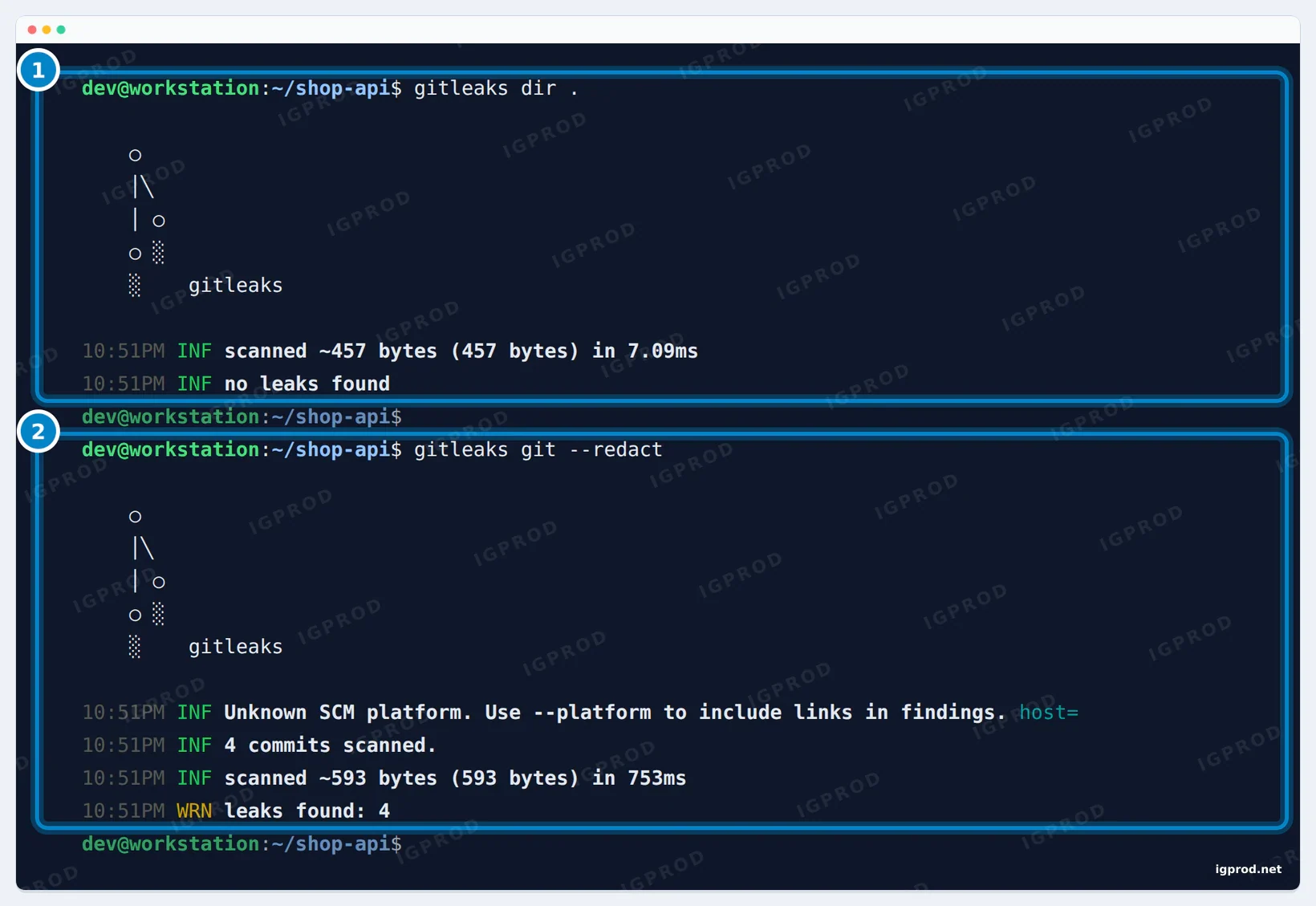
gitleaks dir . finds nothing in today's files. 2: gitleaks git reads all 4 commits and finds 4 secrets.gitleaks dir scans the files as they are on disk and finds nothing. gitleaks git reads every commit with git log -p, including lines that were deleted later, and finds 4 secrets. That is what anyone with a clone of the repository can see.
Add --redact to every scan. Without it, gitleaks prints each secret in full, and scan output ends up in CI logs, tickets and screenshots.
Read a finding
Add -v to print each finding. Here we limit the scan to the Stripe commit, so one finding fits on the screen:
gitleaks git -v --redact --no-banner --log-opts="-1 b7c87a2"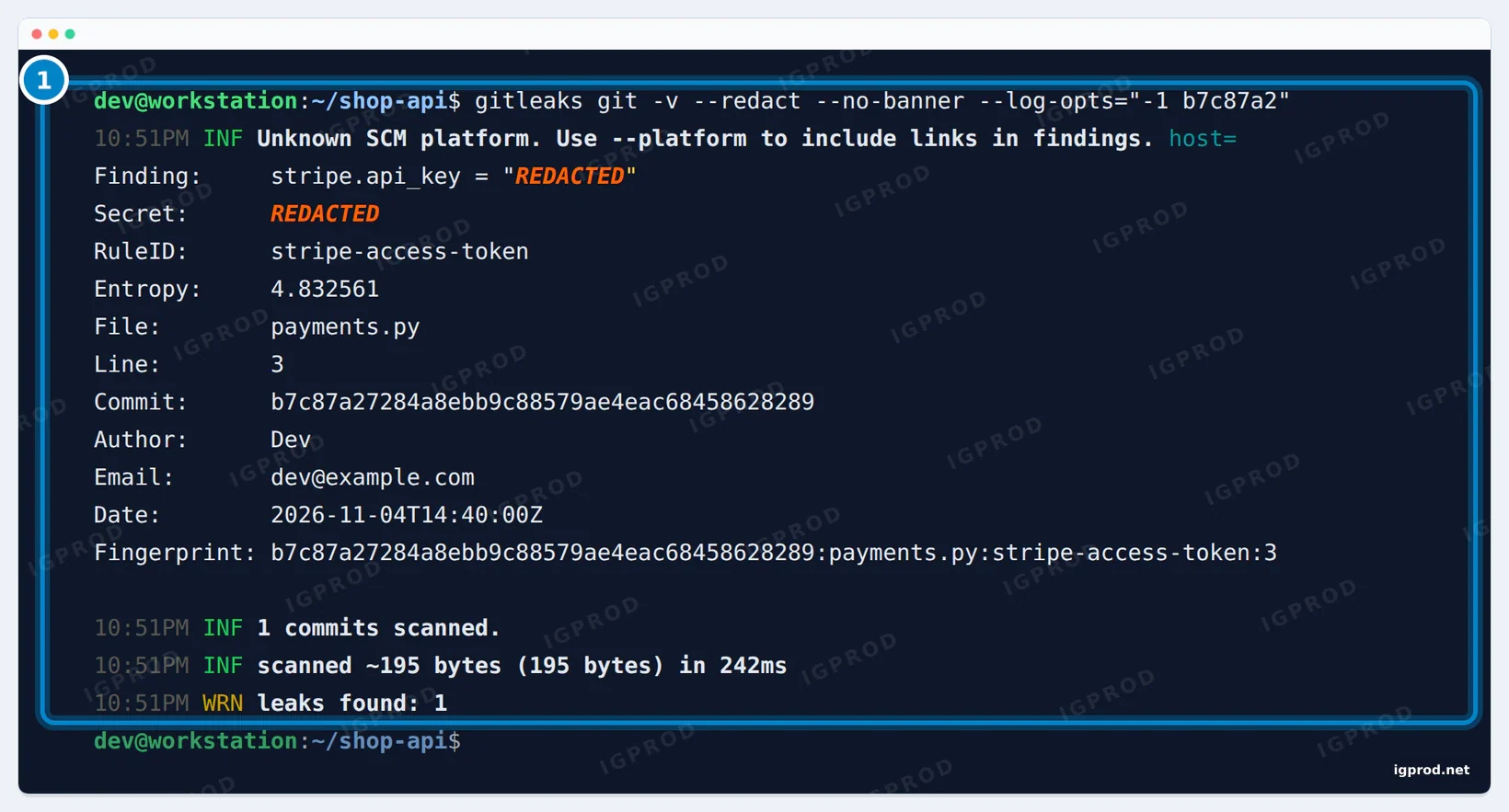
--redact hides the key.--no-banner drops the logo, and --log-opts passes options to git log: -1 b7c87a2 means that one commit. The fields that matter:
- RuleID is the kind of secret.
stripe-access-token,aws-access-tokenandgithub-patname the service that issued it, so you know where to revoke it. - File, Line and Commit show where the secret was added. The commit is the one that introduced it, here "Add Stripe payments".
- Entropy measures how random the value looks. Real keys score high; placeholders like
changemescore low. - Fingerprint joins commit, file, rule and line into one ID. You use it to ignore one finding on purpose, later in this guide.
The other three findings were all in .env: the AWS access key ID (aws-access-token, line 1), the AWS secret key (generic-api-key, line 2) and the GitHub token (github-pat, line 3). The generic rule looks for a random-looking value assigned to a name like key, secret or token.
The INF line "Unknown SCM platform" appears because our test remote was a folder on the same machine. For a repository on GitHub or GitLab, --platform github (or gitlab) makes gitleaks add a link to each finding.
Step 1: revoke and rotate the keys first
Revoke the keys before you rewrite anything. A revoked key is useless at once, including in clones and forks you will never be able to clean, while the history rewrite takes longer and needs your team to stop pushing. The git filter-repo manual and GitHub's guide both start here, and the manual adds that revoking may solve the problem without any rewrite.
- Stripe: roll the secret key in the Dashboard and update your servers with the new one.
- AWS: create a second access key for the IAM user, move your apps to it, then deactivate and delete the leaked one. Look in CloudTrail for calls made with the leaked key ID.
- GitHub token: delete it under Settings, Developer settings, Personal access tokens, then create a new one with only the scopes it needs.
Our keys were made up, so there was nothing to revoke in the test. For a real key, also read the provider's logs for the time it was exposed: revoking stops new use, it does not undo what already happened.
Step 2: remove the secrets from history with git filter-repo
git filter-repo rewrites history quickly and safely, and GitHub's guide uses it. Its --sensitive-data-removal option (short form --sdr) fetches every ref from the server before the rewrite, keeps the origin remote for the push, and prints what you need for the cleanup.
Ask your team to stop pushing and to merge or close open pull requests. Then work in a fresh clone: filter-repo refuses to rewrite a clone you have worked in (see Troubleshooting). Write the text to replace in a file, one rule per line:
regex:sk_live_[0-9A-Za-z]{24,}==>***REMOVED***A line without regex: is matched as plain text, so you can also paste the leaked key itself. ==> sets the replacement, and ***REMOVED*** is the default. Then clone and rewrite:
git clone https://github.com/your-org/shop-api.git shop-api-clean
cd shop-api-clean
git filter-repo --sensitive-data-removal --invert-paths --path .env --replace-text ~/replacements.txt
Our test remote was a bare repository on the same machine, so the clone in the screenshot uses its path:
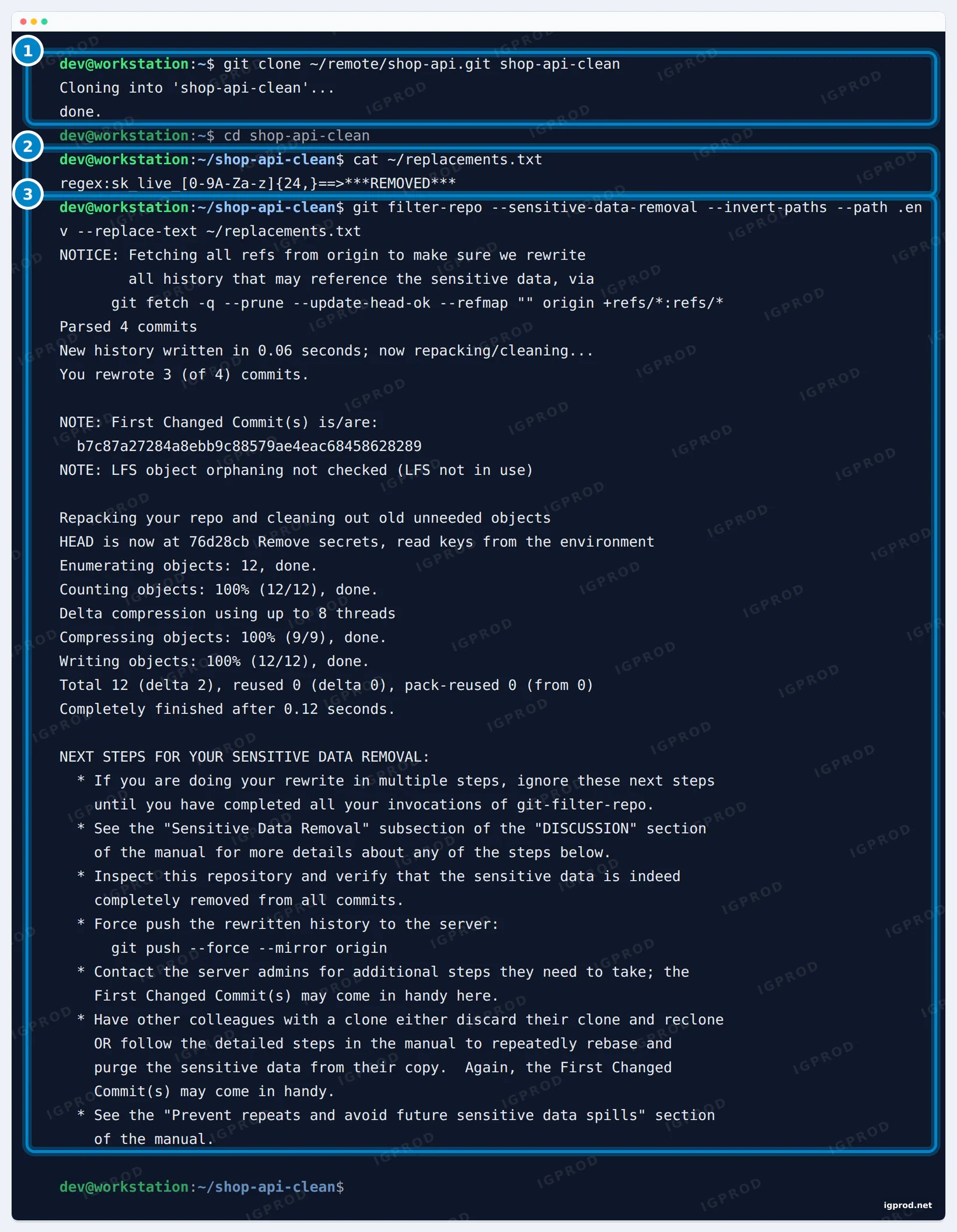
git filter-repo --sensitive-data-removal fetches all refs, rewrites 3 of 4 commits and lists the next steps.--invert-paths --path .envdeletes.envfrom every commit. The third commit only added that file, so it became empty and filter-repo dropped it.--replace-textreplaced the Stripe key in every version of every file, so a copy of the key in another file is caught too.- "You rewrote 3 (of 4) commits": the first commit had no secret and kept its ID. Every commit from the first change onward got a new one.
- "First Changed Commit(s)" is the oldest commit that changed, here
b7c87a2. Keep it: GitHub Support asks for it.
filter-repo also saves its report in .git/filter-repo/. In our clone, changed-refs held refs/heads/main and first-changed-commits held the old and new IDs of the Stripe commit. On a GitHub repository, count the pull requests the rewrite touches, since Support asks for that number too:
grep -c '^refs/pull/.*/head$' .git/filter-repo/changed-refsOur test repository had no pull requests, so we could not test that count.
Check the result before you push
git log --oneline
git show HEAD~1:payments.py | grep api_key
gitleaks git --redact --no-banner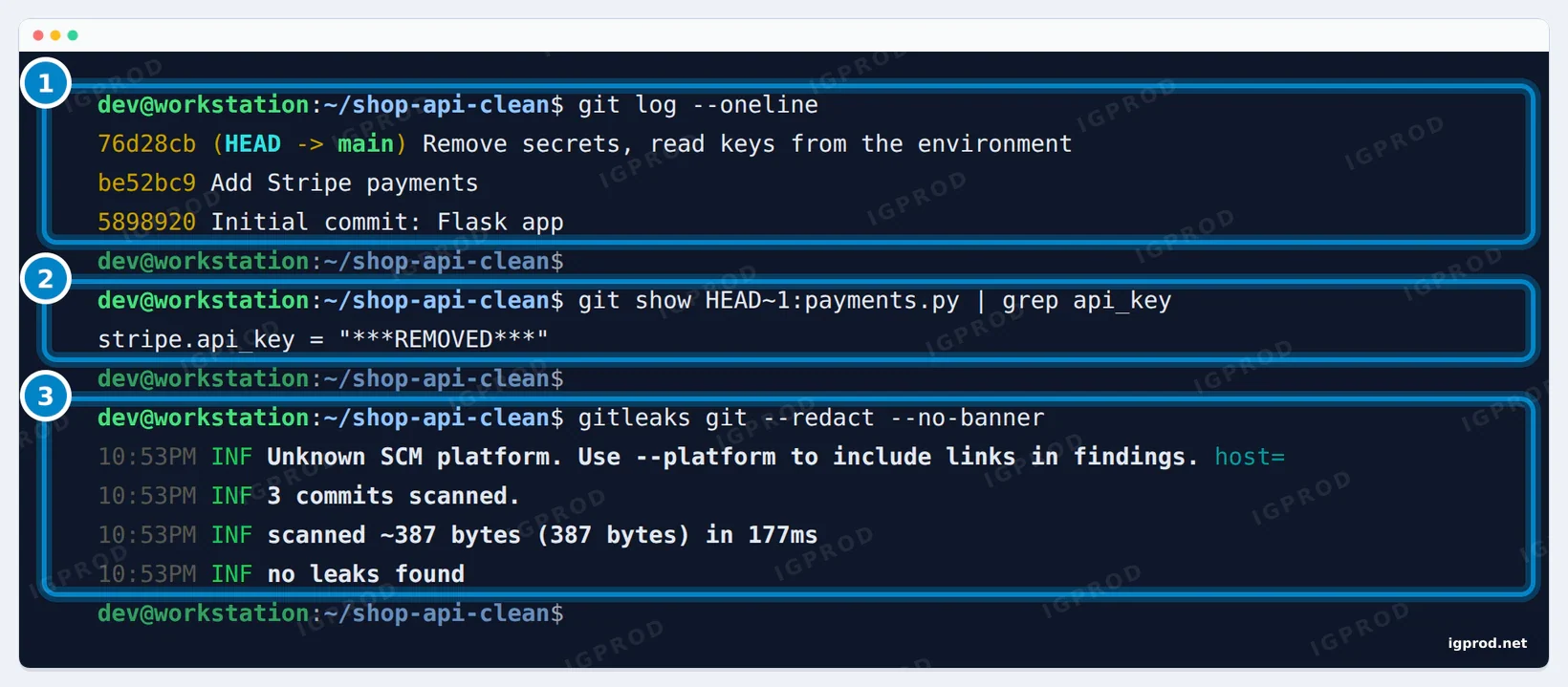
***REMOVED***. 3: gitleaks finds no leaks in the new history.Three commits are left. The Stripe commit kept its message but has a new ID (be52bc9), the key in the old payments.py reads ***REMOVED***, and gitleaks scans 3 commits with no leaks. Do not push before this scan is clean.
Step 3: force push and clean the server
git push --force --mirror origin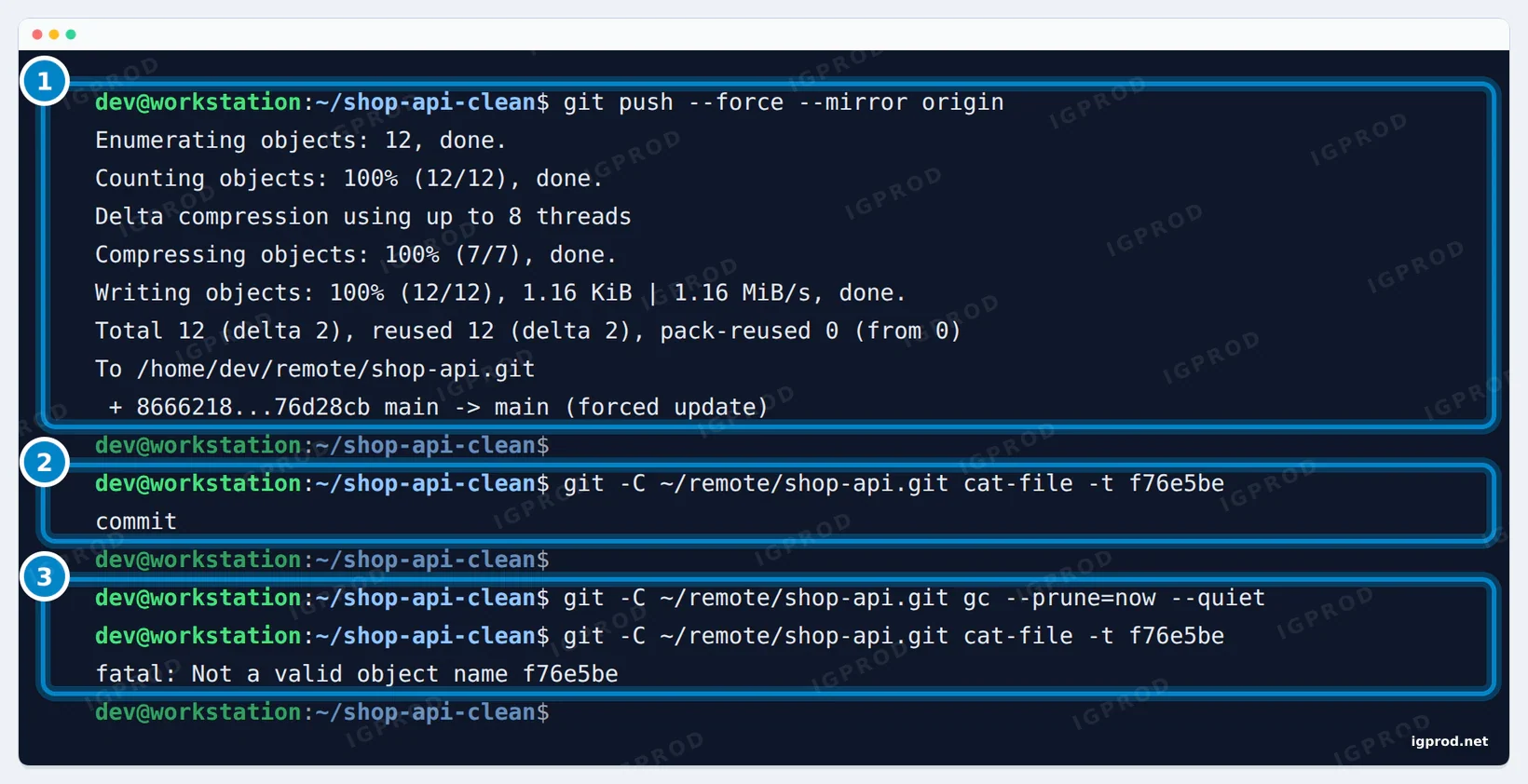
main. 2: the old commit is still on the server. 3: only garbage collection removes it.--mirror pushes every branch and tag and deletes the ones you no longer have. It already implies --force; the filter-repo manual keeps the flag as a reminder that this overwrites the server. The push replaced main.
Then we asked the server for the old .env commit: git cat-file -t f76e5be still answered commit. A push never deletes objects. The old commit stays on the server, unreachable from any branch, until garbage collection removes it, and on a hosted service anyone with its link may still open it.
On a server you run yourself, run the garbage collection after the push. On our bare repository, git gc --prune=now removed it: "fatal: Not a valid object name f76e5be". Self-hosted forges have their own housekeeping task for this; GitLab explains the steps in its Repository size docs (linked in Sources).
On GitHub, a few more steps:
- Allow force pushes on the protected branch for the time of the push, then protect it again.
- Expect the push to fail for pull request refs (
refs/pull/*). The filter-repo manual warns that GitHub, GitLab and Gerrit do not let you update those refs. - Open a ticket in the GitHub Support portal with the First Changed Commit(s) and the number of affected pull requests. Support can remove cached views and dereference or delete the affected pull requests, but GitHub says it helps only when rotating the credentials cannot remove the risk.
- Forks keep the old commits. Ask their owners to remove the data or delete the fork.
Last, every colleague deletes their old clone and clones again. One git pull and git push from a clone made before the rewrite puts the secrets back on the server.
Step 4: block the next leak with a pre-commit hook
A pre-commit hook runs gitleaks on the staged changes before Git records the commit. The pre-commit framework installs and updates the hook from a file in the repository. Add .pre-commit-config.yaml at the root:
repos:
  - repo: https://github.com/gitleaks/gitleaks
    rev: v8.30.1
    hooks:
- id: gitleakspre-commit install
git add .pre-commit-config.yaml
git commit -m "Add gitleaks pre-commit hook"In the clean clone, we then wrote refunds.py with another made-up Stripe key and tried to commit it:
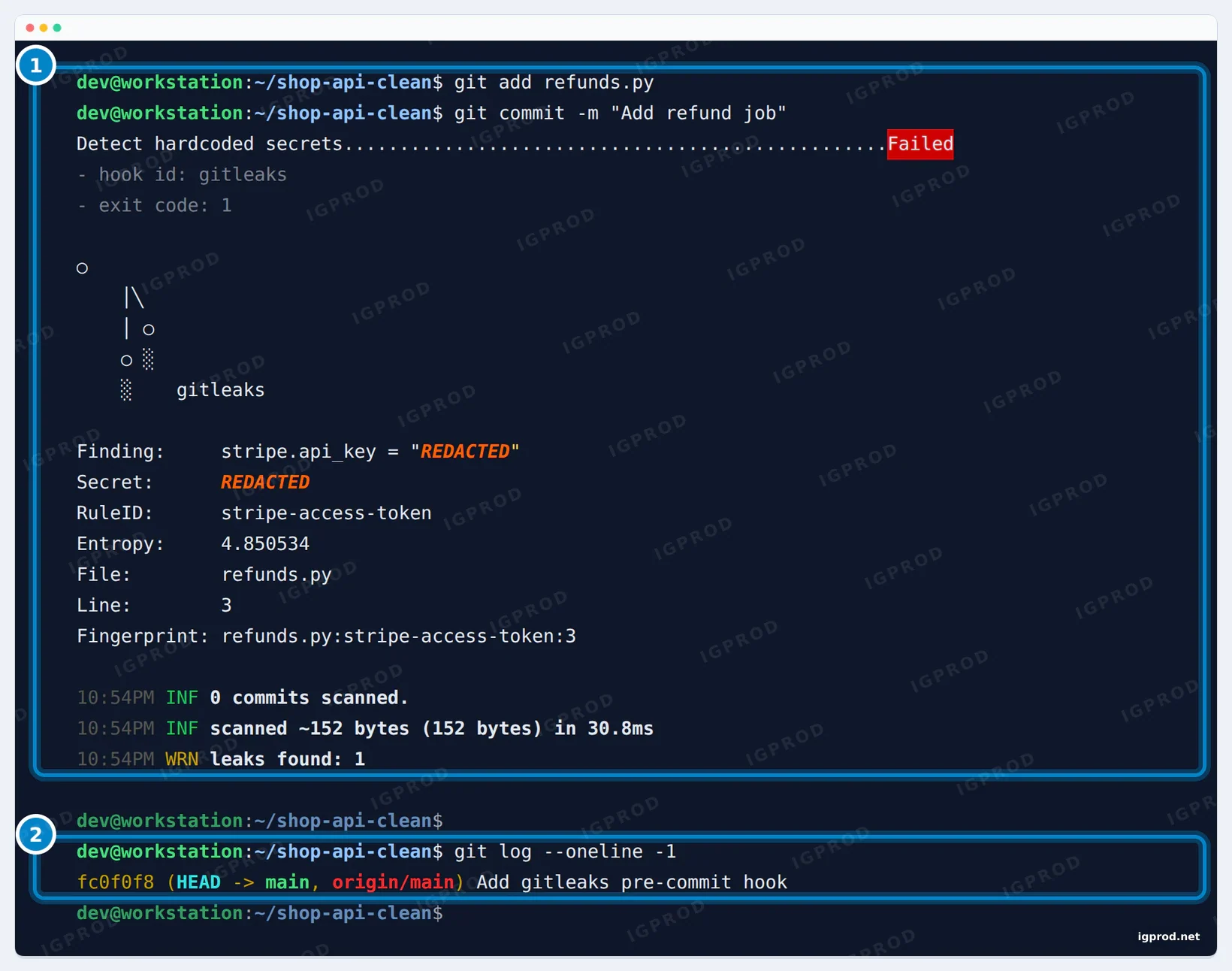
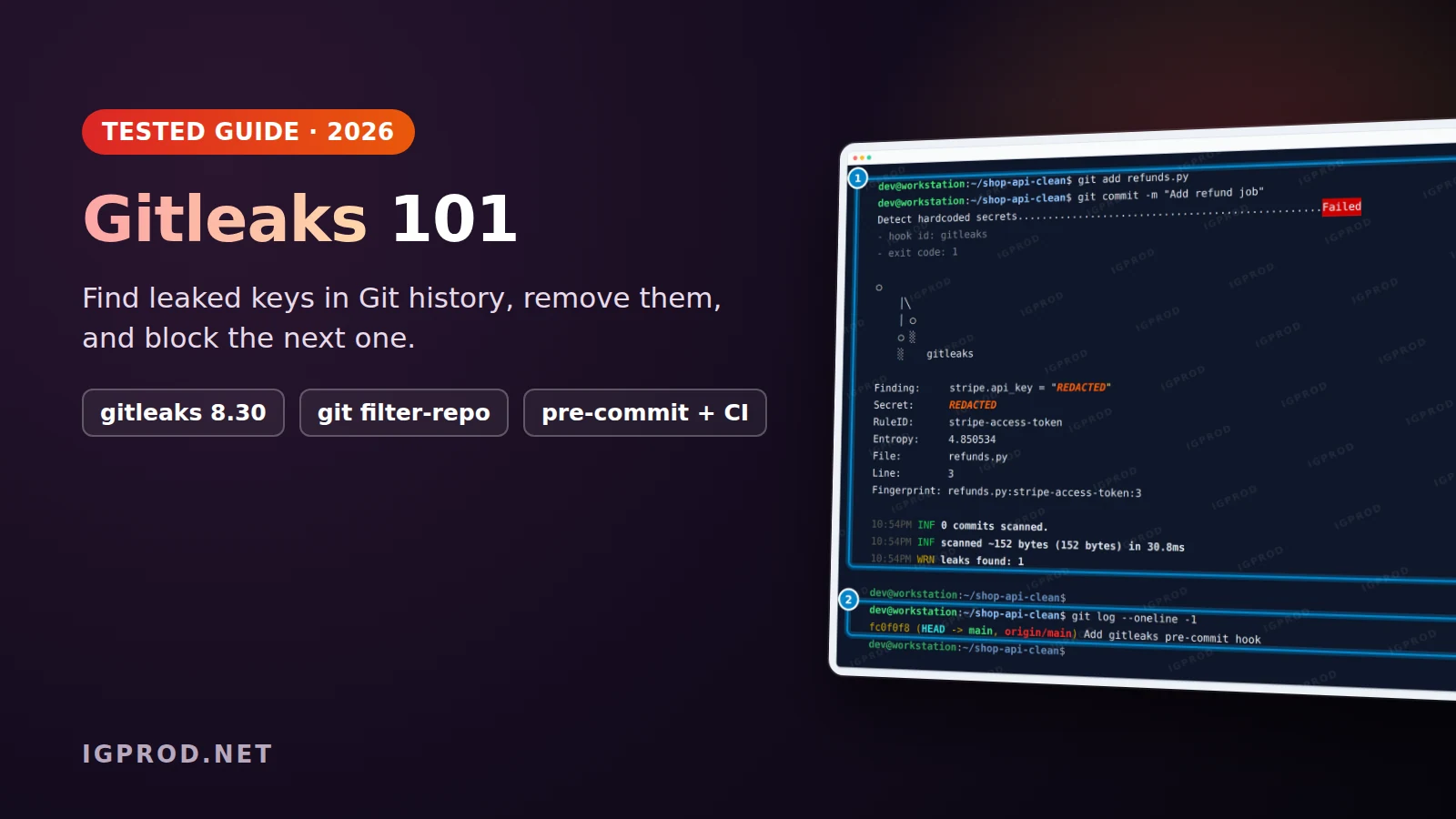
git log shows no new commit.The hook failed, gitleaks printed the finding with the secret redacted, and git log shows that the commit was not made: the top commit is still the hook setup. The hook scanned only the staged change, 152 bytes in 30.8 ms.
The pre-commit example in the gitleaks README still shows rev: v8.24.2, so check the version after you copy it. pre-commit autoupdate moves it to the latest release.
Choose the hook ID with care
gitleaks 8.30.1 publishes three hook IDs, and we tested two of them:
gitleaks: pre-commit builds gitleaks from source with Go. The firstpre-commit install-hookstook 2 minutes 42 seconds on our 2-CPU test machine; later commits reuse the build.gitleaks-system: runs the gitleaks binary you installed, with no build. In 8.30.1 its definition lackspass_filenames: false, so pre-commit passes the staged file names togitleaks git, which accepts one path at most. With one staged file holding a key, gitleaks tried to open the file as a repository ("fatal: cannot change to 'k.py': Not a directory"), still exited with 0, and the key was committed. With two staged files, the hook failed with "accepts at most 1 arg(s), received 2", which blocks every commit.gitleaks-docker: runs the official Docker image. We did not test it.
If you use gitleaks-system, set the option yourself:
repos:
  - repo: https://github.com/gitleaks/gitleaks
    rev: v8.30.1
    hooks:
      - id: gitleaks-system
        pass_filenames: false
With that line, the hook blocked our key in 0.8 seconds and let a clean commit through.
To skip the hook once on purpose, run SKIP=gitleaks git commit; pre-commit reports it as Skipped. For a test value that must stay in the code, end its line with a # gitleaks:allow comment; our commit with one passed the hook. Use both rarely: each one is a hole that the CI check below has to cover.
Each developer also has to run pre-commit install in each clone, because Git never copies hooks with a clone. That is the second reason a hook cannot be your only check.
Step 5: make CI the real gate
git commit --no-verify skips every hook. We used it to commit the same refunds.py, then ran the check a CI job runs on a branch: a scan of only the commits that are not on main yet.
gitleaks git --redact --no-banner --log-opts="origin/main..HEAD"; echo "exit code: $?"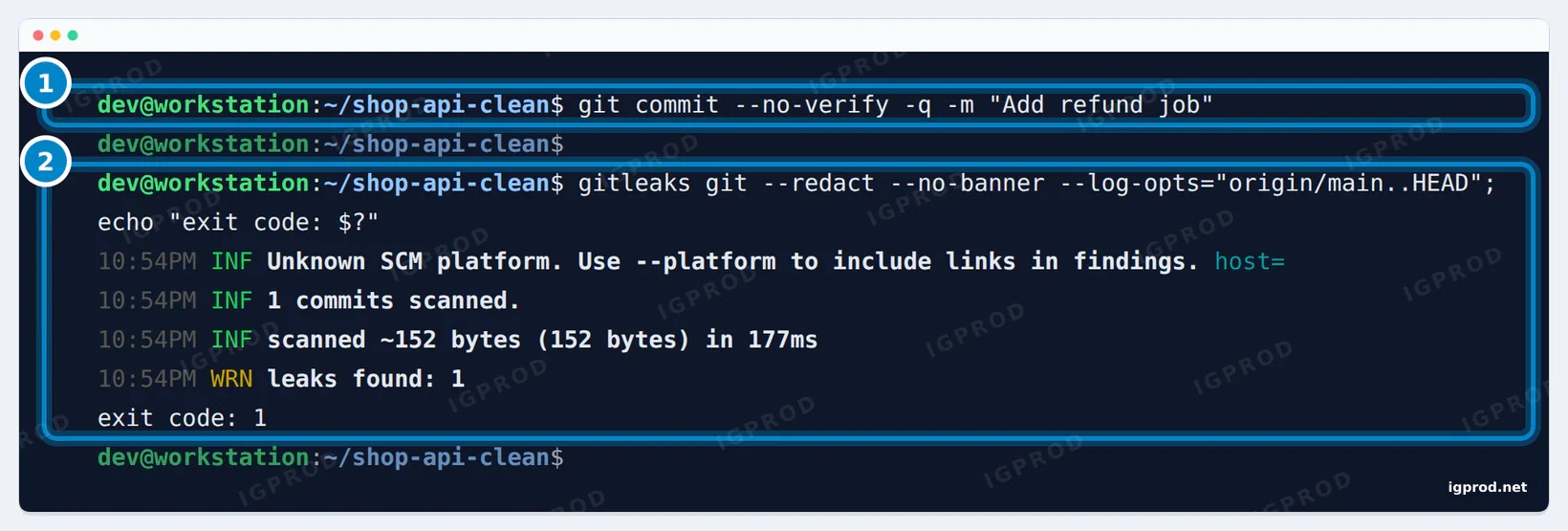
--no-verify skips the hook. 2: the CI-style scan of the new commits finds the key and exits with code 1.gitleaks scanned 1 commit, found the key and exited with code 1. Any CI system fails a job on a non-zero exit code, and --exit-code sets another value if you need one.
For GitHub code scanning, write a SARIF report. On the history of our first project, --report-format sarif --report-path gitleaks.sarif wrote a SARIF 2.1.0 file with the 4 findings, secrets redacted.
On GitHub Actions, the official gitleaks-action is the short way. It needs a free license key, stored as the GITLEAKS_LICENSE secret, for repositories that belong to an organization; personal accounts need none. The example from its README:
name: gitleaks
on:
  pull_request:
  push:
  workflow_dispatch:
  schedule:
    - cron: "0 4 * * *" # run once a day at 4 AM
jobs:
  scan:
    name: gitleaks
    runs-on: ubuntu-latest
    steps:
      - uses: actions/checkout@v6
        with:
          fetch-depth: 0
      - uses: gitleaks/gitleaks-action@v3
        env:
          GITHUB_TOKEN: ${{ secrets.GITHUB_TOKEN }}
          GITLEAKS_LICENSE: ${{ secrets.GITLEAKS_LICENSE }} # Only required for Organizations, not personal accounts.
To avoid the license, run the binary yourself. This job installs gitleaks with the commands tested above and scans the commits of the pull request:
name: gitleaks
on: pull_request
jobs:
  gitleaks:
    runs-on: ubuntu-latest
    steps:
      - uses: actions/checkout@v6
        with:
          fetch-depth: 0
      - name: Install gitleaks 8.30.1
        run: |
          VERSION=8.30.1
          curl -fsSLO "https://github.com/gitleaks/gitleaks/releases/download/v${VERSION}/gitleaks_${VERSION}_linux_x64.tar.gz"
          curl -fsSLO "https://github.com/gitleaks/gitleaks/releases/download/v${VERSION}/gitleaks_${VERSION}_checksums.txt"
          sha256sum --ignore-missing -c "gitleaks_${VERSION}_checksums.txt"
          sudo tar -xzf "gitleaks_${VERSION}_linux_x64.tar.gz" -C /usr/local/bin gitleaks
      - name: Scan the commits of this pull request
        run: gitleaks git --redact --no-banner --log-opts="${{ github.event.pull_request.base.sha }}..${{ github.event.pull_request.head.sha }}"
We ran these commands in our lab, not this workflow on GitHub. fetch-depth: 0 matters in both versions: actions/checkout fetches only the last commit by default, and gitleaks can scan only the history it has.
Existing repositories: start from a baseline
The first full scan of an older repository often finds dozens of results: test keys, keys revoked long ago, false positives. If CI fails on all of them, people turn the check off. Review them once and revoke what is real, then save what exists today as a baseline, so that CI fails only on new findings:
gitleaks git --redact --no-banner --report-path baseline.json
gitleaks git --redact --no-banner --baseline-path baseline.json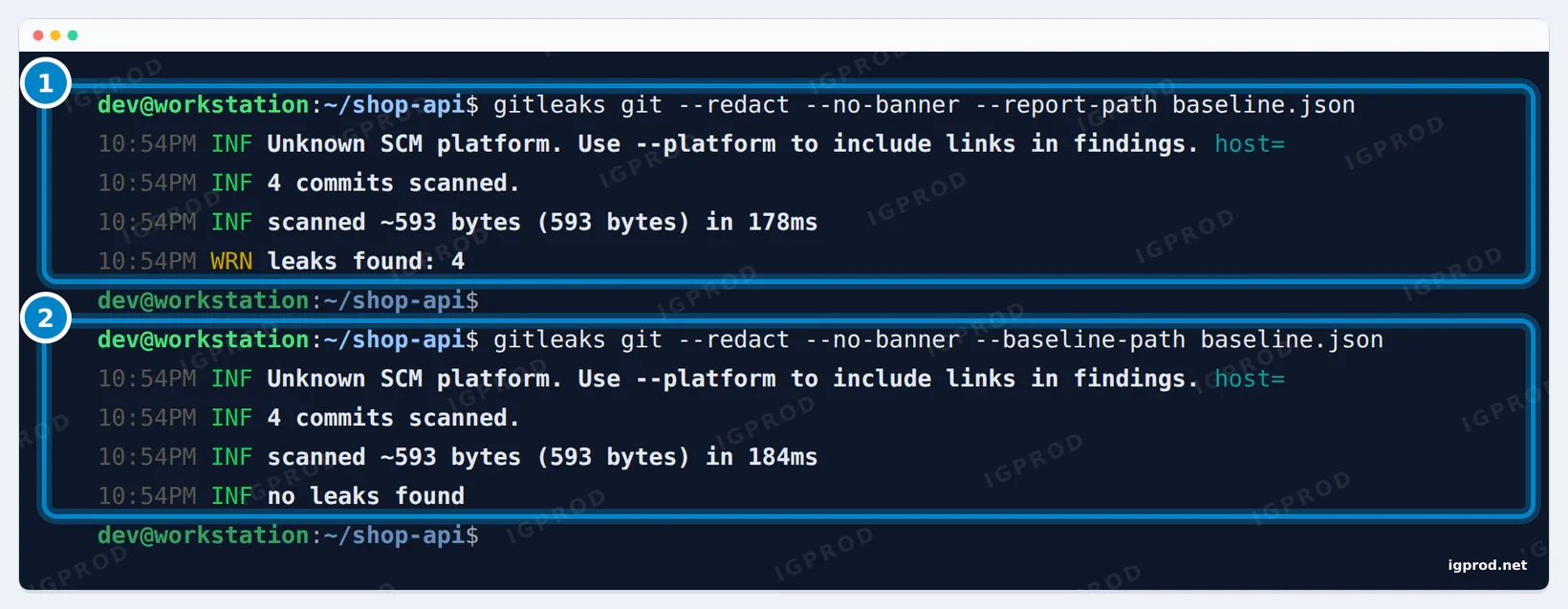
--baseline-path, only new findings count.A baseline is any gitleaks JSON report. Ours held REDACTED in place of each secret and no key, because we wrote it with --redact; without that flag, the report itself would leak the keys into the repository. With --baseline-path, the same 4 findings no longer count.
To ignore one finding without a baseline, add its fingerprint to a .gitleaksignore file at the root of the repository. This one line, the Stripe finding's fingerprint, took our scan from 4 leaks to 3:
b7c87a27284a8ebb9c88579ae4eac68458628289:payments.py:stripe-access-token:3Add rules for your own token formats
The default rules know the key formats of public services. Your own tokens need a rule of their own. Put it in .gitleaks.toml at the root of the repository; with [extend] useDefault = true, it adds to the default rules instead of replacing them:
title = "shop-api gitleaks config"

[extend]
useDefault = true

[[rules]]
id = "shop-internal-token"
description = "Internal shop API token"
regex = '''shpint_[a-z0-9]{32}'''
keywords = ["shpint_"]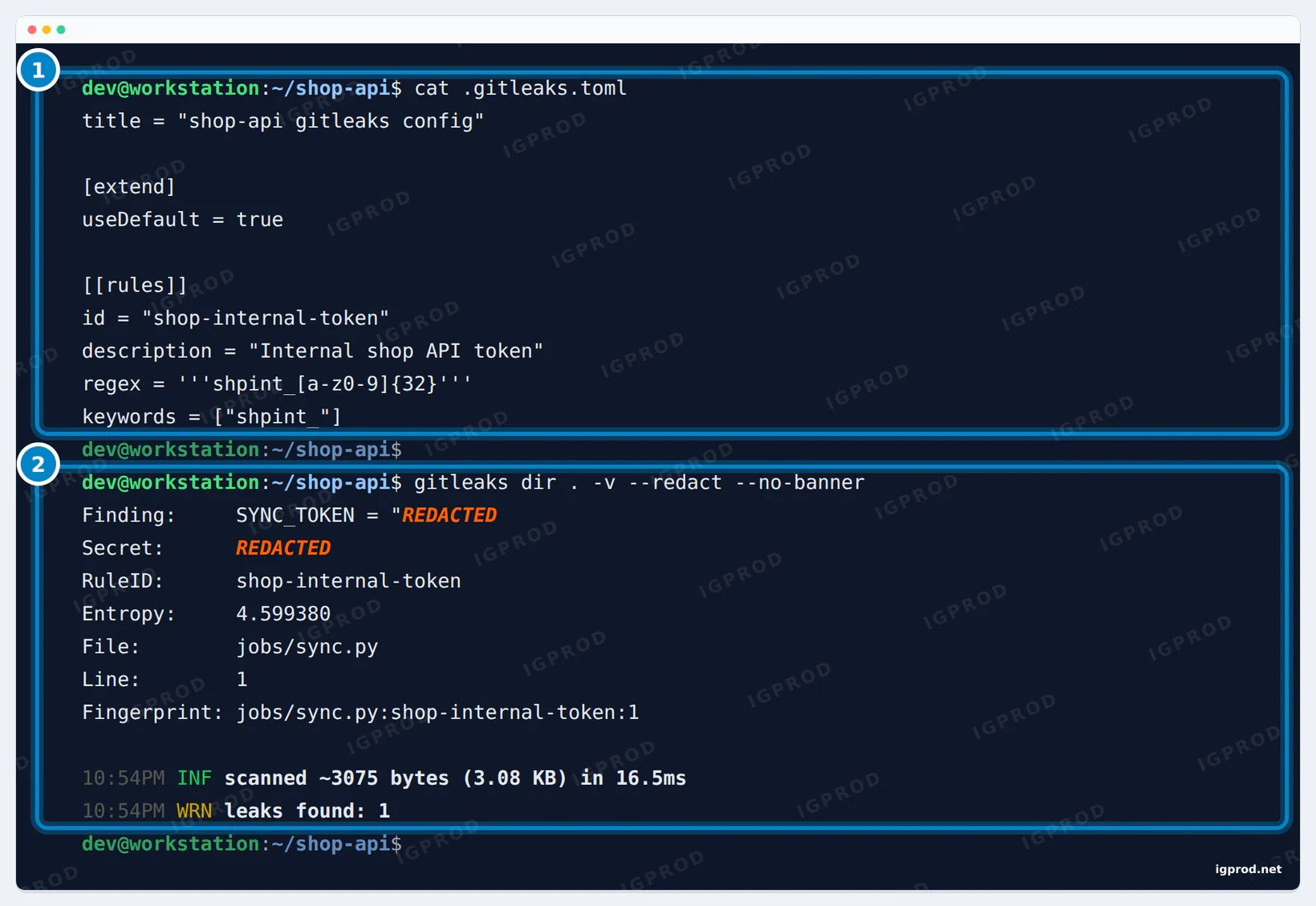
gitleaks found our made-up shpint_ token in jobs/sync.py with the new rule. It reads .gitleaks.toml from the folder it scans; --config or the GITLEAKS_CONFIG variable point to another file. The keywords keep the rule fast: gitleaks runs the regex only on text that contains one of them.
Troubleshooting
git filter-repo: "Refusing to destructively overwrite repo history"
Aborting: Refusing to destructively overwrite repo history since
this does not look like a fresh clone.
  (expected at most one entry in the reflog for HEAD)
Note: when cloning local repositories, you need to pass
      --no-local to git clone to avoid this issue.
Please operate on a fresh clone instead.  If you want to proceed
We got this in a clone where we had made commits. filter-repo checks for a fresh clone so it cannot destroy work that exists only in your copy. Clone again and run it there; --force skips the check, which is exactly what you do not want here.
pre-commit install-hooks: "TLS handshake timeout" while downloading Go
go: downloading go1.24.11 (linux/amd64)
go: download go1.24.11: golang.org/[email protected]: Get "https://storage.googleapis.com/...(cut)": net/http: TLS handshake timeout
The gitleaks hook builds gitleaks with Go, and gitleaks 8.30.1 asks for Go 1.24.11. Our Go was 1.24.4, so Go tried to download the newer toolchain from Google's servers, and the download kept timing out. The cause was our network, not gitleaks: the test ran in a Docker container, the host's network interface had an MTU of 1408, and Docker's default bridge uses 1500, so large TLS packets were lost. From a container on the default bridge, the TLS handshake to the download server timed out after 30 seconds; on a Docker network with an MTU of 1400, it took 0.2 seconds:
docker network create --opt com.docker.network.driver.mtu=1400 lab-net
docker network connect lab-net <container>
docker network disconnect bridge <container>
Outside Docker, the same error usually points to a VPN or a proxy. You can also skip the build with the gitleaks-system hook and pass_filenames: false.
The hook passed, but the key is in the commit
Check the hook ID. With gitleaks-system and no pass_filenames: false, our one-file commit with a key passed, and only a full gitleaks git scan found it afterwards. See Step 4.
Frequently asked questions
Does deleting a file remove the secret from Git?
No. The file stays in every commit made before the deletion. In our test, the commit that deleted .env left all 4 secrets readable in the history until git filter-repo rewrote it.
Is gitleaks free?
Yes. The gitleaks command line tool is open source under the MIT license. The GitHub Action has had its own license since version 2 and needs a free license key for repositories of an organization.
Gitleaks or TruffleHog?
Both scan Git history. TruffleHog can also check whether a found key still works by calling the service that issued it, which helps to tell live keys from dead ones. gitleaks works offline from its rules and entropy, which keeps it fast in a pre-commit hook. We tested only gitleaks for this guide.
Can I use BFG Repo-Cleaner instead of git filter-repo?
BFG can delete files and replace text in history, but GitHub's guide now uses git filter-repo, and only filter-repo has --sensitive-data-removal with its First Changed Commit report. We did not test BFG.
Do I need to rewrite history if I already revoked the key?
Not always. A revoked key is useless, and the filter-repo manual says revoking may be enough. Rewrite when the repository is public, when the leaked data cannot be revoked (a private key you cannot replace, customer data), or when your policy requires it.
How do I scan only the commits of a pull request?
Pass a range with --log-opts: origin/main..HEAD on your machine, or the base and head commits of the pull request in CI, as in the workflow above.
Does GitHub find leaked keys by itself?
GitHub's secret scanning and push protection check pushes against the key formats GitHub supports. gitleaks runs on your machine before the commit exists, and your own rules cover internal formats. They complement each other.
Related guides
- Docker Compose Up: Start Containers and Check They Work
- Run n8n with Docker Compose: PostgreSQL, Task Runners, and HTTPS
- GitHub App Permissions Update: New Least-Privilege Grants for Repository Creation and Installation Management
Sources

Leave a comment
Your email address will not be published. Required fields are marked *