

AdGuard Home and Pi-hole do the same job. Each one becomes the DNS server of your home network and answers 0.0.0.0 when a device asks for an ad or tracker name, so the ad never loads, on any device, with no app to install. We ran both on the same home server at the same time and asked each one the same 131 ad and tracker names: first with its own default blocklist, then with the same blocklist on both. We also measured memory, lookup speed and the settings each one ships with, and we list the production settings we use for each.
Tested on 25 November 2026: AdGuard Home v1.0.0 (Docker image adguard/adguardhome:v1.0.0) and Pi-hole Docker tag 2026.11.0 (Core v6.6, web interface v6.6.1, FTL v6.9), side by side in Docker on an Ubuntu 26.04 home server at 192.168.1.50, asked by a laptop on the same network (192.168.1.21). Every number, output and screenshot below comes from that lab.
Quick answer: AdGuard Home or Pi-hole?
In plain words: DNS is the internet's phone book. Before a site or an app loads, your device asks a DNS server for the address of every name it needs. AdGuard Home and Pi-hole answer those questions for your whole home and send ad and tracker names to a dead end.
- Same list, same result. With the same blocklist (HaGeZi Pro, 246,433 domains), both blocked exactly the same 127 of our 131 test names. How much gets blocked depends on the list, not on the program.
- Out of the box, AdGuard Home blocks more. Its default list (AdGuard DNS filter, 194,772 rules) blocked 106 names; Pi-hole's default (StevenBlack's hosts, 81,677 domains) blocked 89.
- Pi-hole uses less memory. With the same list: 46.27 MiB for Pi-hole, 115.8 MiB for AdGuard Home.
- AdGuard Home starts with more privacy. It sends lookups to Cloudflare over HTTPS (encrypted), with DNSSEC on. Pi-hole sends plain DNS to Google with DNSSEC off until you change it.
- Change one AdGuard Home default. Its rate limit (20 queries per second for a whole /24 network) silently dropped 6 of our 131 quick lookups. On a server the internet cannot reach, set it to 0.
- Speed is a tie. Ten new names took 346 ms on Pi-hole and 350 ms on AdGuard Home; cached answers came back in 0 to 1 ms on both.
Pick AdGuard Home if you want encrypted lookups and DNSSEC from the first start, without an extra container. Pick Pi-hole if memory is tight (a small single-board computer), or if you want the larger community: 62,212 GitHub stars against 38,826 for AdGuard Home on 25 November 2026. Either way, choose your blocklist with care, because that is where the blocking comes from.
Results at a glance
| AdGuard Home | Pi-hole | |
|---|---|---|
| Version tested | v1.0.0 | 2026.11.0 (Core v6.6, FTL v6.9) |
| Default blocklist | AdGuard DNS filter, 194,772 rules | StevenBlack hosts, 81,677 domains |
| Blocked out of the box (of 131) | 106 | 89 |
| Blocked with the same list (HaGeZi Pro) | 127 | 127 |
| Memory, default list | 56.86 MiB | 35.66 MiB |
| Memory, HaGeZi Pro | 115.8 MiB | 46.27 MiB |
| 10 new names / 10 cached | 350 ms / 0 ms | 346 ms / 10 ms |
| Default upstream | Cloudflare, DNS over HTTPS | Google (8.8.8.8, 8.8.4.4), plain DNS |
| DNSSEC out of the box | On | Off |
| Default rate limit | 20 queries/s per /24 network | 1,000 queries per 60 s per device |
| Docker image size | 106 MB | 147 MB |
The two dashboards in our lab, after the tests:
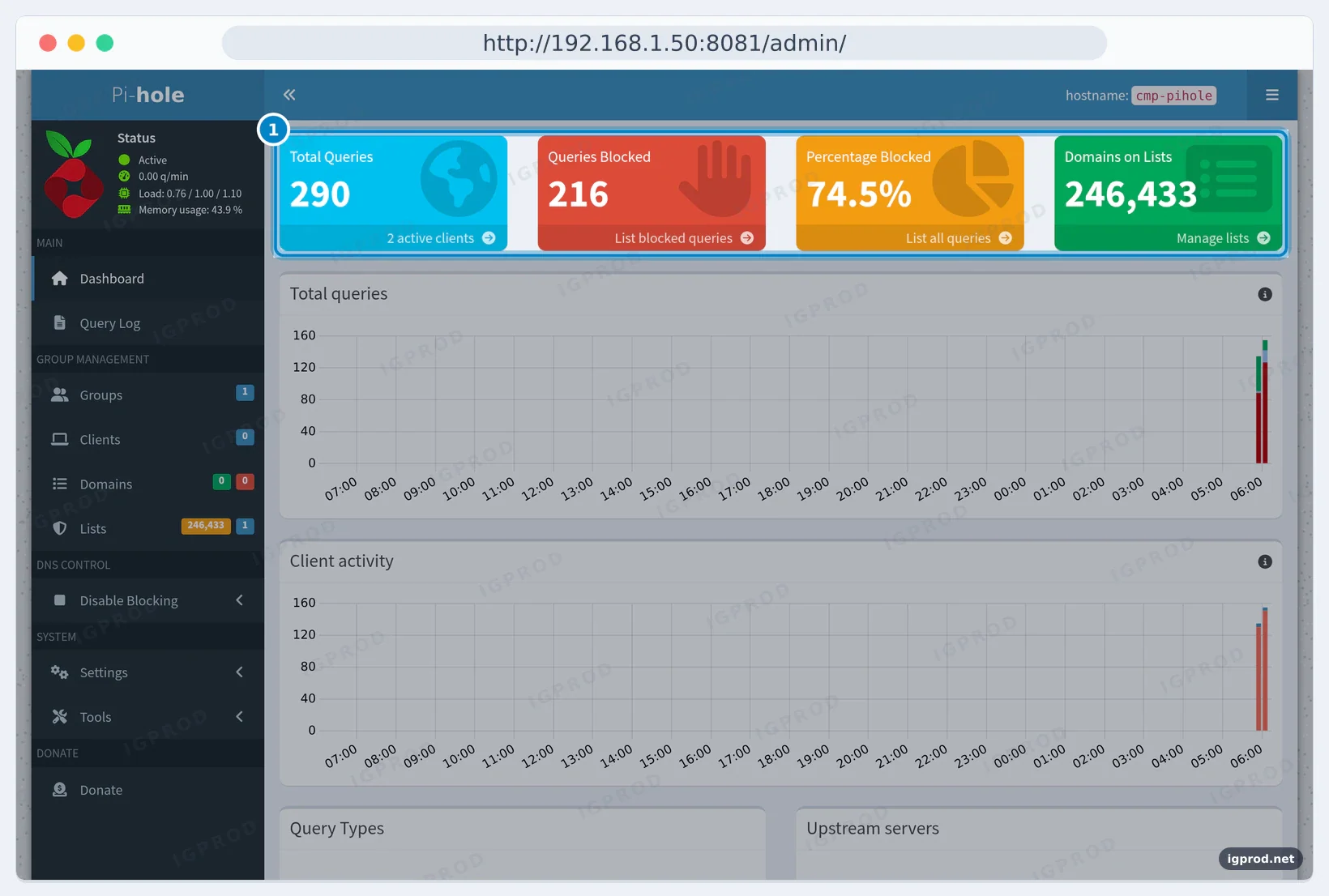
http://192.168.1.50:8081/admin/. 1: the four counters (they add up every test run below).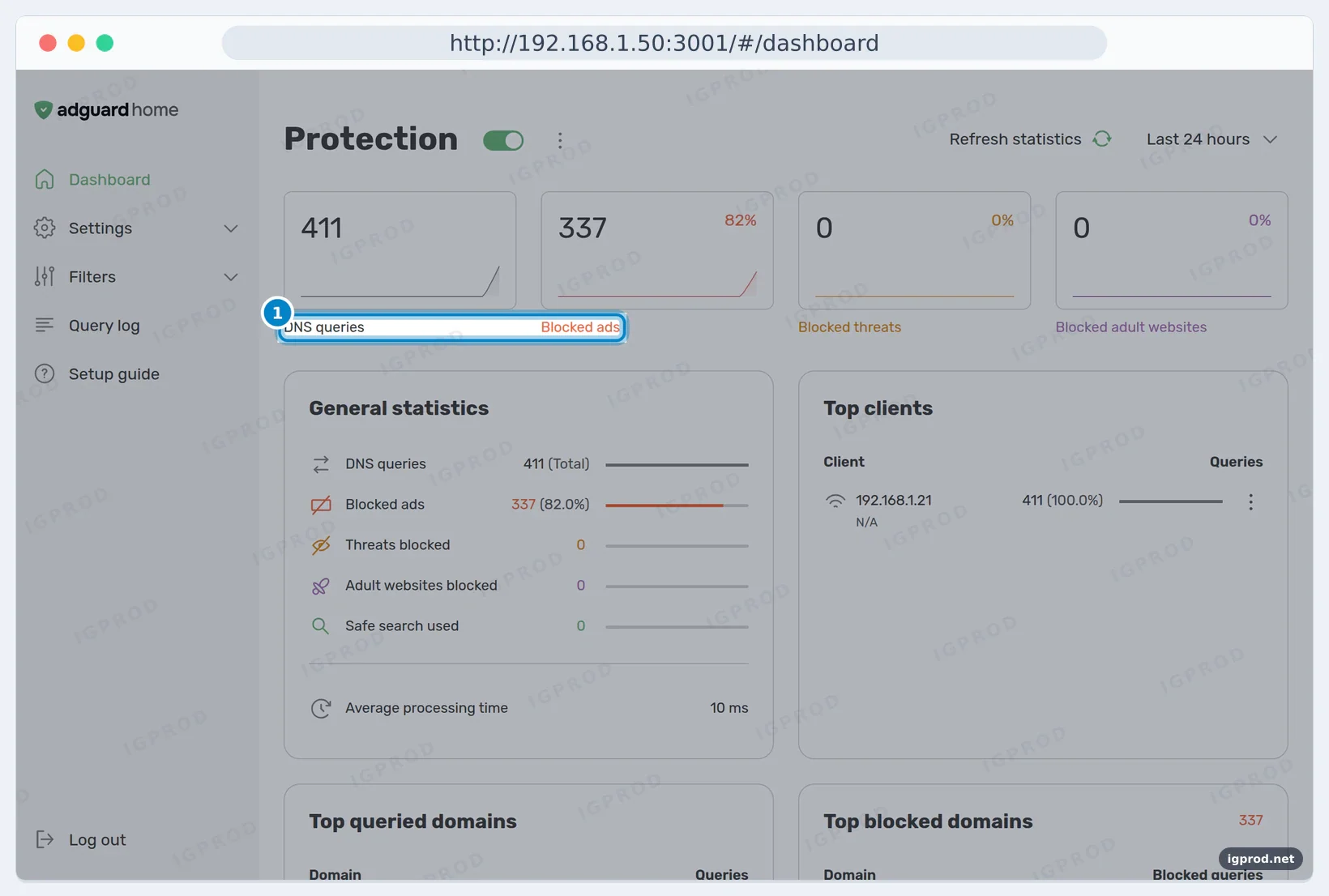
http://192.168.1.50:3001. 1: DNS queries and blocked ads (every test run below together).How we ran both on one server
Both programs want port 53, the DNS port, and only one program can hold a port on one address. So in this lab Pi-hole answers DNS on port 5301 with its web interface on 8081, and AdGuard Home answers on port 5302 with its web interface on 3001. Every port is published on the server's LAN address only. At home you run one of them on port 53: our AdGuard Home guide and Pi-hole guide show that setup step by step, with the "port 53 already in use" fix for Ubuntu.
mkdir -p pihole/etc-pihole adguard/conf adguard/work && (umask 077 && openssl rand -base64 18 > pihole_password.txt)services:
pihole:
image: pihole/pihole:2026.11.0
container_name: cmp-pihole
hostname: cmp-pihole
restart: unless-stopped
ports:
- "192.168.1.50:5301:53/tcp"
- "192.168.1.50:5301:53/udp"
- "192.168.1.50:8081:80/tcp"
environment:
TZ: America/New_York
FTLCONF_dns_listeningMode: ALL
WEBPASSWORD_FILE: pihole_webpasswd
secrets:
- pihole_webpasswd
volumes:
- ./pihole/etc-pihole:/etc/pihole
adguard:
image: adguard/adguardhome:v1.0.0
container_name: cmp-adguard
restart: unless-stopped
ports:
- "192.168.1.50:5302:53/tcp"
- "192.168.1.50:5302:53/udp"
- "192.168.1.50:3001:3000/tcp"
volumes:
- ./adguard/conf:/opt/adguardhome/conf
- ./adguard/work:/opt/adguardhome/work
secrets:
pihole_webpasswd:
file: ./pihole_password.txtdocker compose up -d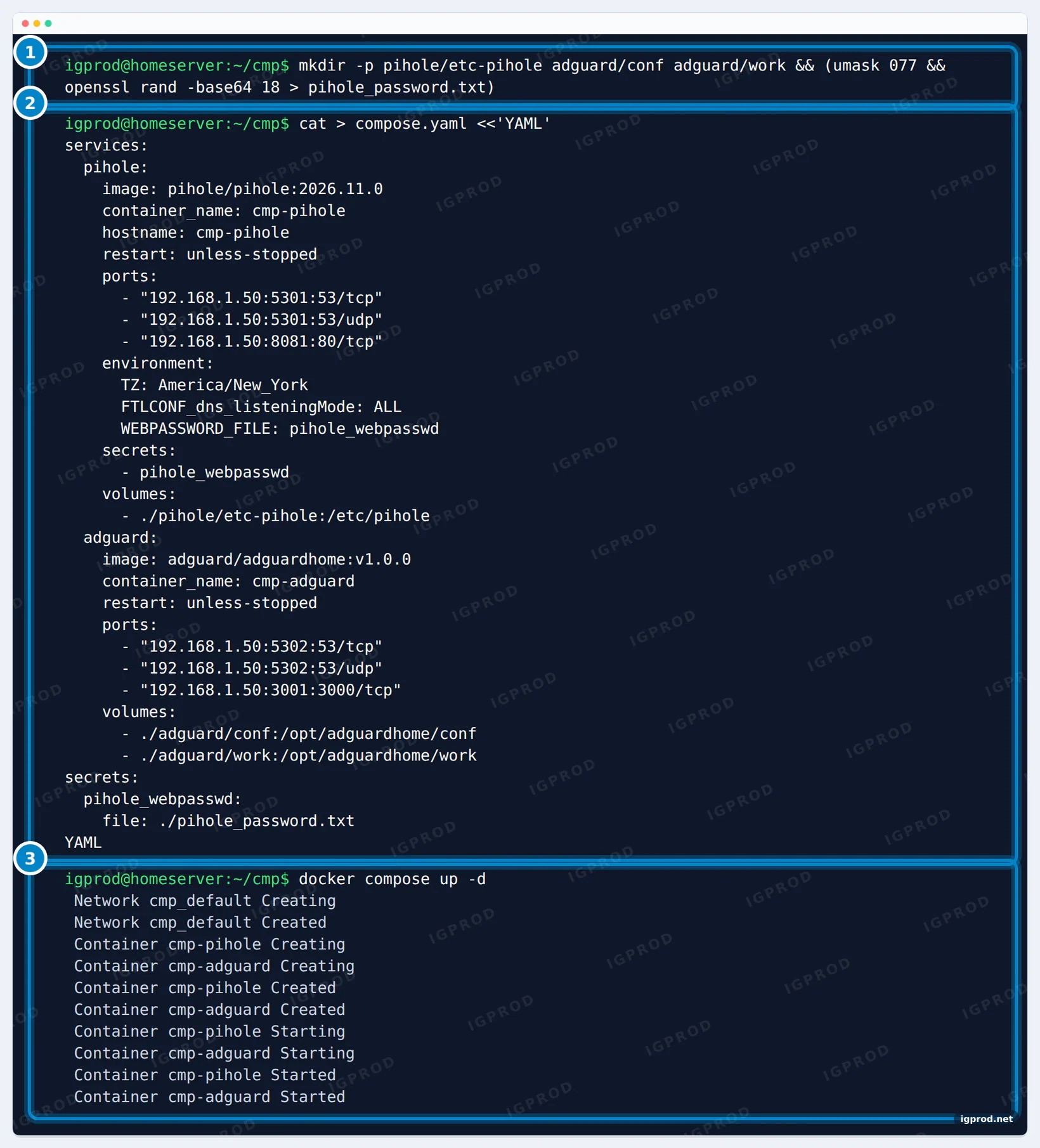
Then we finished AdGuard Home's first-run wizard (web interface on port 3000 inside the container, DNS on port 53 inside, admin user igprod), the same wizard our AdGuard Home guide shows screen by screen. Pi-hole has no wizard: its admin password comes from the Docker secret.
The test: 131 ad and tracker names
We used the domain list of d3ward's ad block test, an open source test page: 131 names in six groups (ads, analytics, error trackers, social trackers, mixed, and the telemetry of phone and TV makers). On the laptop we saved the list:
curl -s https://raw.githubusercontent.com/d3ward/toolz/master/src/data/adblock_data.json | jq -r '.[][][]' > domains.txt && wc -l < domains.txtAnd this small script, dnstest.sh, which asks one DNS server for every name and counts the answers (make it executable with chmod +x dnstest.sh):
#!/bin/bash
# dnstest.sh SERVER PORT: asks the DNS server for every name in domains.txt, writes each answer to
# result-SERVER-PORT.txt and prints the totals.
out="result-$1-$2.txt"
while read -r name; do
  ip=$(dig @"$1" -p "$2" +short +tries=1 +time=3 "$name" A | grep -E '^[0-9.]+$' | tail -n1)
  if [ "$ip" = 0.0.0.0 ]; then r=blocked; elif [ -n "$ip" ]; then r=open; else r=no-address; fi
  echo "$r $name"
done < domains.txt > "$out"
cut -d' ' -f1 "$out" | sort | uniq -c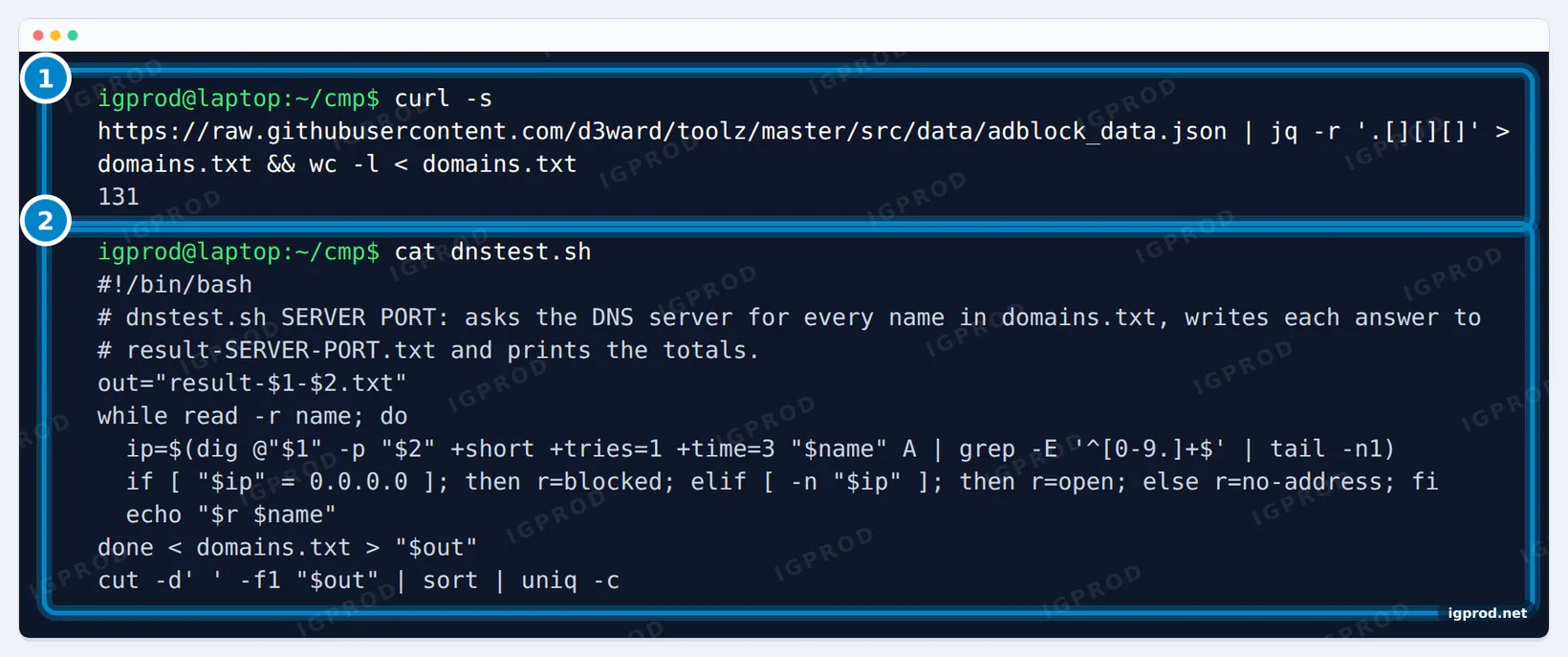
Each name gets one of three results: blocked (the answer is 0.0.0.0, the way both programs block), open (a real address) or no-address (no answer within 3 seconds, or a name that does not exist).
Test 1: each one with its own default blocklist
Two fresh installs, nothing changed. Pi-hole starts with StevenBlack's unified hosts list (81,677 domains), AdGuard Home with its own AdGuard DNS filter (194,772 rules).
./dnstest.sh 192.168.1.50 5301
./dnstest.sh 192.168.1.50 5302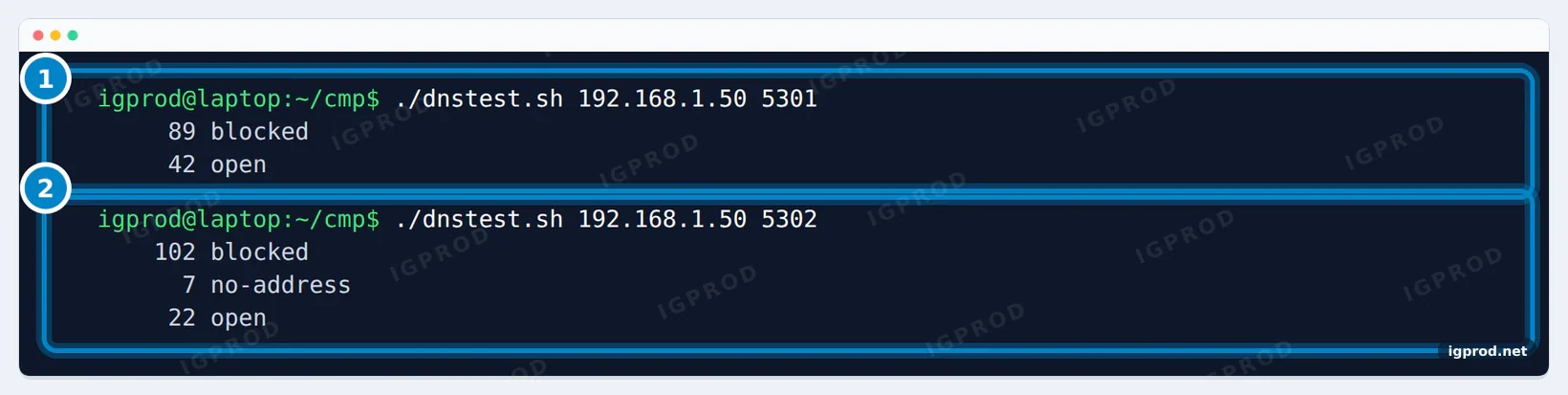
Pi-hole blocked 89 names and let 42 through. AdGuard Home blocked 102, let 22 through, and gave no answer at all for 7. A DNS server that stays silent makes the device wait and retry, so we looked at those 7 first.
Why AdGuard Home dropped 6 lookups: the default rate limit
We asked AdGuard Home about the silent names again, one at a time, and read the rate limit of each program:
grep no-address result-192.168.1.50-5302.txt
dig @192.168.1.50 -p 5302 adservetx.media.net | grep -m1 status
for n in analytics.google.com ads.pinterest.com metrics.icloud.com; do echo "$n $(dig @192.168.1.50 -p 5302 +short $n | tail -n1)"; donedocker exec cmp-adguard grep -E "^ +ratelimit(_subnet_len_ipv4)?:" /opt/adguardhome/conf/AdGuardHome.yaml
docker exec cmp-pihole pihole-FTL --config dns.rateLimit.count; docker exec cmp-pihole pihole-FTL --config dns.rateLimit.interval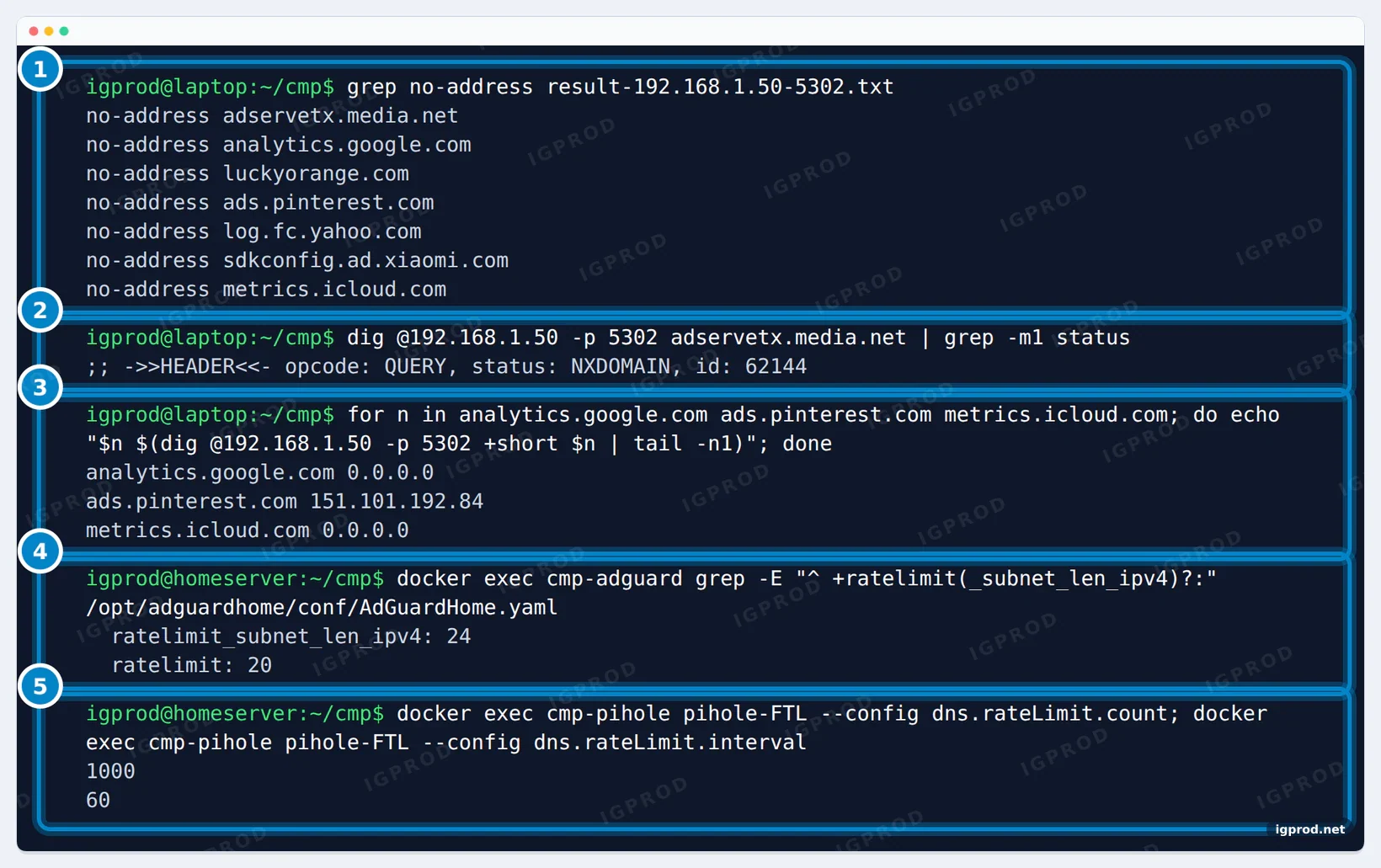
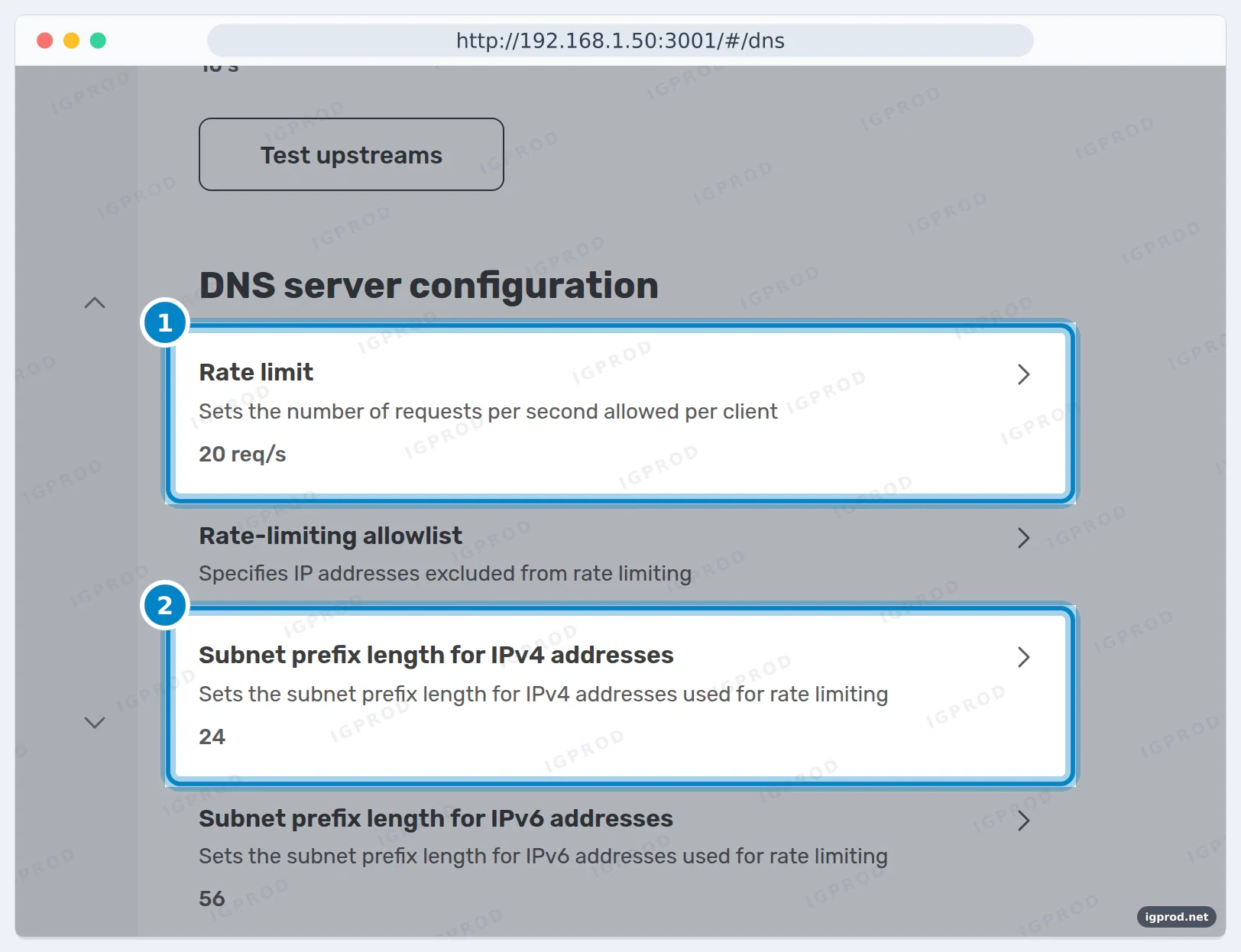
One name, adservetx.media.net, no longer exists (NXDOMAIN): there is nothing to block. The other six answer at once when asked alone (two of the three above come back blocked, as 0.0.0.0), and none of them shows up in AdGuard Home's query log. They were dropped by the rate limit. AdGuard Home answers at most 20 queries per second, counted per /24 network (ratelimit_subnet_len_ipv4: 24), and silently drops the rest. So every device in 192.168.1.x shares the same 20 queries a second. Pi-hole's limit is 1,000 queries per 60 seconds, for each device.
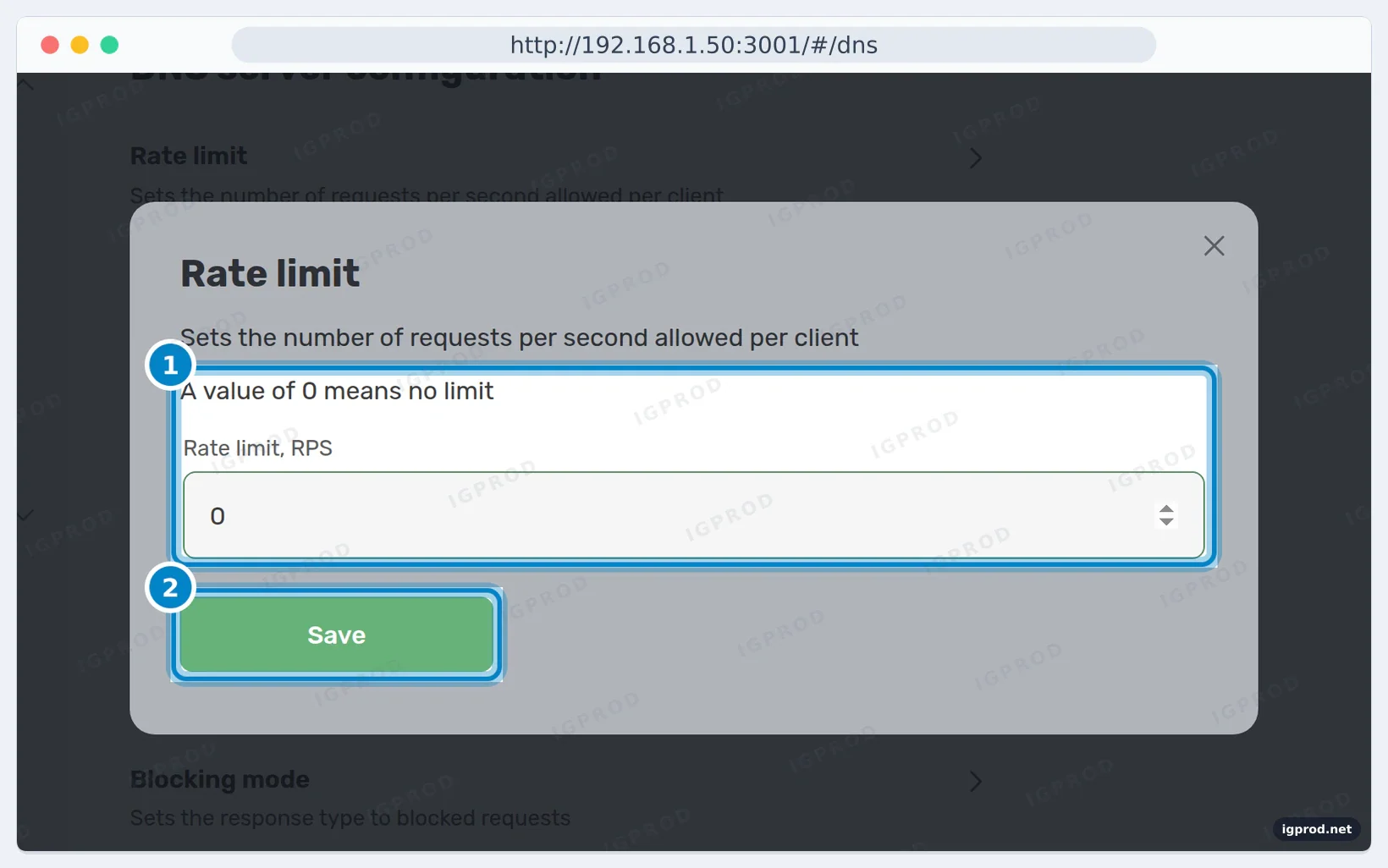
A normal home hits this too: one web page can need dozens of names in a second, and the phone, the TV and the laptop all count against the same 20. AdGuard Home's configuration notes call the rate limit a protection against floods from the internet and say it is safe to switch off when the DNS server is not reachable from the internet. Ours is published on the LAN address only, so we set it to 0 in Settings, DNS settings:
The same test again:
docker exec cmp-adguard grep -E "^ +ratelimit:" /opt/adguardhome/conf/AdGuardHome.yaml
./dnstest.sh 192.168.1.50 5302
grep no-address result-192.168.1.50-5302.txt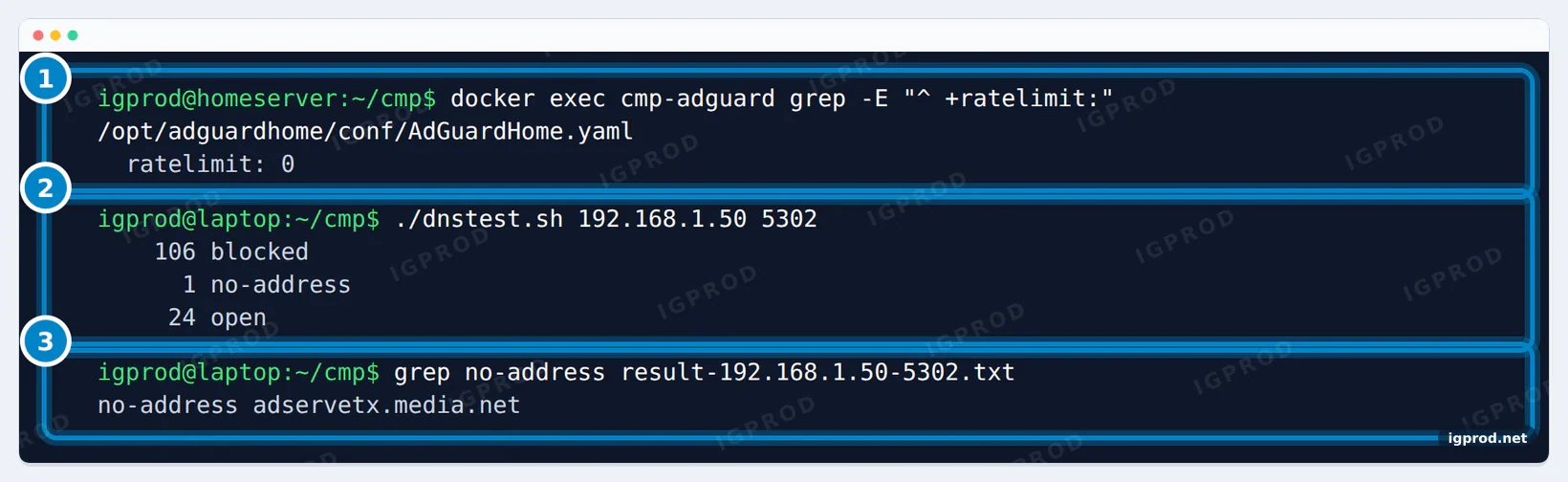
AdGuardHome.yaml. 2: the same test again. 3: only the name that does not exist is left without an answer.106 blocked, 24 open, and one name without an answer: the one that does not exist. If your AdGuard Home has to stay reachable from the internet, keep a limit.
Results by group
| Group | Names | Pi-hole (StevenBlack) | AdGuard Home (AdGuard DNS filter) | Both on HaGeZi Pro |
|---|---|---|---|---|
| Ads | 20 | 20 | 17 | 18 |
| Analytics | 30 | 15 | 29 | 30 |
| Error trackers | 6 | 2 | 0 | 6 |
| Social trackers | 20 | 17 | 14 | 19 |
| Mixed | 20 | 13 | 11 | 19 |
| Phone and TV makers | 35 | 22 | 35 | 35 |
| Total | 131 | 89 | 106 | 127 |
Each default list has its own blind spots. Only Pi-hole's list blocked 15 names: Yahoo (4), TikTok (3), Media.net (3), Bugsnag (2), Pinterest (2) and one Google Analytics name. Only AdGuard Home's list blocked 32: the session recorders Hotjar, Mouseflow and Lucky Orange (4 names each), FreshWorks (3), the telemetry of Huawei (6), Xiaomi (2), Samsung (2) and OnePlus (1), Apple (2), Yandex (2), Reddit (1) and one TikTok name.
To list the names two result files disagree on, use join; it is the last command of the next test.
Test 2: the same blocklist on both
To find out whether the program or the list makes the difference, we gave both the same list: HaGeZi's Pro list, in Adblock format. HaGeZi publishes each list in several formats and names the Adblock format for both Pi-hole and AdGuard Home, so one URL works in both:
https://cdn.jsdelivr.net/gh/hagezi/dns-blocklists@latest/adblock/pro.txt
In AdGuard Home
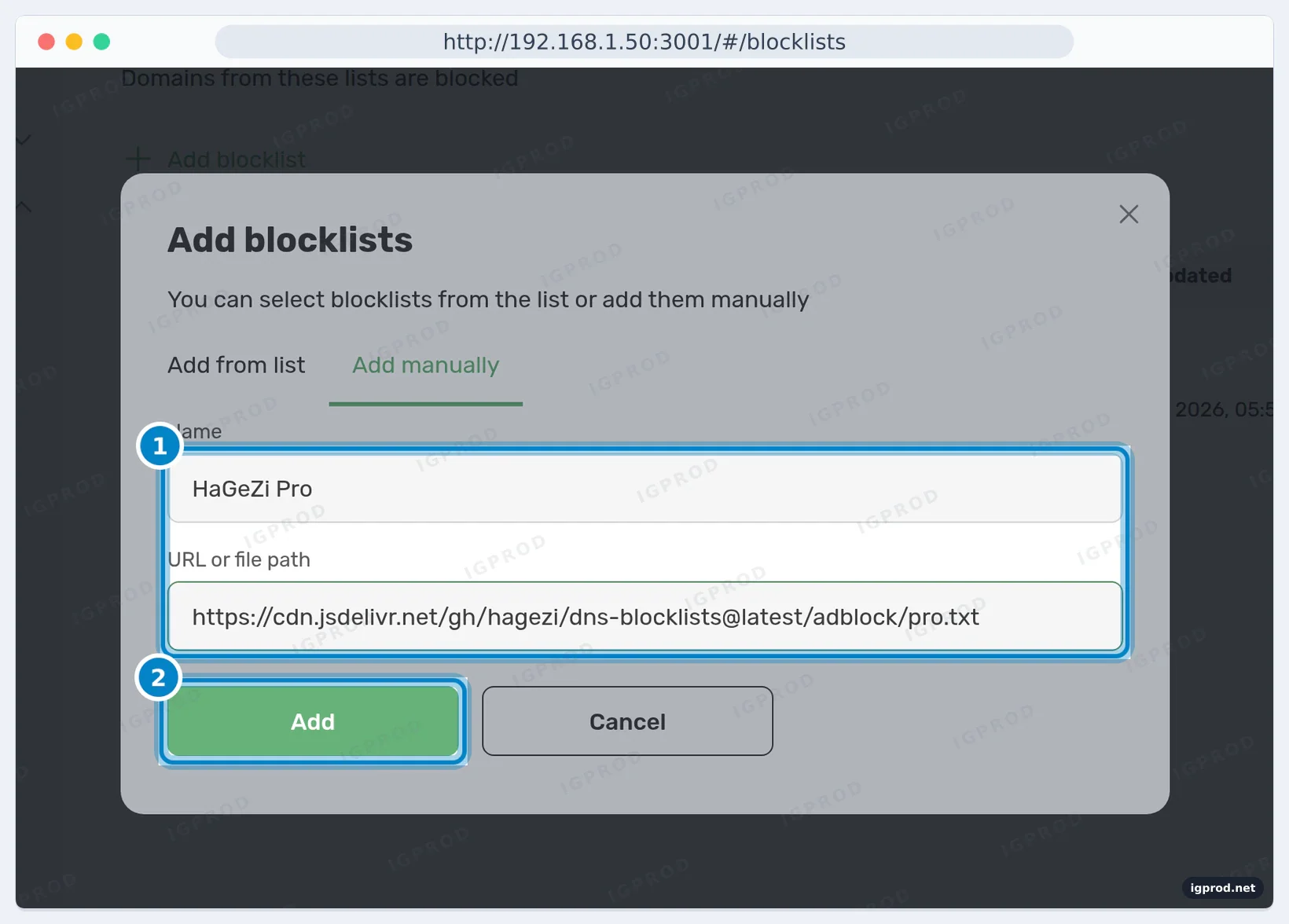
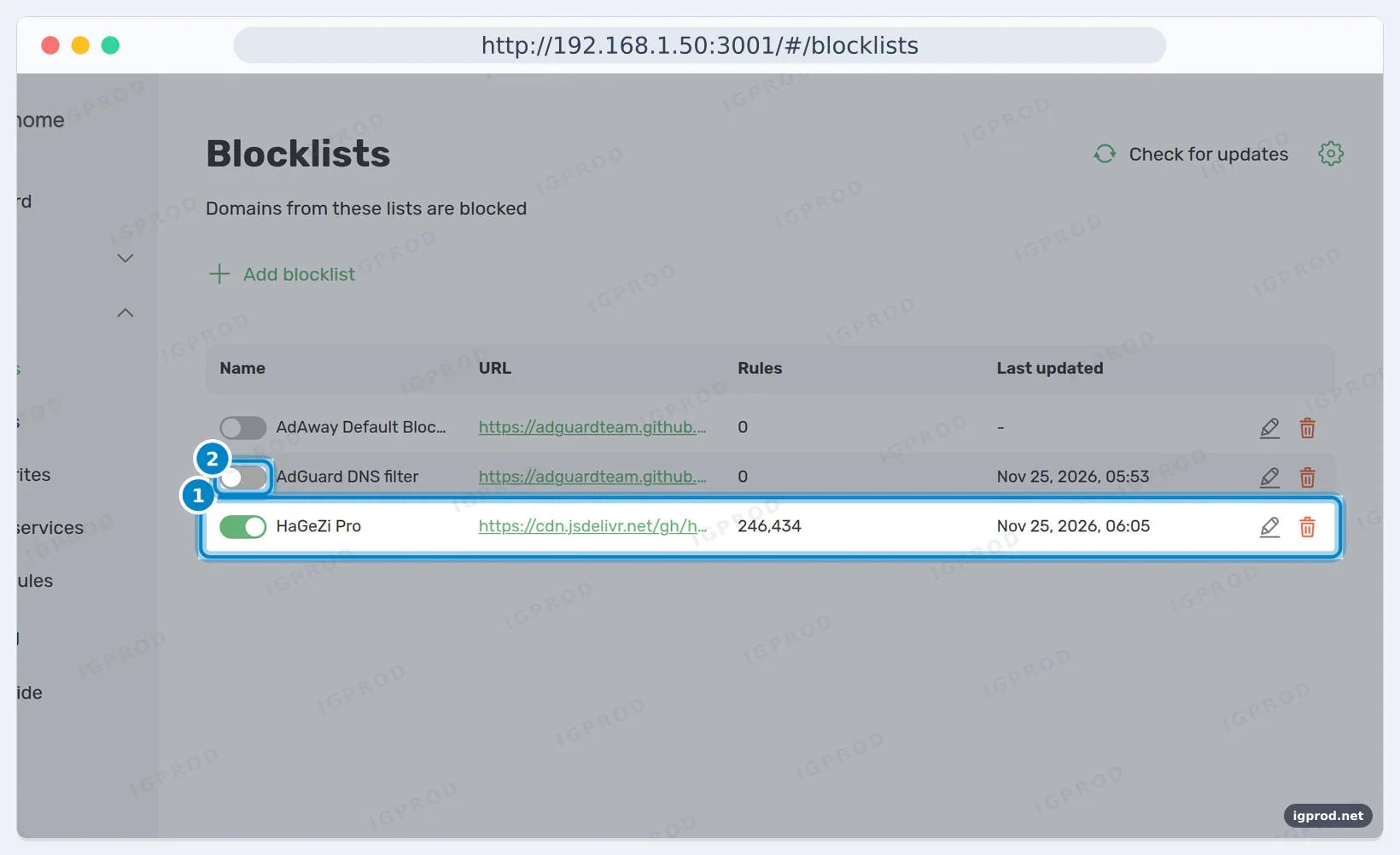
Filters, DNS blocklists, Add blocklist, then the Add manually tab: a name, the URL, Add. Then switch off the AdGuard DNS filter, so only HaGeZi Pro counts.
In Pi-hole
Lists: paste the URL into Address, add a comment, Add blocklist. Switch the StevenBlack list to Disabled. Then run Tools, Update Gravity: Pi-hole only rebuilds its blocking database when gravity runs.
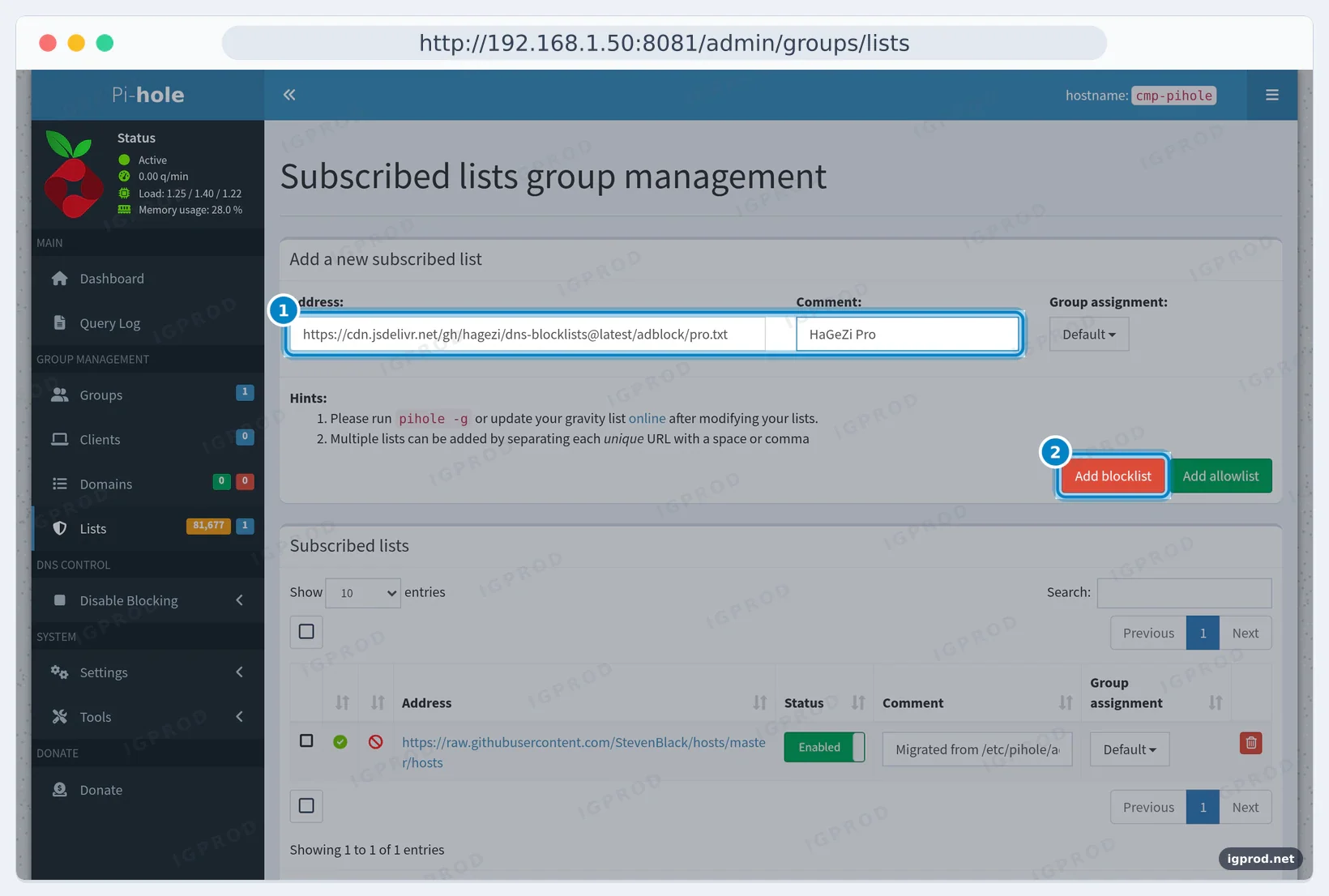
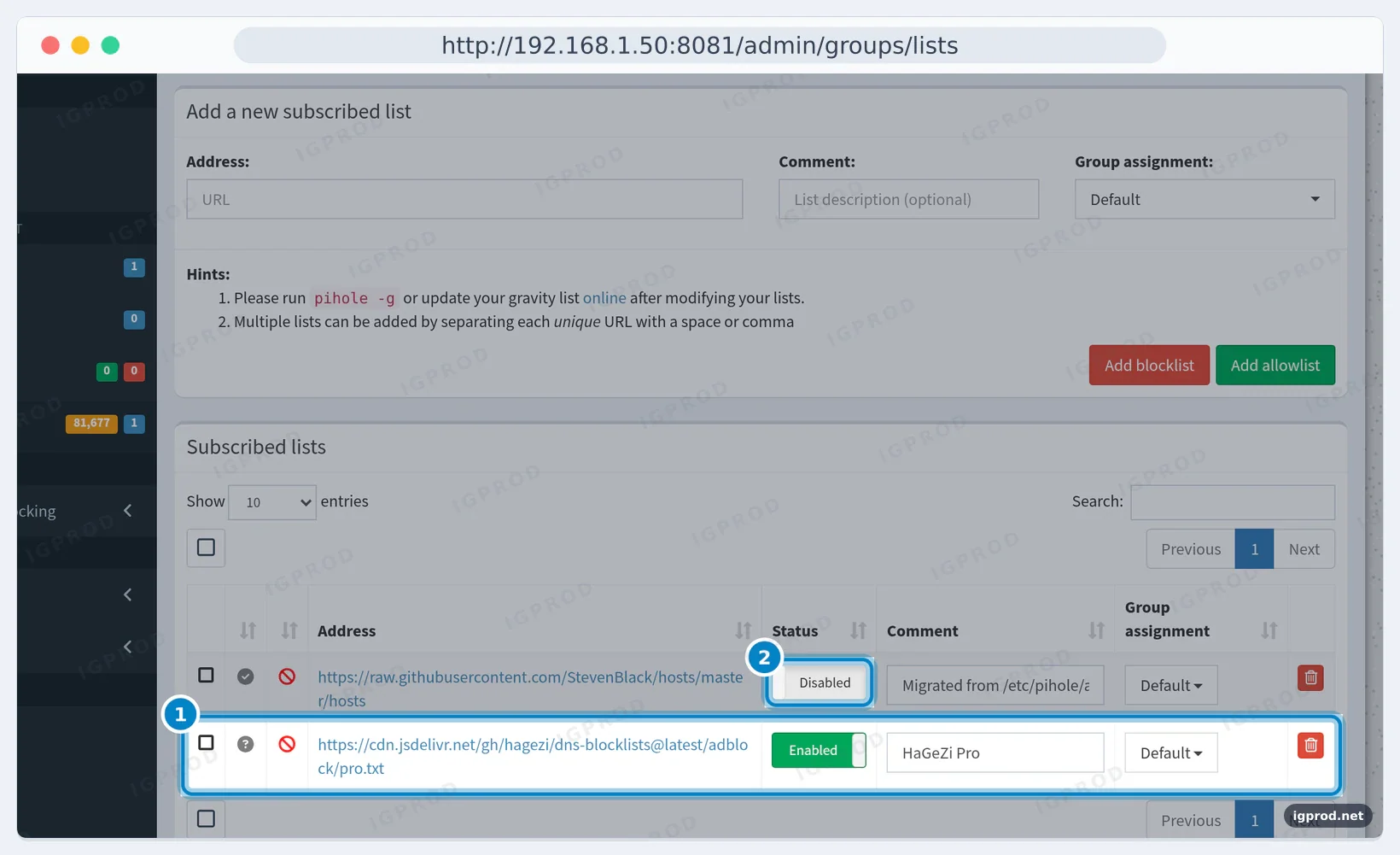
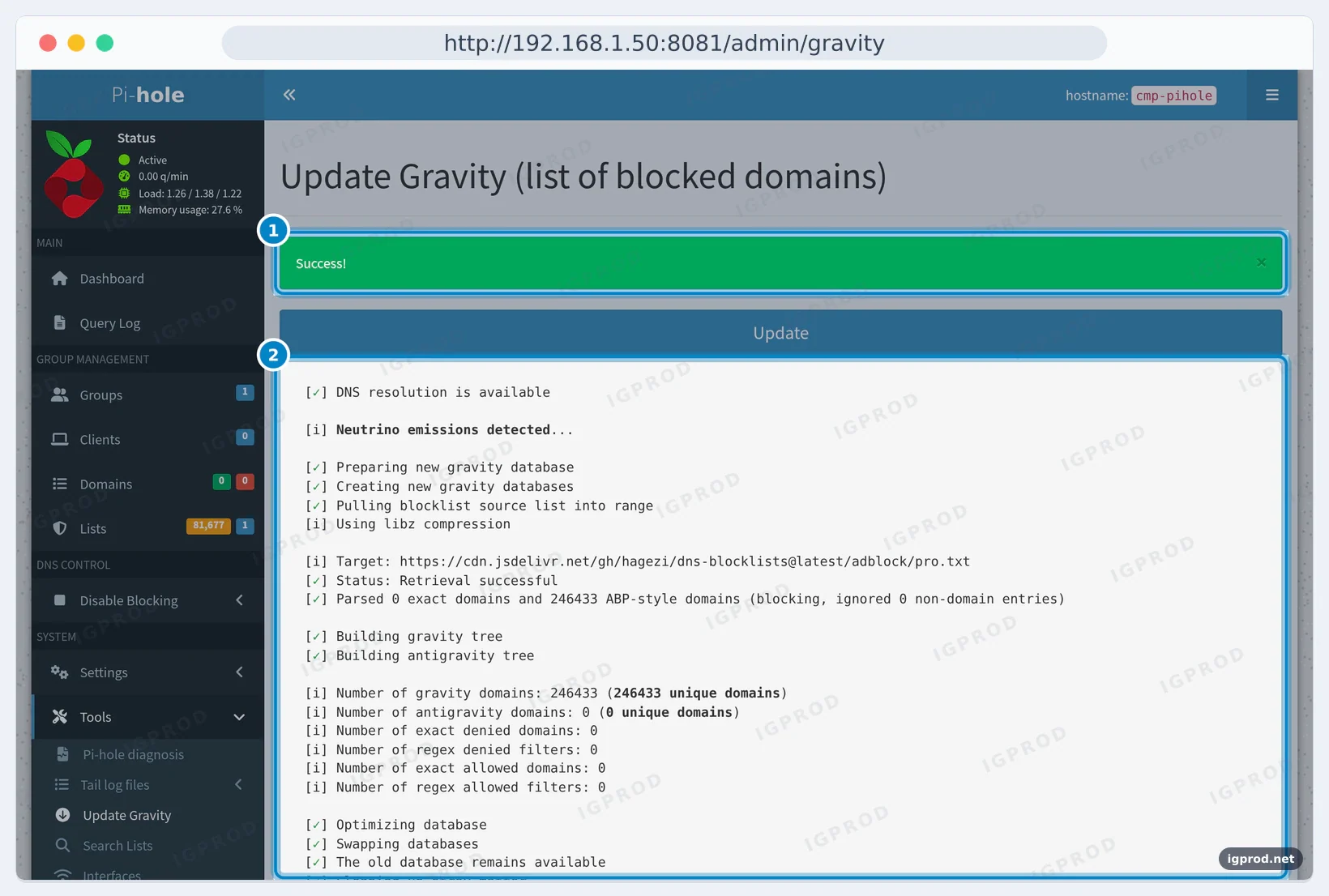
Pi-hole v6 reads Adblock-format lists natively: gravity reports 246,433 ABP-style domains and 0 ignored lines. AdGuard Home counts the same file as 246,434 rules.
The result
./dnstest.sh 192.168.1.50 5301
./dnstest.sh 192.168.1.50 5302
join -j 2 <(sort -k2,2 result-192.168.1.50-5301.txt) <(sort -k2,2 result-192.168.1.50-5302.txt) | awk 'BEGIN {printf "%-34s %-8s %s\n", "NAME", "PI-HOLE", "ADGUARD"} $2 != $3 {printf "%-34s %-8s %s\n", $1, $2, $3}'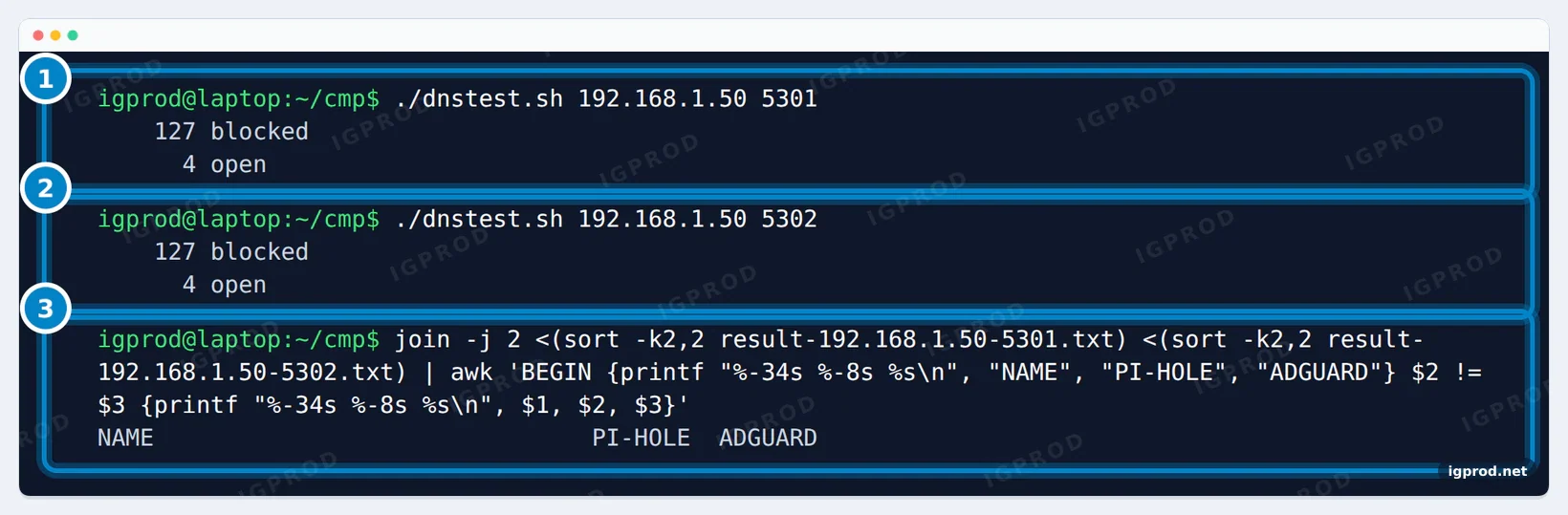
127 blocked and 4 open on both, and the comparison prints only its header: not one name differs. The four names this list leaves open, on both, are adservice.google.com, ad.doubleclick.net, analytics.pinterest.com and udc.yahoo.com.
So the block rate is a choice of list. Start from one good list on either program, and add a second one only for a real need: our AdGuard Home guide adds HaGeZi's Threat Intelligence Feeds against malware and phishing sites.
Memory, speed and size
Memory after each test, from docker stats on the server:
docker stats --no-stream --format "table {{.Name}}\t{{.MemUsage}}" cmp-pihole cmp-adguard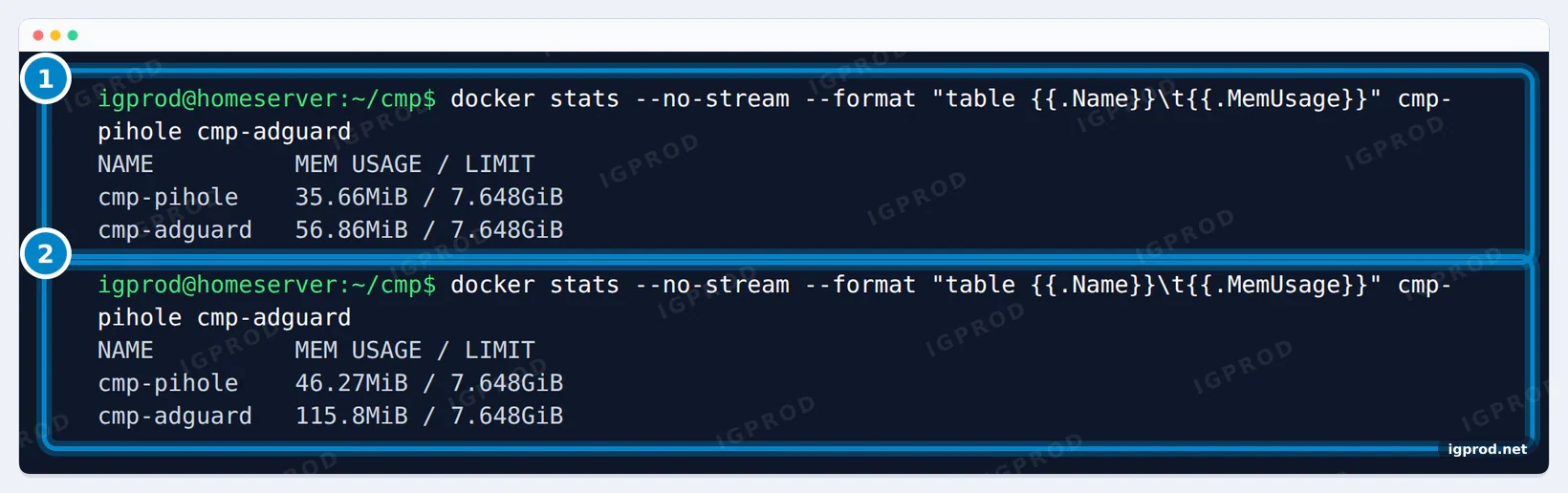
| Blocklist | AdGuard Home | Pi-hole |
|---|---|---|
| Default list of each | 56.86 MiB | 35.66 MiB |
| HaGeZi Pro on both (246,433 domains) | 115.8 MiB | 46.27 MiB |
Pi-hole keeps its blocklist in a database file on disk (gravity.db) and looks names up there. AdGuard Home holds its rules in memory, so its memory grows with every list you add: in our AdGuard Home guide, three lists with 1,396,187 rules took 265.8 MiB. On a server with 1 GB of memory or less, that difference matters; on anything bigger, it does not.
Lookup speed, from the laptop: ten names neither server had looked up yet, then the same ten again from cache.
cat > names.txt <<EOF
wikipedia.org
github.com
debian.org
mozilla.org
python.org
kernel.org
ubuntu.com
docker.com
nginx.org
apache.org
EOF
for run in new cached; do for p in 5301 5302; do t=0; while read -r n; do q=$(dig @192.168.1.50 -p $p "$n" | awk "/Query time/ {print \$4}"); t=$((t + q)); done < names.txt; echo "$run names, port $p: $t ms for 10 lookups"; done; done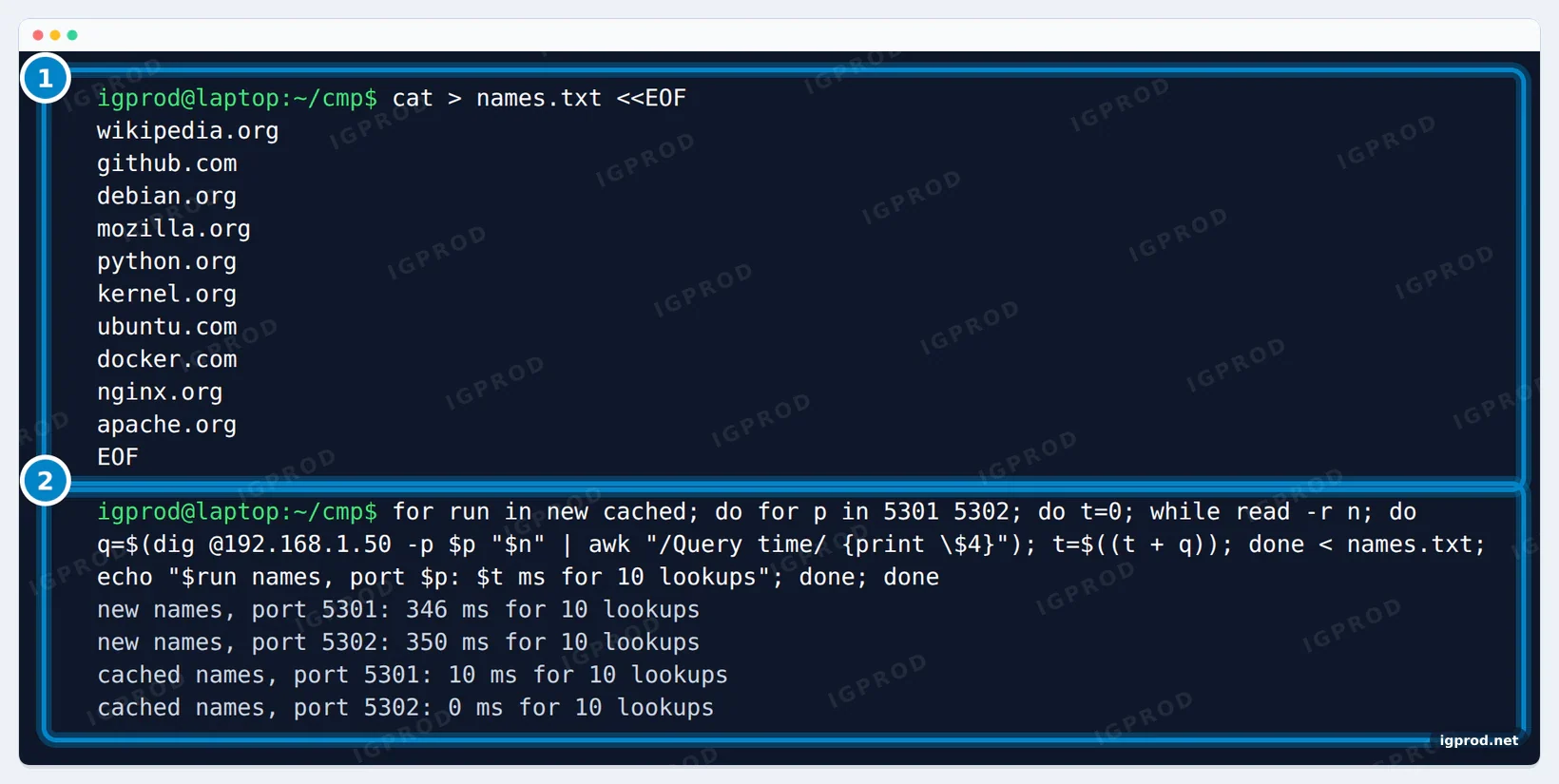
346 ms and 350 ms for ten new names (about 35 ms each, most of it the trip to the upstream service), 10 ms and 0 ms for ten cached ones. You will not feel a difference.
The versions we tested and the size of each image:
docker exec cmp-pihole pihole -v
docker exec cmp-adguard /opt/adguardhome/AdGuardHome --version
docker image ls --format '{{.Repository}}:{{.Tag}}  {{.Size}}' | grep -E 'pihole:2026|adguardhome:v1'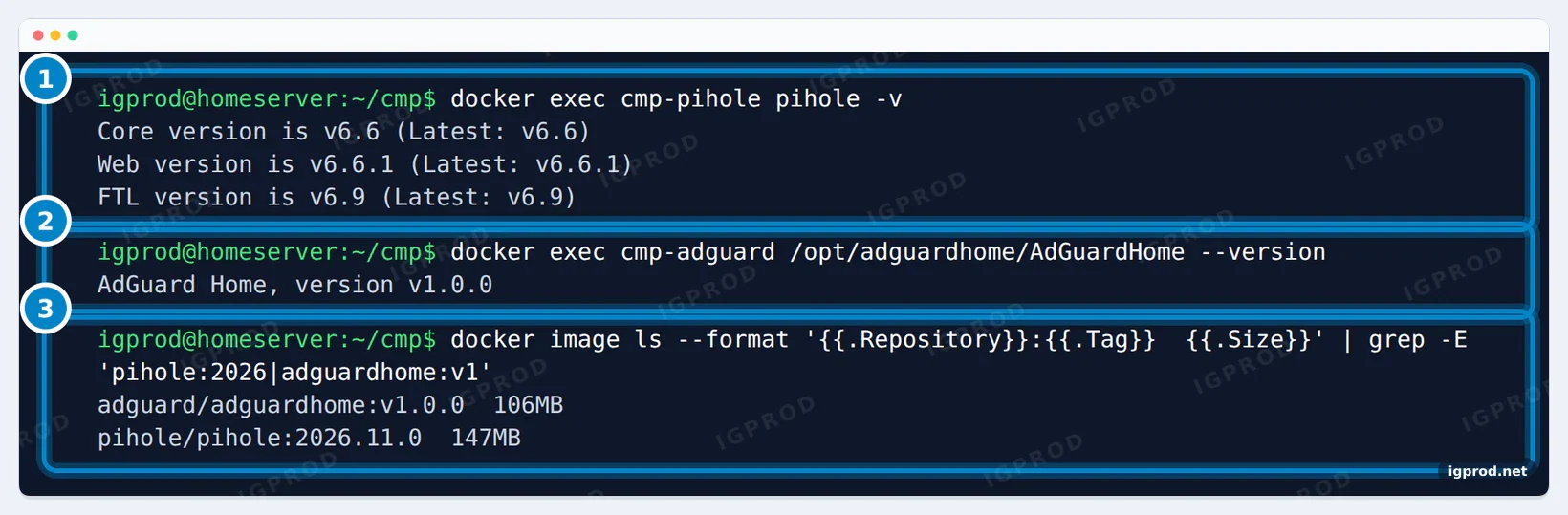
The defaults each one ships with
What a fresh install does before you change anything, read from each container:
for k in dns.upstreams dns.dnssec dns.cache.size; do echo "$k = $(docker exec cmp-pihole pihole-FTL --config $k)"; done
docker exec cmp-adguard grep -E -A1 "^ +(upstream_dns|enable_dnssec|cache_size):" /opt/adguardhome/conf/AdGuardHome.yaml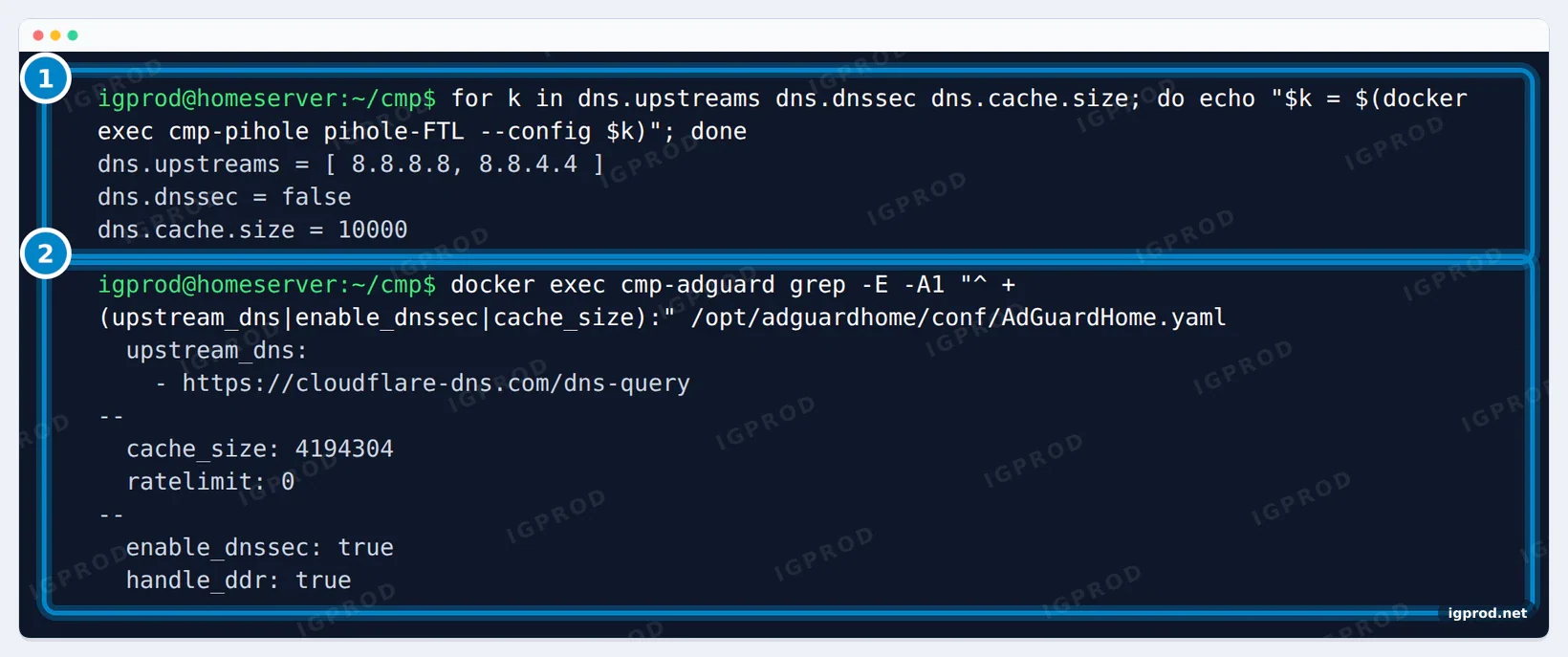
ratelimit: 0 line is our change from the step above).| Setting | AdGuard Home v1.0.0 | Pi-hole 2026.11.0 |
|---|---|---|
| Upstream DNS | https://cloudflare-dns.com/dns-query (encrypted) | 8.8.8.8 and 8.8.4.4 (plain DNS) |
| DNSSEC | On | Off |
| Cache | 4 MiB (4,194,304 bytes) | 10,000 names |
| Rate limit | 20 queries/s per /24 network | 1,000 queries per 60 s per device |
| Answer for a blocked name | 0.0.0.0 | 0.0.0.0 |
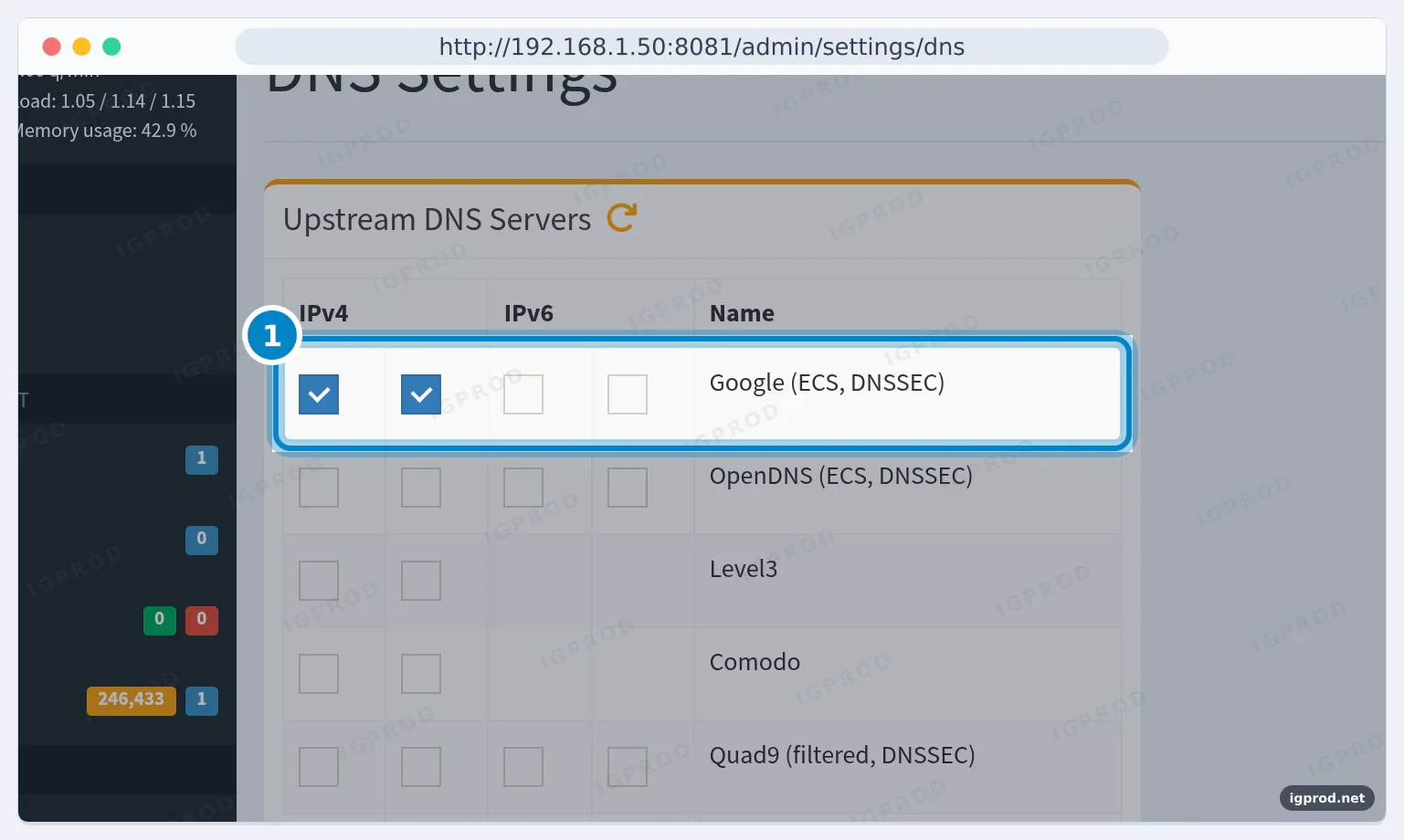
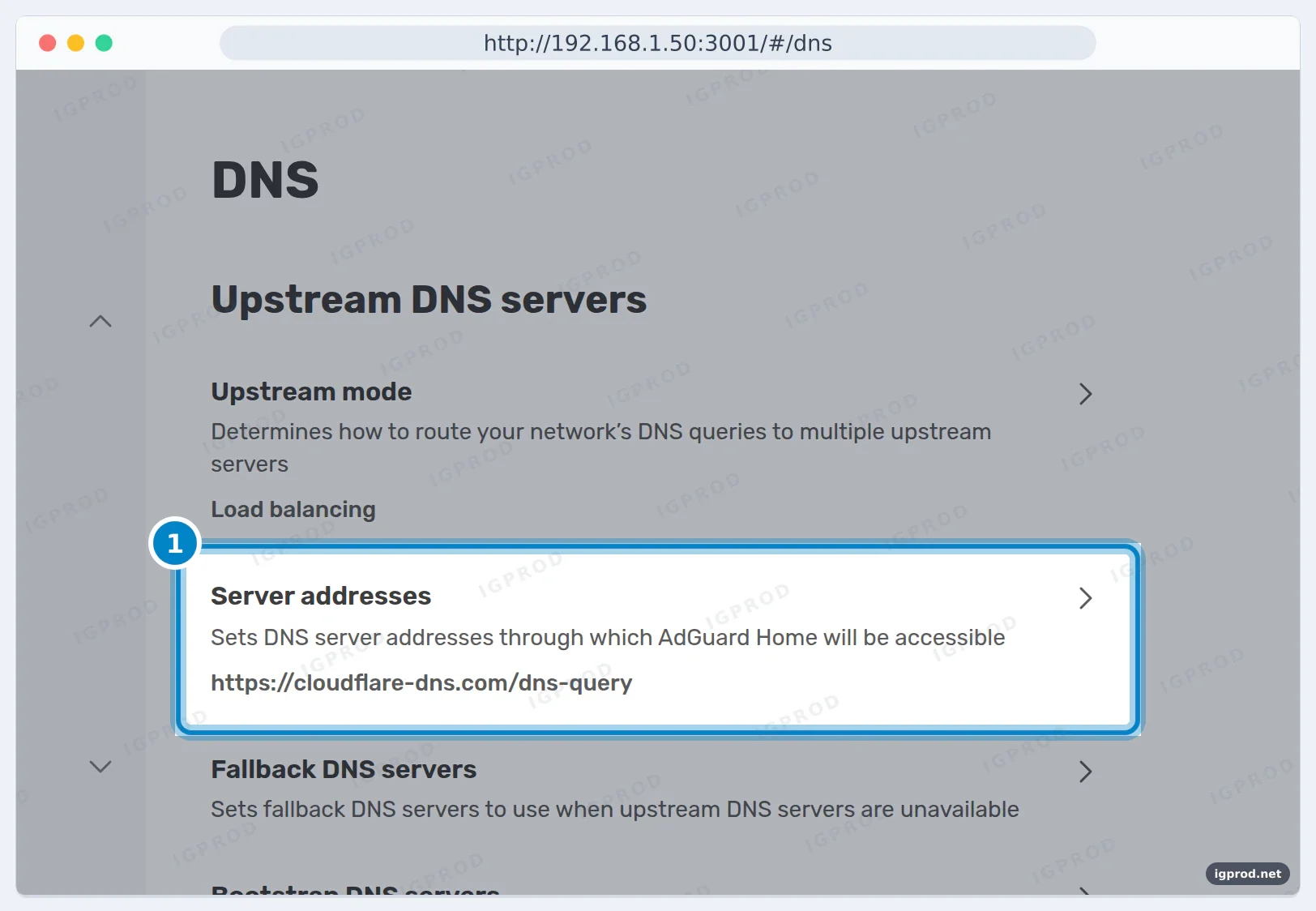
Plain DNS travels unencrypted, so your internet provider can read every name your home looks up. AdGuard Home keeps them from the provider from the first start. Pi-hole v6 forwards plain DNS only: you choose the upstream in Settings, DNS (our Pi-hole guide switches to Cloudflare and turns on DNSSEC in Expert mode), and encrypted lookups need a separate program next to it, which we did not test here.
Production settings for each
What we run in production. Each line was tested, in this lab or in our full guides (AdGuard Home guide, Pi-hole guide), which have the complete compose files:
| Setting | AdGuard Home | Pi-hole |
|---|---|---|
| Ports | DNS and web published on the server's LAN address only ("192.168.1.50:53:53/udp") | The same |
| Admin password | Set in the first-run wizard | A Docker secret (WEBPASSWORD_FILE), never in compose.yaml |
| Upstream | Two DNS-over-HTTPS services (Cloudflare and Google), checked with Test upstreams | One service you trust, in Settings, DNS |
| DNSSEC | On (the default) | On: Settings, DNS, Expert mode, Use DNSSEC |
| Rate limit | 0 on a server only your LAN can reach | The default, 1,000 per 60 s per device |
| Blocklist | HaGeZi Pro, plus HaGeZi's Threat Intelligence Feeds | HaGeZi Pro, Adblock format |
| Container rights | user: "1001:1001", cap_drop: [ALL] with cap_add: [NET_BIND_SERVICE], no-new-privileges | cap_drop: [NET_RAW], cap_add: [SYS_NICE]; no no-new-privileges, which takes away capabilities Pi-hole needs |
| Memory ceiling | mem_limit: 512m | mem_limit: 256m |
| Logs | json-file, 10 MB, 3 files | The same |
| Backup | conf/AdGuardHome.yaml and work/data in a tar file, chmod 600 | Stop, tar etc-pihole and compose.yaml, start, chmod 600 |
| Updates | A fixed version tag; change it, pull, recreate, check | The same |
Which one should you choose?
- A small single-board computer with 512 MB to 1 GB of memory: Pi-hole. It stayed under 50 MiB with a 246,433-domain list.
- Encrypted lookups and DNSSEC from the first start, no extra container: AdGuard Home.
- Different rules for one device (a child's phone, a TV): both do it. AdGuard Home sets them on the device's own client page, with ready-made switches for services such as TikTok; Pi-hole uses groups and rules (a regular expression for TikTok in our Pi-hole guide).
- The most blocking: neither one by default. Choose a list (HaGeZi Pro blocked 127 of 131 on both) and use the same list wherever you run it.
- You already run one and it works: keep it. With the same list, switching blocks nothing more.
Frequently asked questions
Is AdGuard Home better than Pi-hole?
Not for blocking: with the same list, both blocked the same 127 of 131 names in our test. AdGuard Home is the better choice if you want encrypted lookups and DNSSEC out of the box; Pi-hole if memory is tight.
Which one blocks more ads out of the box?
AdGuard Home: 106 of our 131 test names with its default AdGuard DNS filter, against 89 for Pi-hole with StevenBlack's list. Give both the same list and the gap goes away.
Which uses less memory, Pi-hole or AdGuard Home?
Pi-hole: 35.66 MiB against 56.86 MiB with their default lists, and 46.27 MiB against 115.8 MiB with the same 246,433-domain list.
Does Pi-hole support DNS over HTTPS?
Not on its own. Pi-hole v6 forwards plain DNS to the upstream servers you tick (Google by default). AdGuard Home sends DNS over HTTPS to Cloudflare by default.
Why does AdGuard Home drop some DNS queries?
Check the rate limit in Settings, DNS settings. The default, 20 queries per second for a whole /24 network, dropped 6 of 131 quick lookups in our test. On a server only your LAN can reach, set it to 0.
Can I run Pi-hole and AdGuard Home on the same server?
Yes, we did, with different host ports (DNS on 5301 and 5302, web on 8081 and 3001). Your devices use one DNS server on port 53, so give port 53 to the one you keep.
Can I use the same blocklists in both?
Yes, for Adblock-format lists: the same HaGeZi Pro URL worked in both, Pi-hole v6 read it as 246,433 ABP-style domains, and both then blocked exactly the same names.
Related guides
- AdGuard Home 1.0 with Docker Compose: Install, Setup, Per-Device Rules and Hardening (Tested)
- Pi-hole v6 with Docker Compose: Install, Setup, Blocklists, Per-Device Groups and Hardening (Tested)
- Quad9 DNS (9.9.9.9): Servers, IPv6, Private DNS, DoH Setup and Quad9 vs Cloudflare, Tested
- Setting DNS on Android: Private DNS, Wi-Fi IPs, and mobile data
- CrowdSec vs Fail2ban: Real Tests on Ubuntu 26.04 (SSH, Nginx, Docker, RAM) and How to Switch Safely
- Install Docker Compose on Ubuntu using Docker’s repository
Sources

Leave a comment
Your email address will not be published. Required fields are marked *