
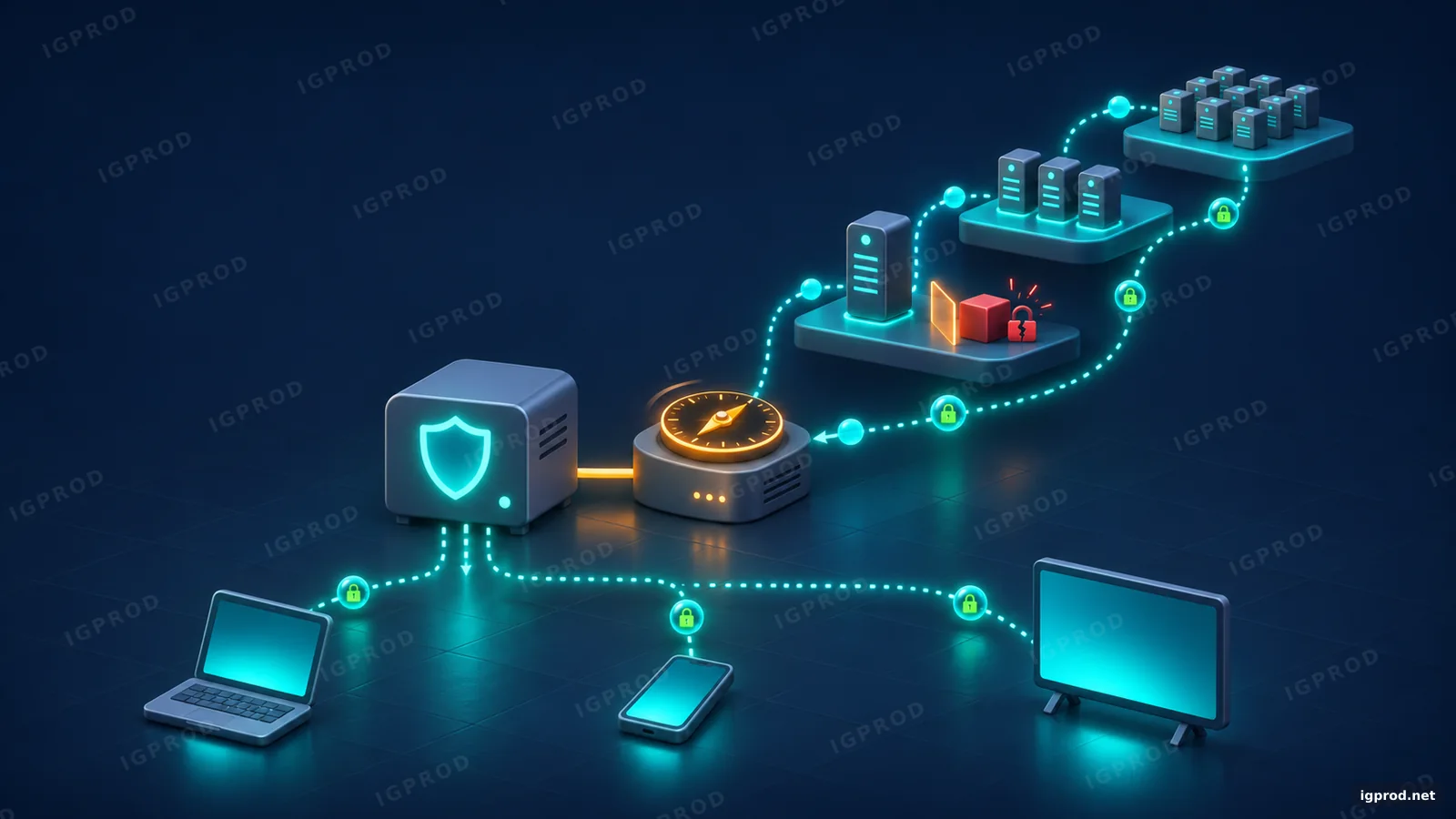
Pi-hole blocks ads for your whole home, but it still sends every other name to a public DNS service such as Google or Cloudflare, so one company sees every site your home visits. Unbound removes that middleman. It is a recursive DNS server: it finds each answer itself, starting at the root servers of the internet, and checks the DNSSEC signatures on the way. This guide adds Unbound to Pi-hole in Docker Compose with the production settings we tested one by one, shows the startup trap that can leave a whole network without DNS, and gives real numbers for speed and memory.
Tested on 25 November 2026: Unbound 1.26.2 (Docker image klutchell/unbound:1.26.2) and Pi-hole Docker tag 2026.11.0 (FTL v6.9), in Docker 29.10.1 with Docker Compose v5.8.0, on an Ubuntu 26.04 home server at 192.168.1.50, asked by a laptop on the same network (192.168.1.21). Every command, output and screenshot below comes from that lab.
Quick answer: Pi-hole + Unbound in five steps
In plain words: when a device asks for the address of www.example.org, Pi-hole normally passes the question to a big public DNS service. With Unbound, your own server asks a root server which servers handle .org, asks one of those which servers handle example.org, and asks those for the address. No single company gets your full list of names, and every signed answer is checked with DNSSEC, the signatures that prove an answer was not changed on the way.
- Check that your server reaches the root servers on port 53 over UDP and TCP:
dig @198.41.0.4 . NS +norecmust show theaaflag. - Write a small Unbound settings file,
unbound/pi-hole.conf, next to your Pi-holecompose.yaml. - Add an
unboundservice to the compose file with the imageklutchell/unbound:1.26.2, a fixed address on the Docker network (172.30.53.53) and a health check. - Point Pi-hole at that address, not at the name
unbound:FTLCONF_dns_upstreams: 172.30.53.53. With the name, one restart in the wrong order left our whole network without DNS. - Run
docker compose up -dand test:dnssec.worksmust answer with theadflag, andfail01.dnssec.worksmust fail withSERVFAIL.
The price: a name nobody in your home has asked for yet takes longer. In our tests, 20 new names took 11.2 to 14.9 seconds through Unbound (0.56 to 0.74 seconds each), against about 1.1 seconds straight from Google. A name already in the cache answered in 0 ms.
Five words you will meet in this guide:
- Recursive DNS server (or recursive resolver): a server that finds answers itself by asking the servers in charge of each part of a name. Unbound is one.
- Root servers: the 13 server groups at the top of DNS, a.root-servers.net to m.root-servers.net. They know which servers handle each ending, such as
.comor.org. - Upstream: where Pi-hole sends the names it does not block. Here, Unbound.
- DNSSEC: digital signatures on DNS answers. A resolver that checks them refuses answers that were changed on the way.
- Cache: the answers your server keeps for a while, so the second lookup of a name is instant.
What Unbound changes for privacy, and what it does not
Unbound keeps every answer in its cache for as long as the answer allows, and it asks each server only what that server needs to know. That second part is QNAME minimisation, already on in the image we use: the root server is asked about org, not about www.example.org. In plain words:
- No public DNS company receives the full list of names your home looks up. Each name server sees only the questions about its own part of DNS.
- Those name servers do see your home's public IP address, because Unbound asks them directly.
- DNS from Unbound to the internet is not encrypted (plain port 53), so your internet provider can still read the names. Hiding them from the provider takes encrypted DNS to a public service, such as Quad9 over DNS-over-HTTPS, which brings a middleman back. That is the trade-off.
Before you start
- Pi-hole running in Docker Compose. This guide builds on the compose file from our Pi-hole with Docker Compose guide; with another Pi-hole setup the idea is the same: Unbound as a second service with a fixed address.
- A free private range for the Docker network. We use 172.30.53.0/24; if your LAN or VPN already uses it, pick another /24 and change the three addresses in the compose file.
- Outgoing DNS from the server to the internet on port 53, over UDP and TCP. Some routers and providers block it, or answer in place of the real servers. Check it on the server:
dig @198.41.0.4 . NS +norec +time=3 | grep -E "status|flags"
dig @198.41.0.4 . NS +norec +tcp +time=3 | grep -E "status|flags"
dig @198.41.0.4 version.bind CH TXT +time=3 +short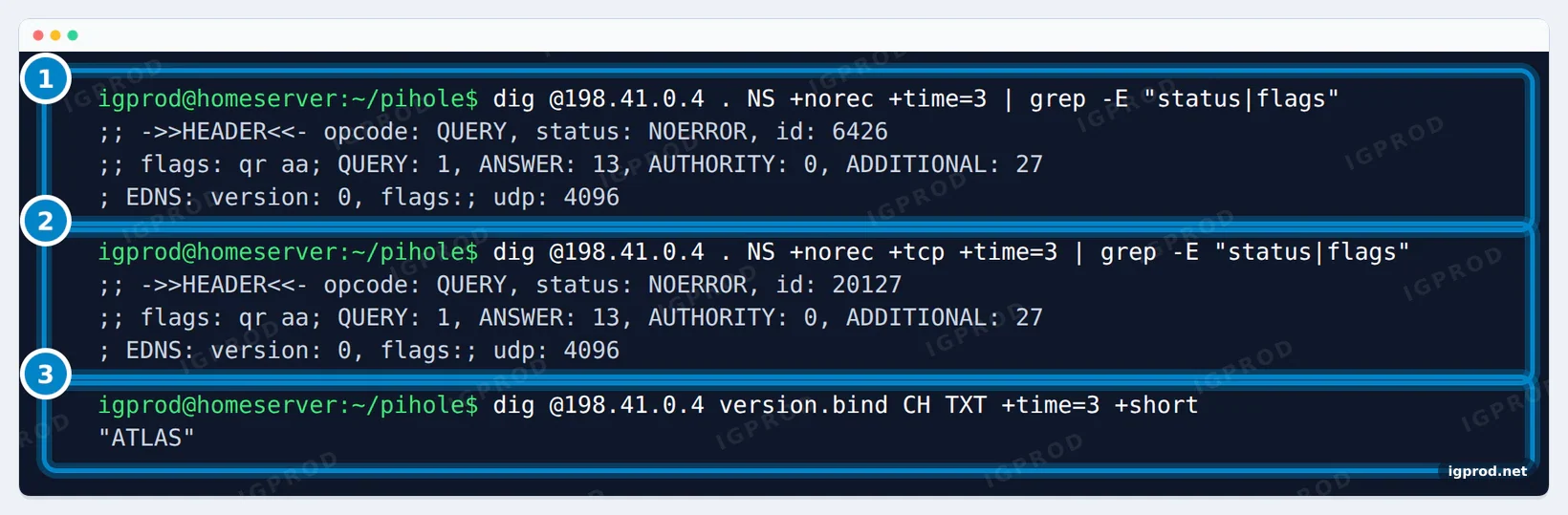
198.41.0.4 is a.root-servers.net. Both lookups must show status: NOERROR and the flags qr aa. The aa flag (authoritative answer) means the root server itself answered, not a box on the way. If the TCP line times out, Unbound will fail on large DNSSEC answers, which need TCP. The last command asks the server for its version: a root server gives its own ("ATLAS" here), not the name of a home router or a provider's resolver.
Which Unbound image: klutchell/unbound, not mvance/unbound
Unbound in Docker comes from community images. We checked the one found in most older Pi-hole setups, mvance/unbound, the one we use, klutchell/unbound, and the latest Unbound release, on 25 November 2026:
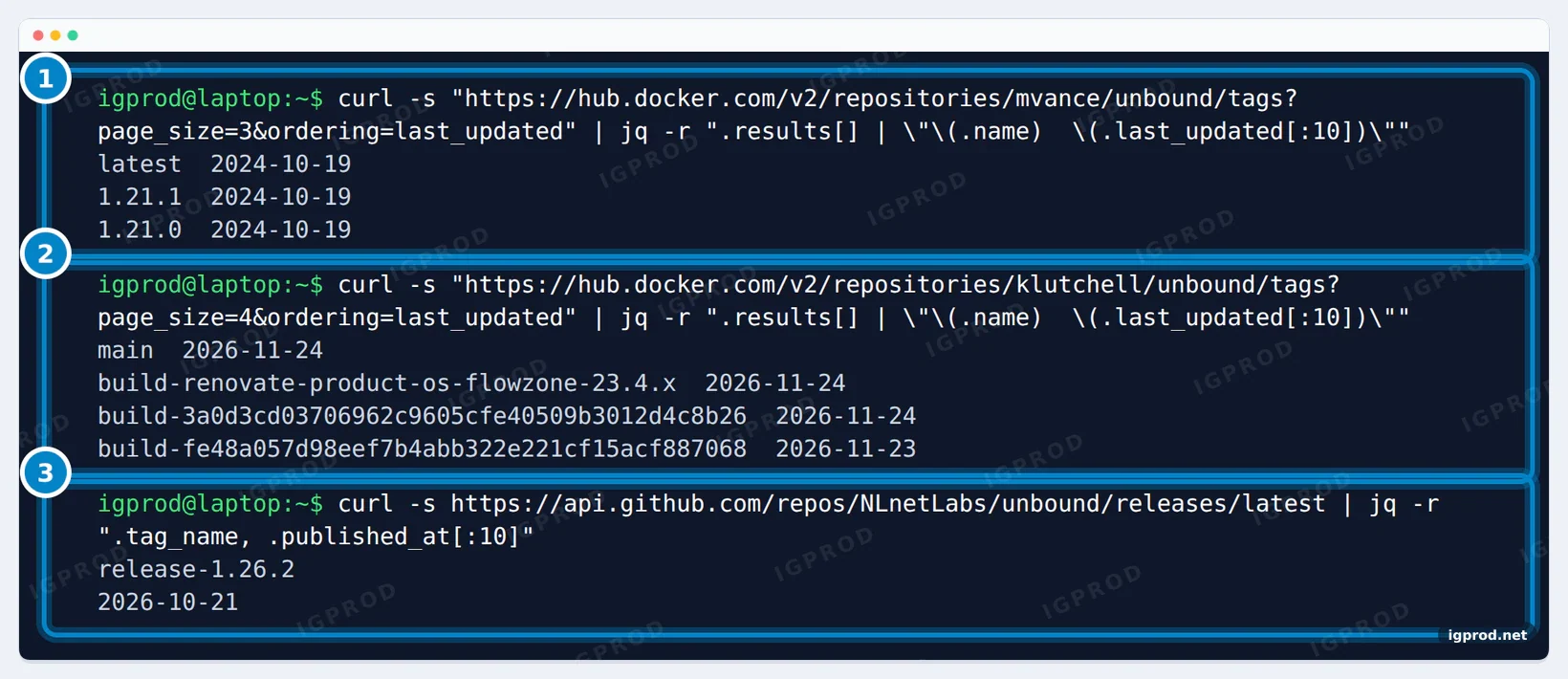
mvance/unbound was last updated on 19 October 2024 and stops at Unbound 1.21.1. klutchell/unbound was updated the day before our test and ships Unbound 1.26.2, the latest release from NLnet Labs (21 October 2026), the team that writes Unbound. It runs Unbound as a normal user (we check that in step 3) and includes drill-hc, a small DNS check made for container health checks. Use a version tag such as 1.26.2 rather than latest, so an update only happens when you choose it.
Step 1: Write the Unbound settings file
The image reads every .conf file in /etc/unbound/custom.conf.d/ on top of its own settings, so you only write the changes. In the folder that holds your Pi-hole compose.yaml (~/pihole in our Pi-hole guide):
mkdir -p unbound && cat > unbound/pi-hole.conf <<'CONF'
server:
    # Give no name or version to "who are you" questions (version.bind, id.server)
    hide-identity: yes
    hide-version: yes
    # Receive buffer for bursts of answers (the host must allow it: net.core.rmem_max)
    so-rcvbuf: 1m
    # Cache sizes that stay well under the container's 256 MB memory limit
    msg-cache-size: 32m
    rrset-cache-size: 64m
    # Write the reason of each DNSSEC failure to the log
    val-log-level: 2
    # These names answer with private addresses on purpose (Plex, nip.io)
    private-domain: "plex.direct"
    private-domain: "nip.io"

remote-control:
    # unbound-control works inside the container only (127.0.0.1, port not published)
    control-enable: yes
    control-use-cert: no
CONF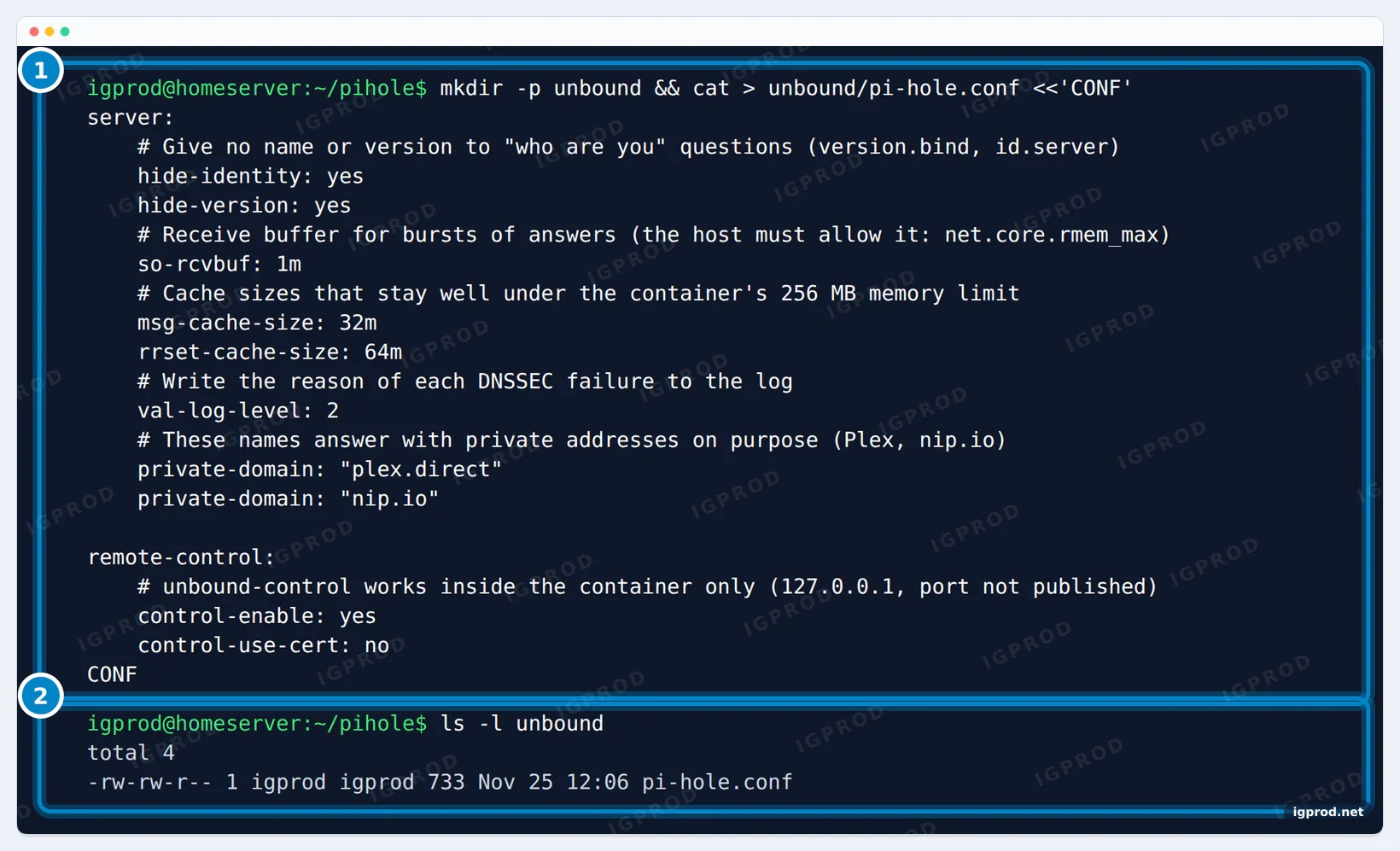
pi-hole.conf.What each part does:
hide-identityandhide-version: Unbound stops telling anyone who asks its name and version.so-rcvbuf: 1m: a bigger network receive buffer, so a burst of answers is not dropped. Your host must allow it: see the production settings below.msg-cache-sizeandrrset-cache-size: the two cache limits (the second about twice the first). 32 MB and 64 MB are far more than a home fills, and they stay well under the 256 MB memory limit in the compose file.val-log-level: 2: when a DNSSEC check fails, the log says which name failed and why.private-domain: Unbound refuses answers from the internet that point to private addresses such as 192.168.x.x, which protects your network from DNS rebinding attacks. Plex (plex.direct) and nip.io give such answers on purpose, so we allow those two domains only.remote-control: turns onunbound-control, the command that shows statistics and empties the cache. It listens on 127.0.0.1 inside the container, and that port is not published, so nothing outside the container can reach it.
The difference is easy to see. With the image's defaults, before this file, Unbound told everyone its name and version, a nip.io name pointing to our server got no answer, and unbound-control did not work:
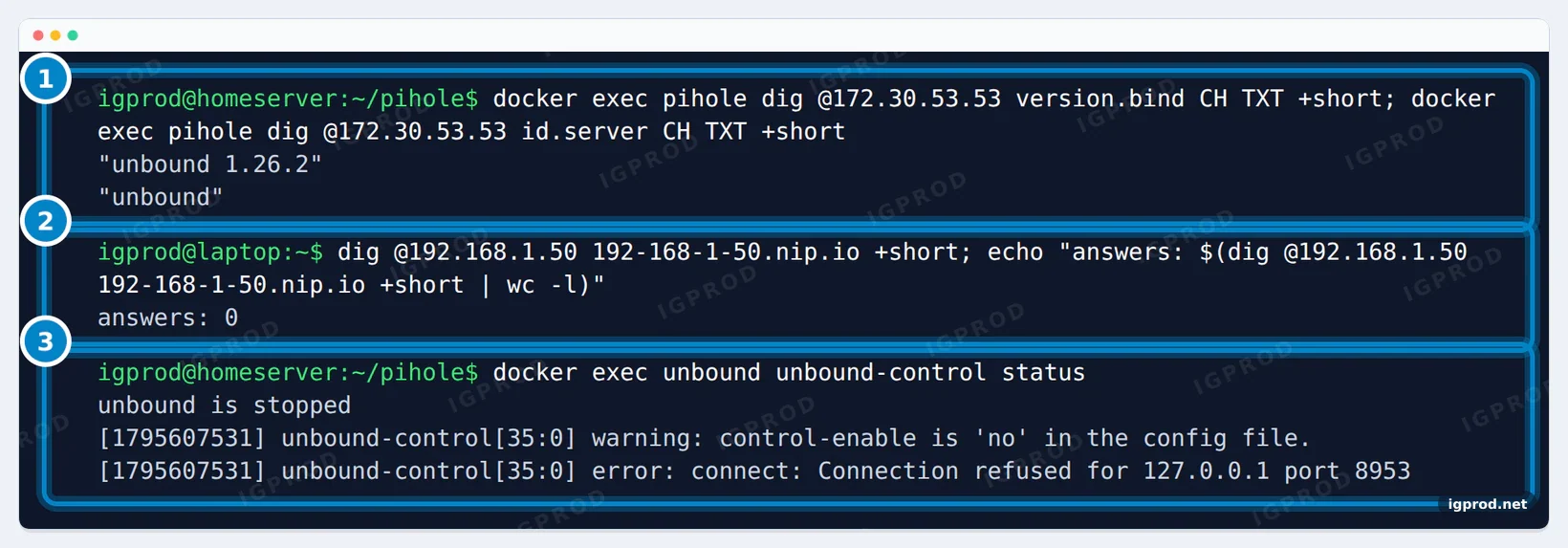
pi-hole.conf. 1: name and version given to anyone who asks. 2: the nip.io name gets no answer. 3: unbound-control is off.Step 2: The production compose file for Pi-hole and Unbound
This is the compose file from our Pi-hole guide with two changes in the pihole service (it waits for Unbound, and Unbound is its only upstream) and a new unbound service. The password file pihole_password.txt and the etc-pihole folder stay as they are. Save it as compose.yaml:
services:
  pihole:
    image: pihole/pihole:2026.11.0
    container_name: pihole
    hostname: pihole
    restart: unless-stopped
    depends_on:
      unbound:
        condition: service_healthy
    ports:
      - "192.168.1.50:53:53/tcp"
      - "192.168.1.50:53:53/udp"
      - "192.168.1.50:80:80/tcp"
      - "192.168.1.50:443:443/tcp"
    environment:
      TZ: America/New_York
      FTLCONF_dns_listeningMode: ALL
      FTLCONF_dns_reply_host_force4: "true"
      FTLCONF_dns_reply_host_IPv4: 192.168.1.50
      FTLCONF_ntp_sync_active: "false"
      FTLCONF_dns_upstreams: 172.30.53.53
      WEBPASSWORD_FILE: pihole_webpasswd
    secrets:
      - pihole_webpasswd
    volumes:
      - ./etc-pihole:/etc/pihole
    cap_add:
      - SYS_NICE
    cap_drop:
      - NET_RAW
    mem_limit: 256m
    logging:
      driver: json-file
      options:
        max-size: "10m"
        max-file: "3"
  unbound:
    image: klutchell/unbound:1.26.2
    container_name: unbound
    hostname: unbound
    restart: unless-stopped
    networks:
      default:
        ipv4_address: 172.30.53.53
    volumes:
      - ./unbound:/etc/unbound/custom.conf.d:ro
    healthcheck:
      test: ["CMD", "drill-hc", "@127.0.0.1", "dnssec.works"]
      interval: 30s
      timeout: 30s
      retries: 3
      start_period: 30s
    cap_drop:
      - ALL
    cap_add:
      - SETUID
      - SETGID
    security_opt:
      - no-new-privileges:true
    mem_limit: 256m
    logging:
      driver: json-file
      options:
        max-size: "10m"
        max-file: "3"
networks:
  default:
    ipam:
      config:
        - subnet: 172.30.53.0/24
          ip_range: 172.30.53.128/25
secrets:
  pihole_webpasswd:
    file: ./pihole_password.txt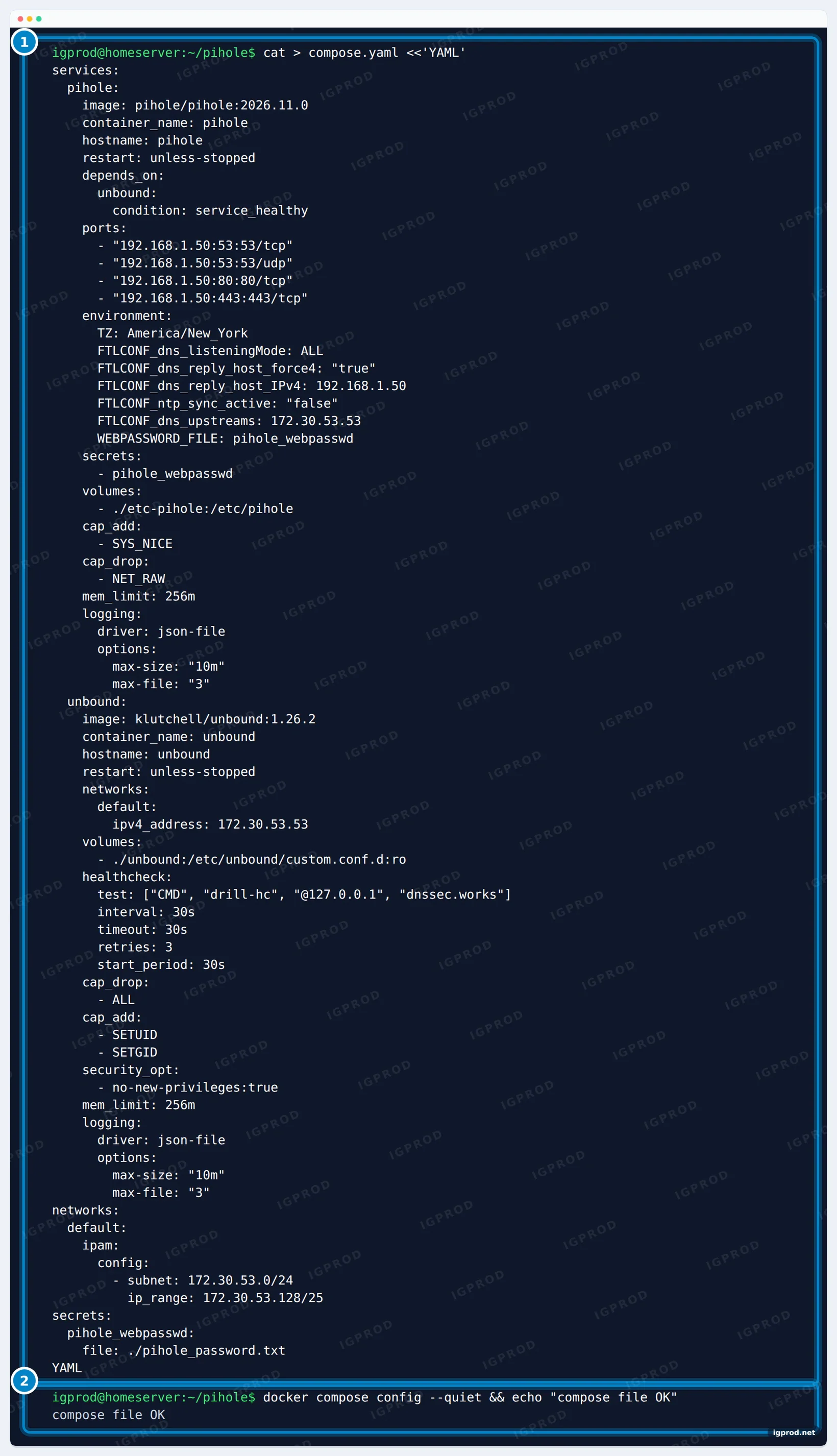
compose.yaml. 2: Compose reads it without errors.The lines that matter:
ipv4_address: 172.30.53.53and thenetworksblock at the end: Unbound always gets the same address.ip_range: 172.30.53.128/25makes Docker give other containers addresses from .128 up only, so none of them can take .53.FTLCONF_dns_upstreams: 172.30.53.53: Pi-hole's only upstream, given as an address. Do not use the nameunboundhere; the startup trap below shows why.healthcheck: every 30 seconds,drill-hclooks updnssec.worksthrough Unbound. Withdepends_onandcondition: service_healthy,docker compose upstarts Pi-hole only after Unbound answers../unbound:/etc/unbound/custom.conf.d:ro: your settings folder, read-only inside the container.cap_drop: ALLwith onlySETUIDandSETGIDadded back, andno-new-privileges: Unbound keeps just the two rights it needs to switch to its own user.- No
ports:for Unbound. Only Pi-hole talks to it, over the Docker network; devices on your LAN cannot reach it. mem_limit: 256mand log rotation (three files of 10 MB) for both services, so neither can fill the memory or the disk.
Step 3: Start both and check the settings Unbound really uses
Pi-hole is recreated during this first start, and your home has no DNS until Unbound is healthy, which took under a minute in our lab. Pick a quiet moment:
docker compose config --quiet && echo "compose file OK"
docker compose up -d
docker compose ps --format "table {{.Name}}\t{{.Image}}\t{{.Status}}"
docker compose logs unbound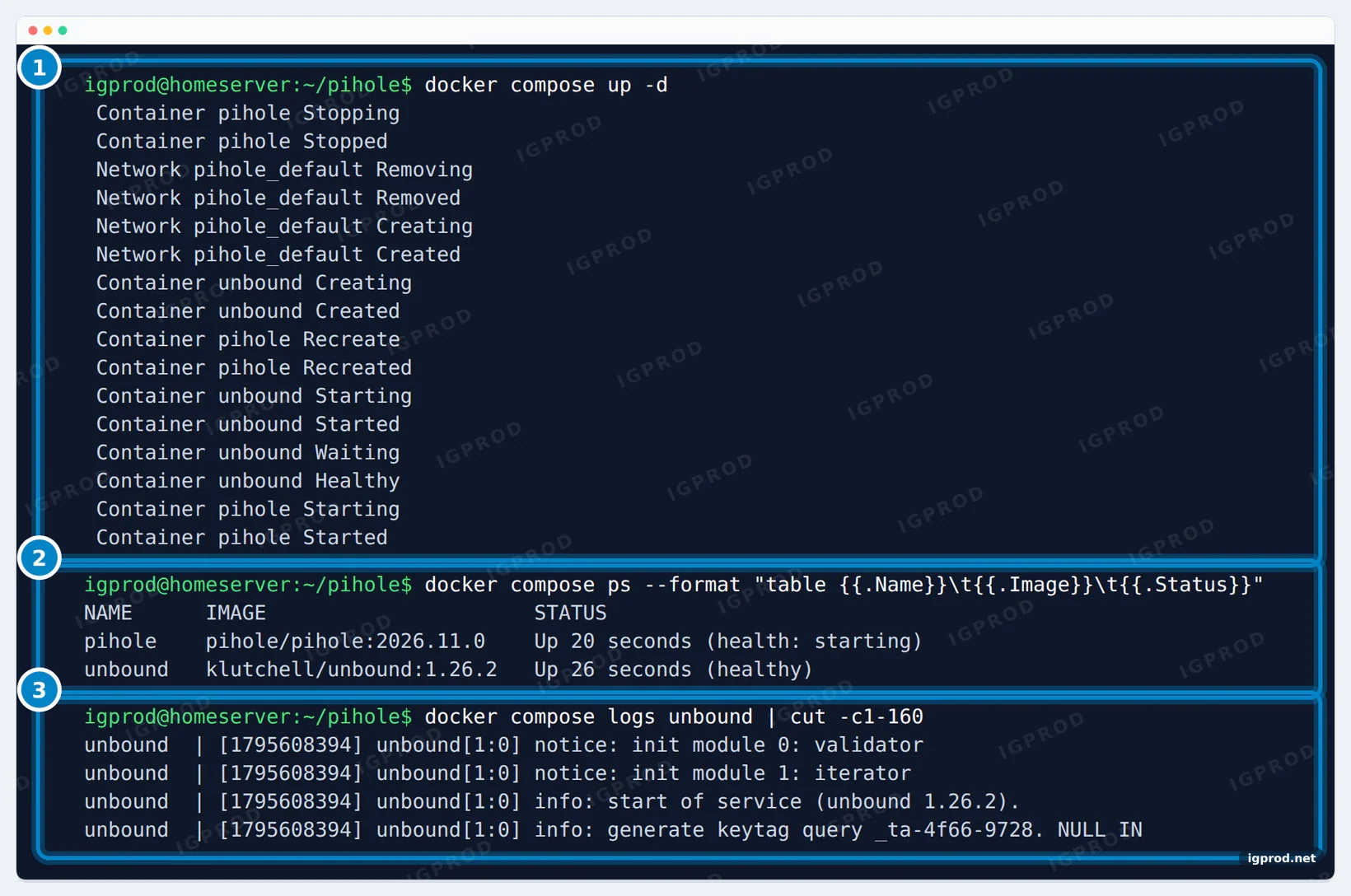
Healthy. 2: both running. 3: Unbound's start log.Compose recreated the network (the address range is new), started Unbound, waited until it was Healthy, and only then started Pi-hole. The log line generate keytag query _ta-4f66-9728 is Unbound reporting to the root servers which DNSSEC root keys it trusts: 4f66 and 9728 are, in hexadecimal, the key tags 20326 and 38696 of the two root zone keys (from 2017 and 2024). Unbound keeps this key list current by itself, in a file inside the container.
Check the values in use with unbound-checkconf
unbound-checkconf checks the files, and with -o it prints the value Unbound will use for one option, including the image's own defaults:
docker exec unbound unbound-checkconf
for o in hide-identity hide-version so-rcvbuf msg-cache-size rrset-cache-size val-log-level qname-minimisation aggressive-nsec prefetch serve-expired edns-buffer-size harden-dnssec-stripped; do echo "$o: $(docker exec unbound unbound-checkconf -o $o)"; done
docker exec pihole pihole-FTL --config dns.upstreams
docker inspect -f "{{.Name}} {{range .NetworkSettings.Networks}}{{.IPAddress}}{{end}}" pihole unbound
docker top unbound -o pid,user,comm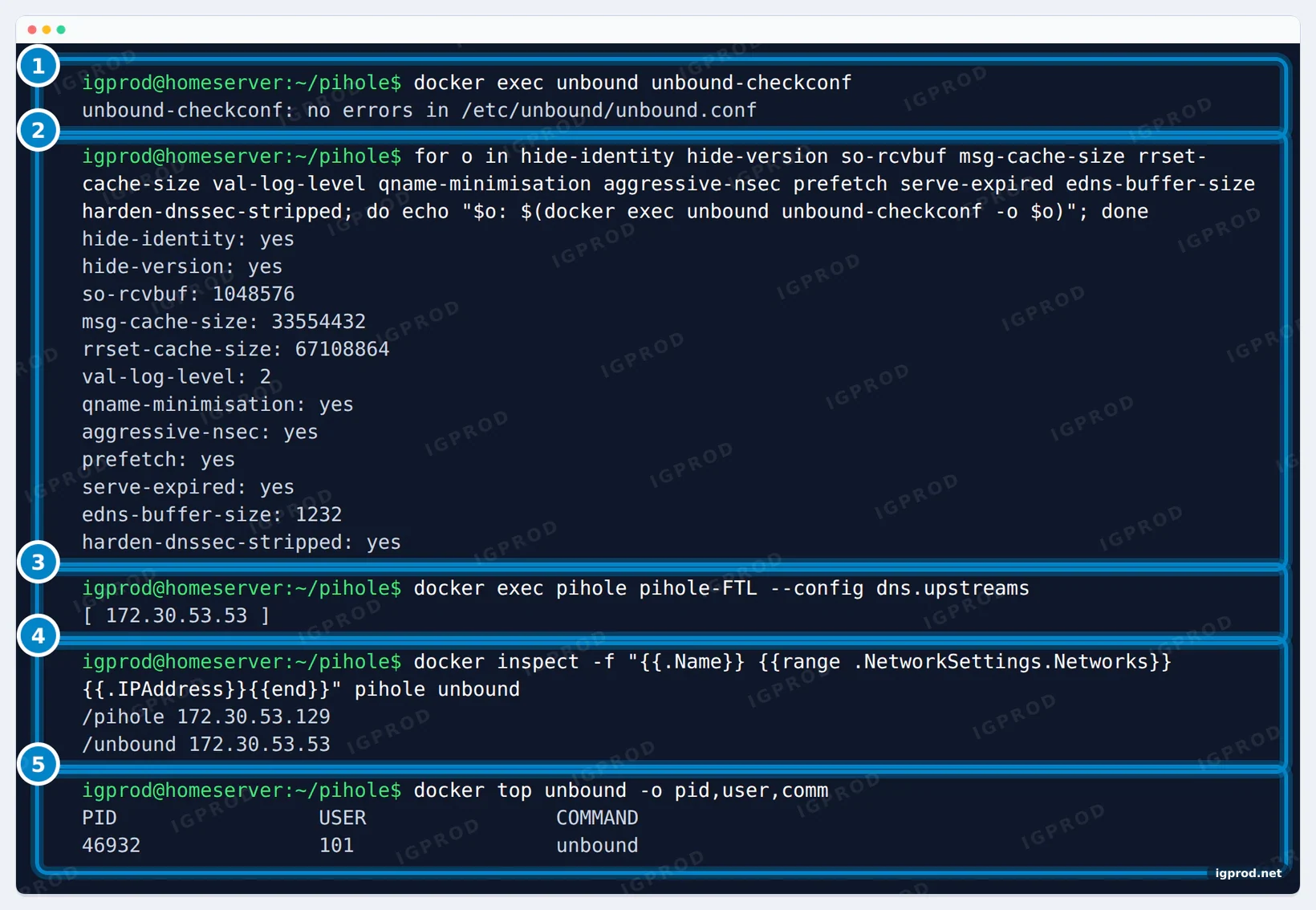
Our six settings are there (in bytes: 1048576 is 1 MB). The next six are already on in this image, so you do not need to write them: QNAME minimisation; aggressive use of signed "this name does not exist" answers, which saves lookups; prefetch, which renews popular names before they expire; serve-expired, which serves an expired answer while it fetches a fresh one; a 1232-byte EDNS buffer, which avoids large UDP answers that some networks drop; and the hardening that rejects answers whose DNSSEC data was stripped. Pi-hole's upstream is [ 172.30.53.53 ], Unbound has that address, and the Unbound process runs as user 101, not as root.
Step 4: Check in Pi-hole's web interface
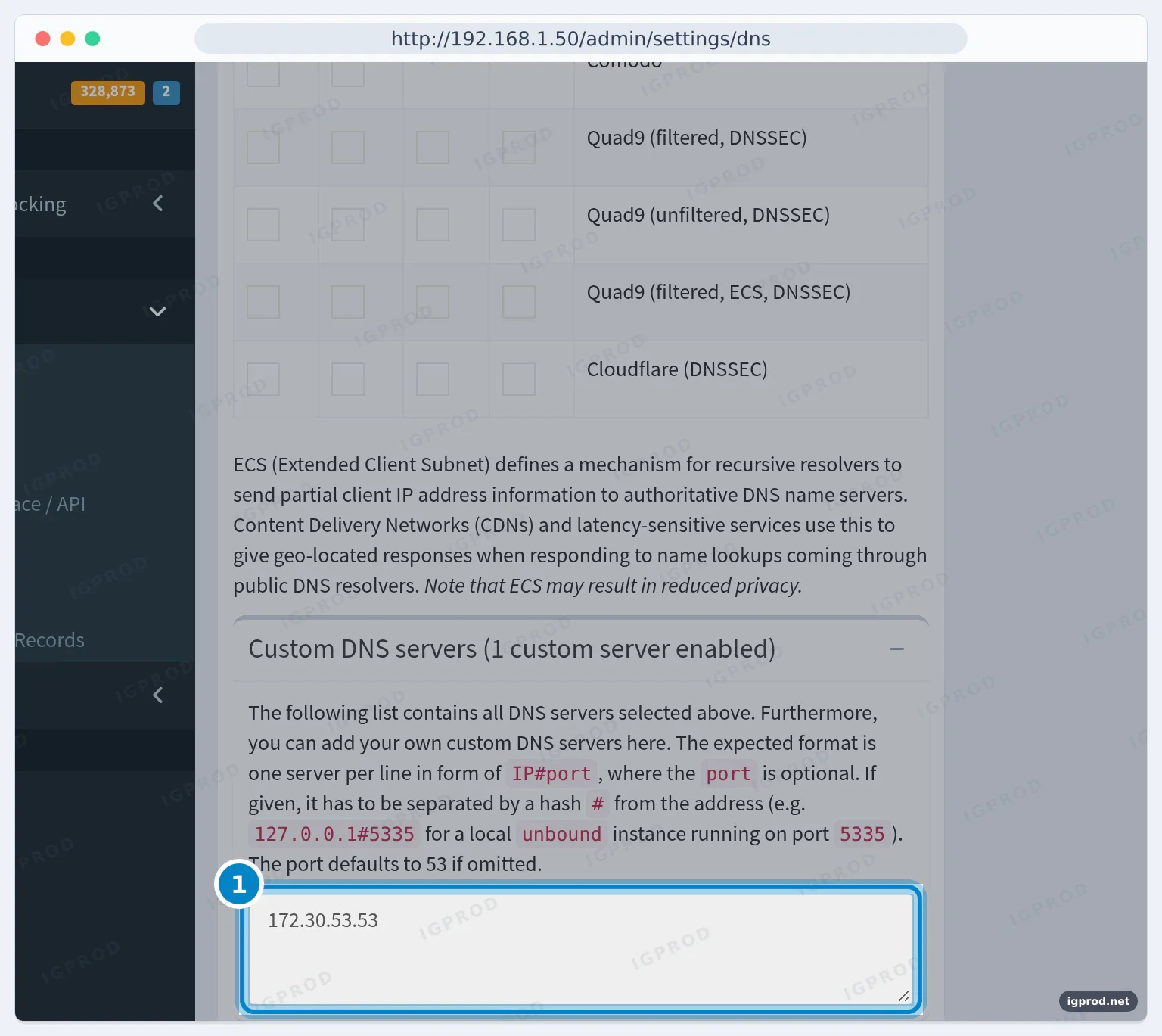
Under Settings, DNS, the Custom DNS servers box shows 172.30.53.53 and no public server is ticked. The address comes from the compose file (FTLCONF_dns_upstreams), which wins at every start, so change it there and not in this box.
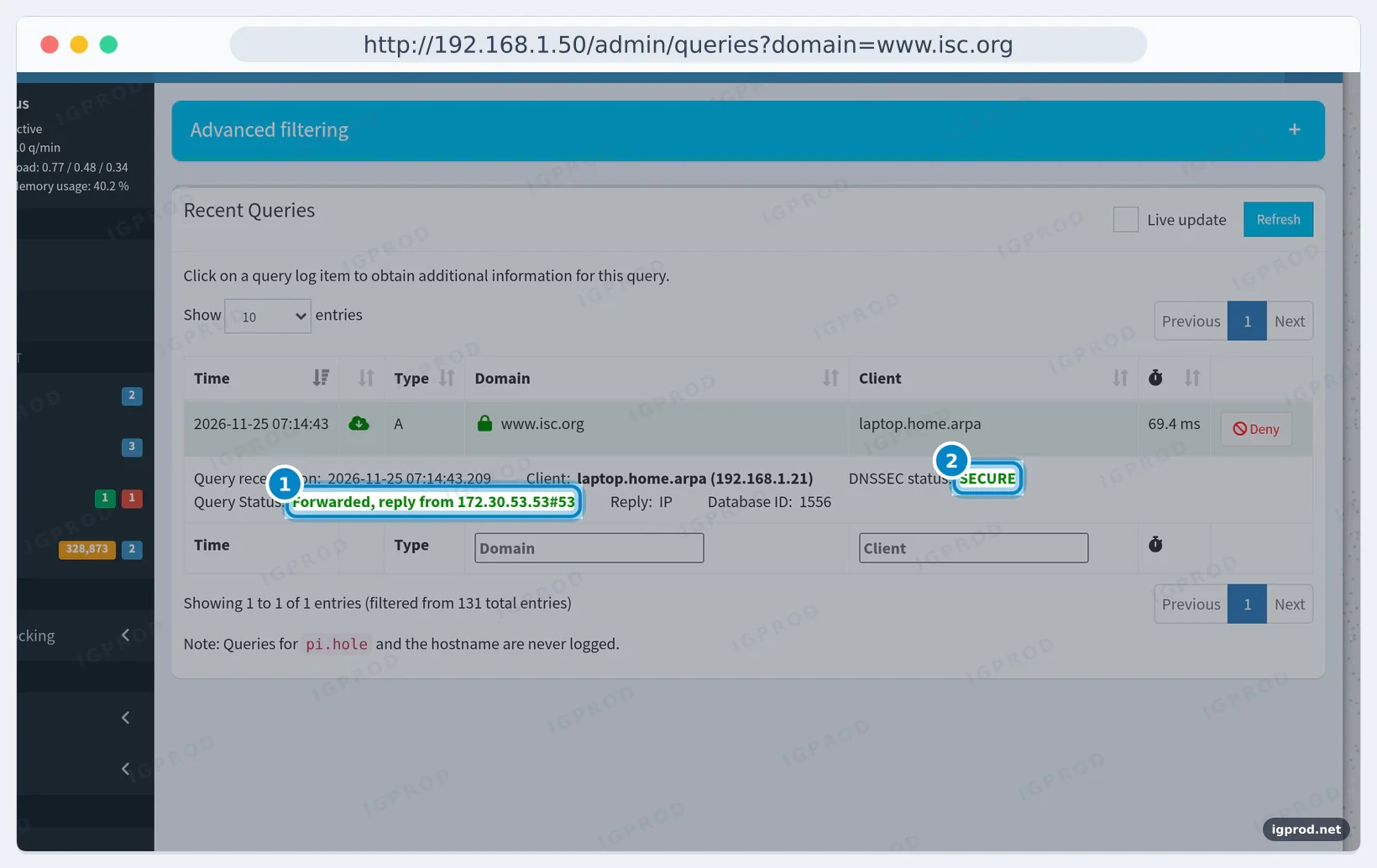
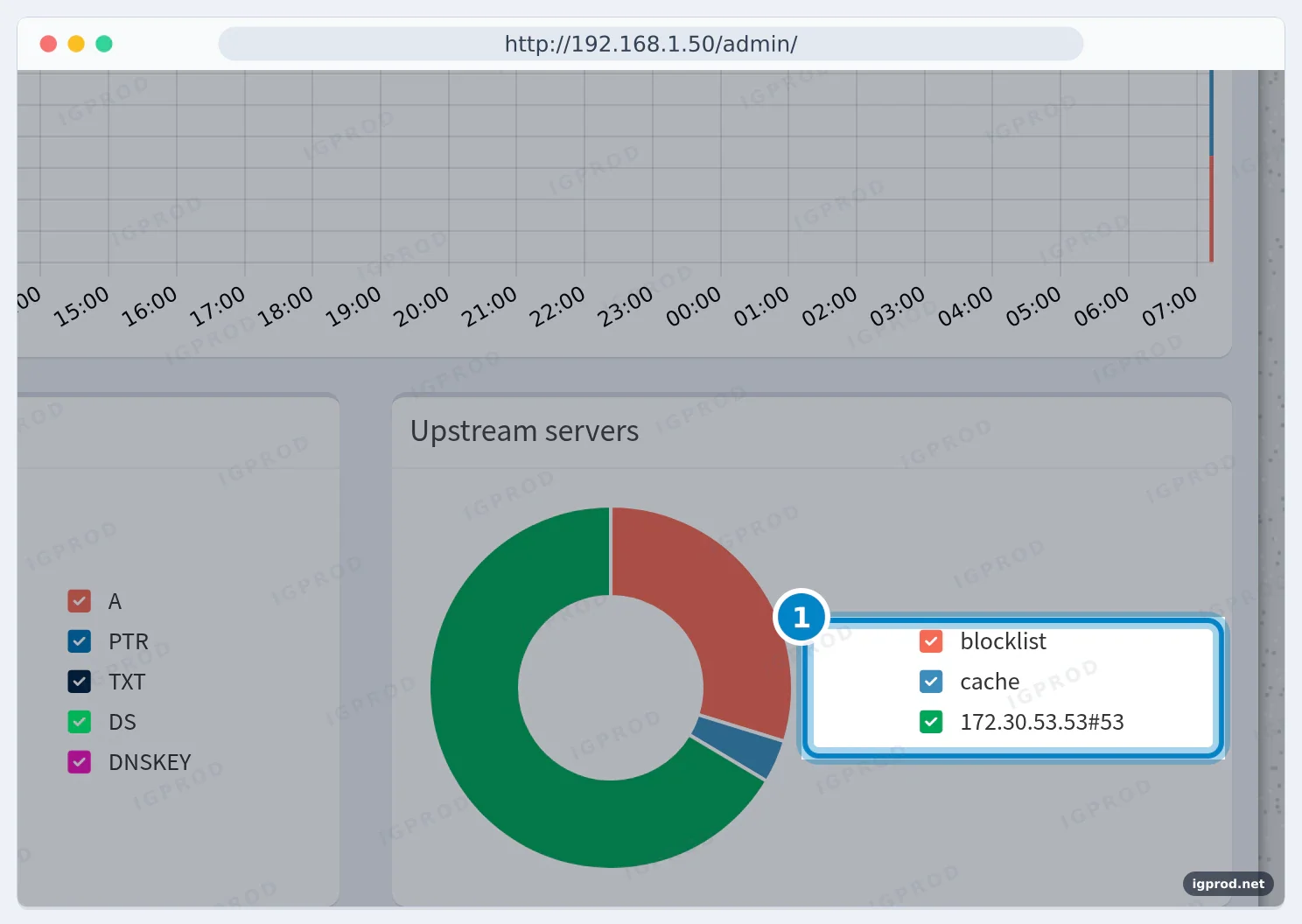
On the dashboard, Upstream servers shows where answers come from: blocklist (names Pi-hole blocked), cache, and 172.30.53.53#53, which is Unbound. In the Query Log, click a name your home has not visited before: the status reads "Forwarded, reply from 172.30.53.53#53" and the DNSSEC status SECURE, as in the screenshot at the top of this guide.
172.30.53.53#53).Step 5: Test DNSSEC, privacy and local names
From a laptop that uses Pi-hole, then the log on the server:
dig @192.168.1.50 dnssec.works | grep -E "status|flags:|^dnssec"
dig @192.168.1.50 fail01.dnssec.works | grep -E "status|flags:"
docker compose logs unbound --since 1m | grep "validation failure"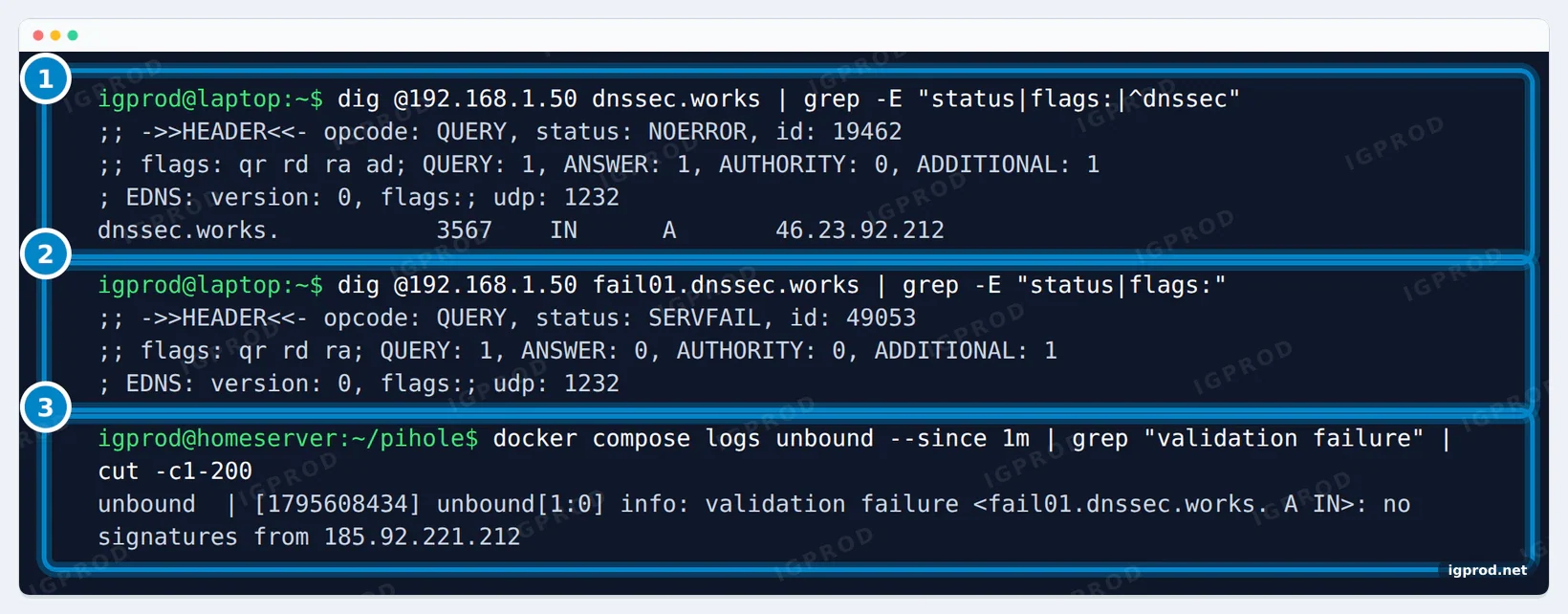
ad flag. 2: broken signatures, SERVFAIL. 3: the reason in Unbound's log.dnssec.works has valid signatures: NOERROR, an address, and the ad flag (authenticated data). fail01.dnssec.works has broken signatures on purpose: SERVFAIL and no address, so a device never receives a forged answer. Thanks to val-log-level: 2, the log gives the reason: "validation failure <fail01.dnssec.works. A IN>: no signatures from 185.92.221.212".
Check what others can see
docker exec pihole dig @172.30.53.53 version.bind CH TXT +short; docker exec pihole dig @172.30.53.53 id.server CH TXT | grep status
dig @192.168.1.50 192-168-1-50.nip.io +short
dig @172.30.53.53 debian.org +time=2 +tries=1 | grep -E "timed out|reached|status"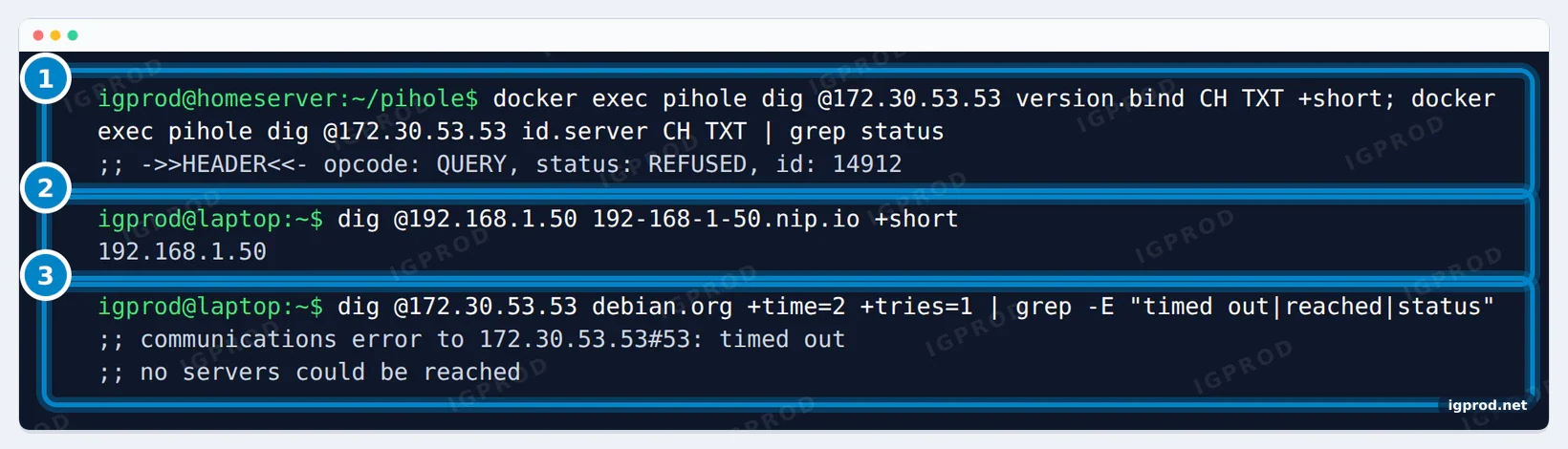
The version question now gets an empty answer and the name question gets REFUSED. The nip.io name answers 192.168.1.50 again. And the laptop cannot reach Unbound at all: only Pi-hole can.
Speed: slower for new names, instant from the cache
We saved 20 well-known sites in a file on the laptop and timed them through Pi-hole and Unbound with empty caches, then the same 20 again, then the same list straight from Google's 8.8.8.8:
mkdir -p ~/unbound && cd ~/unbound && cat > names.txt <<'EOF'
wikipedia.org
github.com
debian.org
ubuntu.com
kernel.org
python.org
mozilla.org
apache.org
nginx.org
docker.com
tagesschau.de
lemonde.fr
bbc.co.uk
nhk.or.jp
nos.nl
svt.se
rtve.es
abc.net.au
cbc.ca
rai.it
EOF
cd ~/unbound && for run in first second; do s=$(date +%s%N); for n in $(cat names.txt); do dig @192.168.1.50 +short $n > /dev/null; done; echo "$run pass: $(( ($(date +%s%N) - s) / 1000000 )) ms for $(wc -l < names.txt) names"; done
cd ~/unbound && s=$(date +%s%N); for n in $(cat names.txt); do dig @8.8.8.8 +short $n > /dev/null; done; echo "8.8.8.8 directly: $(( ($(date +%s%N) - s) / 1000000 )) ms for $(wc -l < names.txt) names"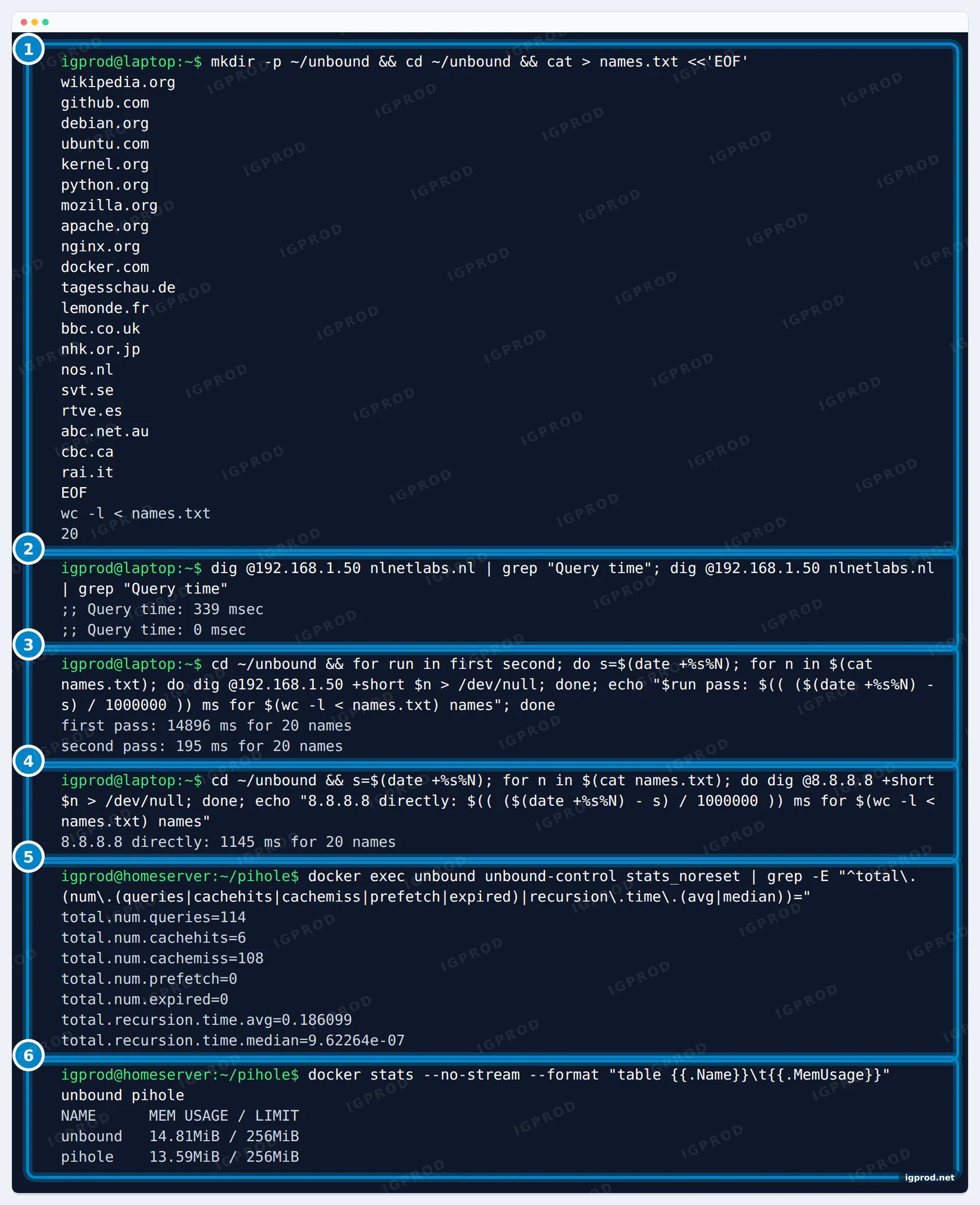
The first pass took 14.9 seconds, about 0.74 seconds a name, because Unbound walked from the root for every new domain. The second pass took 0.2 seconds for all 20: cache. Google answered the 20 new names in 1.1 seconds, because most of them were already in its own cache, which millions of users fill. One name alone shows the same: nlnetlabs.nl took 339 ms the first time and 0 ms the second. Over six runs with empty caches, the first pass took between 11.2 and 14.9 seconds, and Google between 1.0 and 1.1 seconds.
Unbound's own counters after the tests: 114 queries, 6 answered from its cache, and 0.19 seconds on average for each lookup it made itself. Memory after all the tests: 14.81 MiB for Unbound and 13.59 MiB for Pi-hole. In daily use, the cache answers repeat visits and prefetch renews popular names before they expire, so the wait falls mostly on sites your home opens for the first time.
The startup trap: give Pi-hole an address, not a name
Our first compose file pointed Pi-hole at the name unbound (FTLCONF_dns_upstreams: unbound), which Docker's internal DNS turns into Unbound's address. It works, until Pi-hole starts while Unbound is not running. We stopped Unbound, restarted Pi-hole, then started Unbound again:
docker stop unbound && docker restart pihole
docker compose logs pihole --since 30s | grep -iE "unbound|upstream|server|resolv|error|warn"
docker start unbound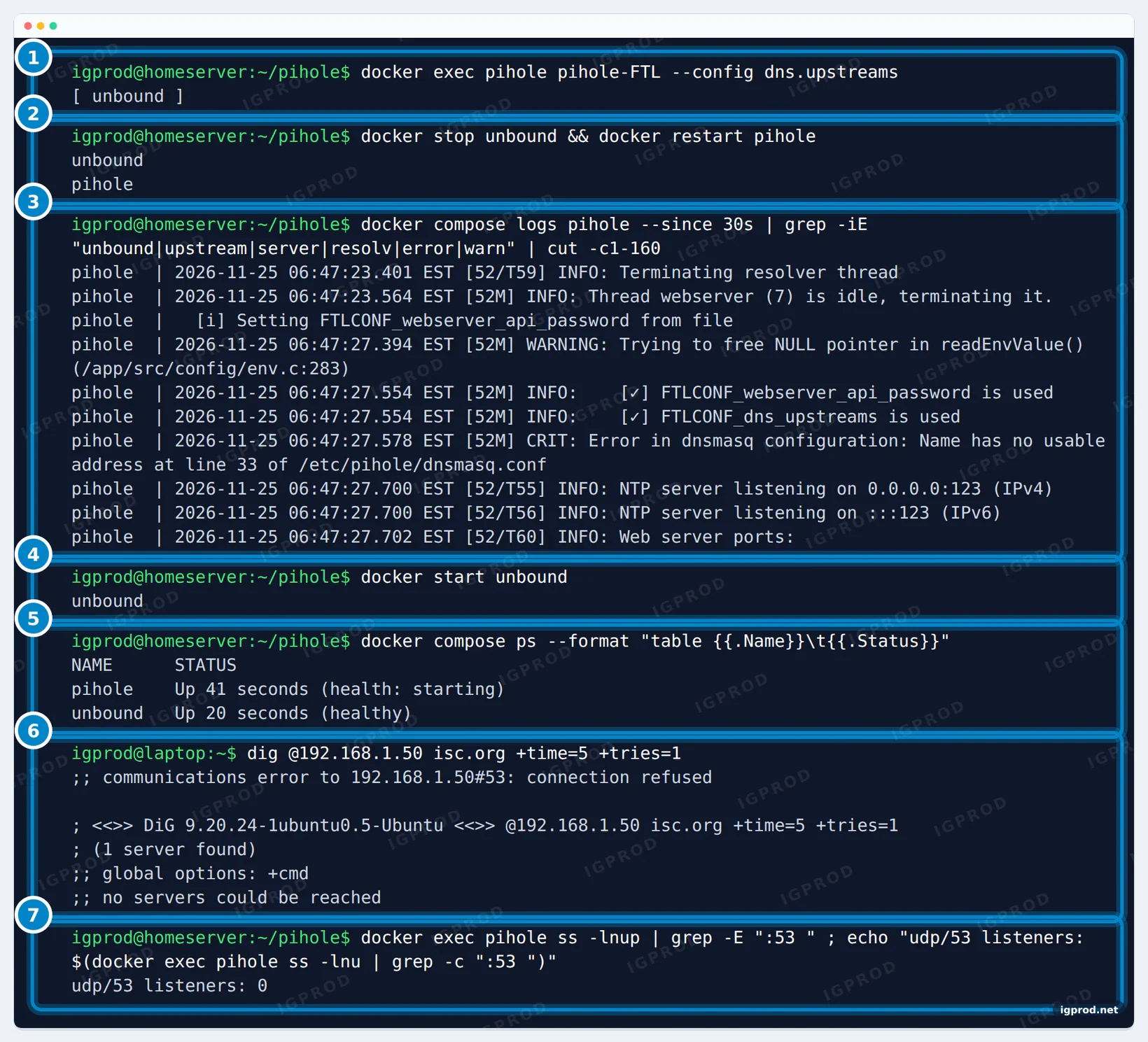
CRIT error. 4-5: Unbound back and healthy. 6: DNS still refused. 7: nothing listens on port 53.Pi-hole writes its upstream into its dnsmasq settings. With Unbound stopped, the name had no address, and Pi-hole's DNS engine rejected the whole configuration: "CRIT: Error in dnsmasq configuration: Name has no usable address at line 33 of /etc/pihole/dnsmasq.conf". The web interface kept running, but nothing listened on port 53 any more, and devices got "connection refused". Starting Unbound again did not help: DNS stayed down for the whole network until we restarted Pi-hole. Its health check turns unhealthy, but Docker does not restart a container for that.
With the fixed address, Pi-hole recovers by itself
The same test with FTLCONF_dns_upstreams: 172.30.53.53:
docker stop unbound && docker restart pihole
docker compose logs pihole --since 30s | grep -E "CRIT|ERROR" | cut -c1-160
dig @192.168.1.50 ietf.org +time=5 +tries=1 | grep -E "status|refused|reached"
docker start unbound
dig @192.168.1.50 ietf.org +time=5 +tries=1 | grep -E "status|refused|reached|^ietf"
docker compose ps --format "table {{.Name}}\t{{.Status}}"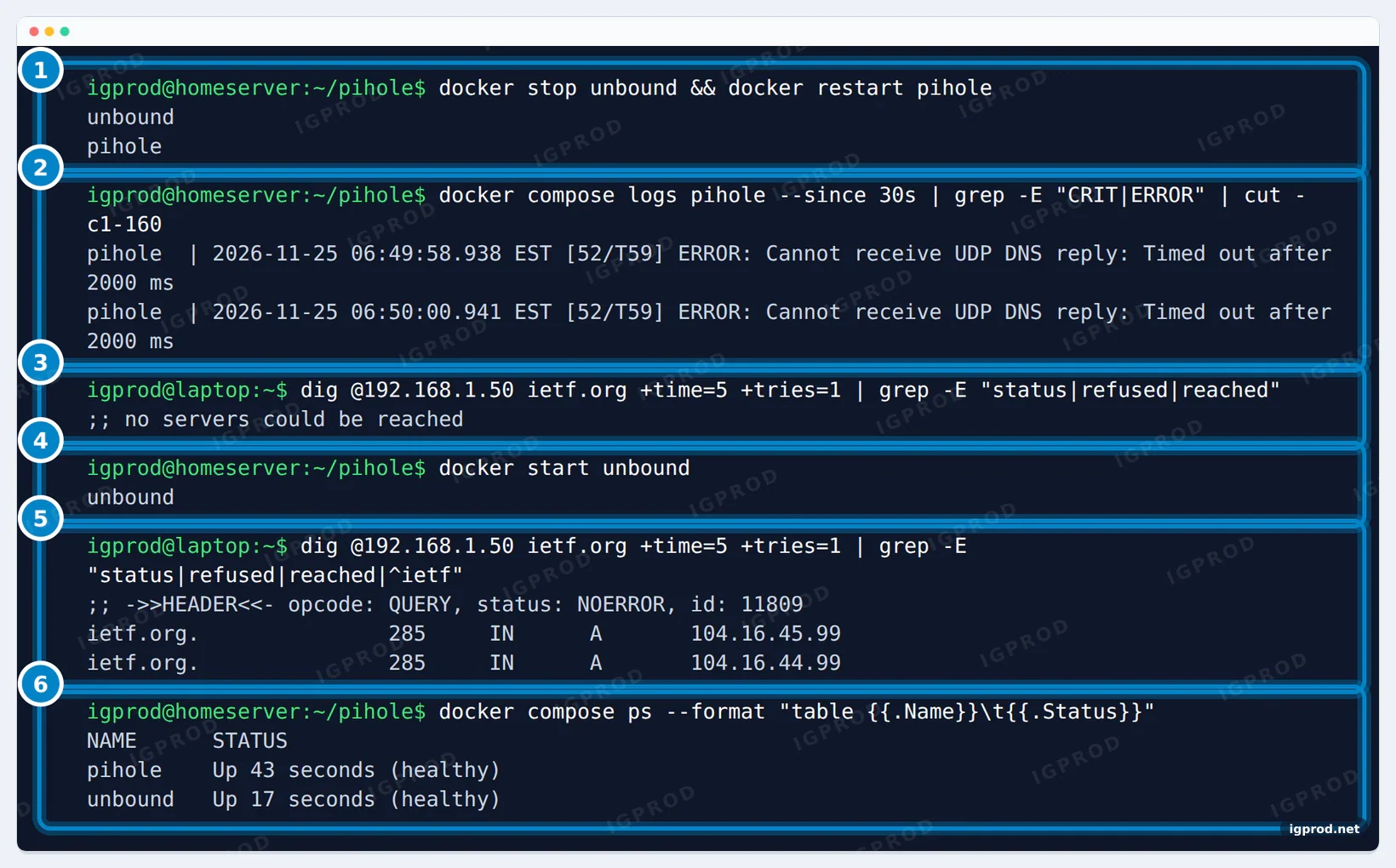
While Unbound was down, Pi-hole logged "Cannot receive UDP DNS reply: Timed out after 2000 ms" and devices got no answer, which is expected with one upstream. As soon as Unbound was back, the next lookup worked (NOERROR for ietf.org) without touching Pi-hole.
Reboot test
depends_on only applies when you run docker compose up. After a reboot, Docker starts the containers itself from their restart policy and does not wait for the health check. Restarting Docker shows what a reboot does:
sudo systemctl restart docker
docker compose ps --format "table {{.Name}}\t{{.Status}}"
docker compose logs pihole --since 1m | grep -E "CRIT|ERROR"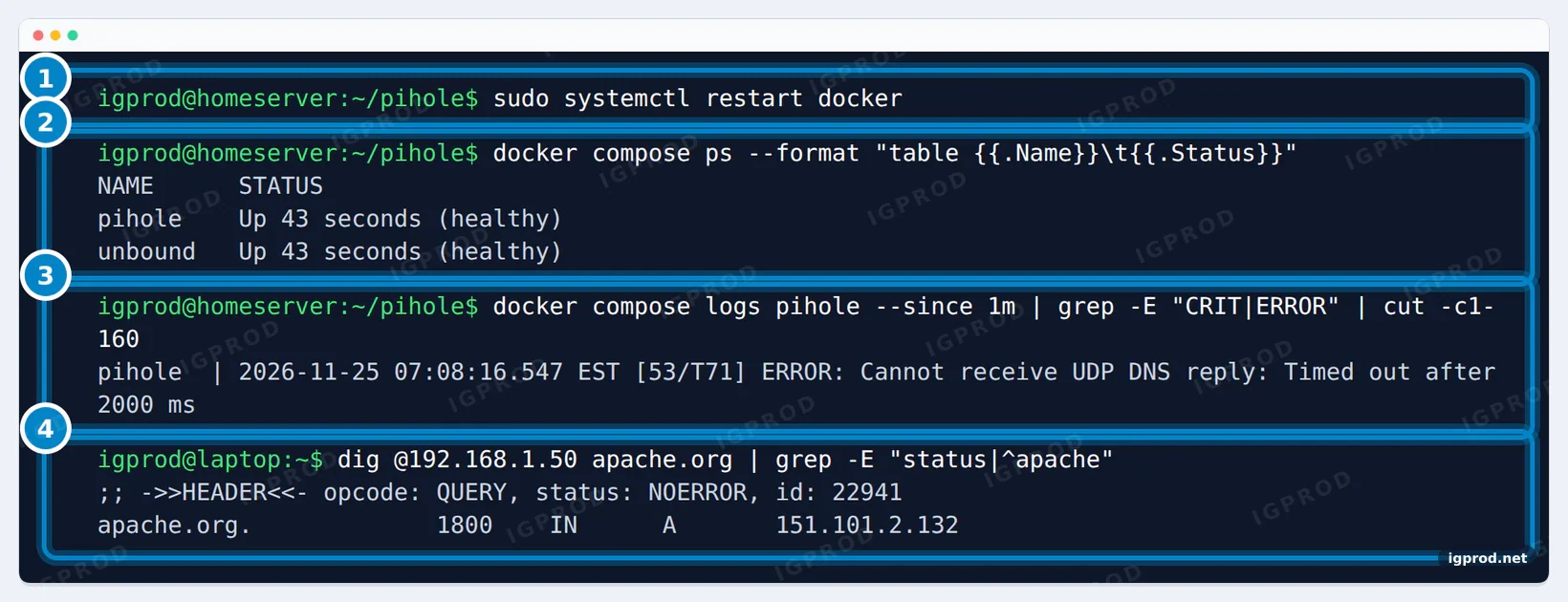
Both containers were healthy again after 43 seconds. Pi-hole logged one timeout, because it started before Unbound was ready, then answered normally: apache.org resolved through Unbound. With the name instead of the address, Pi-hole would need Unbound to be running at the exact moment it starts, and a reboot gives no such promise.
Production settings: what we kept and what we dropped
Every row was tested in the lab on 25 November 2026. The settings we kept are all in the two files above.
| Setting | Value | Why | What we saw |
|---|---|---|---|
| Image | klutchell/unbound:1.26.2 | current Unbound, pinned tag | updated 24 Nov 2026; mvance/unbound last updated 19 Oct 2024 (1.21.1) |
| Pi-hole upstream | 172.30.53.53, fixed address | works in any start order | by name: CRIT error and no DNS; by address: recovers alone |
| Start order | health check with drill-hc, depends_on: service_healthy | Pi-hole waits for a working Unbound | Unbound Healthy, then Pi-hole starts |
| Name and version | hide-identity, hide-version: yes | less for attackers to work with | empty and REFUSED (before: "unbound 1.26.2") |
| Private answers | private-domain: plex.direct, nip.io | rebinding protection stays on for the rest | nip.io answers 192.168.1.50 (before: no answer) |
| DNSSEC failures | val-log-level: 2 | the log says why a name fails | "no signatures from 185.92.221.212" |
| Statistics | remote-control on 127.0.0.1, port not published | unbound-control stats and cache flush | works inside the container only |
| Cache | msg-cache-size: 32m, rrset-cache-size: 64m | room for a home, under the memory limit | 14.81 MiB used after our tests |
| Receive buffer | so-rcvbuf: 1m | fewer dropped answers in bursts | no warning with our host limit (below) |
| Rights | cap_drop: ALL + SETUID, SETGID; no-new-privileges | least privilege | runs as user 101 |
| Exposure | no ports: for Unbound | only Pi-hole reaches it | from the LAN: timed out |
| Limits | mem_limit: 256m, logs 3 x 10 MB | protects the host | both under 15 MiB |
| Pi-hole DNSSEC | on (Use DNSSEC) | SECURE or BOGUS for each name | same speed; 102 instead of 34 Unbound queries |
| Image defaults | QNAME minimisation, aggressive NSEC, prefetch, serve-expired, EDNS 1232, hardening | already on, nothing to add | checked with unbound-checkconf -o |
| Dropped | read-only container | Unbound writes its root key file | "could not open autotrust file for writing" |
| Dropped | cap_drop: ALL alone | Unbound switches to its own user at start | "unable to set group id of unbound" |
| Dropped | so-rcvbuf: 32m | more than the host allows | "was not granted" |
so-rcvbuf and net.core.rmem_max
Linux gives a program at most twice the host's net.core.rmem_max, and Unbound warns when it gets less than half of what it asked for. Our host allowed 4194304 bytes, so 1m, and even 8m, passed without a warning. To see the warning, we asked for 32m in a test file:
sysctl net.core.rmem_max
printf "server:\n    so-rcvbuf: 32m\n" > unbound/zz-test.conf && docker compose restart unbound > /dev/null 2>&1; sleep 5; docker compose logs unbound --since 20s | grep -i rcvbuf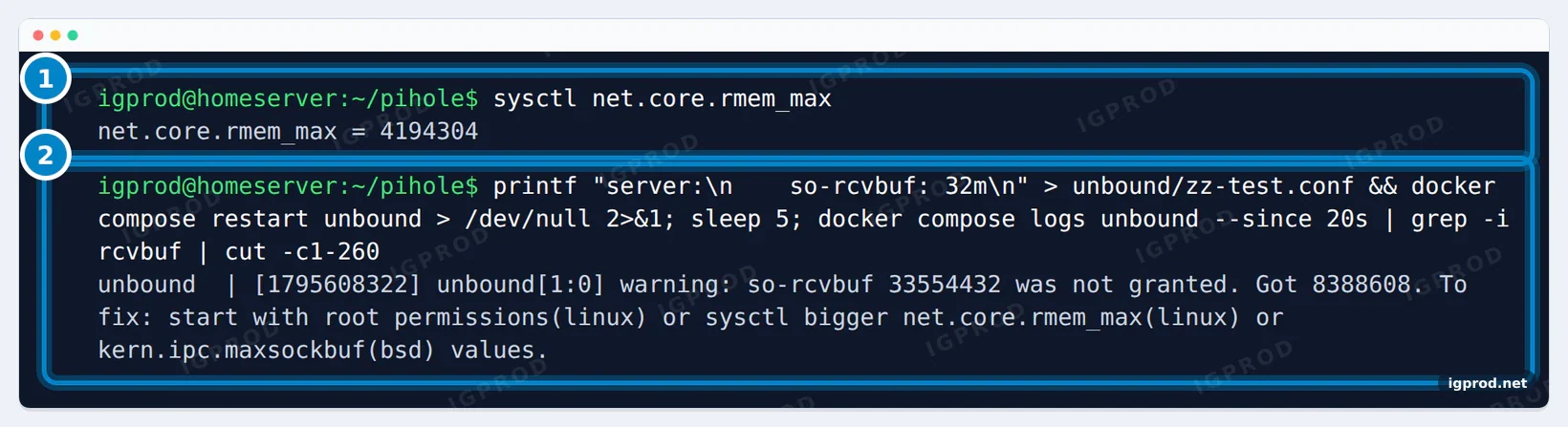
On many Linux hosts the limit is 212992 bytes, and there 1m gives the same warning. The fix in the Pi-hole documentation is to raise the limit on the host to 1048576 with sysctl; our host did not need it, so we did not test that step. If you prefer to leave the host alone, delete the so-rcvbuf line and Unbound uses the system default.
Container rights: what Unbound needs
timeout 20 docker run --rm --cap-drop ALL klutchell/unbound:1.26.2 2>&1 | grep -m1 fatal
timeout 20 docker run --rm --cap-drop ALL --cap-add SETUID --cap-add SETGID --read-only klutchell/unbound:1.26.2 2>&1 | grep -m1 fatal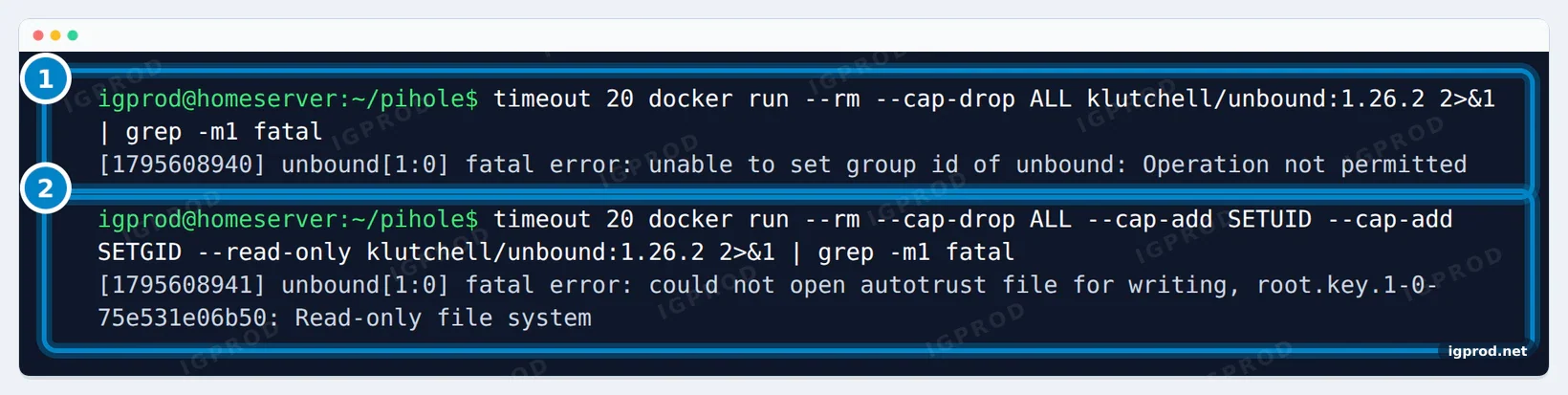
With every capability dropped, Unbound stops at start: it cannot switch to its own user. With SETUID and SETGID back it starts, so the compose file keeps those two. A read-only container then fails another way: Unbound cannot update its root key file. That is why only the settings folder is read-only, not the whole container.
Pi-hole's own DNSSEC: keep it on
Unbound already checks DNSSEC, so we measured Pi-hole with its own check on and off, with both caches empty each time:
docker exec pihole pihole-FTL --config dns.dnssec true
docker exec pihole pihole-FTL --config dns.dnssec false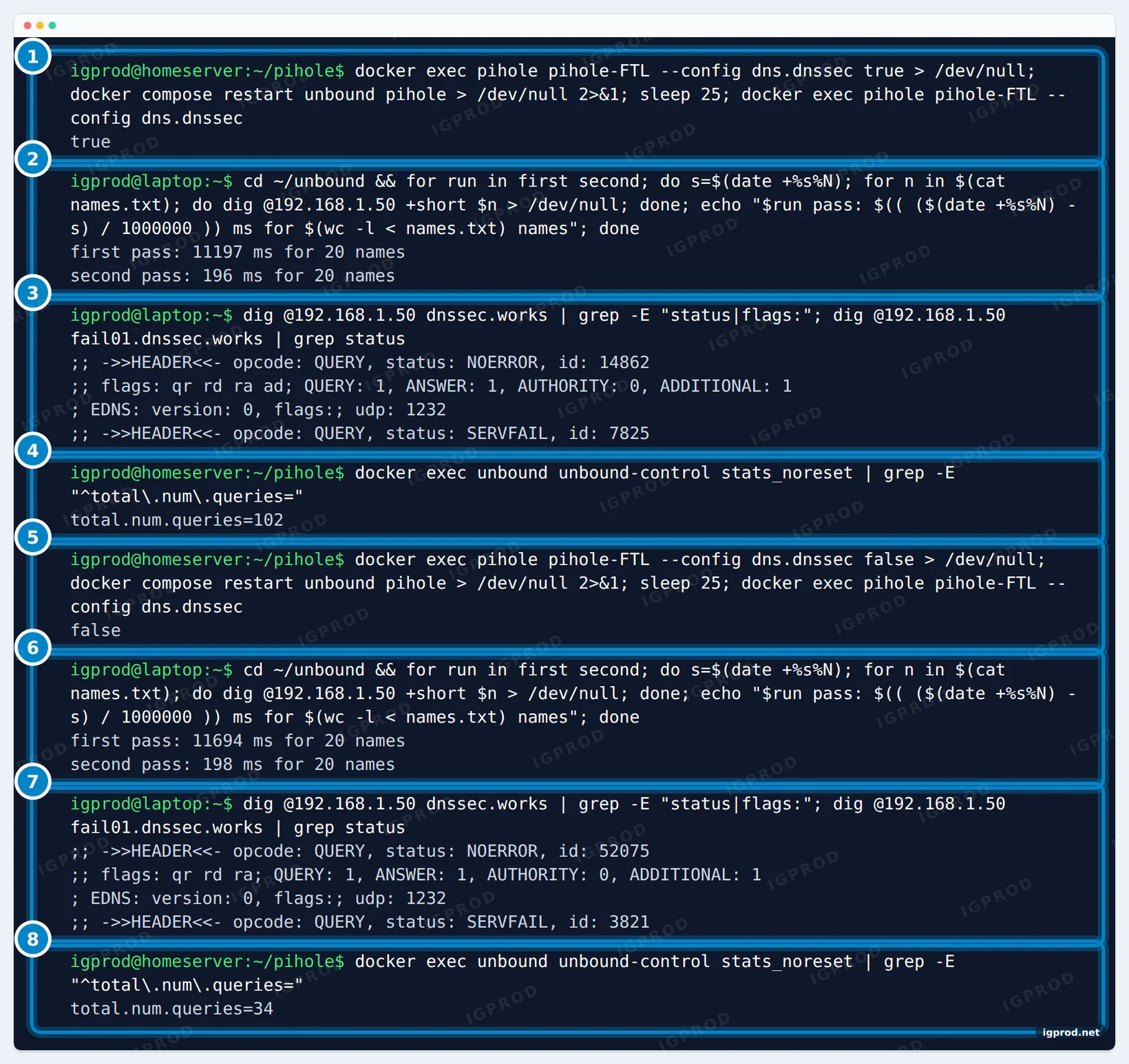
| Pi-hole DNSSEC | 20 new names | Same 20 again | dnssec.works | fail01.dnssec.works | Queries to Unbound |
|---|---|---|---|---|---|
| on | 11,197 ms | 196 ms | ad flag | SERVFAIL | 102 |
| off | 11,694 ms | 198 ms | no ad flag | SERVFAIL | 34 |
Speed was the same, and broken names failed either way, because Unbound blocks them. With Pi-hole's check on, devices get the ad flag and the Query Log shows SECURE or BOGUS for each name, which is worth the extra queries: Pi-hole also asks for the DS and DNSKEY records it needs for its own check. Keep it on: Settings, DNS, Use DNSSEC.
Update Unbound and Pi-hole
Both images have fixed tags. To update, look up the new version (the Unbound releases from NLnet Labs, the klutchell/unbound tags on Docker Hub, Pi-hole's Docker releases), change the tag in compose.yaml, then run:
docker compose pull
docker compose up -d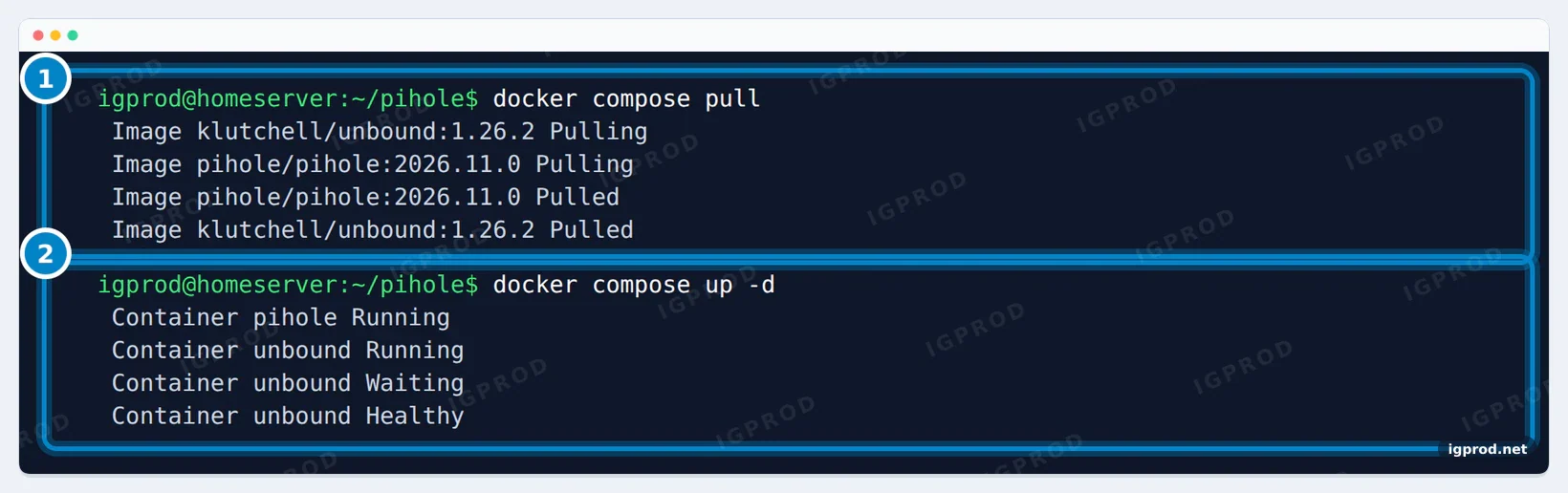
compose.yaml. 2: apply them.In our run both tags were current, so nothing changed: both containers kept running and Unbound was reported Healthy. With a new tag, Compose pulls it and recreates that container.
Troubleshooting
- Every name fails with SERVFAIL. Run the root server check from "Before you start": without UDP and TCP port 53 to the internet, Unbound cannot work. Also check the server's clock: DNSSEC signatures carry dates, and a wrong clock makes valid answers look broken.
- "CRIT: Error in dnsmasq configuration: Name has no usable address" in Pi-hole's log: the upstream is a name. Use Unbound's fixed address and restart Pi-hole.
- "so-rcvbuf ... was not granted" in Unbound's log: the host limit is lower than the buffer you asked for. Raise
net.core.rmem_maxor delete the line. - "fatal error: unable to set group id of unbound":
SETUIDandSETGIDare missing fromcap_add. - "could not open autotrust file for writing": the container is read-only. Remove
read_only. - A local name stopped working (Plex, nip.io, or any name that points to 192.168.x.x): add its domain as a
private-domainline, then rundocker compose restart unbound. - "control-enable is 'no'" from
unbound-control: theremote-controlblock is missing. - "WARNING: Trying to free NULL pointer in readEnvValue()" in Pi-hole's log: it appeared at every start in our lab, with DNS working. You can ignore it.
- A site opens slowly the first time only: that is the walk from the root. The next visit comes from the cache.
Frequently asked questions
Is Pi-hole with Unbound faster than Google or Cloudflare DNS?
Not for new names. In our tests a new name took 0.56 to 0.74 seconds through Unbound, against about 0.05 seconds from Google, whose cache is shared by millions of users. Names already in the cache answered in 0 ms, so the difference shows only the first time your home visits a site.
Does Unbound make my DNS private?
It removes the one company that sees all your lookups. It does not encrypt DNS: your internet provider can still read the names, and each name server sees the questions about its own domain together with your public IP address.
Should Pi-hole's DNSSEC stay on when Unbound already checks it?
Yes. In our test the speed was the same with it on or off, and bogus names failed either way. With it on, devices get the ad flag and the Query Log shows SECURE or BOGUS for each name.
How much memory does Unbound use?
14.81 MiB after all our tests, with cache limits of 32 MB and 64 MB and a container limit of 256 MB. The cache grows with use, but a home stays far below those limits.
Do I need to open a port on my router for Unbound?
No. Unbound only makes outgoing requests, like a browser. Do not publish Unbound's port at all, and publish Pi-hole's port 53 on the server's LAN address only, as in the compose file.
What happens to my network if Unbound stops?
Lookups fail for every device until Unbound is back, because it is Pi-hole's only upstream. restart: unless-stopped starts it again after a crash, and with the fixed address Pi-hole answers again on its own as soon as Unbound is up, as our test showed.
Do I need to download root.hints for Unbound in Docker?
No. Unbound has the root server addresses built in and asks a root server for the current list before its first lookup, so an old list does no harm. The DNSSEC root key is the part that must stay current, and Unbound updates that file by itself, which is why the container must not be read-only.
Is mvance/unbound still updated?
Not when we checked on 25 November 2026: its last update on Docker Hub was 19 October 2024, with Unbound 1.21.1. We use klutchell/unbound, which had Unbound 1.26.2, the latest release.
Related guides
- Pi-hole v6 with Docker Compose: Install, Setup, Blocklists, Per-Device Groups and Hardening (Tested)
- AdGuard Home vs Pi-hole: Tested Side by Side on One Server, With Production Settings (2026)
- AdGuard Home 1.0 with Docker Compose: Install, Setup, Per-Device Rules and Hardening (Tested)
- Quad9 DNS (9.9.9.9): Servers, IPv6, Private DNS, DoH Setup and Quad9 vs Cloudflare, Tested
- Setting DNS on Android: Private DNS, Wi-Fi IPs, and mobile data
- Install Docker Compose on Ubuntu using Docker’s repository
- Tailscale 101: What It Is, Setup on Linux, SSH, Exit Node and Docker (2026)
Sources
- Unbound documentation: unbound.conf (NLnet Labs)
- Unbound documentation: unbound-control (NLnet Labs)
- Unbound 1.26.2 release (GitHub)
- klutchell/unbound-docker (GitHub)
- Pi-hole docs: unbound as a recursive DNS server
- Pi-hole docs: FTL configuration (pihole.toml)
- docker-pi-hole 2026.11.0 release notes (GitHub)
- Docker docs: control startup order in Compose
- RFC 9156: DNS query name minimisation
- RFC 8145: signaling trust anchor knowledge in DNSSEC (key tag queries)
- IANA: list of root servers

Leave a comment
Your email address will not be published. Required fields are marked *