

On 18 November 2026 nginx fixed five flaws that their finders call nginx2root. The worst, CVE-2026-123007, sits in the HTTP/2 code that most HTTPS sites have switched on: a visitor with no login can crash an nginx worker and, in the researchers' tests, run their own code on the server. nginx often runs in more than one place on the same machine: the web server package, Docker containers, and tools built on it such as Nginx Proxy Manager. This guide finds every one, checks which flaws your settings expose, patches each kind, proves the new program is the one running, and closes the server to everyone but Cloudflare. Each step comes with the production setting we tested.
Tested on 25 November 2026 on an Ubuntu 26.04.1 LTS home server (192.168.1.50) with Docker 29.10.1 and Docker Compose 5.8.0, running three unpatched nginx setups: Ubuntu's own package (1.28.3-2ubuntu1), the official image nginx:1.30.4, and Nginx Proxy Manager 2.17.0. A laptop on the same network (192.168.1.21) played the visitor. Every command, output and screenshot below comes from that lab.
Quick answer: patch nginx2root in five steps
In plain words: nginx is the program that answers web requests on a huge number of servers. Most of these flaws sit in the code for HTTP/2, the protocol browsers use for HTTPS sites today. An update replaces the program file, but the old program keeps running until it is restarted, and a patched package often keeps the old version number. So check what runs, not only what is installed.
- Find every nginx:
nginx -von the server, anddocker exec <container> nginx -vfor each container. Then read the package or image version: that is where the fix shows. - Update each one: on Ubuntu 26.04,
sudo apt-get install --only-upgrade nginx nginx-common(fixed from package 1.28.3-2ubuntu1.13); the official Docker image fromnginx:1.30.8(stable) ornginx:1.31.10(mainline); Nginx Proxy Manager from 2.17.1. - Check that the new program runs: the nginx main process must have a new process ID after the update. A reload alone keeps the old program.
- Cannot update today? Set
http2 off;on every listener the internet reaches. It removes the two HTTP/2 flaws until you patch. - Behind Cloudflare? Accept ports 80 and 443 only from Cloudflare's addresses, and publish Docker ports on 127.0.0.1 unless the internet must reach them: Docker's ports skip the ufw firewall.
Six words you will meet in this guide:
- HTTP/2: the web protocol most browsers use over HTTPS. In nginx:
http2 on;, orlisten 443 ssl http2;before nginx 1.25.1. - HTTP/3 (QUIC): the newest web protocol, over UDP. In nginx:
listen 443 quic;. - Upstream: the app nginx passes requests to, with
proxy_pass,fastcgi_passorgrpc_pass. - OpenResty: nginx with extra modules. Nginx Proxy Manager runs it.
- Origin: your own server, the one a CDN such as Cloudflare forwards visitors to.
- Backport: a fix copied into an older version. The version number stays the same; only the package or image version changes.
What nginx2root is, and which settings expose you
nginx2root is the name that Xint, the research team at Theori, gave to five nginx flaws and one separate Linux kernel flaw. Each nginx flaw on its own let them run code with the rights of the nginx worker, which may be enough to read the site's data, its secrets and internal services. The kernel flaw then turns that into root on the host, even from inside a Docker container. nginx fixed its part in versions 1.30.7 (stable) and 1.31.9 (mainline), released on 18 November 2026. The kernel needs its own update: Xint said on 18 November that the kernel fix would follow in the coming weeks.
Each flaw needs a feature to be switched on. The version ranges come from nginx.org's advisories:
| CVE | Part of nginx | You are exposed if | Vulnerable versions |
|---|---|---|---|
| CVE-2026-123007 | HTTP/2 | HTTP/2 is on | 1.9.5 to 1.31.8 |
| CVE-2026-123633 | HTTP/2 | HTTP/2 is on and nginx passes requests to an upstream (proxy_pass, fastcgi_pass, grpc_pass); it strikes when worker_connections run out | 1.19.7 to 1.31.8 |
| CVE-2026-121810 | HTTP/3 | HTTP/3 (quic) is on with an upstream; same condition | 1.25.0 to 1.31.8 |
| CVE-2026-123634 | resolver | resolver, proxy_pass, mirror and mirror_request_body off together | 0.6.18 to 1.31.8 |
| CVE-2026-113425 | mail proxy | a mail proxy with proxy on and auth_http | 0.5.33 to 1.31.8 |
The same releases fixed four more flaws in other parts: CVE-2026-118899, CVE-2026-120967, CVE-2026-123640 and CVE-2026-125283 (alias together with try_files). On 23 November nginx 1.30.8 and 1.31.10 fixed one more, CVE-2026-132779: heavy CPU use when ssl_early_data is on, which it is not by default. So today's targets are 1.30.8 or 1.31.10, or a distribution package that lists these CVEs.
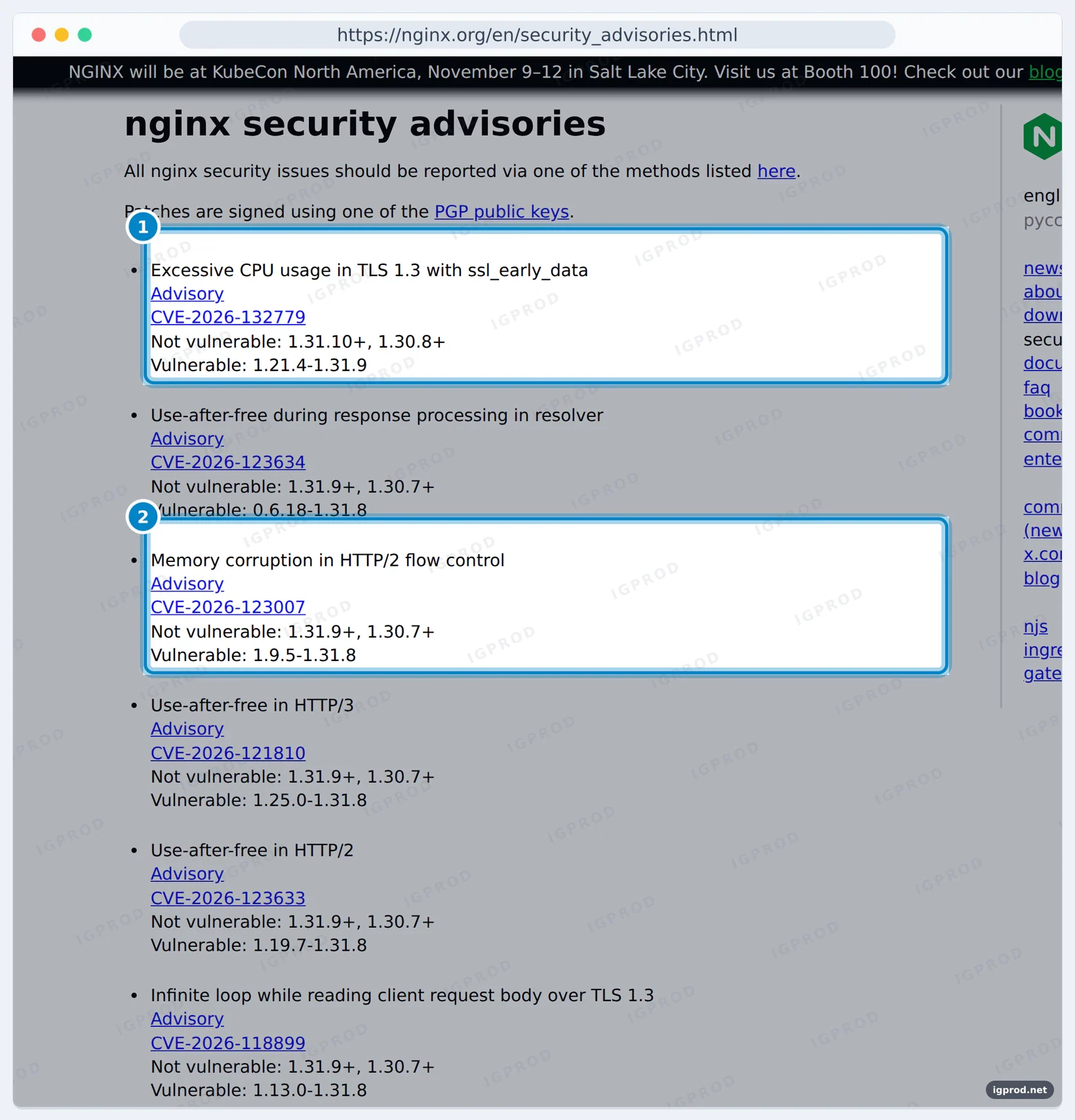
Is it used in attacks? On 24 November 2026 CISA's catalog of exploited vulnerabilities listed none of these flaws, and Xint had no evidence of attacks and had not published its exploit. Some of the bugs are over ten years old, though, so Xint cannot rule out that someone found them before. Patch now rather than wait for the first report.
Before you start
- SSH access to the server and a user with
sudo. - A copy of
/etc/nginxand of yourcompose.yamlfiles, so you can go back. - A second device on the same network, such as a laptop. Tests from the server itself skip the firewall and can show a result a visitor never sees.
- Know how visitors reach your sites: straight to your IP address, through Cloudflare's proxy (orange cloud), or through a Cloudflare Tunnel. Step 7 depends on it.
Step 1: Find every nginx on the server
Start with the host, then look inside every running container. The last command runs on the laptop and shows what visitors see in the Server header:
nginx -v
dpkg -l "nginx*" | grep ^ii | awk "{print \$2, \$3}"
docker ps --format "table {{.Names}}\t{{.Image}}"
for c in $(docker ps --format "{{.Names}}"); do v=$(docker exec "$c" nginx -v 2>&1); case "$v" in *"nginx version"*) echo "$c: $v";; esac; done
# on the laptop
curl -skI https://192.168.1.50/ | grep -i "^server"; curl -sI http://192.168.1.50:8088/ | grep -i "^server"; curl -sI http://192.168.1.50:8080/ | grep -i "^server"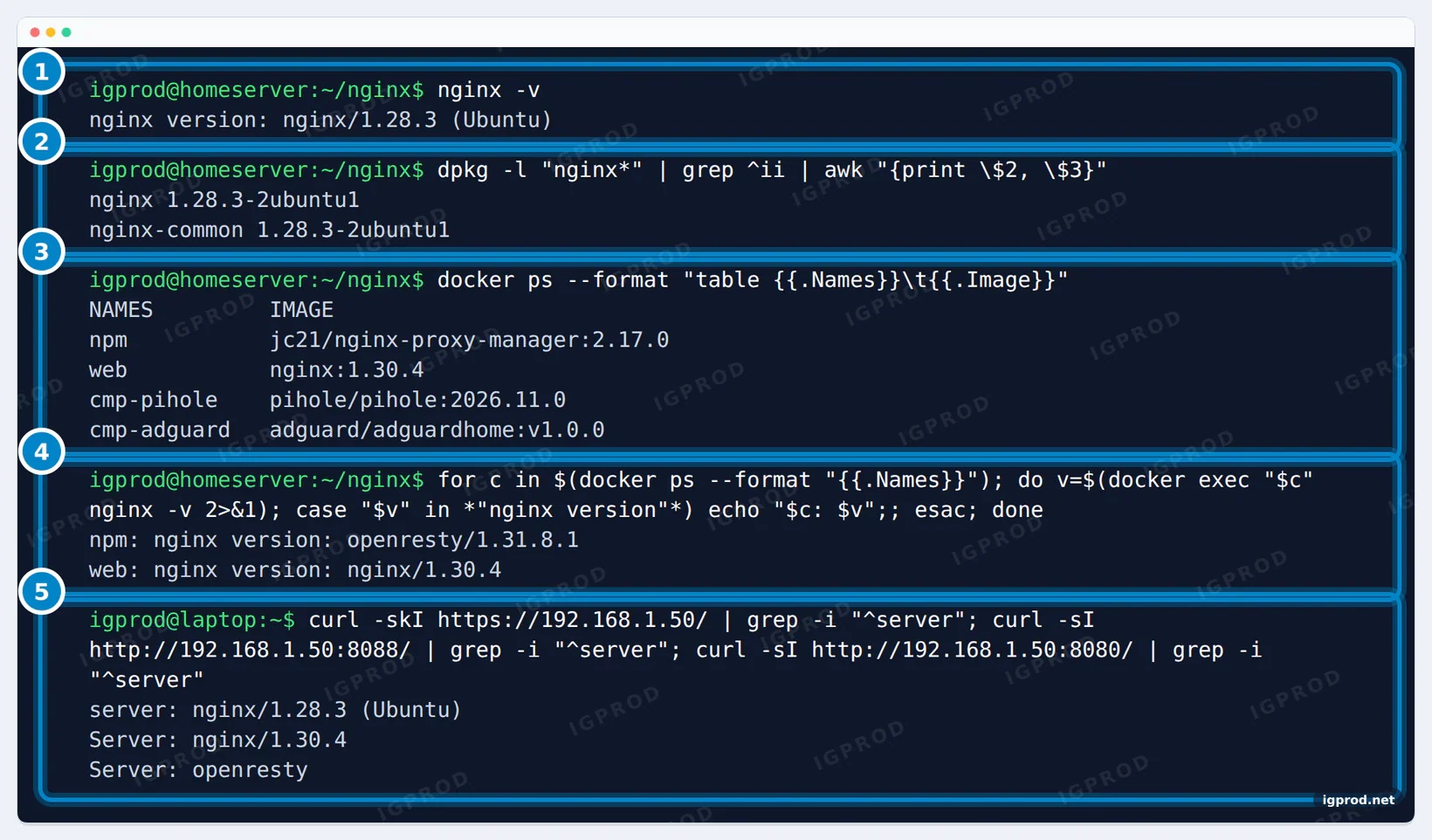
Server header each one sends to the laptop.Three nginx on one server, and each one is patched a different way: Ubuntu's package with apt, the official image by its tag, Nginx Proxy Manager by its own release. Look at the numbers too: nginx -v printed 1.28.3 and openresty/1.31.8.1, and both stayed exactly the same after the fixes below. Judge by the package or image version, not by nginx -v.
Other devices count as well. A NAS, a router or an appliance may run its own nginx; its maker's security advisory says which firmware has the fixes. NGINX Plus users find the fixed releases in F5's article K000163926.
Step 2: Check which nginx2root features you use
nginx -T prints the full configuration nginx has loaded, from every included file; nginx -V shows the modules built in. The grep keeps only the lines that matter for nginx2root:
sudo nginx -T 2>/dev/null | grep -nE "^\s*(listen|http2|http3|quic|resolver|ssl_early_data|mail|mirror|ssi|alias|try_files)\b"
nginx -V 2>&1 | grep -oE "with-(http_v2|http_v3|mail|stream)[a-z_]*" | sort -u | tr "\n" " "; echo
docker exec web nginx -T 2>/dev/null | grep -nE "^\s*(listen|http2|http3|quic|resolver|ssl_early_data|mail|mirror|ssi|alias|try_files)\b"
docker exec web nginx -V 2>&1 | grep -oE "with-(http_v2|http_v3|mail|stream)[a-z_]*" | sort -u | tr "\n" " "; echo
# on the laptop
curl -sk -o /dev/null -w "%{http_version}\n" https://192.168.1.50/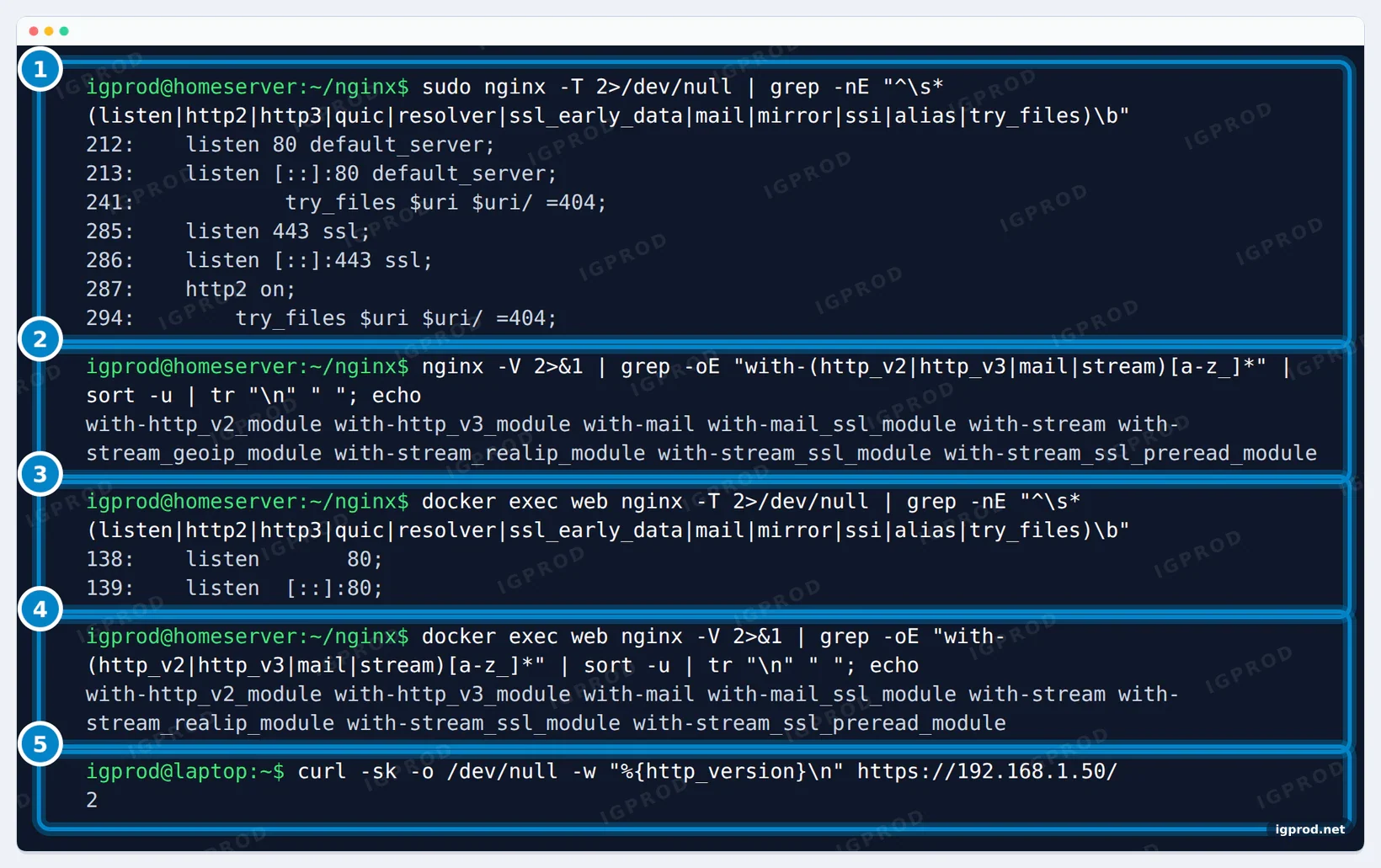
Built in is not the same as switched on. Both builds include HTTP/3 and the mail proxy, but no listen line uses quic, and there is no mail block, no resolver and no mirror. So on this server CVE-2026-123007 applies to the host's HTTPS site, where HTTP/2 is on. That site serves files itself, without proxy_pass, so CVE-2026-123633 does not apply to it. The container answers plain HTTP/1.1 on port 80, so none of the five applies to its current settings. Patch it anyway: settings change, and a later http2 on; would expose it.
| Line in your configuration | Flaw it exposes |
|---|---|
http2 on; or listen ... http2 | CVE-2026-123007; with an upstream, also CVE-2026-123633 |
listen ... quic with an upstream | CVE-2026-121810 |
resolver + proxy_pass + mirror + mirror_request_body off | CVE-2026-123634 |
mail { ... } with proxy on and auth_http | CVE-2026-113425 |
alias with try_files in the same location | CVE-2026-125283 |
ssl_early_data on; | CVE-2026-132779 (fixed on 23 November) |
A server only reachable from your home or office network still needs the update: anyone or anything already inside that network can reach it.
Step 3: Cannot update right now? Switch HTTP/2 off
If no fixed package is out for your system yet, or you need a change window, turn HTTP/2 off on every listener the internet reaches. Once it is off and the old HTTP/2 connections have ended, CVE-2026-123007 and CVE-2026-123633 no longer apply there. HTTP/3, the resolver and the mail proxy need their own checks from step 2.
sudo sed -i "s/http2 on;/http2 off;/" /etc/nginx/sites-available/homeserver && grep -n "http2" /etc/nginx/sites-available/homeserver
sudo nginx -t && sudo systemctl reload nginx
# on the laptop
curl -sk -o /dev/null -w "%{http_version}\n" https://192.168.1.50/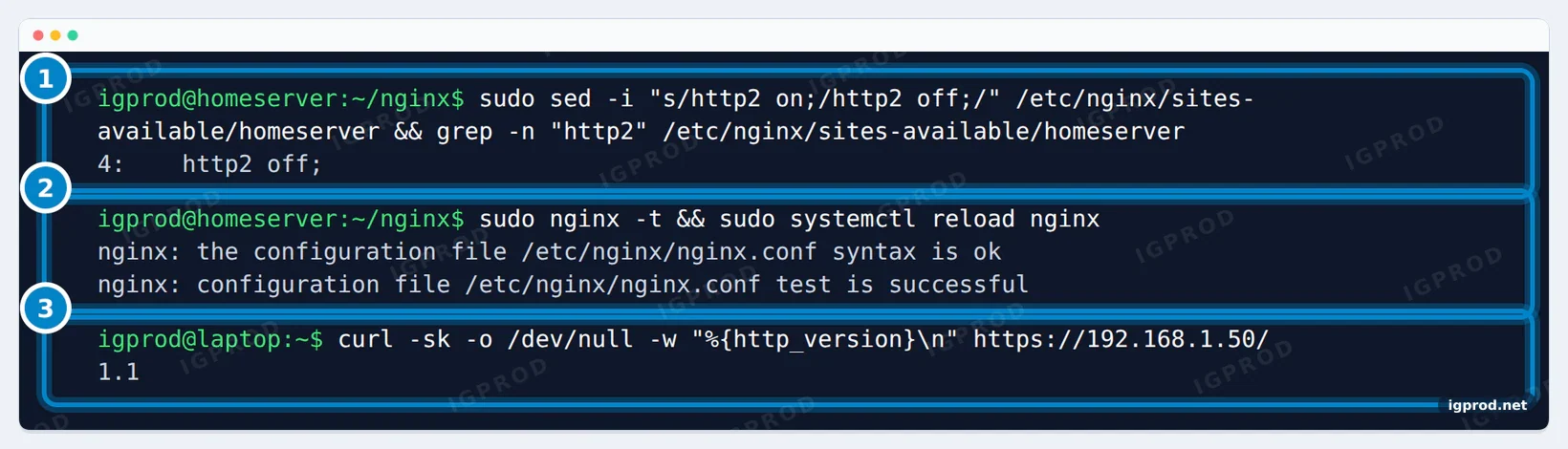
After a reload, old workers finish their open connections before they exit, so give it a minute, or run sudo systemctl restart nginx to cut them at once. Then check that nothing is left: sudo nginx -T | grep -n http2 must show no http2 on; and no listen line with http2, in any server block. Browsers fall back to HTTP/1.1 without errors; gRPC services need HTTP/2 and stop working, so test those clients first. Switch HTTP/2 back on once you have patched: our next step ends with that.
Step 4: Patch nginx from Ubuntu or Debian
First see what apt offers, whether the installed changelog already names the fixes, and which program the running nginx uses:
apt list --upgradable 2>/dev/null | grep nginx
zgrep -oE "CVE-2026-(123007|123633|121810|123634|113425)" /usr/share/doc/nginx-common/changelog.Debian.gz | sort -u | wc -l
pid=$(systemctl show -p MainPID --value nginx); echo "main process: $pid"; sudo ls -l /proc/$pid/exe | awk "{print \$(NF-2), \$(NF-1), \$NF}"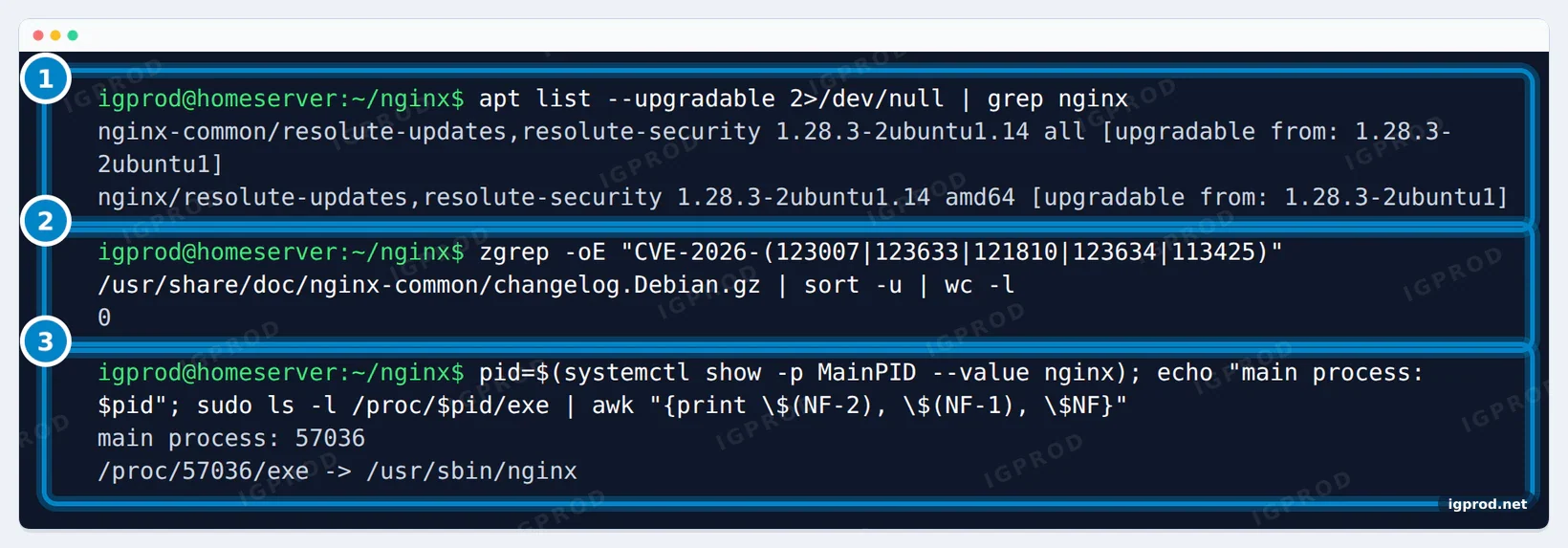
Then update only the nginx packages, and run the same checks again:
sudo apt-get install --only-upgrade -y nginx nginx-common 2>&1 | grep -E "^(Unpacking|Setting up| \* )|upgraded,"
nginx -v; dpkg -l "nginx*" | grep ^ii | awk "{print \$2, \$3}"
zgrep -oE "CVE-2026-(123007|123633|121810|123634|113425)" /usr/share/doc/nginx-common/changelog.Debian.gz | sort -u
pid=$(systemctl show -p MainPID --value nginx); echo "main process: $pid"; sudo ls -l /proc/$pid/exe | awk "{print \$(NF-2), \$(NF-1), \$NF}"
sudo sed -i "s/http2 off;/http2 on;/" /etc/nginx/sites-available/homeserver && sudo nginx -t 2>&1 | tail -1 && sudo systemctl reload nginx
# on the laptop
curl -sk -o /dev/null -w "%{http_version}\n" https://192.168.1.50/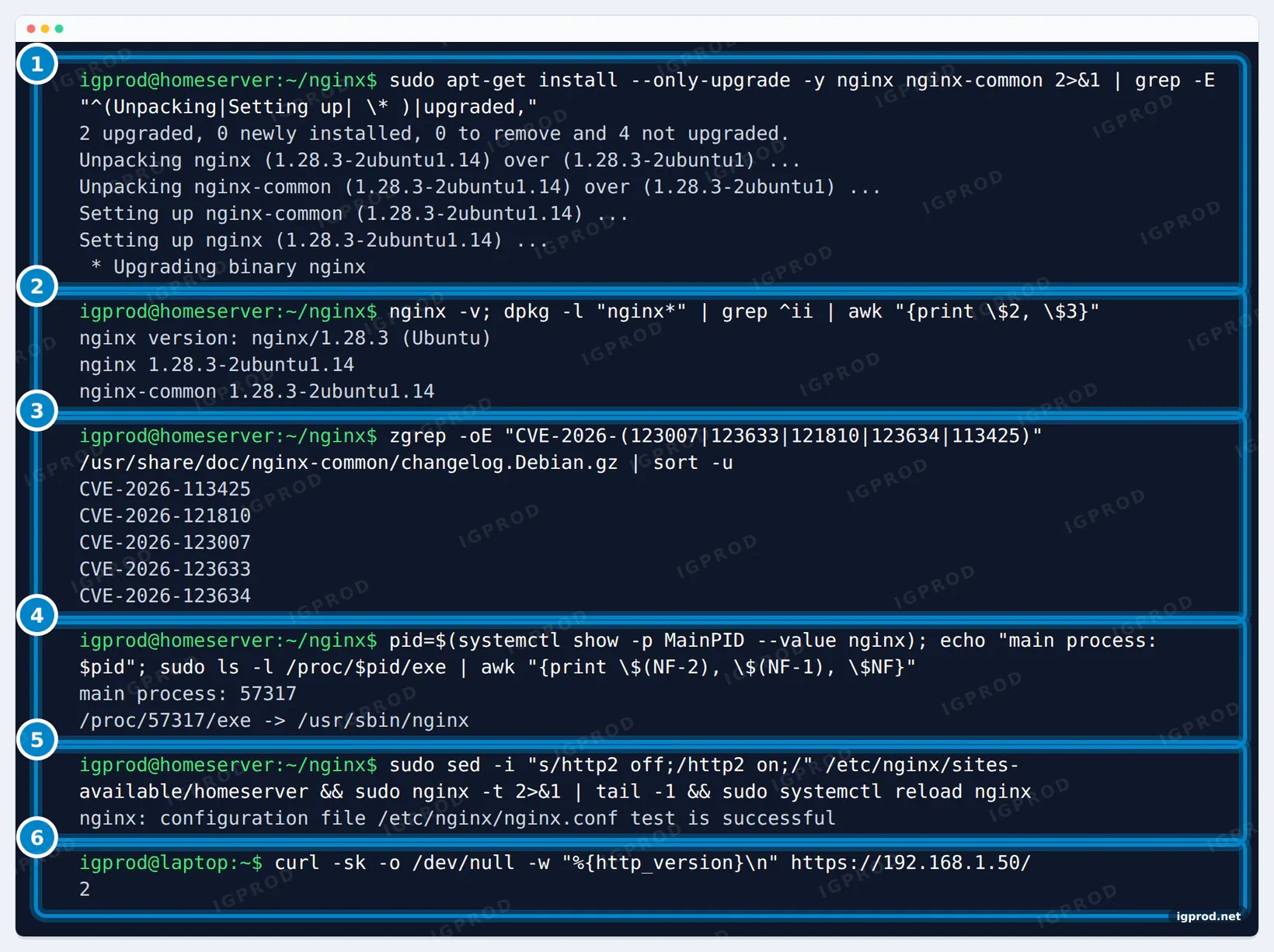
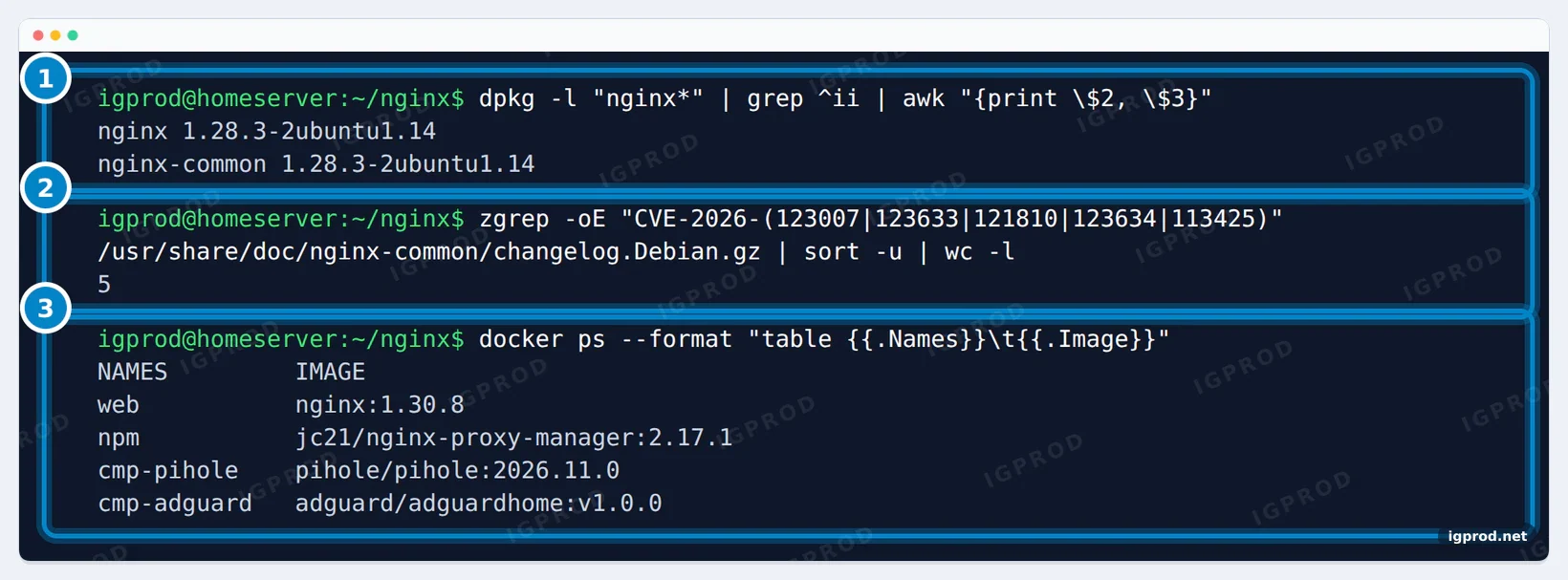
nginx -v still says 1.28.3, the package says 1.28.3-2ubuntu1.14. 3: the five CVEs in the changelog. 4: a new main process. 5: HTTP/2 back on. 6: the laptop gets HTTP/2 again.Two results matter here. First, nginx -v did not change: the fix shows only in the package version, 1.28.3-2ubuntu1.14, and in its changelog, which now names the five CVEs (and the four other flaws fixed the same day). Second, the main process changed from 57036 to 57317: the package started the new program by itself ("Upgrading binary nginx"). A plain nginx -s reload rereads the settings but keeps the old program, flaws and all. If the main process number does not change after an update, or the exe line ends with (deleted), run sudo systemctl restart nginx.
Which package fixes it on your release? Ubuntu's own page for the CVE lists the first fixed version for each one:
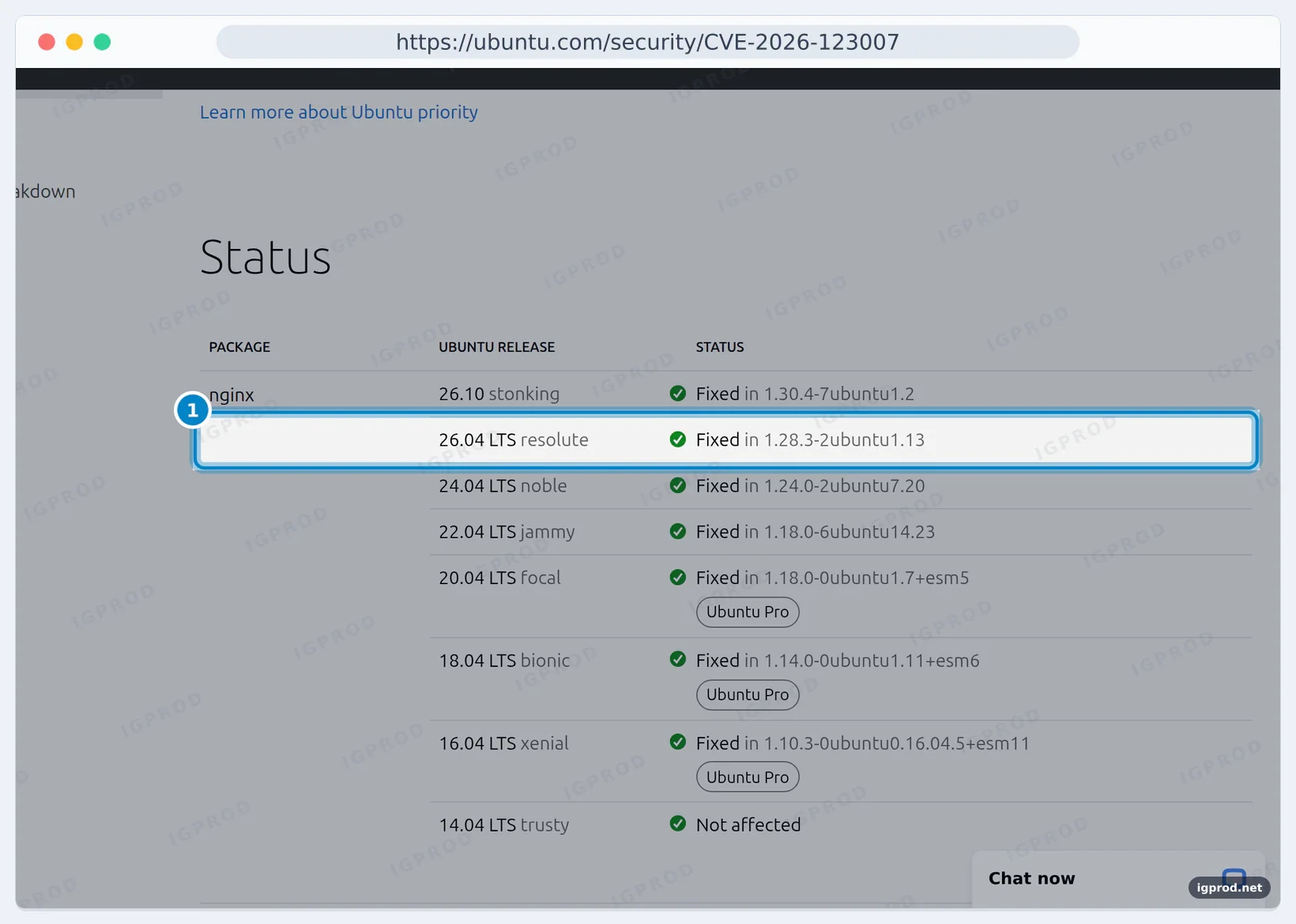
| Release | First fixed nginx package (CVE-2026-123007) |
|---|---|
| Ubuntu 26.10 | 1.30.4-7ubuntu1.2 |
| Ubuntu 26.04 LTS | 1.28.3-2ubuntu1.13 (our server got 1.28.3-2ubuntu1.14, dated 19 November) |
| Ubuntu 24.04 LTS | 1.24.0-2ubuntu7.20 |
| Ubuntu 22.04 LTS | 1.18.0-6ubuntu14.23 |
| Ubuntu 20.04, 18.04, 16.04 | Ubuntu Pro only: 1.18.0-0ubuntu1.7+esm5, 1.14.0-0ubuntu1.11+esm6, 1.10.3-0ubuntu0.16.04.5+esm11 |
| Debian 13 (trixie) | 1.26.3-3+deb13u11 (DSA-6642-1) |
| Debian 12 (bookworm) | 1.22.1-9+deb12u11 (DLA-4918-1) |
The Ubuntu versions come from Ubuntu's CVE page and the Debian ones from Debian's security tracker, both read on 25 November 2026. We tested Ubuntu 26.04 only. On other systems, look for the package version that your vendor's notice gives for CVE-2026-123007. One gap remains on Ubuntu: the 19 November package does not name CVE-2026-132779 yet. That flaw needs ssl_early_data on;, which step 2 showed is not in use here; if you use it, turn it off until your package lists the fix.
Step 5: Update the official nginx Docker image
A container keeps the nginx it was built with: the host's update does not reach it. The official image has the fixes from nginx:1.30.8 (stable, which also includes the 23 November fix) and nginx:1.31.10 (mainline); the -alpine tags follow the same numbers. Change the tag in compose.yaml and recreate the container:
cd ~/nginx/web
grep -n "image:" compose.yaml && docker exec web nginx -v
sed -i "s/nginx:1.30.4/nginx:1.30.8/" compose.yaml && docker compose pull --quiet && docker compose up -d
grep -n "image:" compose.yaml && docker exec web nginx -v && docker compose ps --format "table {{.Name}}\t{{.Image}}\t{{.Status}}"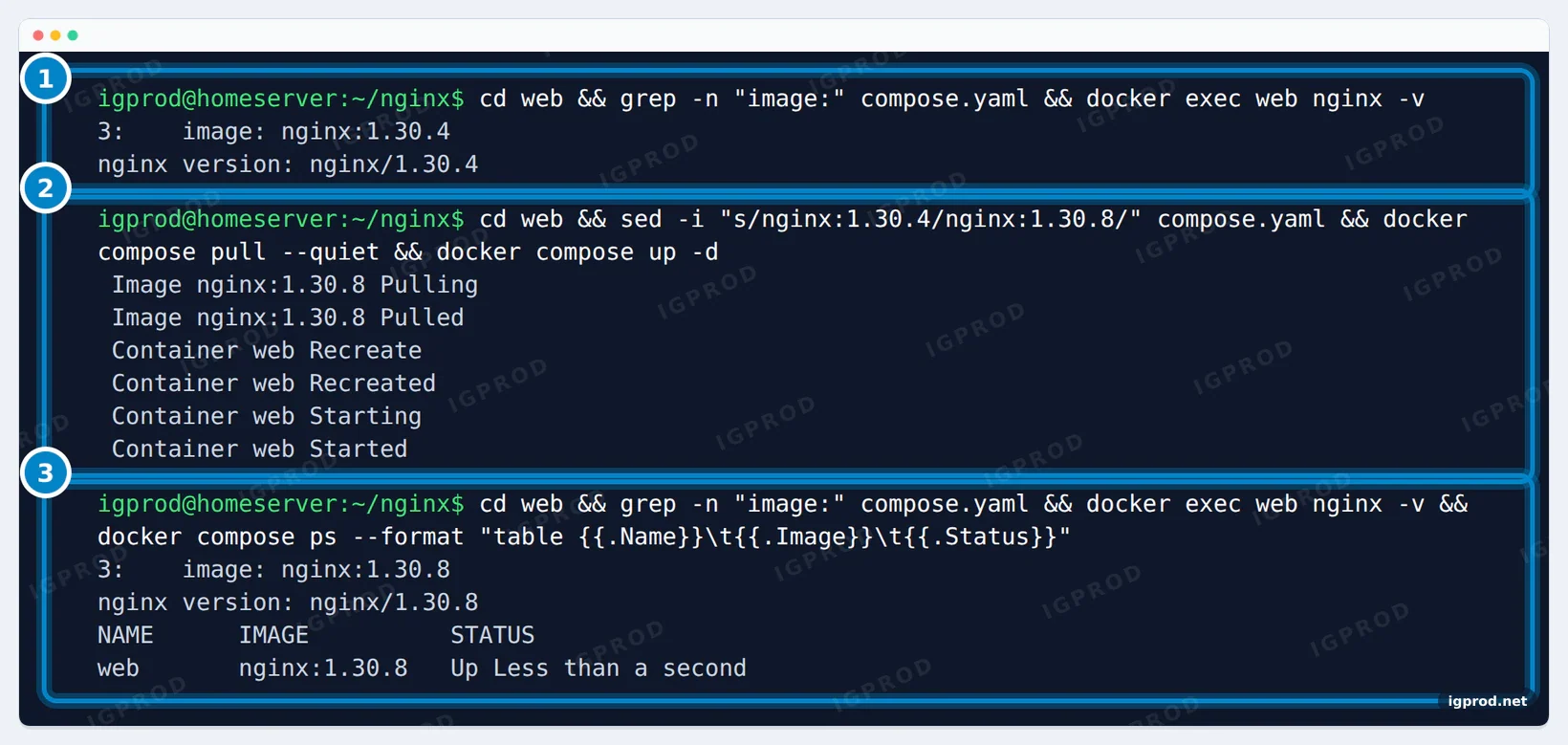
nginx:1.30.4. 2: new tag, pull, recreate. 3: after: nginx 1.30.8 running.Write the exact tag, such as 1.30.8, not latest or stable: you always know what runs, and each update is a change you make and check, like this one. If you build your own image FROM nginx, rebuild it on the new tag; a running container never updates itself.
Step 6: Update Nginx Proxy Manager
Nginx Proxy Manager brings its own OpenResty inside its image, so neither the host's update nor the official nginx image reaches it. Version 2.17.1, released on 19 November 2026, uses an OpenResty base with the nginx2root fixes backported.
cd ~/nginx/npm
grep -n "image:" compose.yaml && docker exec npm nginx -v
sed -i "s/nginx-proxy-manager:2.17.0/nginx-proxy-manager:2.17.1/" compose.yaml && docker compose pull --quiet && docker compose up -d
grep -n "image:" compose.yaml && docker exec npm nginx -v && docker compose ps --format "table {{.Name}}\t{{.Image}}\t{{.Status}}"
docker image ls --format "table {{.Repository}}:{{.Tag}}\t{{.ID}}\t{{.CreatedSince}}" jc21/nginx-proxy-manager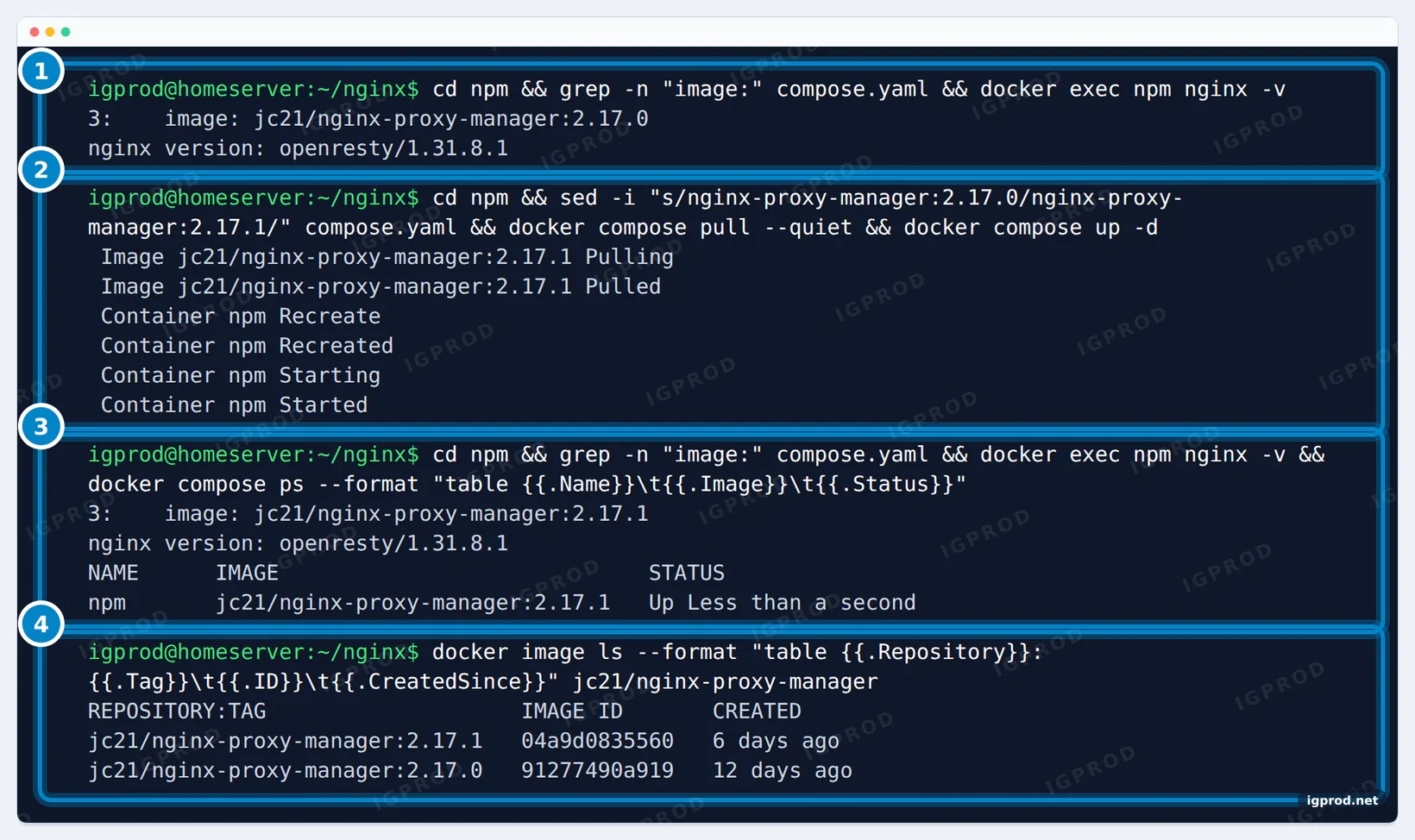
openresty/1.31.8.1. 2: new tag, pull, recreate. 3: 2.17.1, same openresty/1.31.8.1. 4: the two images: only the tag tells them apart.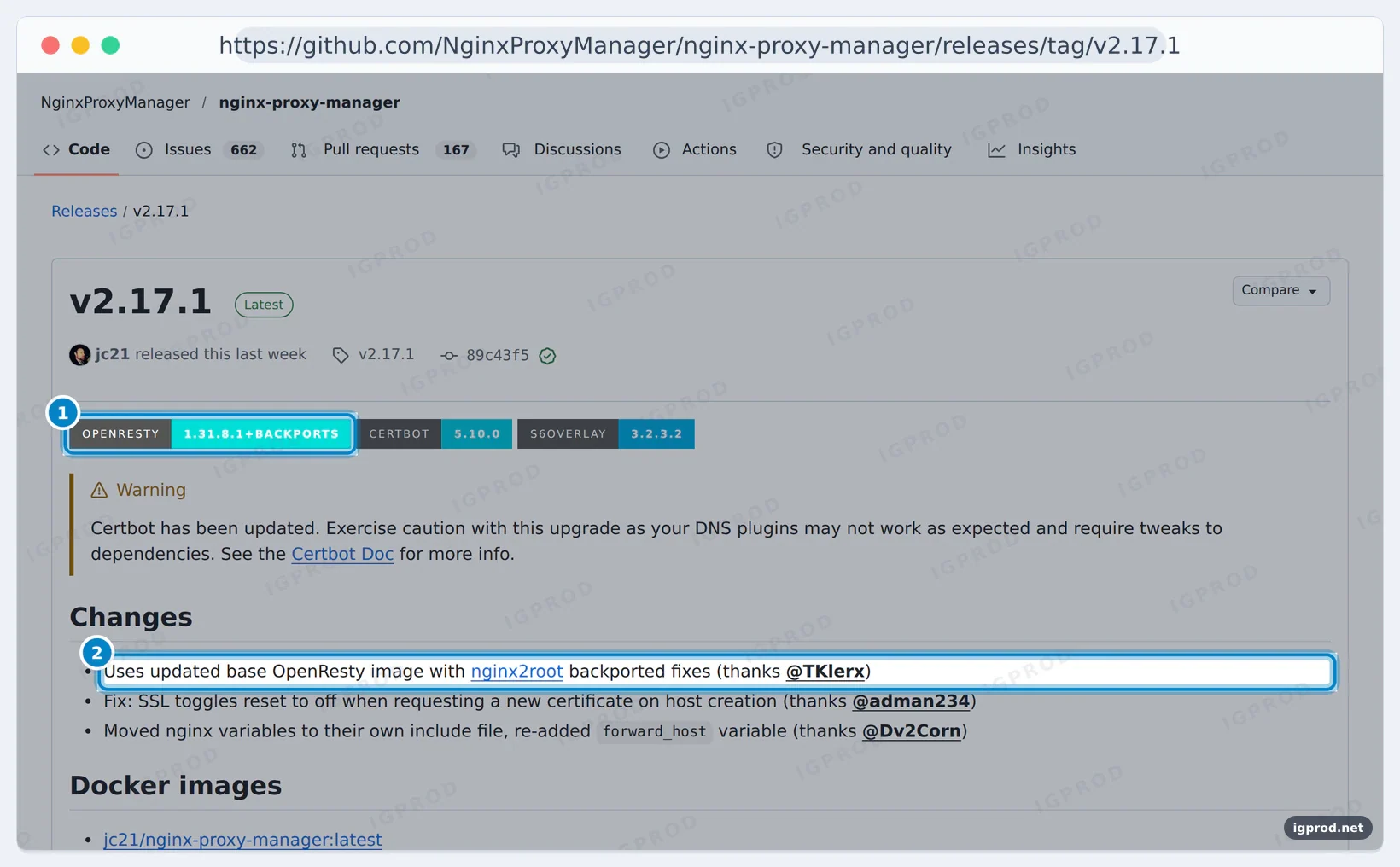
Here too the version string stayed openresty/1.31.8.1, so the image tag is the only proof. Copy the data and letsencrypt folders before you update, so you can go back to 2.17.0 if something breaks. The 2.17.1 notes also say Certbot was updated and that DNS plugins may need changes. If you use DNS challenges for certificates, renew one by hand after the update and check that it works, before an automatic renewal fails; our lab had no such certificate, so we could not test that part.
Step 7: Behind Cloudflare? Accept web traffic only from Cloudflare
Cloudflare says its proxy shields proxied hostnames (orange cloud) from the HTTP/2 and HTTP/3 flaws, as long as nobody can reach your server directly. DNS-only records (grey cloud) and mail get no such cover, and the resolver flaw is covered only in part. Most origin servers still answer anyone who finds their IP address, which defeats that shield. A firewall that opens ports 80 and 443 only to Cloudflare's published ranges closes the gap. It lowers who can reach the bugs; it does not remove them, so patch as well.
{ curl -s https://www.cloudflare.com/ips-v4; echo; curl -s https://www.cloudflare.com/ips-v6; echo; } | grep . > cloudflare-ips.txt && wc -l < cloudflare-ips.txt && head -3 cloudflare-ips.txt
sudo ufw allow 22/tcp comment ssh
while read -r r; do sudo ufw allow proto tcp from "$r" to any port 80,443 comment cloudflare > /dev/null; done < cloudflare-ips.txt; sudo ufw show added | grep -c cloudflare
sudo ufw default deny incoming && sudo ufw --force enable
sudo ufw status | head -7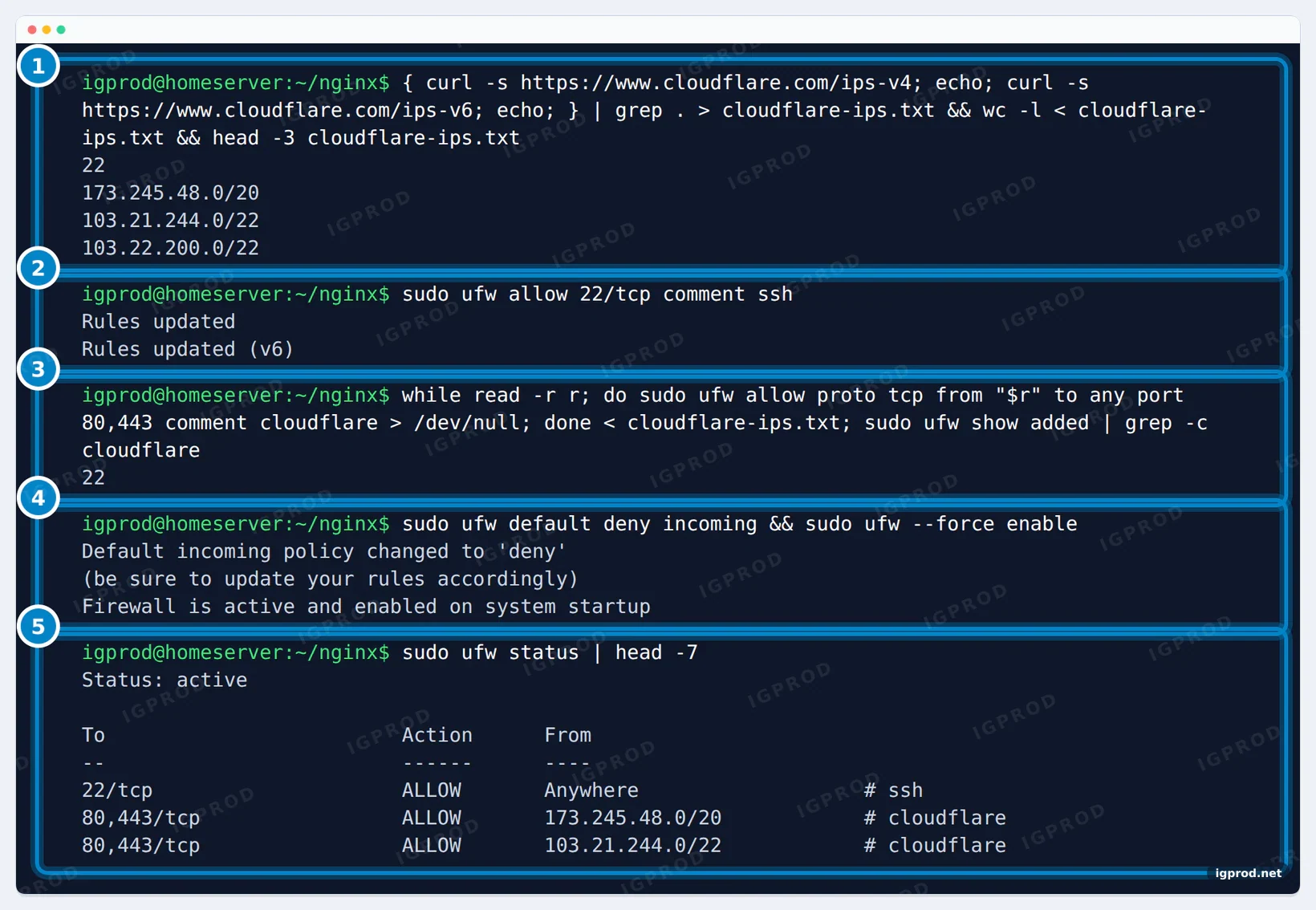
Allow SSH before you enable ufw, or you lock yourself out of the server. On 25 November Cloudflare published 15 IPv4 and 7 IPv6 ranges, 22 in all, and the loop added one rule for each; ufw keeps the IPv6 ones in its v6 table. The list can change: compare it with Cloudflare's page now and then, add new ranges and delete rules for ranges that left. Then test from outside the list and from inside it:
# on the laptop
curl -sk -m 5 -o /dev/null -w "%{http_code}\n" https://192.168.1.50/
# back on the server
docker network create --subnet 173.245.48.0/24 cf-test > /dev/null && docker run --rm --network cf-test nginx:1.30.8 curl -sk -m 5 -o /dev/null -w "%{http_code}\n" https://192.168.1.50/; docker network rm cf-test > /dev/null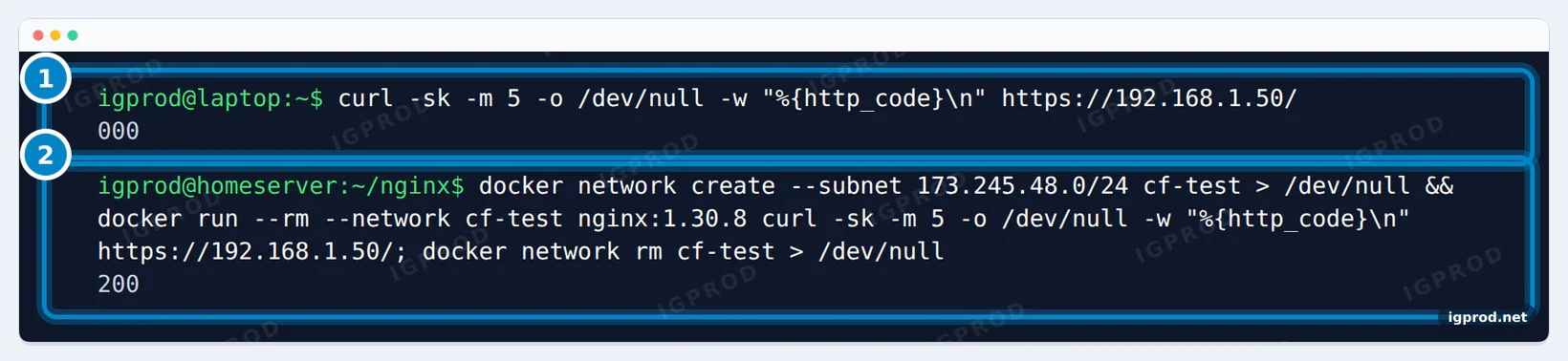
A lab cannot send traffic from Cloudflare's real addresses, so the second test gives a container an address inside 173.245.48.0/24 and asks the server from there: ufw let it through. Delete that test network right away, as the command does. While it exists, your server sends traffic for that range to the container instead of to Cloudflare. We tested the IPv4 rules only; our lab had no IPv6 route.
Two stronger options close the door for good. A Cloudflare Tunnel opens no inbound port at all: the server connects out to Cloudflare. Authenticated Origin Pulls make nginx ask for Cloudflare's client certificate, and with your own certificate they also stop another Cloudflare account that points a name at your IP address, which the IP list alone lets through. We did not test either one for this guide.
The Docker port trap: ufw does not cover published ports
After ufw default deny incoming, the container on port 8088 still answered the laptop. Docker writes its own firewall rules for published ports, and they act before ufw's, as Docker's documentation warns.
# on the laptop
curl -s -m 5 -o /dev/null -w "%{http_code}\n" http://192.168.1.50:8088/
# back on the server
cd ~/nginx/web && sed -i "s/\"8088:80\"/\"127.0.0.1:8088:80\"/" compose.yaml && grep -n "8088" compose.yaml && docker compose up -d 2>&1 | tail -1
# on the laptop
curl -s -m 5 -o /dev/null -w "%{http_code}\n" http://192.168.1.50:8088/
# back on the server
curl -s -o /dev/null -w "%{http_code}\n" http://127.0.0.1:8088/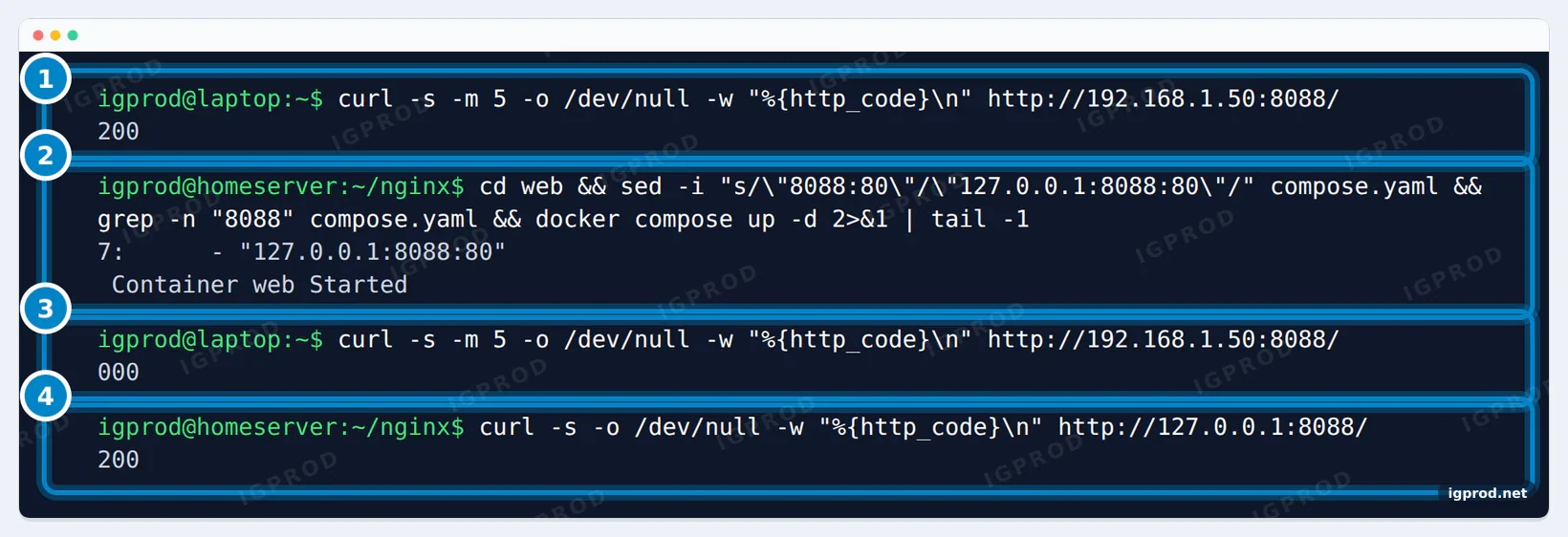
Publish a port on 127.0.0.1 when only something on the same server needs it: the host's nginx as a reverse proxy, or a tunnel connector. For a port that must stay public, Docker's documentation says to put filter rules in its DOCKER-USER chain; we did not test that.
Production checklist after nginx2root
The settings we keep on a production server, each tested in the lab unless the last column says otherwise:
| Setting | Why | Tested |
|---|---|---|
A package or image with the fixes: Ubuntu 26.04 from 1.28.3-2ubuntu1.13, nginx:1.30.8, Nginx Proxy Manager 2.17.1 | closes the flaws themselves | yes |
A new main process after each update (systemctl show -p MainPID --value nginx) | a reload keeps the old program | yes |
Exact image tags in compose.yaml | you know what runs; updates are deliberate | yes |
http2 off; until patched, on again after | removes the two HTTP/2 flaws meanwhile | yes |
HTTP/3 (quic), the mail proxy, resolver with mirror only where needed | each one is the door for one flaw | config check only |
ssl_early_data left off (the default) | CVE-2026-132779; Ubuntu's 19 November package does not name it yet | config check only |
| Ports 80 and 443 open to Cloudflare's ranges only (proxied sites) | nobody skips Cloudflare's proxy | IPv4 yes, IPv6 no |
| Container ports on 127.0.0.1 unless they must be public | Docker's ports skip ufw | yes |
server_tokens off; | scanners cannot read your version | yes |
| Watch the error log for "worker_connections are not enough" and for workers that exit on a signal | two flaws need nginx to run out of connections; crashed workers are what a failed attack leaves | no |
| Kernel update and reboot when the fix for the SCTP flaw ships | the root part of the chain | not released yet |
Hide the version number
Ubuntu 26.04's nginx.conf ships with server_tokens build; and a comment that recommends turning it off:
grep -n "server_tokens" /etc/nginx/nginx.conf
sudo sed -i "s/server_tokens build;/server_tokens off;/" /etc/nginx/nginx.conf && grep -n "server_tokens" /etc/nginx/nginx.conf && sudo nginx -t 2>&1 | tail -1 && sudo systemctl reload nginx
# on the laptop
curl -skI https://192.168.1.50/ | grep -i "^server"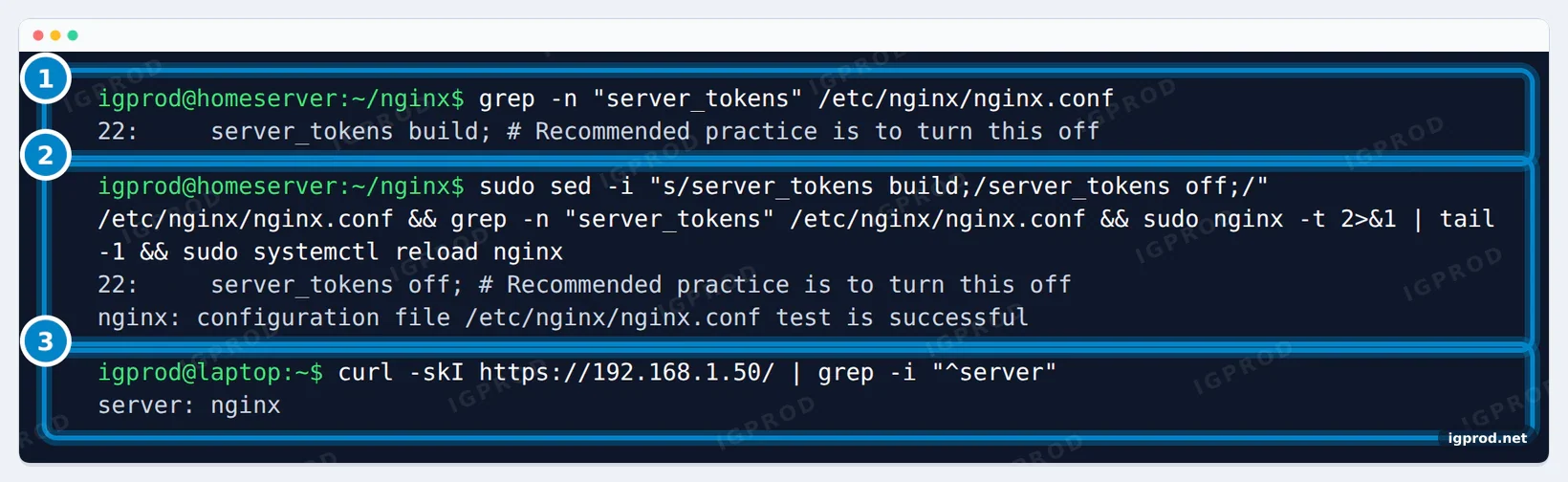
This fixes nothing by itself, but scanners that look for old versions no longer read yours in the Server header or on error pages. For a site behind Cloudflare, the Cloudflare WAF adds rules in front, but rules that read URLs and request bodies cannot stop a bug in how nginx reads HTTP/2 frames. What shields proxied sites is the proxy itself, and patching stays the fix.
What we did not test
- Any attack. We ran no exploit code, and Xint has not published its exploit. Our checks cover versions, settings, the running program and who can reach the server.
- Debian, RHEL, SUSE and other systems: the versions above come from their trackers only.
- The IPv6 firewall rules (added, not tested), Cloudflare's own network (we used a lab address inside its range), Authenticated Origin Pulls,
DOCKER-USERrules, and DNS challenge renewals after the Nginx Proxy Manager update. - The kernel fix, which was not released when we tested.
Frequently asked questions
What is nginx2root?
Five nginx flaws, led by CVE-2026-123007 in HTTP/2, plus a separate Linux kernel flaw, all found by Xint at Theori. Each nginx flaw can give an attacker code execution with the nginx worker's rights; chained with the kernel flaw, that becomes root on the host. nginx fixed its part on 18 November 2026 in 1.30.7 and 1.31.9.
Is my nginx still vulnerable if nginx -v shows an old version?
Not always. Distributions and image makers backport the fixes without changing that number: our Ubuntu server still printed 1.28.3 after the fix, and Nginx Proxy Manager 2.17.1 prints the same openresty/1.31.8.1 as 2.17.0. Compare the full package version (dpkg -l 'nginx*') or the image tag with your vendor's notice.
Is reloading nginx enough after the update?
No. nginx -s reload rereads the settings and keeps the old program in memory. The main process ID must change after the update: Ubuntu's package did that by itself in our test; otherwise run sudo systemctl restart nginx. Containers must be recreated on the new image.
Does Cloudflare protect my server from nginx2root?
Partly. Cloudflare says proxied hostnames are shielded from the HTTP/2 and HTTP/3 flaws if attackers cannot reach your server directly. DNS-only records and mail are not covered, and the resolver flaw only in part. Limit ports 80 and 443 to Cloudflare's ranges, as in step 7, and patch anyway.
Am I safe if I turn HTTP/2 off?
Safe from CVE-2026-123007 and CVE-2026-123633 on every listener where it is off, once the old connections have ended. HTTP/3, the resolver and the mail proxy flaws do not depend on HTTP/2, so check them separately, and still install the update when you can.
Does running nginx in Docker protect the host?
No. Xint got root on the host from nginx inside a Docker container, using the kernel flaw. Update the image and, when the fix ships, the host's kernel.
Is nginx2root being exploited?
No attacks were reported as of 24 November 2026, and the exploit was not public. Normal access logs do not record the HTTP/2 control frames these bugs use, so a clean access log proves little. Look in the error log for crashed workers, and watch for unexpected processes started by the nginx user.
Which nginx version fixes nginx2root?
nginx 1.30.7 and 1.31.9 fix the five; 1.30.8 and 1.31.10 also fix CVE-2026-132779. For packages, use your vendor's fixed version: on Ubuntu 26.04, 1.28.3-2ubuntu1.13 or later. For Nginx Proxy Manager, 2.17.1.
Related guides
- How to create cloudflare tunnel and expose your services with-synology
- Cloudflare WAF full transaction detection: availability, use cases and response rules
- CrowdSec vs Fail2ban: Real Tests on Ubuntu 26.04 (SSH, Nginx, Docker, RAM) and How to Switch Safely
- Cloudflare Zero Trust 101: Put a Self-Hosted App Behind Access (Free Plan, 2026)
- Change Cloudflare Nameservers Without Breaking Self-Hosted Services
- Install Docker Compose on Ubuntu using Docker’s repository
- Tailscale 101: What It Is, Setup on Linux, SSH, Exit Node and Docker (2026)
Sources
- nginx security advisories (nginx.org)
- nginx 1.30 changes (nginx.org)
- nginx2root by Xint
- Xint: nginx2root remote code execution
- Cloudflare blog: nginx2root
- Ubuntu: CVE-2026-123007
- Ubuntu security notice USN-9159-1
- Debian security tracker: CVE-2026-123007
- F5 article K000163926
- Nginx Proxy Manager v2.17.1 release (GitHub)
- nginx official image (Docker Hub)
- Cloudflare IP ranges
- Cloudflare docs: Cloudflare IP addresses
- Cloudflare docs: Authenticated Origin Pulls
- CISA Known Exploited Vulnerabilities catalog
- Docker docs: packet filtering and firewalls
- nginx docs: ngx_http_v2_module
- nginx docs: controlling nginx (reload and binary upgrade)
- nginx docs: ngx_http_core_module (server_tokens)

Leave a comment
Your email address will not be published. Required fields are marked *