
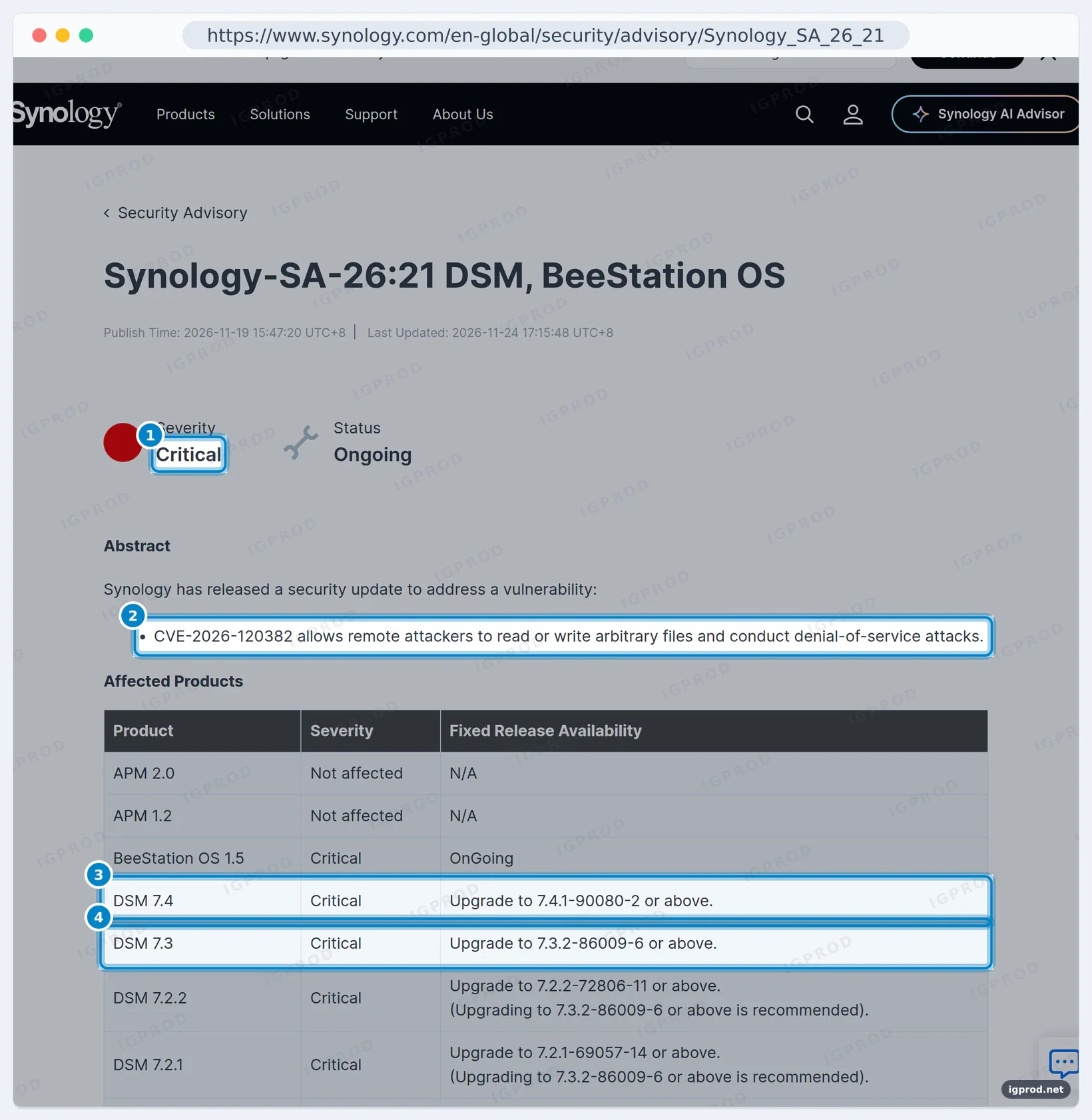
Synology published Synology-SA-26:21 on 19 November 2026: a critical flaw, CVE-2026-120382, in the OAuth API of DSM, the system that runs Synology NAS units. Synology rates it 9.8 out of 10: someone who can reach your NAS over the network can read or write files on it and stop its services, with no account and no click from you. Updates for DSM 7.4, 7.3, 7.2.2, 7.2.1 and 7.1 fix it; BeeStation OS 1.5 is affected too, and its fix was not out yet on 25 November 2026.
Tested on 25 November 2026 on a real Synology DS720+ running DSM 7.4.1-90080 Update 2 (build date 20 November 2026), with the OAuth Service package 1.3.0-0220 installed and running. Every check in this guide ran on that NAS, in DSM's web interface and over SSH as an administrator account, and no setting was changed on it. The checklist at the end covers the DSM 7.4 settings that limit the damage of the next flaw.
Quick answer: check and fix SA-26:21 in five steps
In plain words: OAuth Service is a Synology package that lets other apps sign in with the accounts on your NAS. The bug sits in DSM's OAuth API, and the fix is a DSM update, not a package update.
- Open Control Panel > Update & Restore > DSM Update and read Current DSM version.
- Compare it with the fixed release for your branch: DSM 7.4 needs 7.4.1-90080 Update 2 or later, DSM 7.3 needs 7.3.2-86009 Update 6 or later. The table below has the other branches.
- Older? Install the update from the same page, or with Manual DSM Update and the .pat file for your model.
- Cannot update today? In Package Center, open OAuth Service, click the arrow next to Open and choose Stop. That is Synology's own mitigation.
- Checking over SSH? Run
sudo synopkg status OAuthService. Withoutsudo, DSM answers "package is stopped" even when the package runs.
Six words used below: DSM is the NAS operating system; the build is the long number in the version (90080); an Update is a small fix release on top of a build; OAuth is a standard way for an app to sign you in with an account it does not own; a package is an app from Package Center; sudo runs one command with the system's full rights.
What Synology-SA-26:21 is, and who is exposed
The advisory (Synology-SA-26:21) names one flaw, CVE-2026-120382: "improper neutralization of argument delimiters in a command" (CWE-88) in the OAuth API. In plain words, DSM passes something a visitor sends into a command without cleaning it first. The score is 9.8 (CVSS 3.1: AV:N/AC:L/PR:N/UI:N), which means: over the network, easy to repeat, no account needed, no user action needed. Synology's own summary: it "allows remote attackers to read or write arbitrary files and conduct denial-of-service attacks".
| Product | Fixed release (advisory) | How DSM shows it |
|---|---|---|
| DSM 7.4 | 7.4.1-90080-2 or above | DSM 7.4.1-90080 Update 2 |
| DSM 7.3 | 7.3.2-86009-6 or above | DSM 7.3.2-86009 Update 6 |
| DSM 7.2.2 | 7.2.2-72806-11 or above (Synology recommends 7.3.2-86009-6) | DSM 7.2.2-72806 Update 11 |
| DSM 7.2.1 | 7.2.1-69057-14 or above (Synology recommends 7.3.2-86009-6) | DSM 7.2.1-69057 Update 14 |
| DSM 7.1 | 7.1.1-42962-10 or above | DSM 7.1.1-42962 Update 10 |
| BeeStation OS 1.5 | Fix ongoing on 25 November 2026 | No fixed version yet |
| DSM Enterprise 1.0, SRM 1.3 and 1.2, APM 2.0 and 1.2 | Not affected | - |
The advisory came out on 19 November 2026 with the fixes still pending. Synology added the DSM 7.3 and 7.4 fixes on 20 November and the DSM 7.1, 7.2.1 and 7.2.2 fixes on 24 November. Its status still reads "Ongoing" because of BeeStation OS.
Who is exposed: every NAS on an affected version. The risk is highest when DSM's web interface can be reached from the Internet: a port forward on the router to DSM's ports, a reverse proxy, or Synology's remote-access relay. Since no account is needed, a strong password does not help here.
Is it being exploited? On 25 November 2026, CVE-2026-120382 was not in the CISA Known Exploited Vulnerabilities catalog (catalog version 2026.11.25), and Synology's page says nothing about attacks. But on 18 November 2026 CISA added an older DSM flaw to that catalog: CVE-2024-10441 (Synology-SA-24:20, also 9.8), marked as used in ransomware campaigns. It was fixed in 2024 (DSM 7.2-64570-4, 7.2.1-69057-6 and 7.2.2-72806-1). Every release that fixes SA-26:21 is newer than those, so one update covers both.
Before you start
- An administrator account in DSM. Every check below also works in the web interface alone; SSH is optional.
- For the SSH checks: SSH switched on in Control Panel > Terminal & SNMP. Our guide to SSH into a Synology shows how, with keys.
- A backup of the shares you cannot lose, and a configuration backup (Update & Restore > Configuration Backup). DSM's own update window warns that it "cannot be rolled back to an older version".
- A few minutes when the NAS can restart: a DSM update ends with a restart, and everything it serves stops meanwhile.
Step 1: Check your DSM version in Control Panel
Go to Control Panel > Update & Restore, tab DSM Update. Two lines answer the question: Current DSM version and Status.
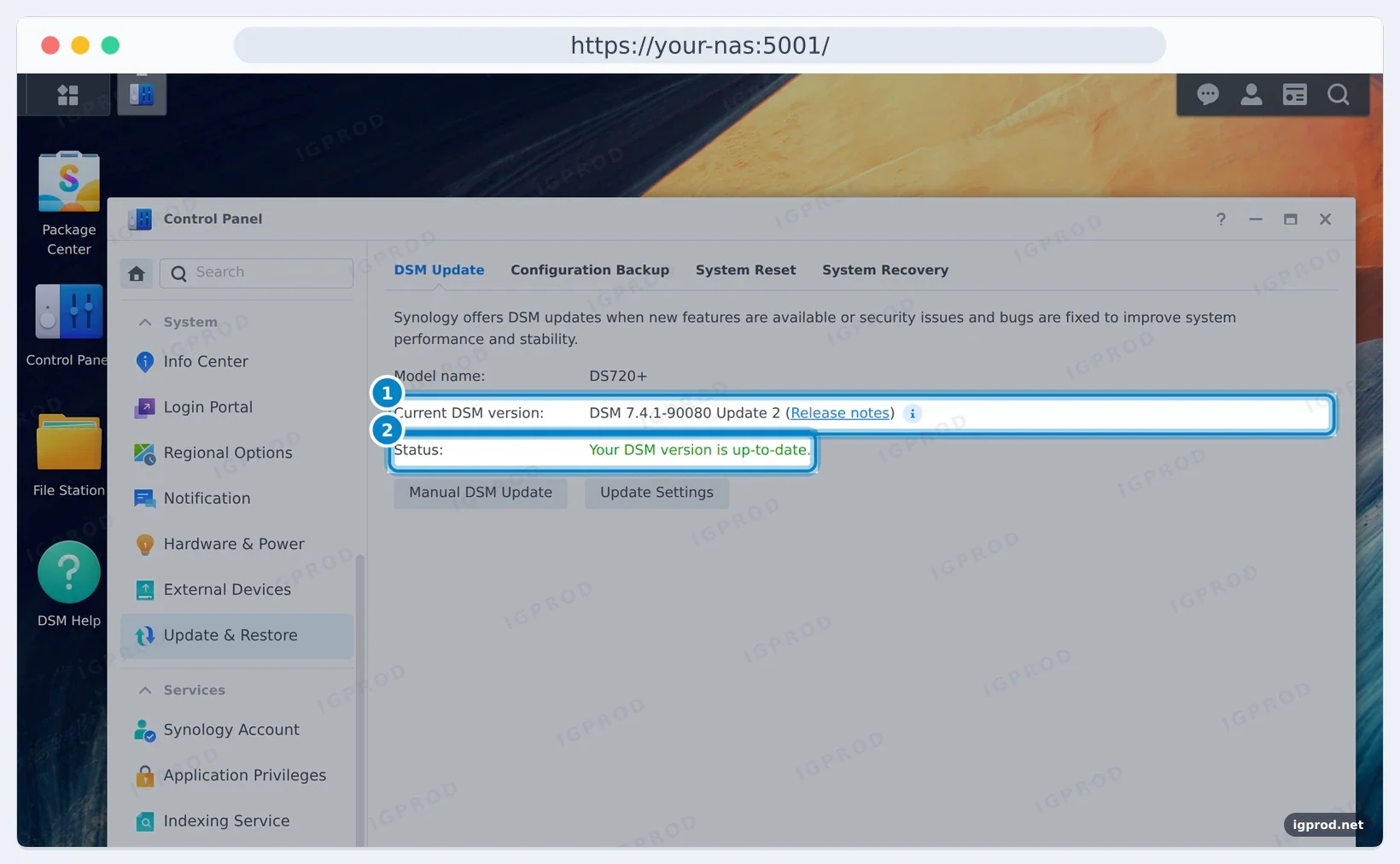
On our NAS: "DSM 7.4.1-90080 Update 2" and "Your DSM version is up-to-date." If your version is older than the fixed release for your branch, the same page offers the newer version: install it now (Step 3).
Be careful with the branch. "7.4.1-90080 Update 1" is DSM 7.4 but still affected; "7.3.2-86009 Update 6" is DSM 7.3 and fixed. Compare the build and the Update number with the row of your own branch in the table.
Step 2: Check the version over SSH
Handy when you look after several NAS units, or want the answer in a script. Sign in over SSH with an administrator account and run:
cat /etc.defaults/VERSION
synopkg version OAuthService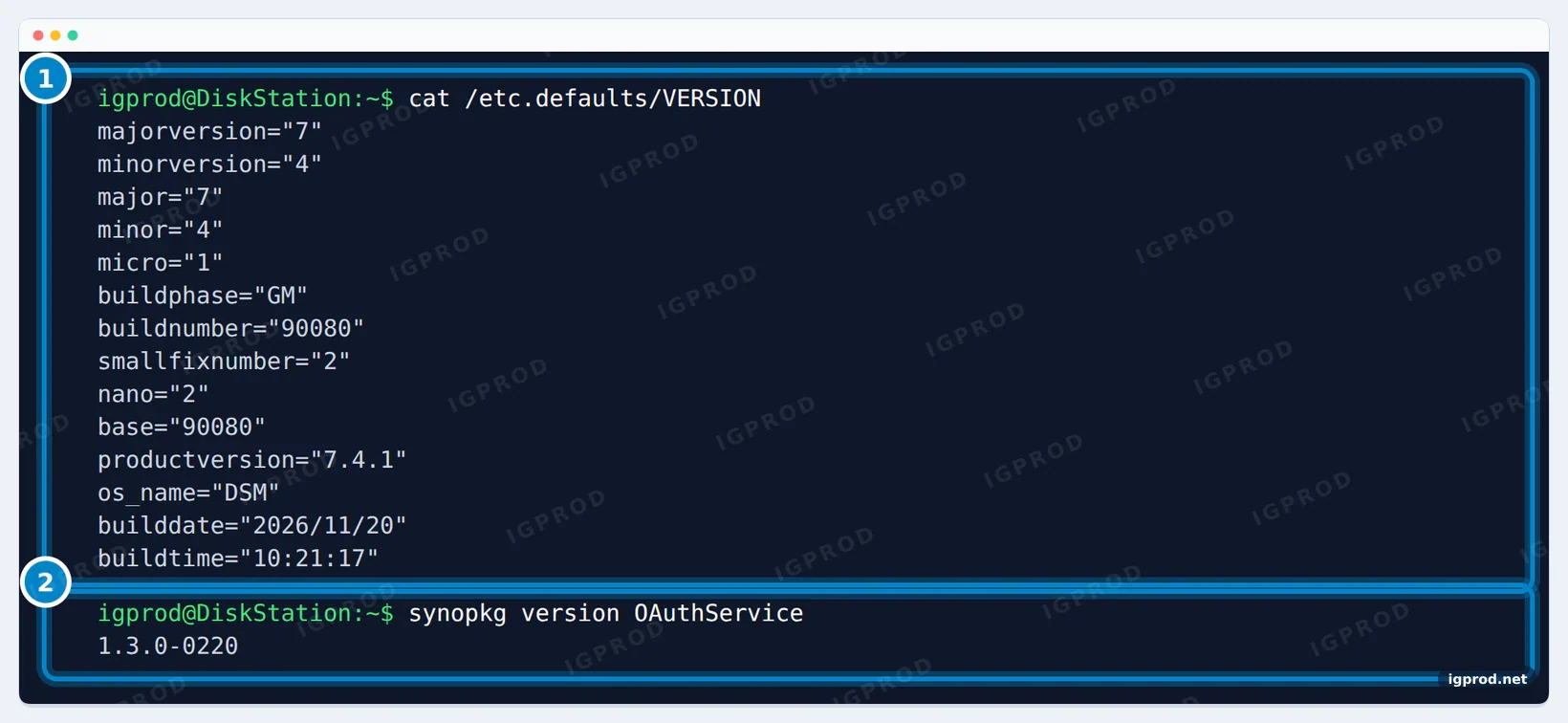
How to read the version number
The file holds the parts of the version on separate lines. On our NAS: productversion="7.4.1", buildnumber="90080" and smallfixnumber="2". Put together, that is 7.4.1-90080-2, the exact release Synology's advisory asks for, and what Control Panel shows as "DSM 7.4.1-90080 Update 2". builddate="2026/11/20" matches the day Synology added the DSM 7.4 fix to the advisory.
The second command prints the OAuth Service package version: 1.3.0-0220 on our patched NAS. That number does not tell you whether you are safe; the DSM version does.
Step 3: Update DSM
If Step 1 offers a newer version, install it from Control Panel > Update & Restore > DSM Update. The NAS restarts at the end. When the download does not come, use Manual DSM Update: download the .pat file for your exact model from Synology's Download Center, then click Browse, choose the file and confirm.
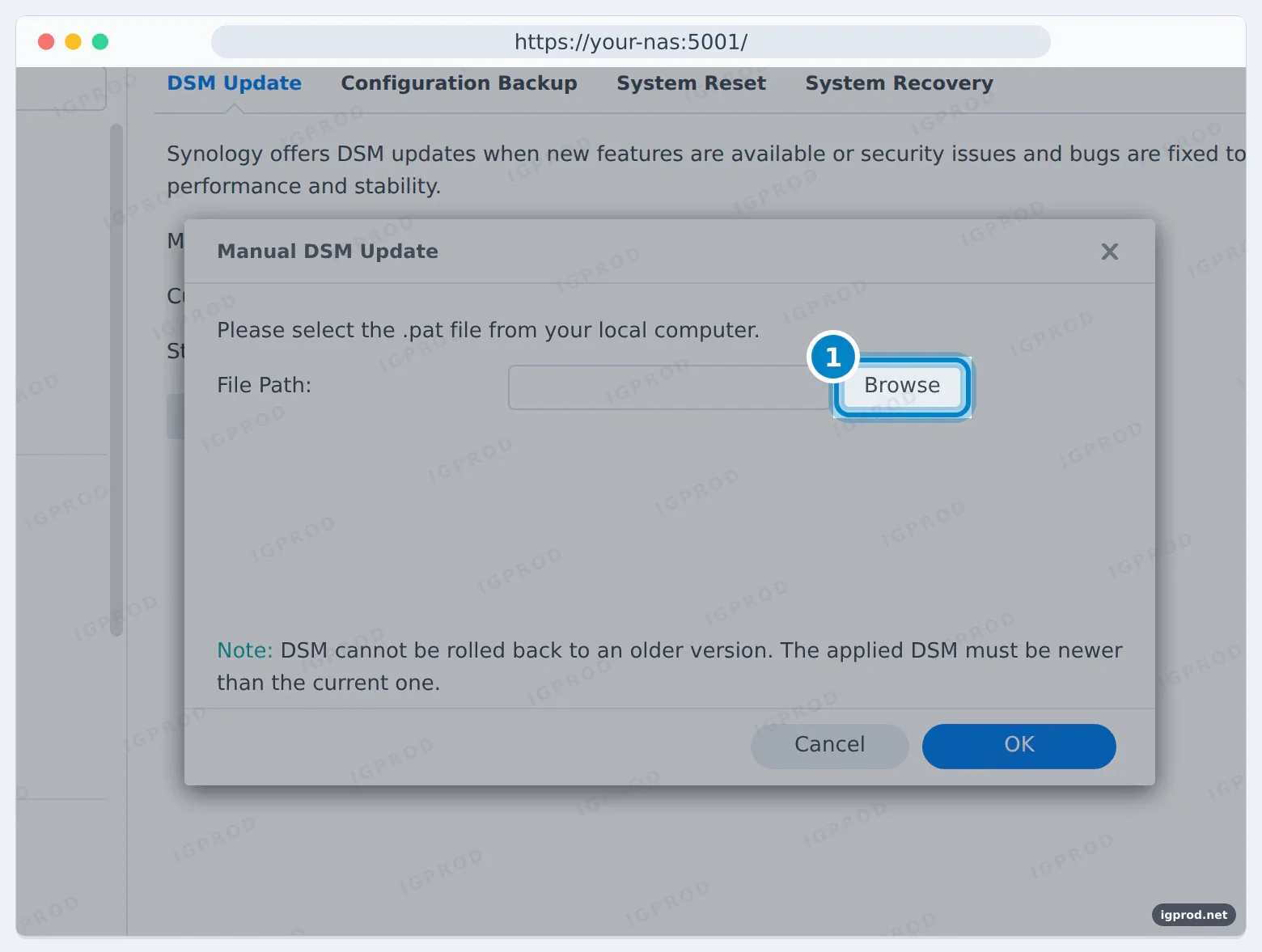
The window states the two rules: DSM "cannot be rolled back to an older version", and "the applied DSM must be newer than the current one". After the restart, repeat Step 1 or Step 2: the version must match the fixed release of your branch.
Our NAS already ran 7.4.1-90080 Update 2 when we tested, so we did not install an update during this test.
Step 4: Check OAuth Service in Package Center
Open Package Center > Installed and click OAuth Service. The page shows whether it runs and which version is installed.
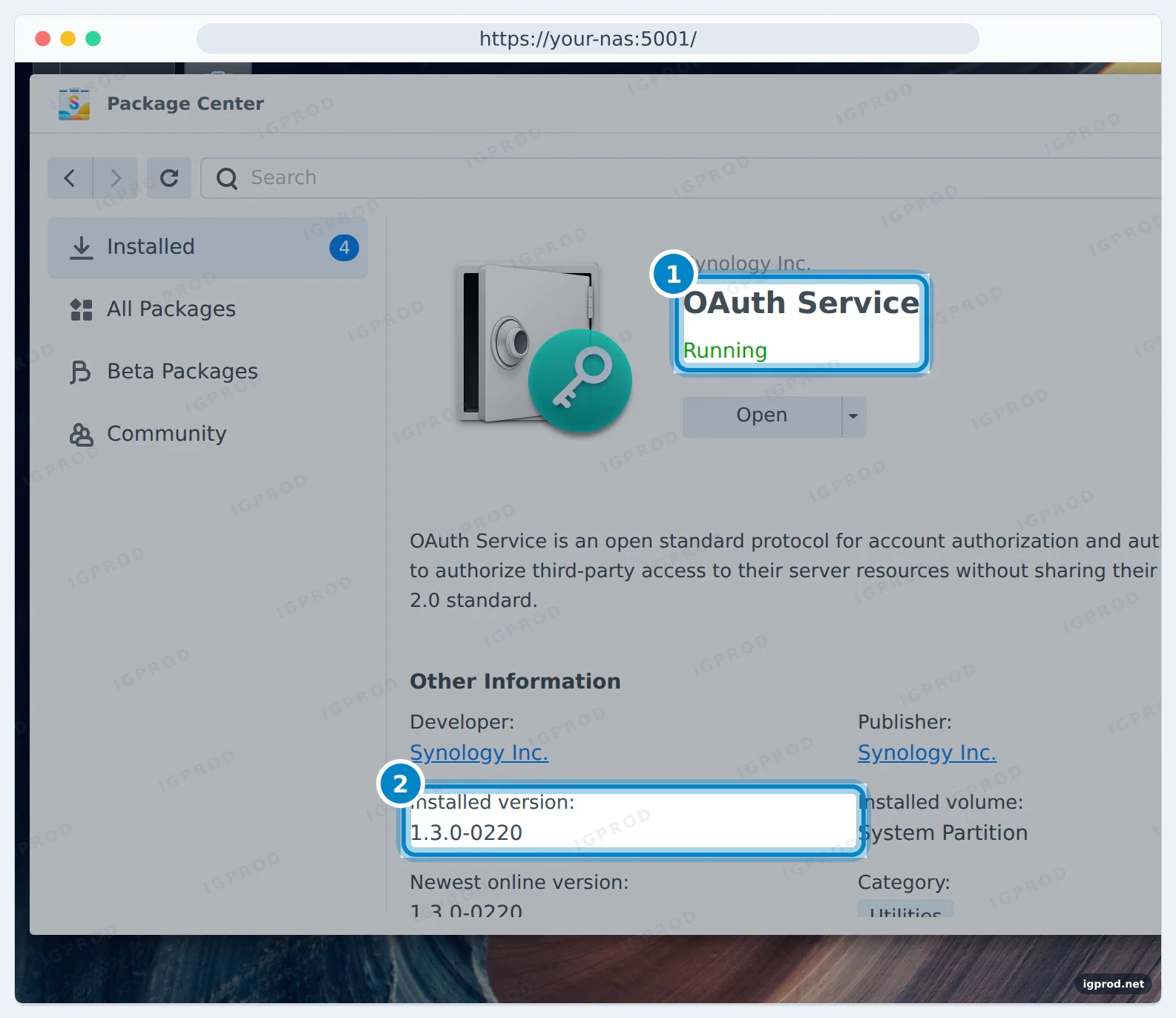
On our fixed NAS, the package is Running at version 1.3.0-0220, and Package Center lists the same number as the newest online version. So there is no package update to look for: the fixed releases in the advisory are DSM versions. A running OAuth Service is fine once DSM is up to date.
Step 5: Check it over SSH, and the sudo trap
DSM's synopkg tool reports a package's state. Ask it with and without sudo:
synopkg status OAuthService
sudo synopkg status OAuthService
sudo synopkg is_onoff OAuthService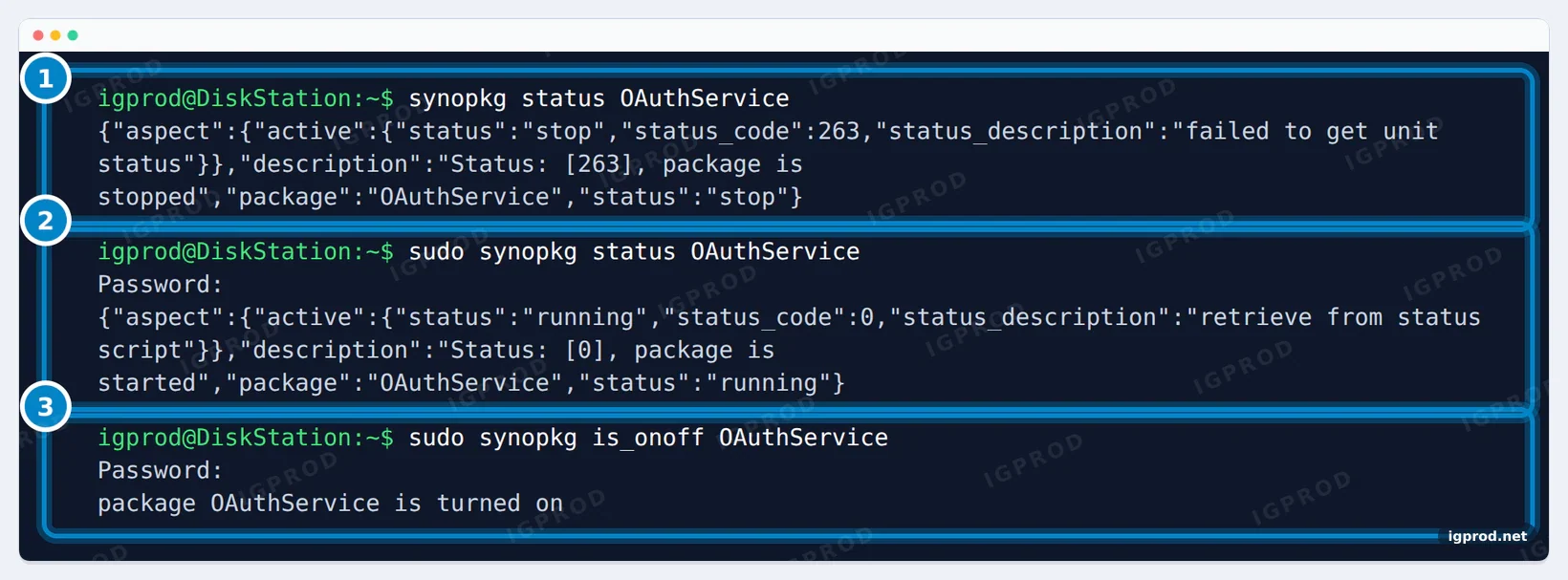
sudo, a false "stopped" (exit code 7). 2: with sudo, the truth: running. 3: the short form.Without sudo, the answer is wrong: "status":"stop" with "status_code":263, "failed to get unit status" and "package is stopped", exit code 7. With sudo, the same package is "status":"running", code 0, and is_onoff confirms "package OAuthService is turned on". A monitoring script that runs as a normal account would report a vulnerable service as stopped. Always check with sudo.
Step 6: Cannot update yet? Stop OAuth Service
Synology's mitigation is short: "Deactivate the OAuth Service package." First check whether another package on your NAS relies on it. Every installed package describes itself in an INFO file, so search them all:
grep -l OAuthService /var/packages/*/INFO
On our NAS, only OAuth Service's own file names it: no other installed package declares it. If other files show up on yours, those packages may lose their sign-in while OAuth Service is stopped; plan for that.
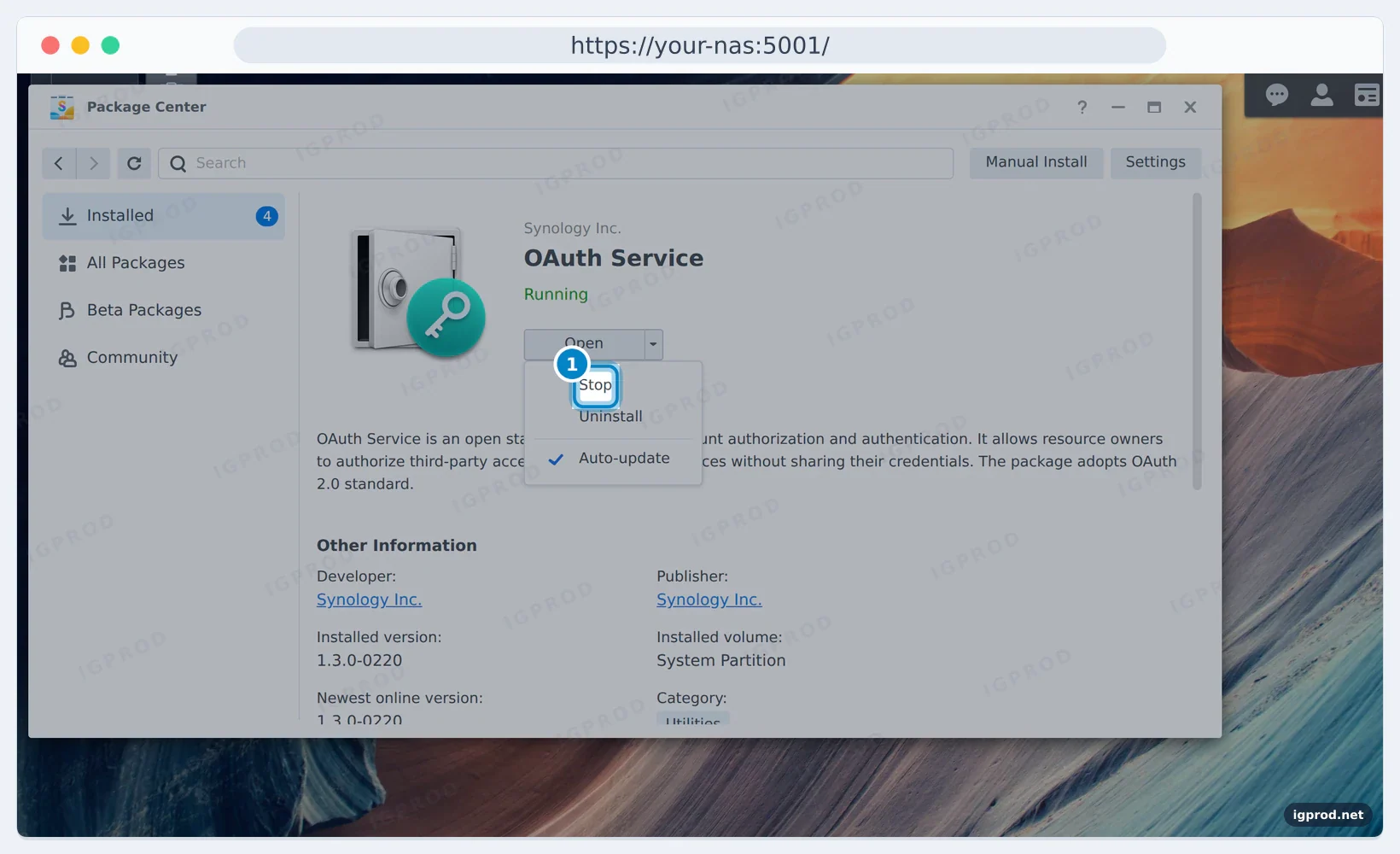
Then, in Package Center > Installed > OAuth Service, click the small arrow next to Open and choose Stop. Check with Step 4 or Step 5 that it no longer runs. Once DSM is updated, start it again from the same place if your apps need it.
Production checklist for DSM 7.4 after SA-26:21
The update closes this flaw. These four settings, all on the same NAS, limit the damage of the next one, and the fifth point is the one that would have kept SA-26:21 away from strangers.
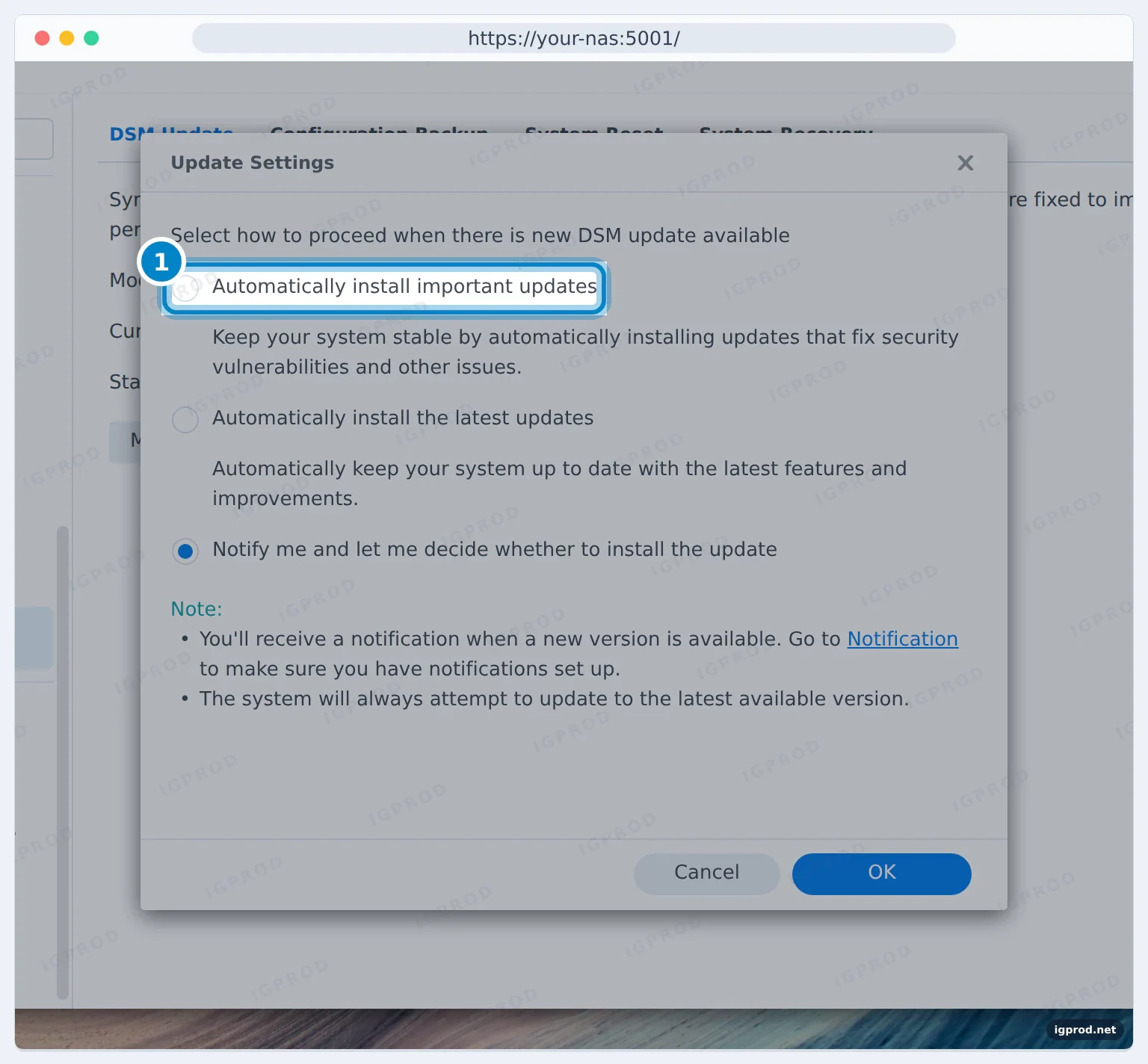
1. Install important updates automatically
Control Panel > Update & Restore > DSM Update > Update Settings. Choose Automatically install important updates: DSM then installs fixes for security flaws without waiting for you. "Notify me and let me decide" only works if someone reads the notice the same day; the DSM 7.4 fix came out one day after this advisory.
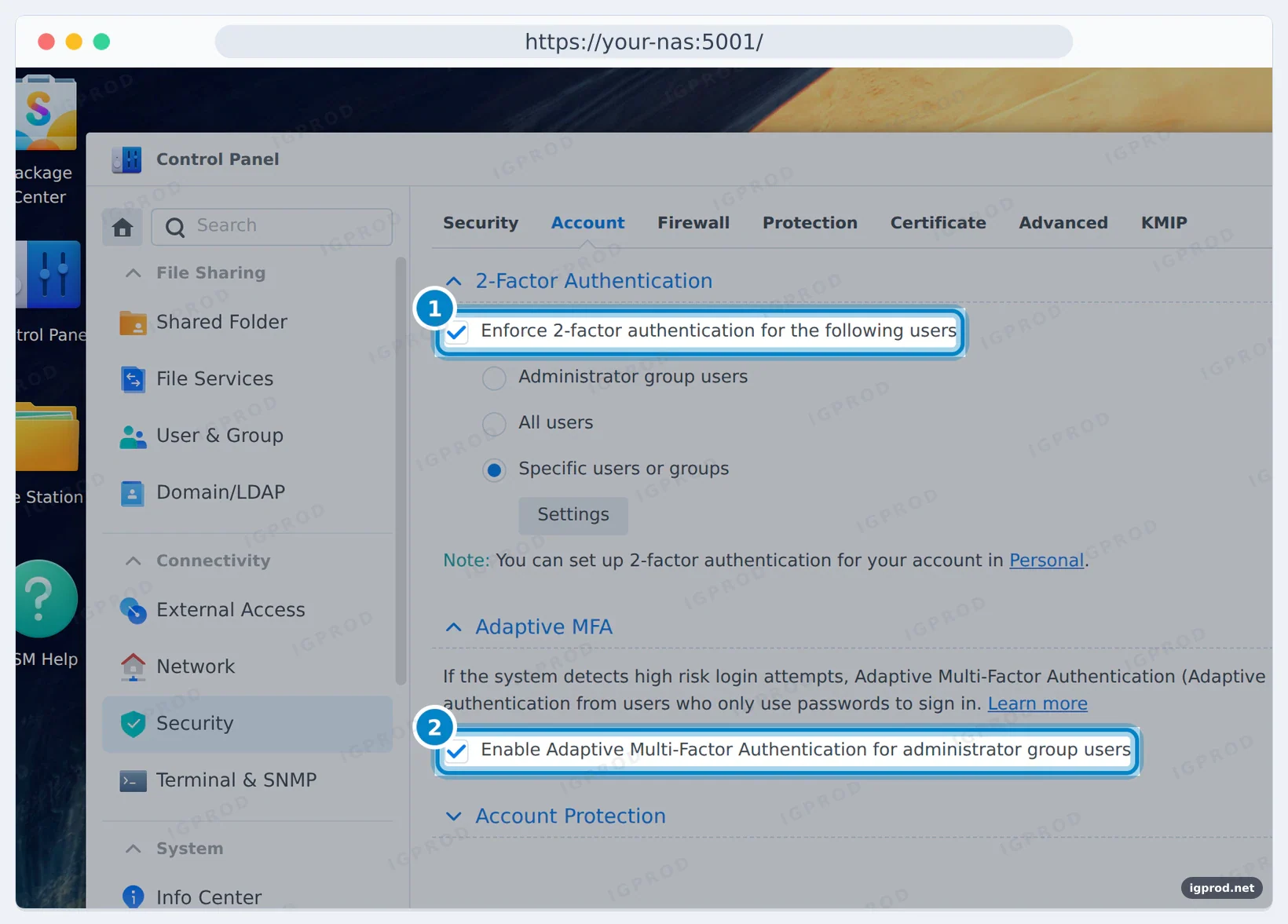
2. Enforce 2-factor sign-in for administrators
Control Panel > Security > Account. Tick Enforce 2-factor authentication for the following users and choose at least Administrator group users, then tick Enable Adaptive Multi-Factor Authentication for administrator group users. Be clear about what it does: 2-factor sign-in stops stolen passwords, not SA-26:21, which needs no sign-in at all.
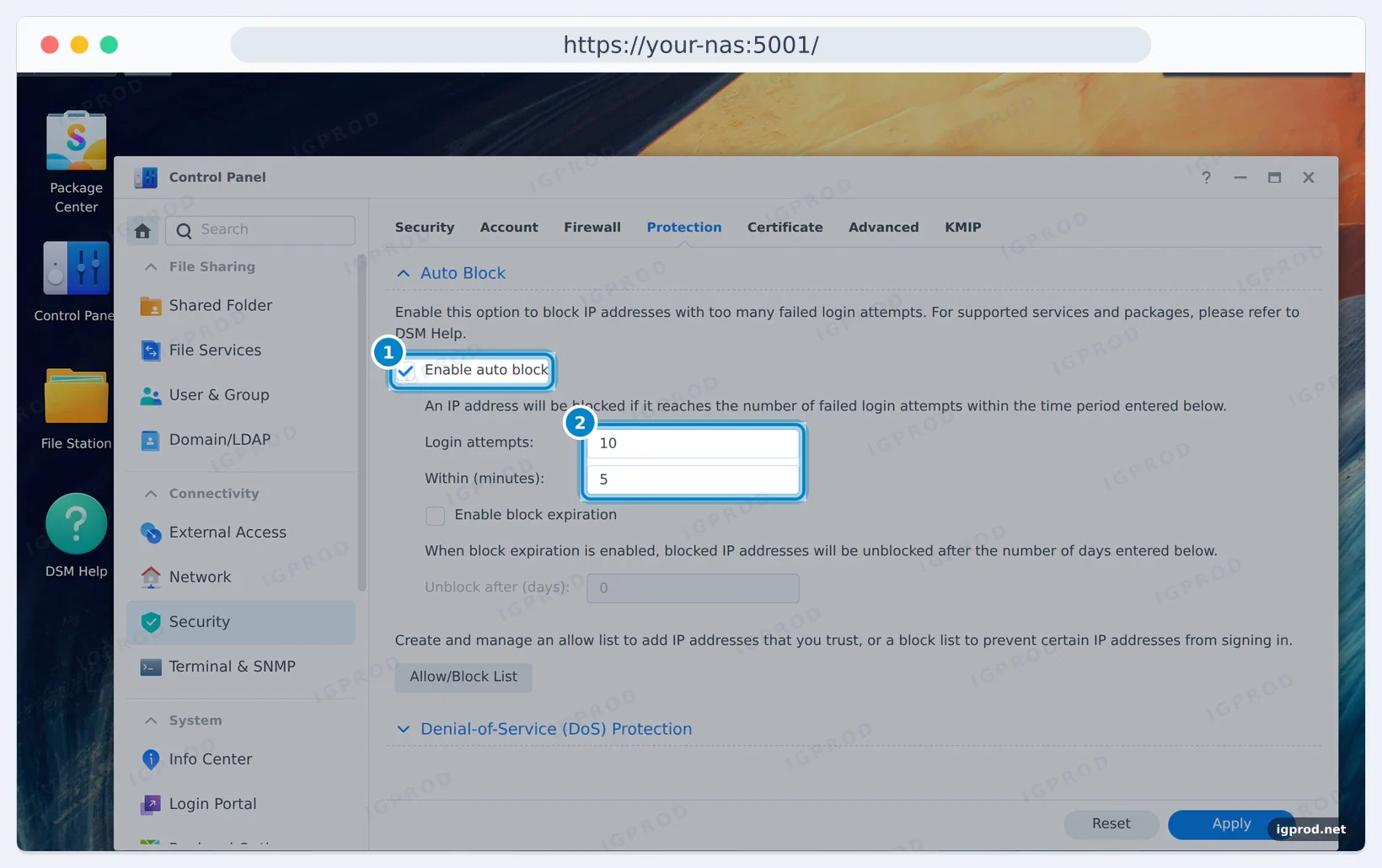
3. Keep Auto Block on
Control Panel > Security > Protection. Enable auto block blocks an address after too many failed sign-ins; 10 attempts within 5 minutes, as in the screenshot, stops password guessing without locking you out after one typo. Leave Enable block expiration off unless you want blocked addresses to come back.
4. Run Security Advisor
Open Security Advisor from the main menu and press Scan. It checks malware, system settings, accounts, the network and updates.
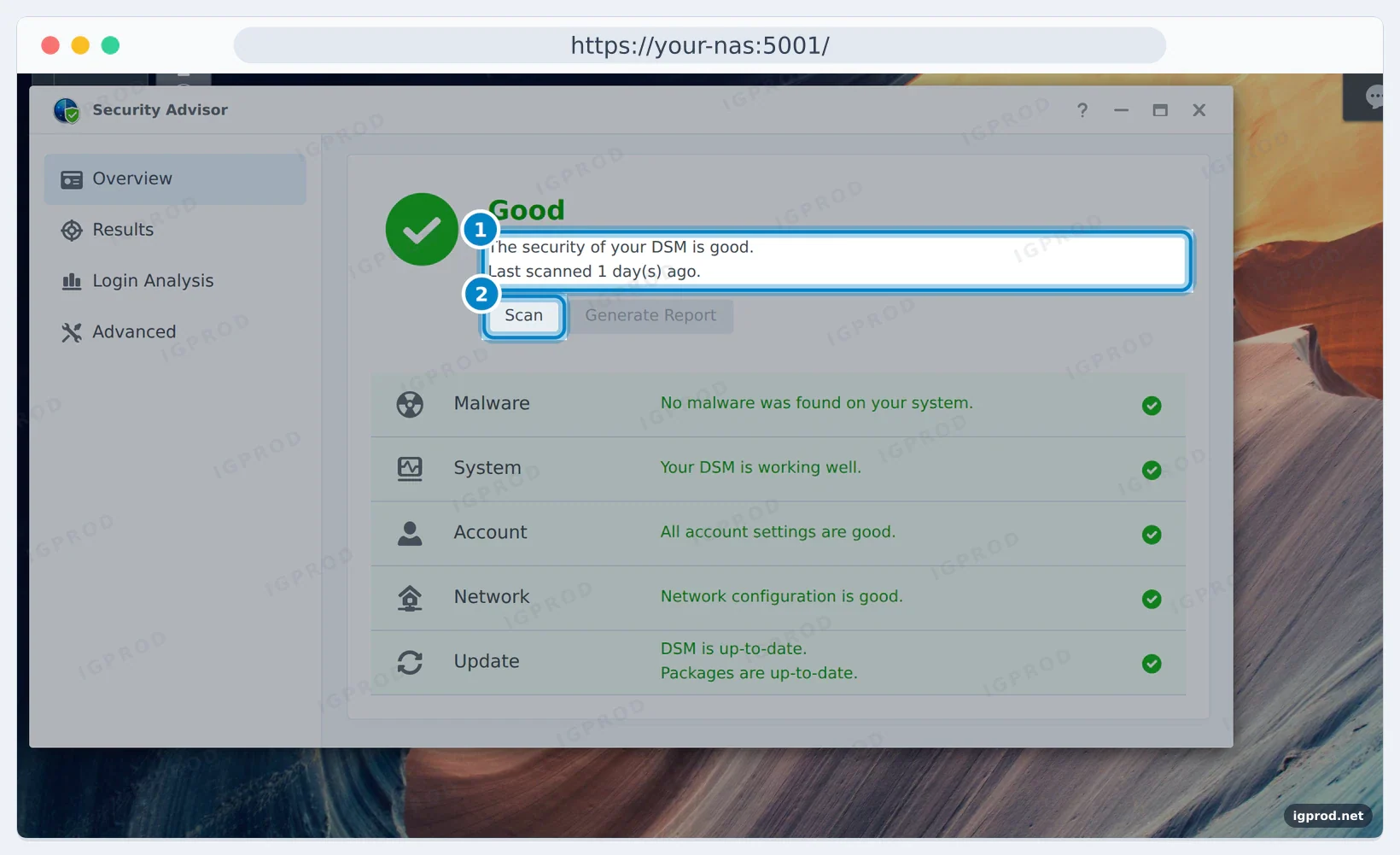
Look at "Last scanned": the overview shows the last scan, not the present. On our NAS, Package Center already offered package updates that the overview, from a scan a day earlier, did not show yet. Scan again after every update.
5. Keep DSM's web interface off the open Internet
SA-26:21 needs no account, so 2-factor sign-in and Auto Block do not stop it; only the network does. Close router port forwards to DSM's ports and reach DSM through a private network such as Tailscale, or put it behind an access gate such as Cloudflare Zero Trust Access. A NAS that strangers cannot reach gives you time when the next advisory comes out with no fix.
What we did not test
- Installing the update: our DS720+ already ran DSM 7.4.1-90080 Update 2.
- Stopping OAuth Service: we opened the menu but did not click Stop, since our NAS runs the fixed build.
- DSM 7.3, 7.2.2, 7.2.1, 7.1 and BeeStation OS: the fixed versions come from Synology's advisory.
- The flaw itself: we did not try to reproduce it, and Synology has published no technical details.
- Reaching DSM through Synology's remote-access relay or a reverse proxy: not part of this test.
Frequently asked questions
Is my Synology NAS affected by CVE-2026-120382?
Yes if it runs DSM older than the fixed release of its branch: 7.4.1-90080-2, 7.3.2-86009-6, 7.2.2-72806-11, 7.2.1-69057-14 or 7.1.1-42962-10. BeeStation OS 1.5 is affected with no fix yet on 25 November 2026. DSM Enterprise 1.0, SRM and APM are not affected.
Is updating OAuth Service in Package Center enough?
No. The fixed releases are DSM versions. On our patched NAS, OAuth Service is still 1.3.0-0220, which is also the newest version Package Center offers. Update DSM.
Does 2-factor authentication protect me from SA-26:21?
No. The flaw needs no account and no sign-in. 2-factor sign-in is still worth having for stolen passwords, but only the update, stopping OAuth Service or keeping DSM off the Internet help against this one.
What breaks if I stop OAuth Service?
Apps that sign in through your NAS with OAuth stop working until you start it again. Check which packages name it with grep -l OAuthService /var/packages/*/INFO; on our NAS, none did. We did not test stopping it.
Is CVE-2026-120382 being exploited?
It was not in CISA's Known Exploited Vulnerabilities catalog on 25 November 2026, and Synology's advisory does not mention attacks. An older DSM flaw, CVE-2024-10441, was added on 18 November 2026 as used in ransomware, which is reason enough to update now.
What does 7.4.1-90080-2 mean?
DSM version 7.4.1, build 90080, Update 2. DSM shows it as "DSM 7.4.1-90080 Update 2", and the file /etc.defaults/VERSION stores it as productversion, buildnumber and smallfixnumber.
Why does synopkg say OAuth Service is stopped when it runs?
Without sudo, synopkg status cannot read the package's state and answers "failed to get unit status", code 263, "package is stopped". Run it with sudo to get the real answer.
My NAS runs DSM 7.2.2: update within 7.2.2 or move to 7.3?
Both fix the flaw: 7.2.2-72806-11 within the branch, or 7.3.2-86009-6, which Synology recommends for DSM 7.2.2 and 7.2.1. Moving to 7.3 is a larger change, so check that your packages support it first.
Related guides
- How to SSH Into a Synology NAS: Enable SSH, Root and SSH Keys
- Synology MailPlus Server SA-26:11: Update to Fix Critical Vulnerabilities
- Tailscale 101: What It Is, Setup on Linux, SSH, Exit Node and Docker (2026)
- Cloudflare Zero Trust 101: Put a Self-Hosted App Behind Access (Free Plan, 2026)
- Local HTTPS with mkcert: Fix NET::ERR_CERT_AUTHORITY_INVALID for Self-Hosted Apps and Synology
- RAID Calculator for Synology NAS: SHR, RAID 5, 6 and 10
- Backblaze B2 vs Synology C2: A Comprehensive Comparison
Sources

Leave a comment
Your email address will not be published. Required fields are marked *