Trivy is a free, open-source security scanner from Aqua Security. Point it at a Docker image, a project folder or a Dockerfile, and it lists the known flaws (CVEs) in the packages inside, the passwords and API keys left in files, and risky build settings, each with the version or change that fixes it. In March 2026 attackers also showed that the scanner itself can be the way in: they published a malicious Trivy release and moved the tags of its GitHub Action. So this guide starts with an install you can prove, then builds a scan that stops a bad release.
Tested on 25 November 2026 on an Ubuntu 26.04.1 server with Docker: Trivy 0.76.2 (signed and released on 5 November 2026), cosign 3.1.5 and the Trivy vulnerability database of 25 November 2026. Every command below ran there, and every screenshot shows its real output. The test images are public nginx images and a small Python web app made for this test.
Quick answer: scan a Docker image with Trivy and fail the build on HIGH and CRITICAL
In plain words: Trivy reads the list of packages in an image or a folder and compares it with a public database of known flaws, rebuilt every day. You choose which severity stops a release.
- Install a pinned version from GitHub and check it before the first run: checksum, then
cosign verify-blob(Step 1). Stay away from Trivy 0.69.4, 0.69.5 and 0.69.6: those were the malicious releases. - Scan an image:
trivy image --severity HIGH,CRITICAL nginx:1.30.4-alpine. - Turn the scan into a gate: add
--exit-code 1 --ignore-unfixed. The command then fails when a HIGH or CRITICAL flaw has a fix you have not applied. - Scan the project as well:
trivy fs --scanners vuln,secret,misconfig .finds old libraries, leaked keys and Dockerfile mistakes before the image exists. - Pin Trivy itself: by digest in Docker, by full commit SHA in GitHub Actions.
Six words used below: a CVE is the public ID of one known flaw; the severity says how bad it is (LOW, MEDIUM, HIGH, CRITICAL); a flaw is fixed when a newer package version solves it; the exit code is the number a command returns, 0 for success, which CI pipelines use to stop; a digest is the sha256 ID of one exact image; an SBOM is the list of everything inside a piece of software.
Is Trivy safe to use after the March 2026 supply-chain attack?
Yes, if you pin it and check it. Here is what happened, from Trivy's own advisory GHSA-69fq-xp46-6x23 (CVE-2026-33634, rated critical). On 19 March 2026, attackers used stolen credentials to publish a malicious Trivy v0.69.4, to force-push 76 of the 77 version tags of aquasecurity/trivy-action and to replace all 7 tags of aquasecurity/setup-trivy. On 22 March they pushed malicious aquasec/trivy images 0.69.5 and 0.69.6 straight to Docker Hub. The malicious code stole credentials from the machines and CI runners that ran it.
| What | Exposed (UTC) | For about |
|---|---|---|
| Trivy v0.69.4: GitHub release, deb and rpm packages, get.trivy.dev, images on GHCR, ECR Public and Docker Hub (also tagged latest) | 19 March 18:22 to ~21:42 | 3 hours |
| trivy-action: 76 of 77 tags | 19 March ~17:43 to 20 March ~05:40 | 12 hours |
| setup-trivy: all 7 tags | 19 March ~17:43 to ~21:44 | 4 hours |
| Docker Hub images 0.69.5 and 0.69.6 | 22 March 15:43 to 23 March ~01:40 | 10 hours |
Not affected, according to the advisory: Trivy v0.69.3 or older (v0.69.3 was protected by GitHub's immutable releases, switched on for Trivy on 3 March), images pulled by digest, Trivy built from source, the official Homebrew formula, and the trivy-action tag 0.35.0. The old trivy-action tags 0.0.1 to 0.34.2 were deleted and published again with a v prefix (v0.34.2 instead of 0.34.2). On 25 November 2026 the newest releases are Trivy 0.76.2, trivy-action v0.36.0 and setup-trivy v0.3.1.
If an affected version ran on your side:
- Treat every secret that run could read as stolen, and rotate it: cloud keys, registry passwords, tokens in CI variables.
- Read your workflow run logs from 19 and 20 March 2026 for trivy-action and setup-trivy.
- Look for a repository named
tpcp-docsin your GitHub account or organization: the malware created it to upload stolen data when its first way out failed. - Delete any 0.69.4, 0.69.5 or 0.69.6 binary or image you still have.
To check a machine, ask for the Trivy version it runs and the Trivy images Docker keeps:
trivy --version | head -n 1 && docker images --format '{{.Repository}}:{{.Tag}}' | grep -i trivy
On our server: 0.76.2 and aquasec/trivy:0.76.2. A 0.69.4, 0.69.5 or 0.69.6 in that output means the machine has a malicious build: follow the list above.
Before you start
- A Linux machine on x86-64 (amd64) with Docker. On ARM, take the ARM64 files of the same release.
curl,jqandgit;sha256sumcomes with Linux. On Ubuntu:sudo apt install curl jq git.- Room for the database. Trivy downloads its vulnerability database on the first scan and keeps it in
~/.cache/trivy. Images that contain Java.jarfiles make it download a second, much larger Java database: give a small server the disk and memory for that. - An account that may use Docker, so Trivy can read local images. New to Docker? Start with our Docker for beginners guide.
Step 1: Install Trivy and verify it before the first run
Take the release file from GitHub together with its signature bundle and its checksum list. Put the version in the URL, never a "latest" link, so you always know what you run.
Download it and compare the checksum
curl -sSL --remote-name-all https://github.com/aquasecurity/trivy/releases/download/v0.76.2/trivy_0.76.2_Linux-64bit.tar.gz https://github.com/aquasecurity/trivy/releases/download/v0.76.2/trivy_0.76.2_Linux-64bit.tar.gz.sigstore.json https://github.com/aquasecurity/trivy/releases/download/v0.76.2/trivy_0.76.2_checksums.txt && ls -l
sha256sum --ignore-missing -c trivy_0.76.2_checksums.txt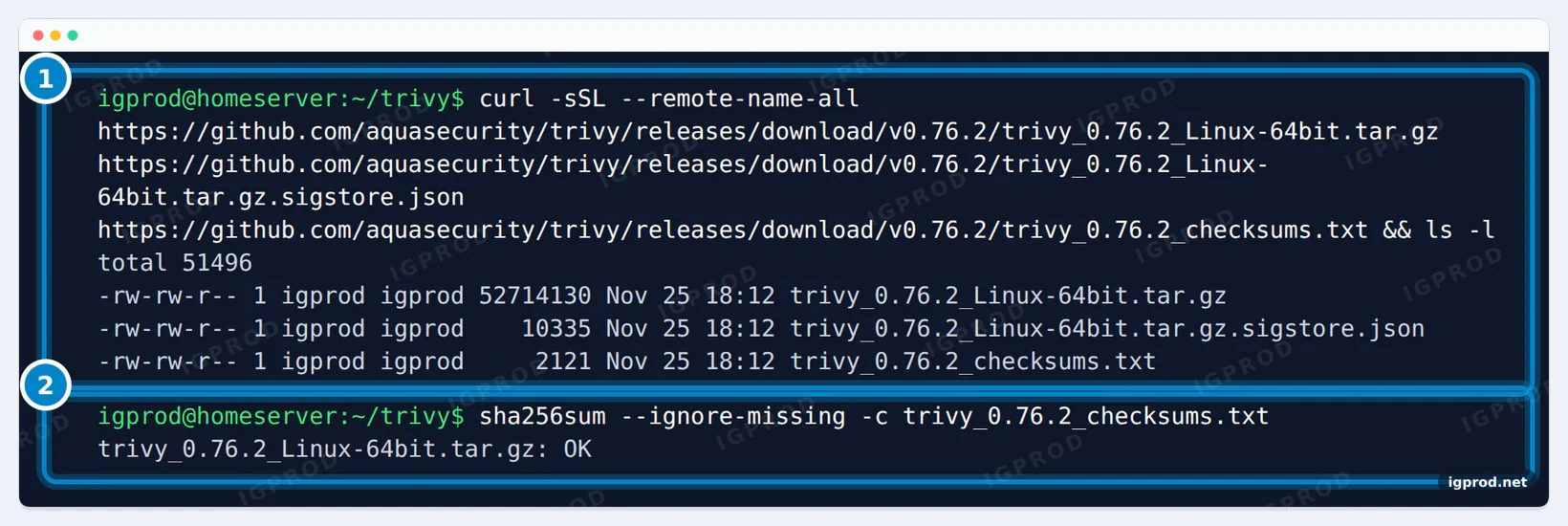
The checksum proves the file is the one the list describes. It does not prove who wrote the list: whoever can replace a release can replace both. The signature check below closes that gap.
Install cosign, checked the same way
cosign is the Sigstore tool that checks signatures. Take a pinned version and compare its checksum too:
curl -sSL --remote-name-all https://github.com/sigstore/cosign/releases/download/v3.1.5/cosign-linux-amd64 https://github.com/sigstore/cosign/releases/download/v3.1.5/cosign_checksums.txt && sha256sum --ignore-missing -c cosign_checksums.txt
sudo install -m 0755 cosign-linux-amd64 /usr/local/bin/cosign && cosign version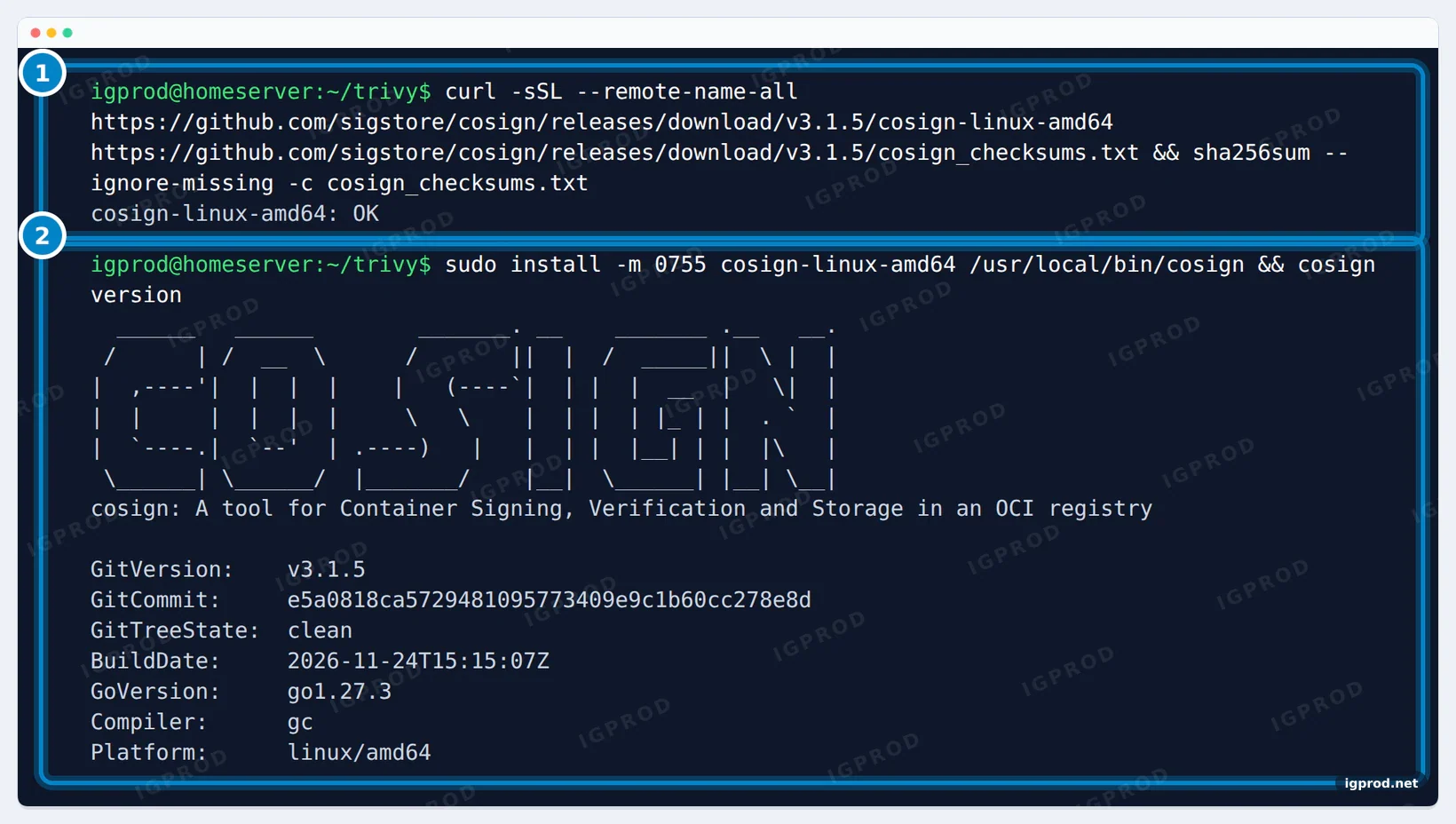
Verify the signature of the Trivy file
This is the check from Trivy's own advisory. It accepts only a signature made by a GitHub Actions workflow of the aquasecurity organization, then reads the time the signature was logged:
cosign verify-blob --certificate-identity-regexp 'https://github\.com/aquasecurity/' --certificate-oidc-issuer 'https://token.actions.githubusercontent.com' --bundle trivy_0.76.2_Linux-64bit.tar.gz.sigstore.json trivy_0.76.2_Linux-64bit.tar.gz
date -u -d @$(jq -r '.verificationMaterial.tlogEntries[].integratedTime' trivy_0.76.2_Linux-64bit.tar.gz.sigstore.json)
To see it fail, add one byte to a copy and check the copy:
cp trivy_0.76.2_Linux-64bit.tar.gz tampered.tar.gz && printf 'x' >> tampered.tar.gz && cosign verify-blob --certificate-identity-regexp 'https://github\.com/aquasecurity/' --certificate-oidc-issuer 'https://token.actions.githubusercontent.com' --bundle trivy_0.76.2_Linux-64bit.tar.gz.sigstore.json tampered.tar.gz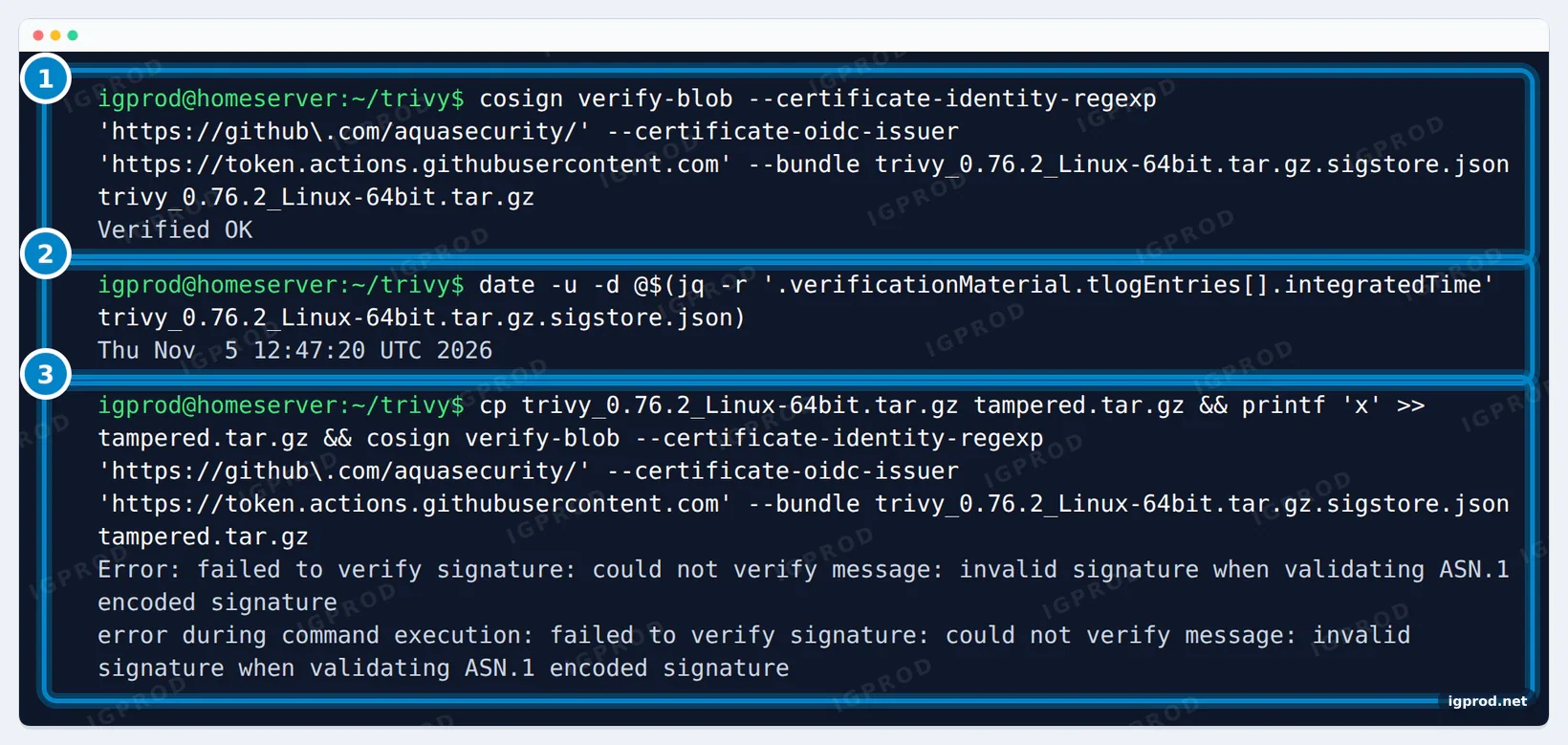
Three answers. "Verified OK": the file was signed in Aqua Security's GitHub workflow and has not changed since. The signing time comes from the public transparency log: 5 November 2026 at 12:47:20 UTC, the day v0.76.2 came out. A file signed on another day, such as 19 March 2026, needs an explanation before it runs. The copy with one extra byte fails with "invalid signature when validating ASN.1 encoded signature" and exit code 1, so a script stops there.
Install the binary
rm tampered.tar.gz && tar -xzf trivy_0.76.2_Linux-64bit.tar.gz trivy && sudo install -m 0755 trivy /usr/local/bin/trivy && trivy --versionAfter the first scan, the same command also shows the vulnerability database:
trivy --version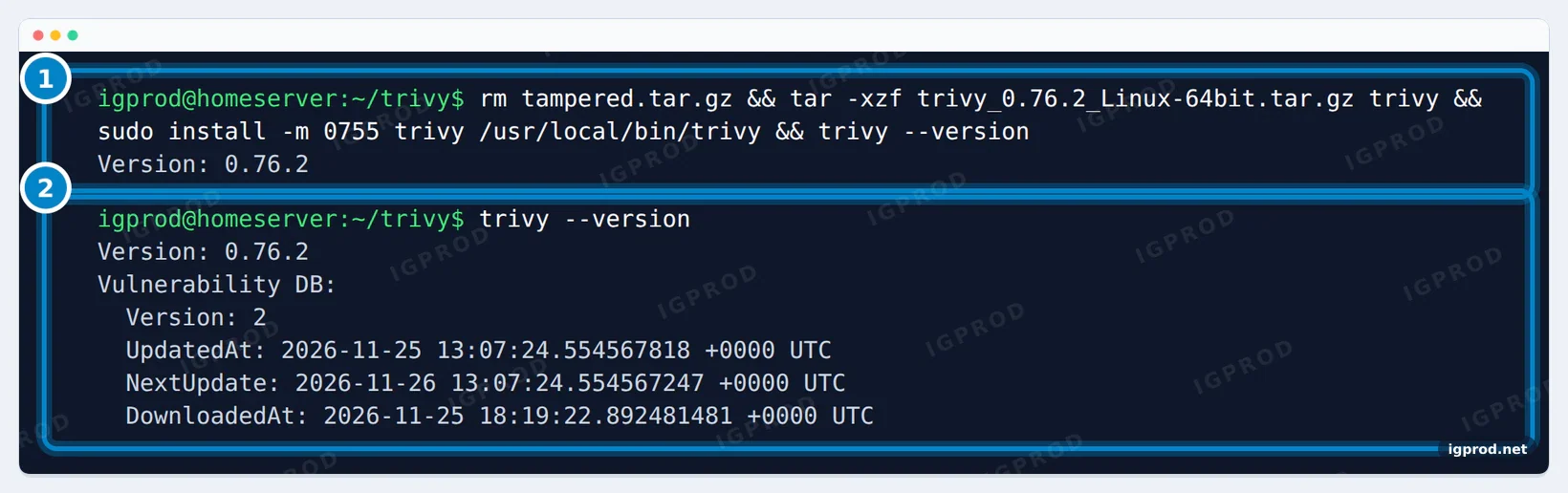
The database we scanned with was built on 25 November 2026 at 13:07 UTC, and its NextUpdate is 24 hours later. Trivy downloads a new one on the first scan after that time. In CI, cache ~/.cache/trivy between runs so every job does not download it again.
Trivy also offers deb and rpm repositories and an install script at get.trivy.dev. In March the malicious v0.69.4 went out through those too, so wherever you install from, pin the version and check the signature.
Step 2: Scan a Docker image
Start with an image you know is old: nginx 1.30.4 on Alpine. nginx 1.30.8 is a newer tag of the same image.
trivy image --severity HIGH,CRITICAL nginx:1.30.4-alpineTrivy reads the image (from Docker when it is there, otherwise from the registry), finds Alpine 3.24.1 with 71 packages and prints one table per target. The total for this image: 35 flaws, 29 HIGH and 6 CRITICAL. The full table is long, so here are only the CRITICAL ones, with --quiet to drop the progress lines:
trivy image --quiet --severity CRITICAL nginx:1.30.4-alpine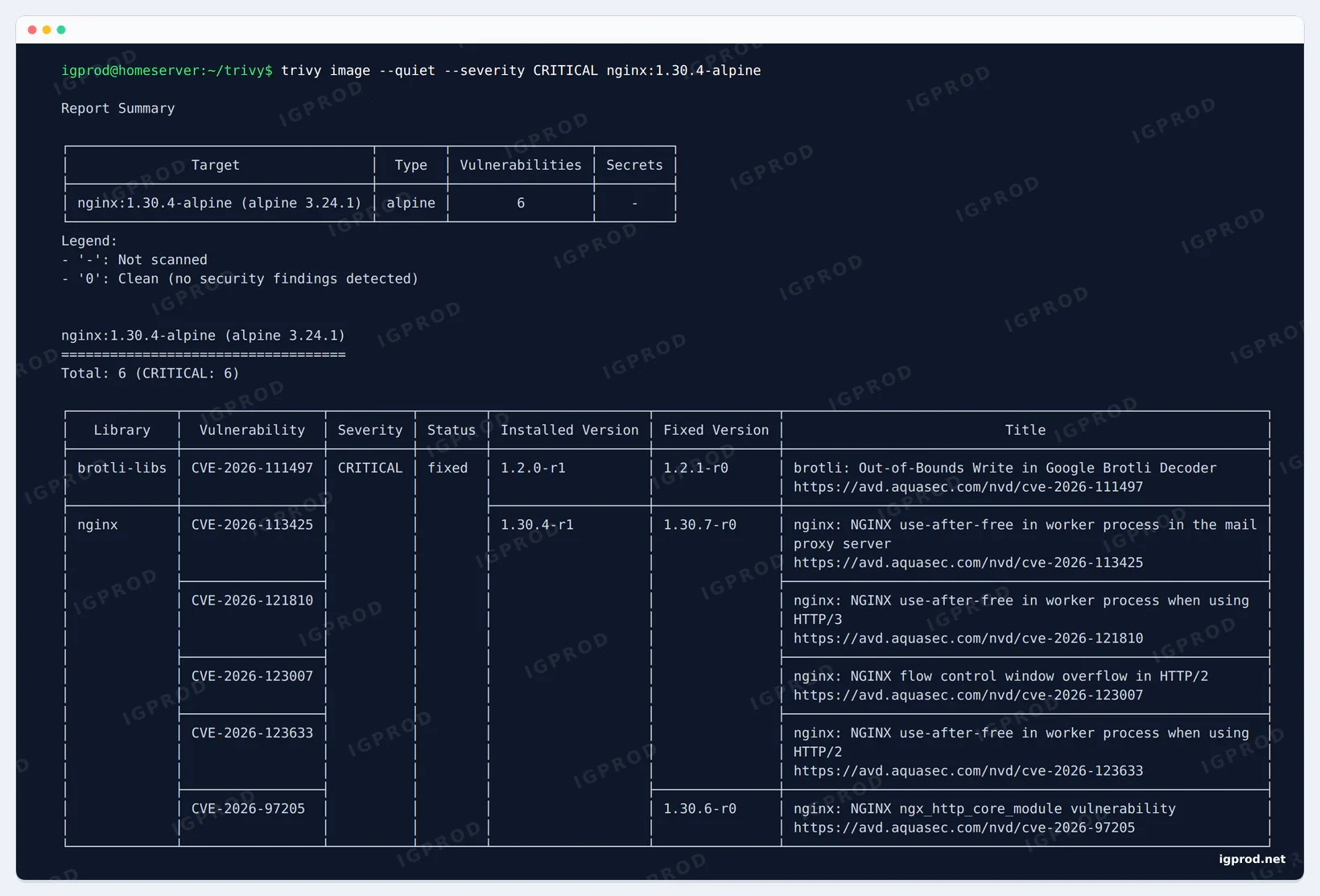
Each row is one flaw: the package, its CVE, the severity, the status (fixed: a newer package version has the fix), the version in the image and the first version that fixes it. Five of the six are in nginx itself, fixed in nginx 1.30.6 or 1.30.7; the sixth is in the Brotli compression library. CVE-2026-123007, "NGINX flow control window overflow in HTTP/2", is the HTTP/2 flaw in the news in November 2026. Now the newer tag:
trivy image --quiet --severity HIGH,CRITICAL --table-mode summary nginx:1.30.8-alpine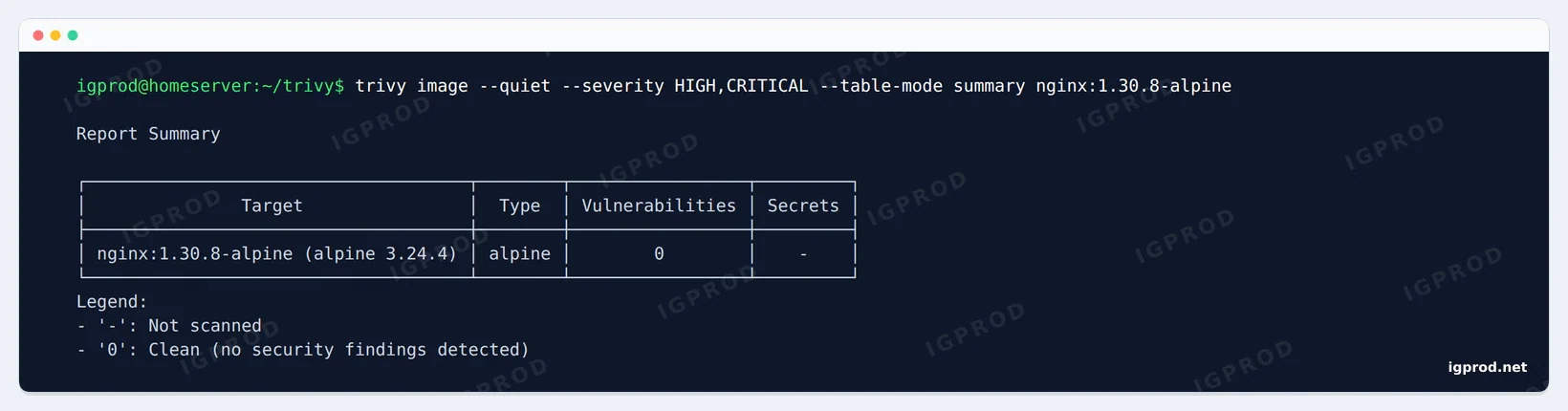
nginx:1.30.8-alpine, on Alpine 3.24.4: 0. The fix for an image is almost always a newer image: pull the new tag, or rebuild yours on a newer base, and scan again.
Two flags worth knowing. --table-mode summary prints one line per target instead of every flaw, which reads well in CI logs; Trivy 0.76 marks it as experimental. And trivy image also looks for secrets inside the image by default; when speed matters more, Trivy's own hint is --scanners vuln.
Step 3: Fail the build on HIGH and CRITICAL
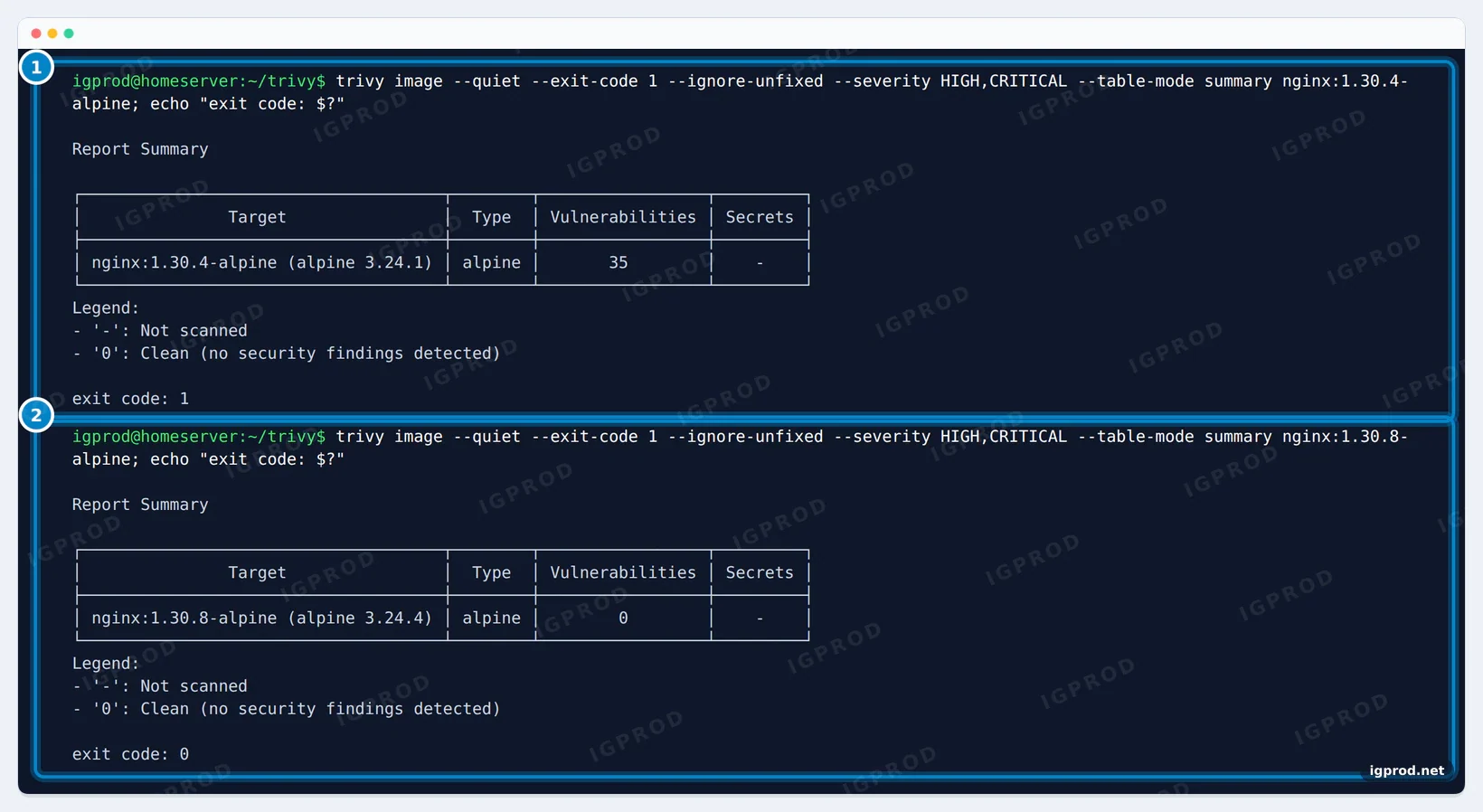
A scan that only prints is easy to ignore. --exit-code 1 makes Trivy end with exit code 1 when it finds something at the chosen severities, and that stops a CI job or a deploy script. --ignore-unfixed leaves out flaws that have no fix yet, so the gate fails only on what an update can solve.
trivy image --quiet --exit-code 1 --ignore-unfixed --severity HIGH,CRITICAL --table-mode summary nginx:1.30.4-alpine; echo "exit code: $?"The screenshot in the quick answer shows both sides: the old image has 35 HIGH or CRITICAL flaws, all with a fix, and the command ends with exit code 1; nginx:1.30.8-alpine has 0 and ends with exit code 0. Production rule: run the gate on the image you just built, before you push it to a registry, and keep a full report (without --ignore-unfixed) next to it so flaws with no fix yet stay visible.
Running a stack with Docker Compose? Gate every image it uses. docker compose config --images lists them, and this loop keeps going after a failure but remembers it:
cat compose.yaml && docker compose config --images
failed=0; for image in $(docker compose config --images); do trivy image --quiet --exit-code 1 --ignore-unfixed --severity HIGH,CRITICAL --table-mode summary "$image" || failed=1; done; echo "exit code: $failed"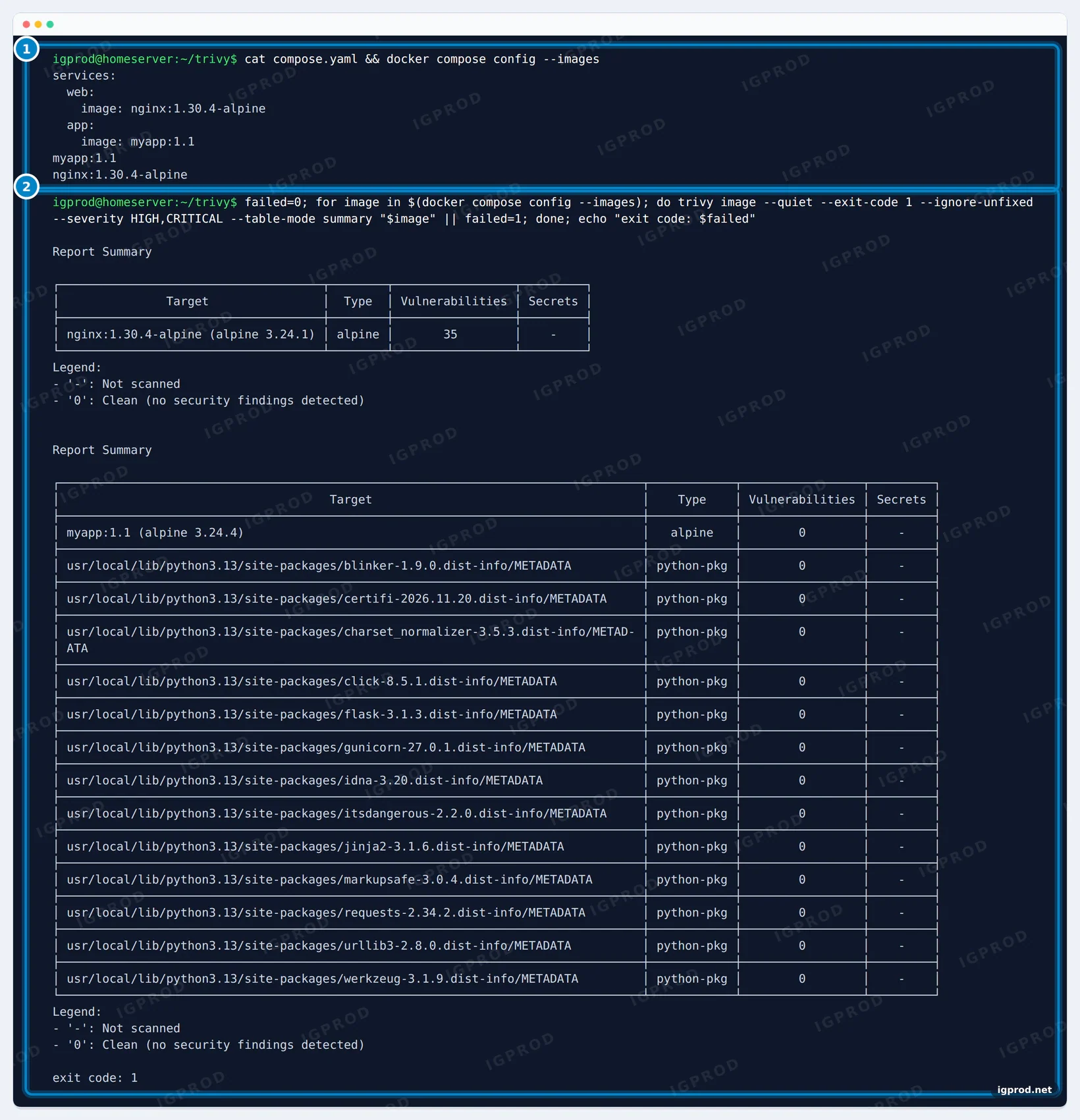
nginx:1.30.4-alpine fails with 35, and myapp:1.1, our own image from Step 7, passes; the loop ends with exit code 1. Run it in the folder of your compose.yaml after docker compose pull, so it checks the images you are about to start (our Docker Compose up guide covers the rest of that routine).
Step 4: Scan your project folder: libraries, secrets and the Dockerfile
Images are only half the story. trivy fs scans a folder before anything is built: dependency files such as requirements.txt or package-lock.json, secrets in any file, and Dockerfiles. Our test project is a small Python web app with three classic mistakes:
ls -A app && cat app/Dockerfile app/requirements.txt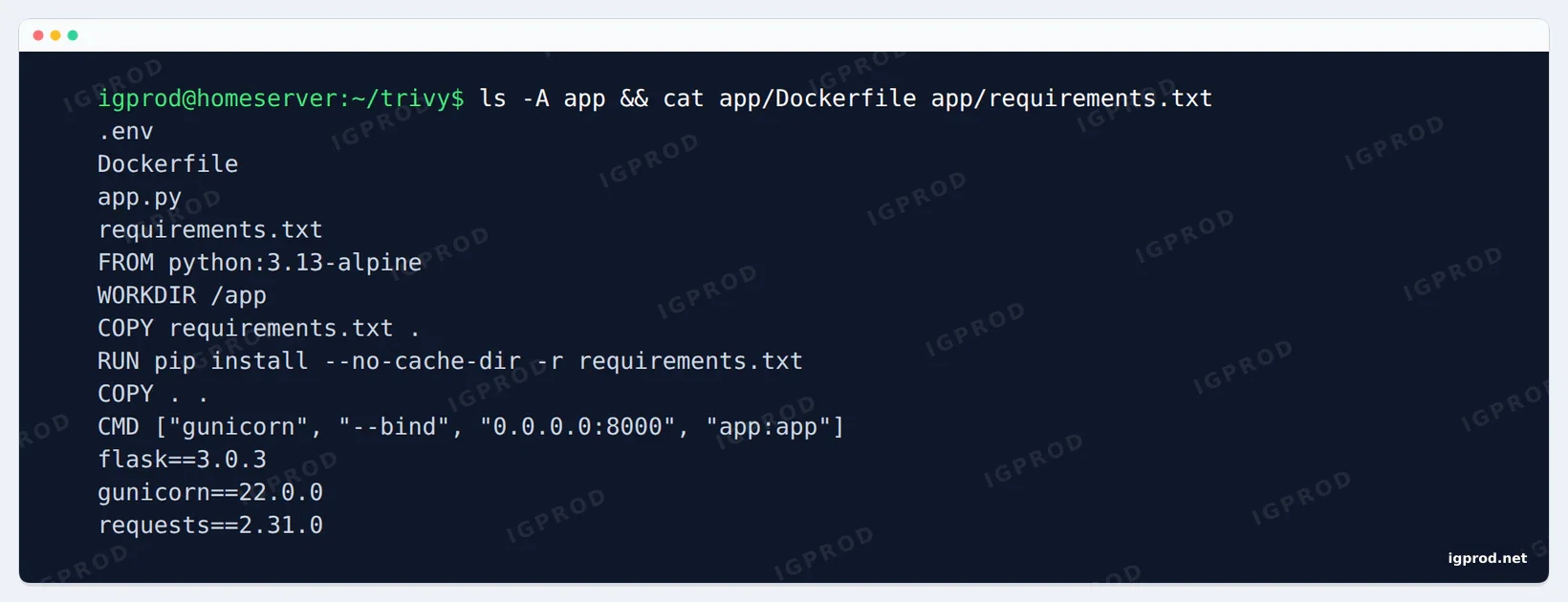
A .env file with a GitHub token; a Dockerfile whose COPY . . puts that file into the image and that runs everything as root; and old library versions. The token in our test file is random text in GitHub's token format, not a real key. Now one scan with the three scanners:
trivy fs --quiet --scanners vuln,secret,misconfig app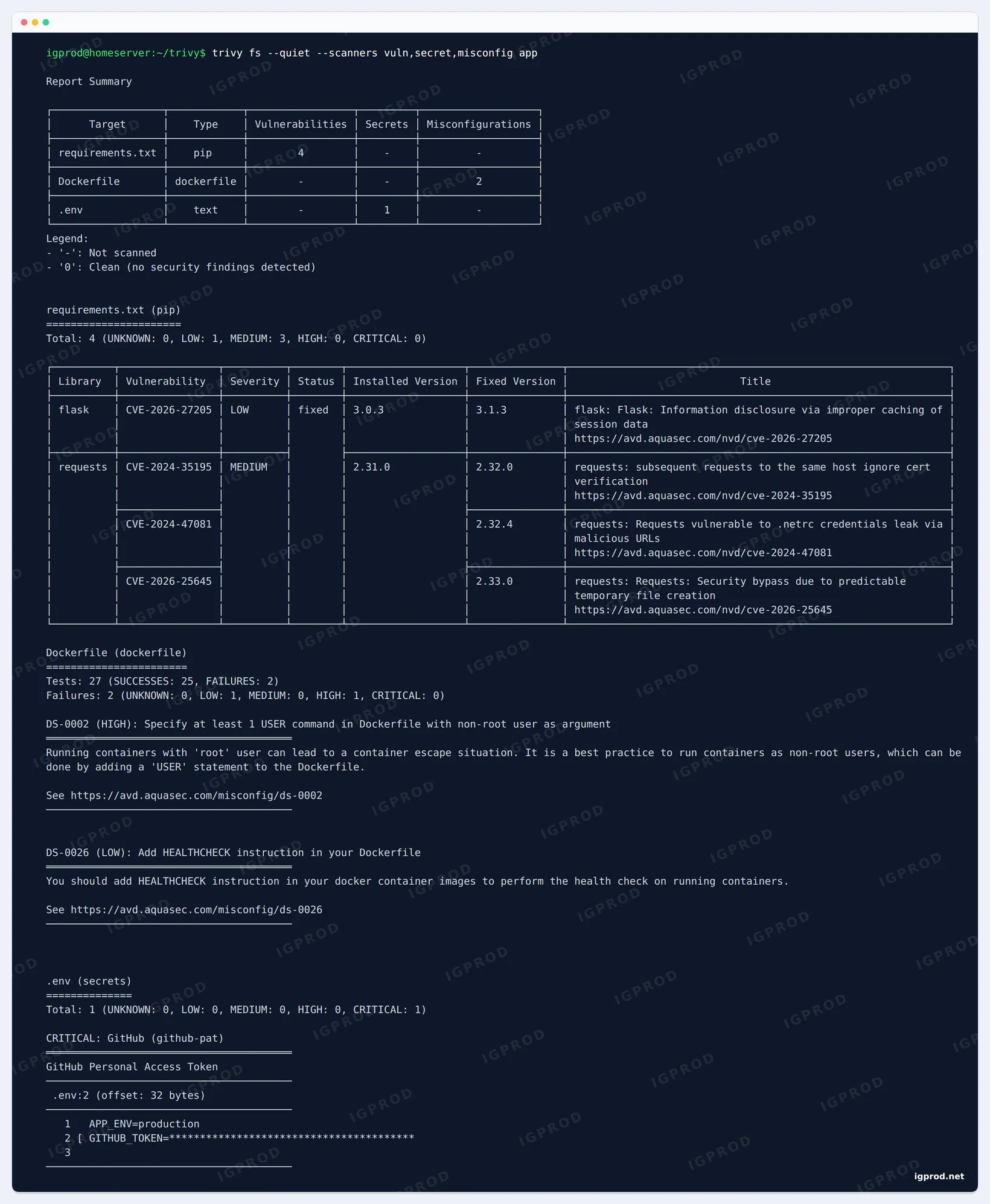
- requirements.txt: 4 flaws in flask 3.0.3 and requests 2.31.0 (1 LOW, 3 MEDIUM), with the versions that fix them: flask 3.1.3, requests 2.32.0, 2.32.4 and 2.33.0.
- Dockerfile: 27 checks, 2 failed. DS-0002 (HIGH): no
USERline, so the app runs as root. DS-0026 (LOW): noHEALTHCHECK. - .env: a CRITICAL GitHub personal access token on line 2. Trivy prints the token as asterisks, so the CI log does not leak it a second time.
For a whole repository, run trivy fs --scanners vuln,secret,misconfig . from its root. A key that Trivy finds has left your control if the file was ever committed: revoke it first, then clean the history, as our Gitleaks guide shows.
Step 5: Accept a risk on purpose, with an end date
Sometimes a fix has to wait. Do not lower the severity or remove the gate: write the exception down. Trivy reads ignore rules from a .trivyignore.yaml file, with a reason and an end date for each rule:
vulnerabilities:
  - id: CVE-2024-35195
    paths:
      - "requirements.txt"
    statement: requests upgrade planned in the next release
expired_at: 2027-01-31trivy fs --quiet --scanners vuln --ignorefile .trivyignore.yaml --show-suppressed app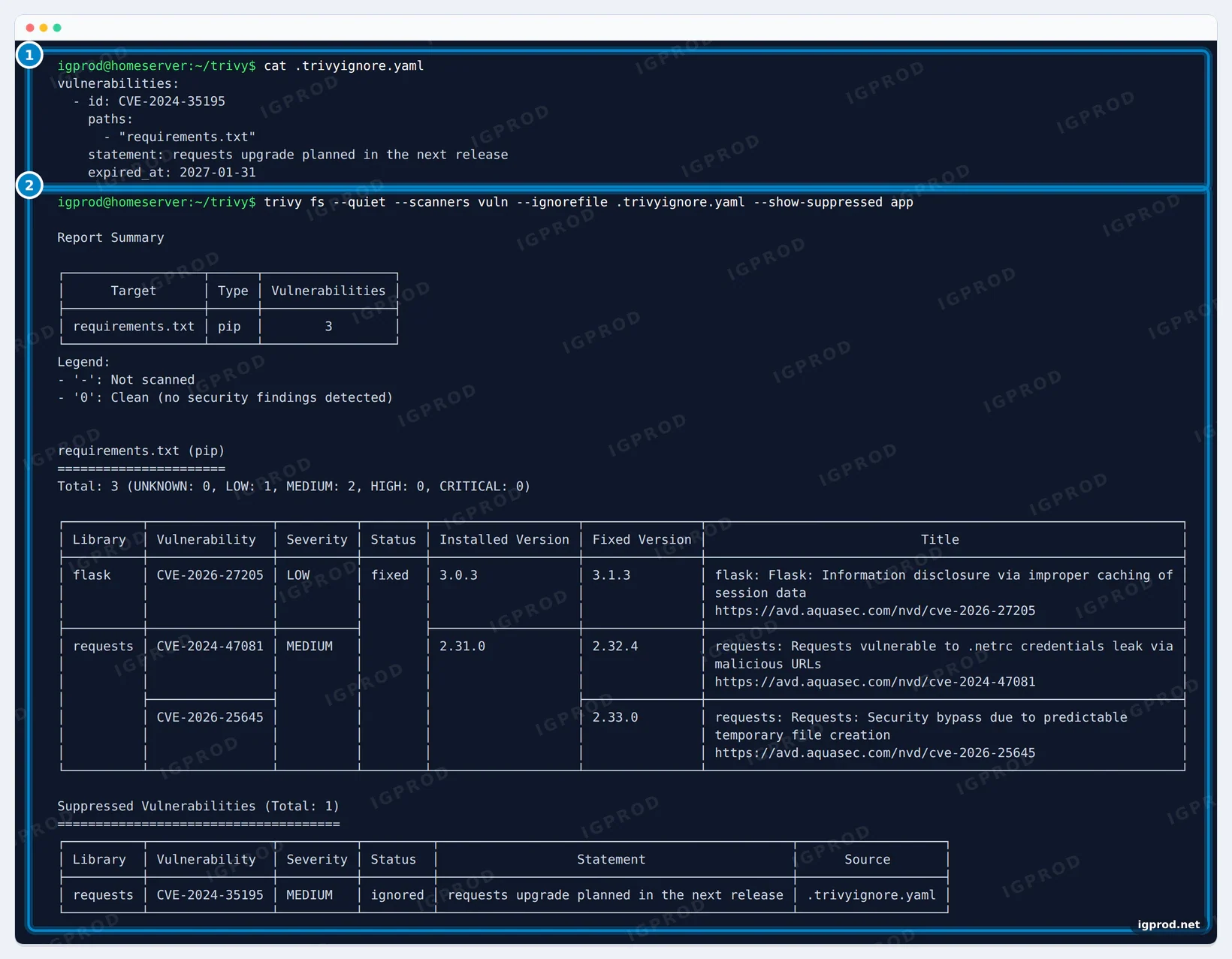
The scan counts 3 flaws instead of 4. --show-suppressed lists the ignored one with its statement and the file that ignored it, so the exception stays visible in every log. After 31 January 2027 the rule stops working and the finding comes back by itself.
Three details from Trivy's documentation. The YAML file is experimental, so pass it with --ignorefile; without that flag Trivy reads only the plain .trivyignore (one ID per line, no reason, no date). A rule can be limited to paths, as here, so the same CVE in another file still counts. And --show-suppressed is experimental too.
Step 6: Fix the findings and scan again
The fixes: delete .env and revoke the token, keep local files out of the build with a .dockerignore that lists .env, copy only the app, run as a normal user, add a health check, and move to current library versions. The new Dockerfile:
FROM python:3.13-alpine
WORKDIR /app
COPY requirements.txt .
RUN pip install --no-cache-dir -r requirements.txt
COPY app.py .
RUN adduser -D -H app
USER app
HEALTHCHECK --interval=30s --timeout=3s --retries=3 CMD wget -qO /dev/null http://127.0.0.1:8000/ || exit 1
CMD ["gunicorn", "--bind", "0.0.0.0:8000", "app:app"]
And requirements.txt; requests 2.34.2 was the newest version on PyPI on 25 November 2026:
flask==3.1.3
gunicorn==27.0.1
requests==2.34.2ls -A app && cat app/Dockerfile app/requirements.txt
trivy fs --quiet --scanners vuln,secret,misconfig --exit-code 1 app; echo "exit code: $?"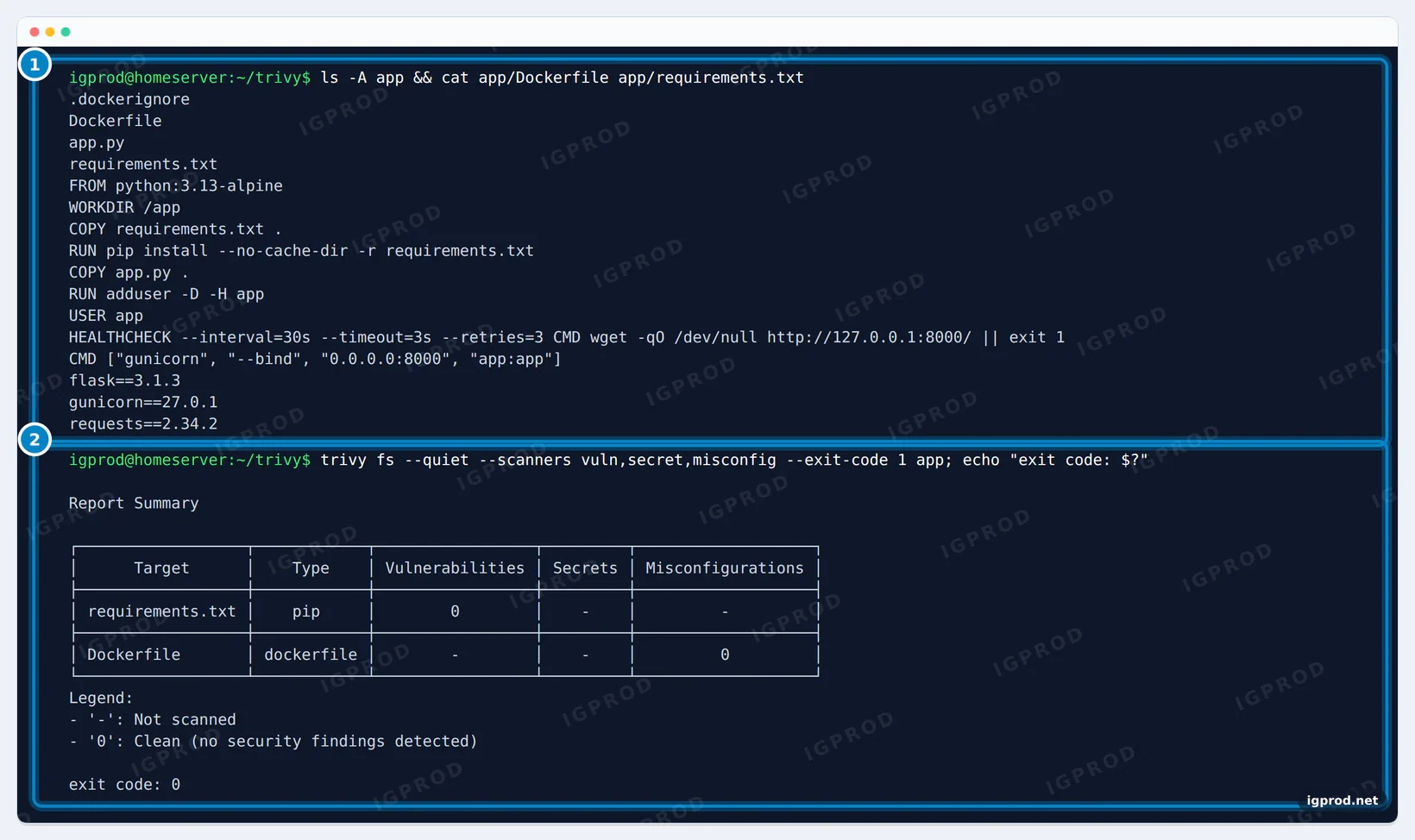
requirements.txt: 0. Dockerfile: 0 failed checks. Exit code 0. Deleting .env does not undo a leak, though: until you revoke the token on GitHub, anyone who copied the file or an old image can use it.
Step 7: Build the image and scan it, then the pip trap
Build the fixed project, start it and scan the image you just built:
docker build -q -t myapp:1.0 app && docker run -d --name myapp myapp:1.0
docker inspect --format "{{.State.Health.Status}}" myapp && docker exec myapp id
trivy image --quiet --severity HIGH,CRITICAL --exit-code 1 --table-mode summary myapp:1.0; echo "exit code: $?"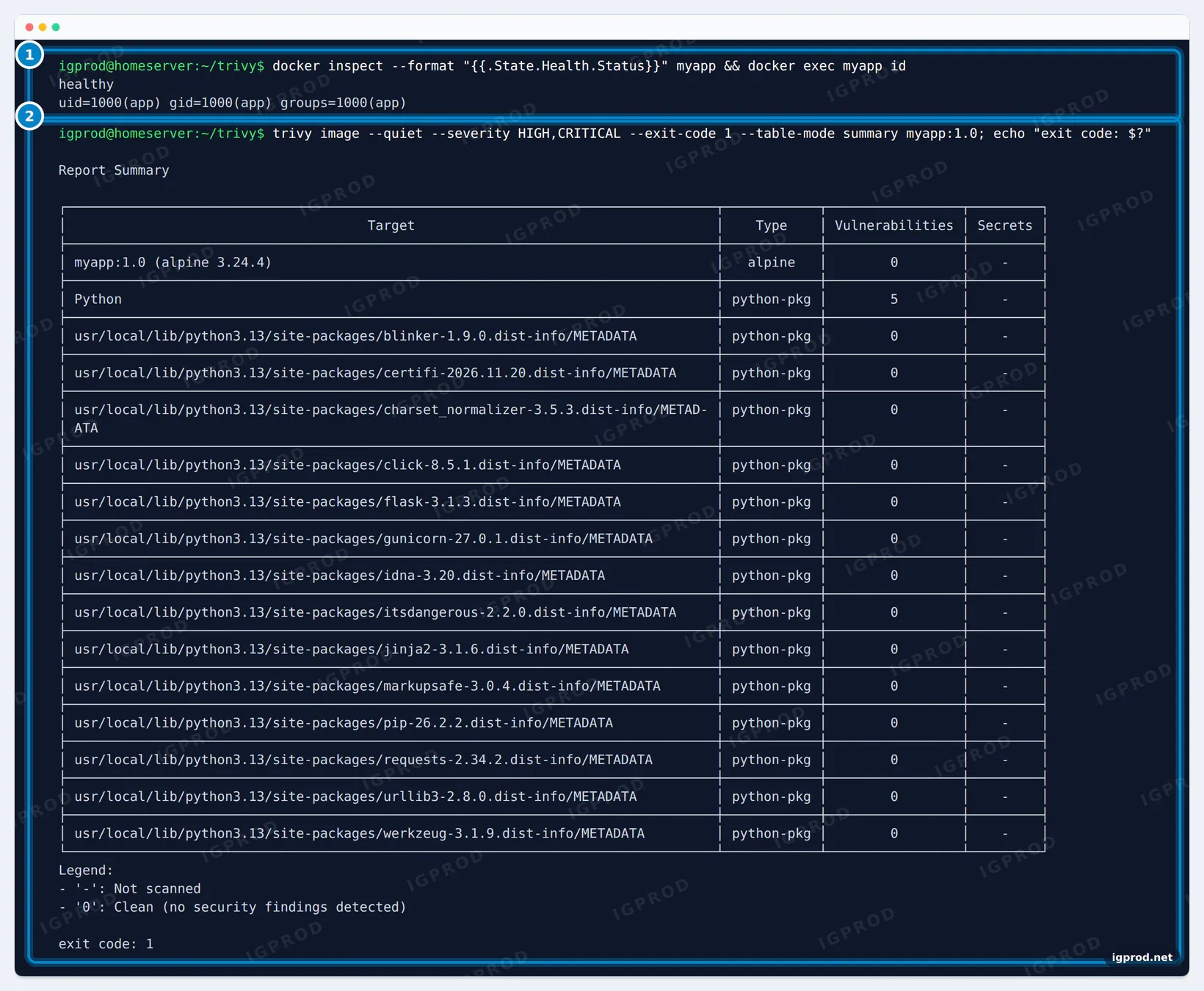
The container is healthy and runs as uid 1000, not root. But the image fails the gate: 5 HIGH flaws in a target called Python, while every library from requirements.txt shows 0. The base image, python:3.13-alpine, brings pip 26.2.2, and pip is where they are.
Which packages? Ask for JSON
The summary leaves out the names. Trivy's JSON report has them, and jq turns it into one line per finding, a format that reads well in a CI log:
trivy image --quiet --severity HIGH,CRITICAL --format json myapp:1.0 | jq -r '.Results[] | select(.Vulnerabilities) | .Target as $t | .Vulnerabilities[] | "\($t): \(.PkgName) \(.InstalledVersion) \(.VulnerabilityID) \(.Severity), fixed in \(.FixedVersion)"'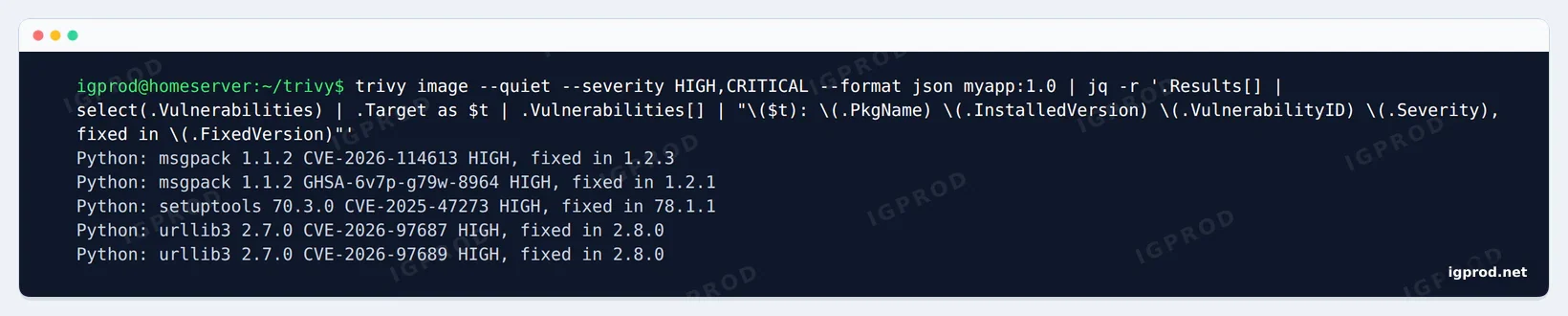
msgpack 1.1.2 (CVE-2026-114613 and GHSA-6v7p-g79w-8964), setuptools 70.3.0 (CVE-2025-47273) and urllib3 2.7.0 (CVE-2026-97687 and CVE-2026-97689). None of them is in requirements.txt, and the urllib3 our app uses is 2.8.0.
Where they come from, and the fix
pip carries its own copies of the libraries it needs, listed in a vendor.txt file. Ask the image:
docker run --rm --entrypoint grep myapp:1.0 -E "msgpack|urllib3|setuptools" /usr/local/lib/python3.13/site-packages/pip/_vendor/vendor.txtThe same three versions. Your app never imports them, but they are in the image, so scanners report them. The app does not need pip once its libraries are installed, so remove pip in the same RUN line:
sed -i 's|-r requirements.txt$|-r requirements.txt \&\& pip uninstall -y pip|' app/Dockerfile && grep -n 'RUN pip' app/Dockerfile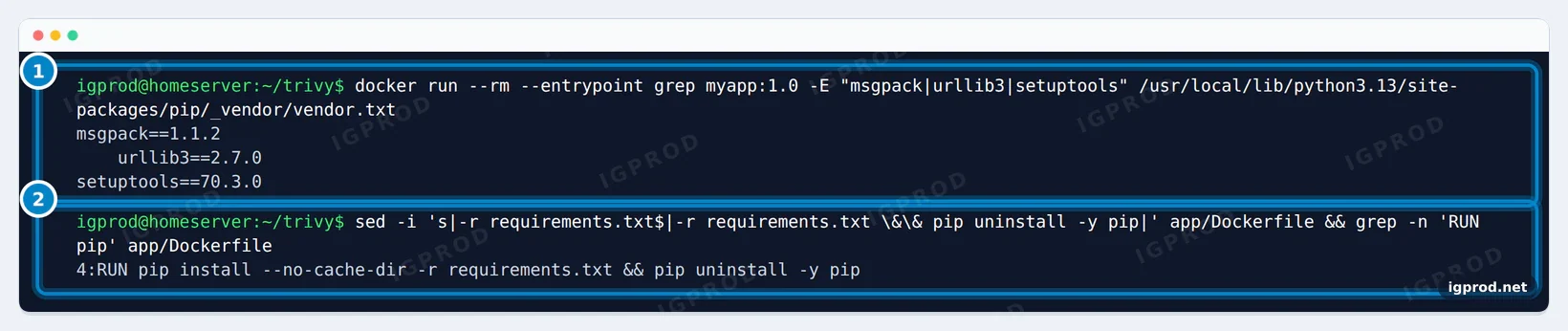
Then rebuild, restart and scan:
docker build -q -t myapp:1.1 app && docker rm -f myapp && docker run -d --name myapp myapp:1.1
docker inspect --format "{{.State.Health.Status}}" myapp
trivy image --quiet --severity HIGH,CRITICAL --exit-code 1 --table-mode summary myapp:1.1; echo "exit code: $?"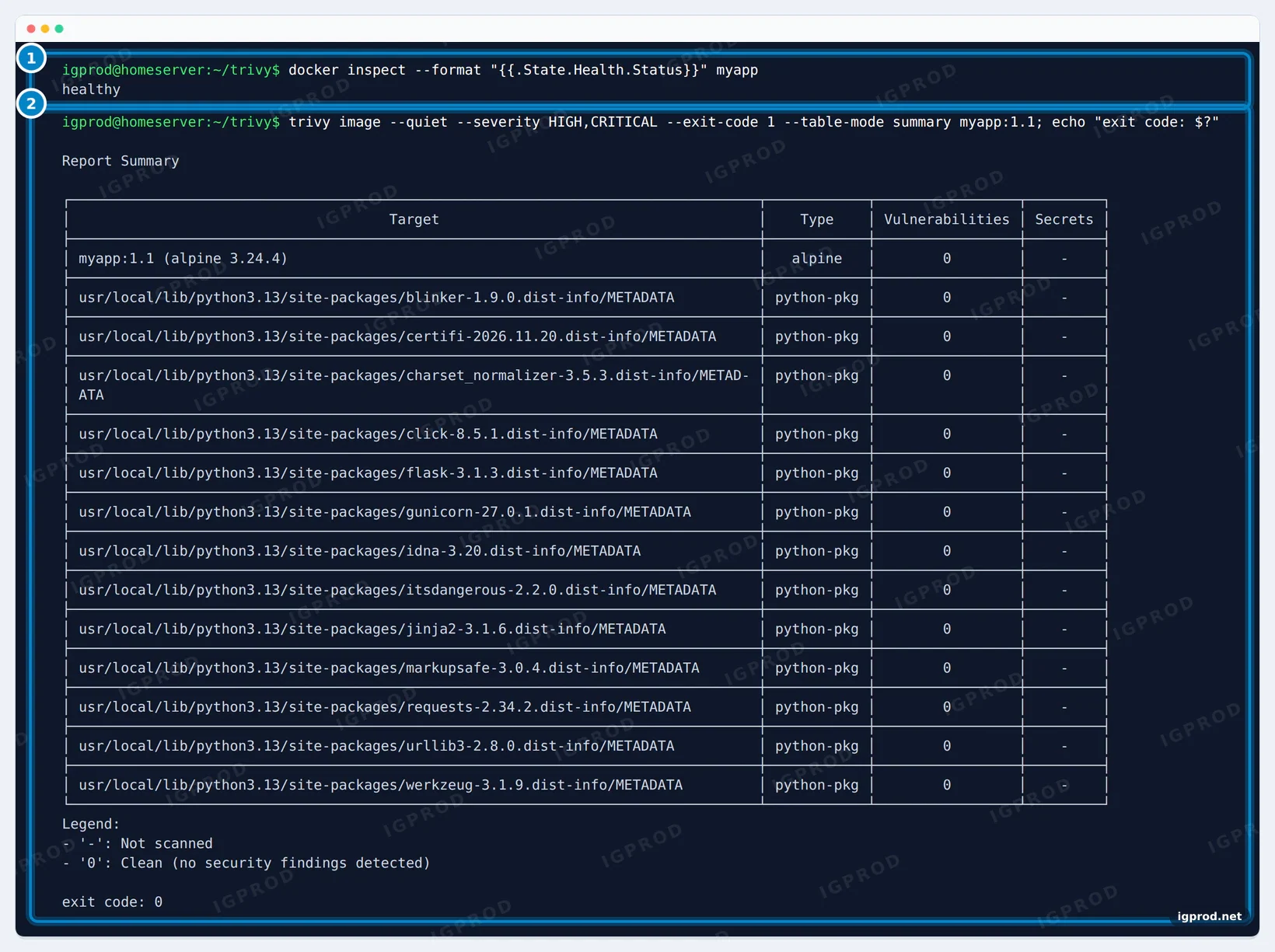
Healthy again, no Python target, exit code 0. If your container has to install packages while it runs, keep pip and accept these findings with an end date (Step 5) instead.
Step 8: Keep an SBOM and scan it later
An SBOM is the list of every package in the image. Save one with each release; when a new CVE comes out, scan the list instead of pulling every image again:
trivy image --quiet --format cyclonedx --output myapp-1.1.cdx.json myapp:1.1 && ls -l myapp-1.1.cdx.json && jq '.components | length' myapp-1.1.cdx.json
trivy sbom --quiet --severity HIGH,CRITICAL --exit-code 1 --table-mode summary myapp-1.1.cdx.json; echo "exit code: $?"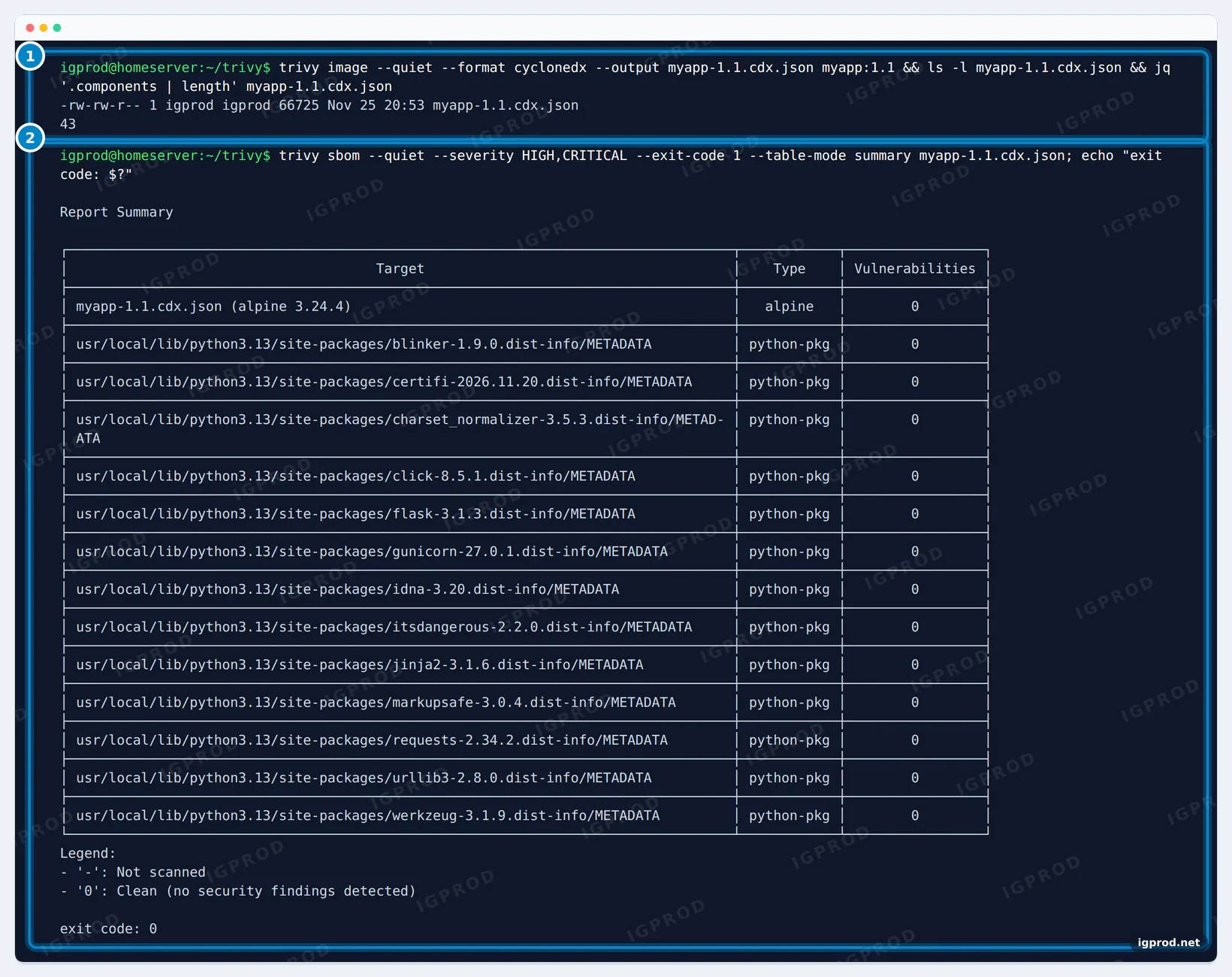
CycloneDX is a standard SBOM format; ours lists 43 components in 66,725 bytes. trivy sbom checks it against the current database: 0 HIGH or CRITICAL, exit code 0. Run that every day from a scheduled job: an image that passed at release can fail a week later when a new flaw is published, and the SBOM tells you without a rebuild.
Step 9: Run Trivy in Docker, pinned by a verified digest
The Trivy image is signed too. Check the signature, read the digest from it and run that digest. A tag like 0.76.2 can be pushed again; a digest always names the same bytes, and images pulled by digest were safe during the March attack.
cosign verify --certificate-identity-regexp 'https://github\.com/aquasecurity/' --certificate-oidc-issuer 'https://token.actions.githubusercontent.com' -o json aquasec/trivy:0.76.2 | jq -r '.[0].critical.image."docker-manifest-digest"'
docker image inspect --format '{{index .RepoDigests 0}}' aquasec/trivy:0.76.2
docker run --rm -v /var/run/docker.sock:/var/run/docker.sock -v $HOME/.cache/trivy:/root/.cache/trivy aquasec/trivy@sha256:8f6bb947dbc528902e11f2f5be52f7b519f6a39d5d148f41166f2040499768fb image --quiet --severity HIGH,CRITICAL --table-mode summary nginx:1.30.8-alpine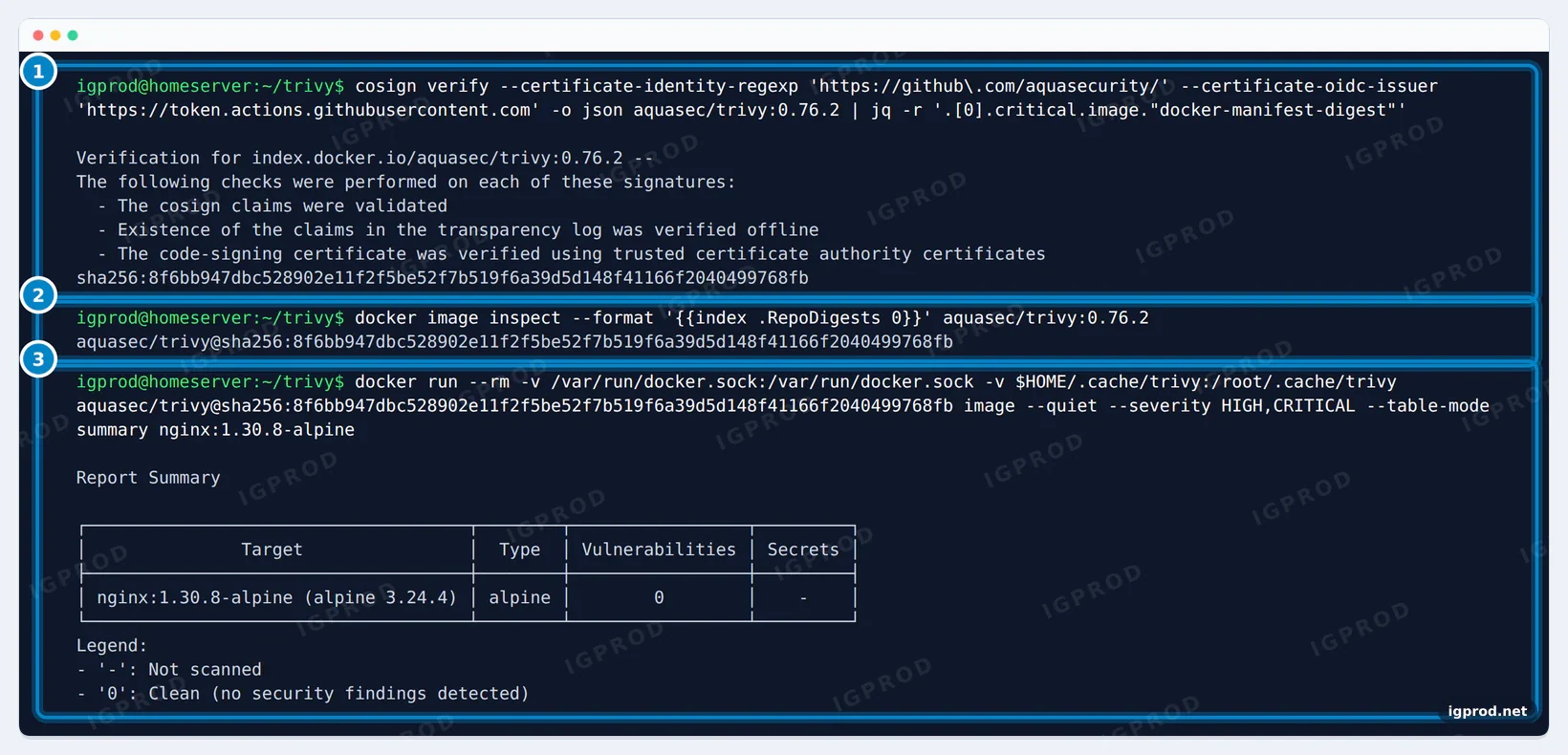
The digest cosign verified, sha256:8f6bb947..., is the one Docker pulled, and Trivy ran from it: nginx:1.30.8-alpine, 0. The second mount keeps the database in your own cache folder, so each run does not download it again.
Careful with the Docker socket. Mounting /var/run/docker.sock gives the container full control of Docker, which means root on the host. Do it only with an image you verified, as here, and on a machine where that is acceptable; on a shared CI runner, prefer the verified binary from Step 1.
Step 10: GitHub Actions: pin trivy-action to a full commit SHA
In March 2026, workflows that used aquasecurity/trivy-action by tag ran the attackers' code: the tags themselves were moved. A full commit SHA cannot be moved. Get it with git:
git ls-remote --tags https://github.com/aquasecurity/trivy-action 'v0.36.0*'
git ls-remote --tags https://github.com/actions/checkout 'v7.0.1*'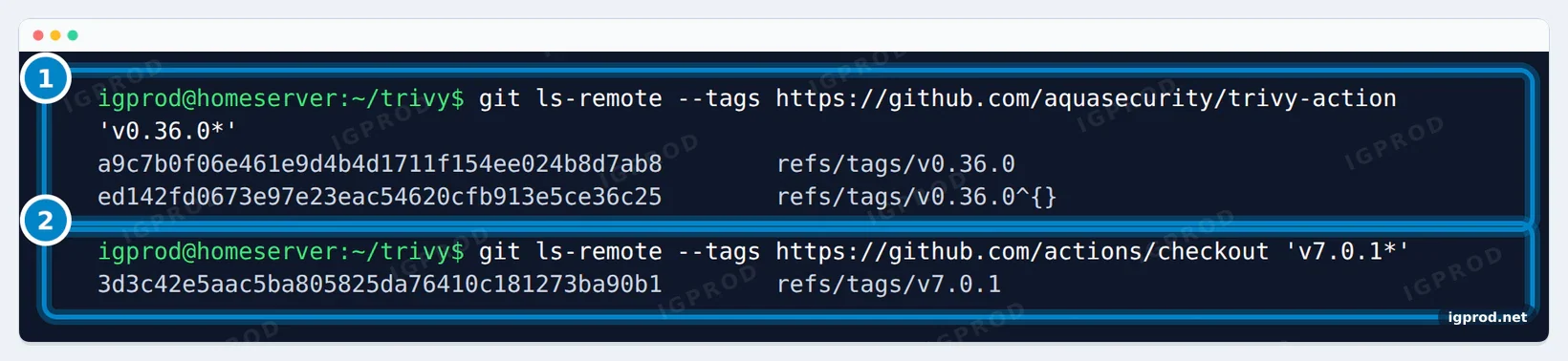
The ^{} trap. trivy-action v0.36.0 is an annotated tag, so git prints two lines. The first SHA (a9c7b0f) is the tag object; the line ending in ^{} (ed142fd) is the commit, and that is the one a workflow pins. actions/checkout v7.0.1 is a plain tag: one line, and that SHA is its commit.
The workflow builds the image, then runs the gate from Step 3 on it. Set the Trivy version yourself: when you leave it out, trivy-action v0.36.0 installs Trivy v0.70.0.
name: build-and-scan
on:
  push:
    branches: [main]
  pull_request:
permissions:
  contents: read
jobs:
  scan:
    runs-on: ubuntu-latest
    steps:
      - uses: actions/checkout@3d3c42e5aac5ba805825da76410c181273ba90b1 # v7.0.1
      - name: Build the image
        run: docker build -t myapp:ci .
      - name: Scan the image with Trivy
        uses: aquasecurity/trivy-action@ed142fd0673e97e23eac54620cfb913e5ce36c25 # v0.36.0
        with:
          image-ref: myapp:ci
          version: v0.76.2
          severity: HIGH,CRITICAL
          ignore-unfixed: true
          exit-code: '1'
The comment after each SHA keeps the version readable for people and for update tools such as Dependabot. permissions: contents: read gives the job's token read access only, so a compromised step has less to steal. We did not run this workflow: the SHAs come from the commands above and the inputs from trivy-action's README at that commit.
Production checklist for Trivy
- Install a pinned version, then check the checksum, the cosign signature and the signing date. Never pipe a moving URL into a shell.
- Pin Trivy everywhere: by digest in Docker, by full commit SHA in GitHub Actions, with the
versioninput set. - Gate every image you build with
--exit-code 1 --ignore-unfixed --severity HIGH,CRITICAL, before the push, and keep the full report. - Scan the repository too:
trivy fs --scanners vuln,secret,misconfig .on every pull request. - Write every exception in
.trivyignore.yamlwith a statement and anexpired_atdate, and print it with--show-suppressed. - Keep the build context clean: a
.dockerignore, noCOPY . .of secrets, a non-rootUSER, aHEALTHCHECK, no pip or compilers in the final image. - Save a CycloneDX SBOM per release and scan it daily: the database changes every 24 hours, your images do not.
- Revoke any key Trivy finds, even in a test branch.
- Follow Trivy's security advisories on GitHub: in March 2026 the scanner itself was the target.
What we did not test
- The GitHub Actions workflow in Step 10: we did not run it. The SHAs come from
git ls-remote. - The malicious releases of March 2026: we did not download them. Their description comes from the advisory.
- Trivy's deb and rpm repositories, the install script and Homebrew; Windows and macOS.
- Images with Java
.jarfiles and the Java database; Kubernetes scans (trivy k8s); Trivy's server mode.
Frequently asked questions
What is the latest version of Trivy?
Trivy 0.76.2, signed on 5 November 2026, was the newest release on 25 November 2026. Check yours with trivy --version, and take new releases from GitHub with the checks in Step 1.
Which Trivy versions were malicious?
Trivy v0.69.4 (all channels, 19 March 2026), the Docker Hub images 0.69.5 and 0.69.6 (22 March), 76 of the 77 trivy-action tags and all 7 setup-trivy tags (19 to 20 March). The details are in advisory GHSA-69fq-xp46-6x23, CVE-2026-33634.
Is Trivy safe to use now?
Yes, with the care you would give any tool that sees your secrets: a pinned version, a checked signature, images by digest and actions by commit SHA. Trivy now publishes immutable releases on GitHub, so the files of a published release cannot be swapped.
What does --ignore-unfixed do in Trivy?
It leaves out flaws that have no fixed version yet, so a gate fails only on what an update can solve. On our old nginx image it changed nothing: all 35 HIGH and CRITICAL flaws already had a fix.
How often is the Trivy database updated?
Every day. The database we used was built at 13:07 UTC on 25 November 2026, with its next update 24 hours later. Trivy downloads the new one on the first scan after that time; in CI, cache ~/.cache/trivy.
Why does Trivy report pip in my Python image?
pip carries its own copies of libraries such as urllib3, msgpack and setuptools. In python:3.13-alpine they gave 5 HIGH findings. Remove pip after installing your libraries (pip uninstall -y pip in the same RUN line), or accept the findings with an end date.
How do I ignore a vulnerability in Trivy?
List its ID in .trivyignore, one per line, or better, in .trivyignore.yaml with id, paths, statement and expired_at, passed with --ignorefile. Add --show-suppressed so the ignored findings stay in the log.
Is Trivy free?
Yes. Trivy is open source under the Apache-2.0 license, free to use on your machines and in CI.
Related guides
- Gitleaks 101: Find Leaked Keys in Git History, Remove Them and Block the Next One (2026)
- Docker Compose Up: Start Containers and Check They Work
- Docker for Beginners: Everything You Need to Know
- Install Docker Compose on Ubuntu using Docker’s repository
- Synology : Update docker containers
- How to Install Portainer with Docker (2026 Step-by-Step Guide)
- CrowdSec vs Fail2ban: Real Tests on Ubuntu 26.04 (SSH, Nginx, Docker, RAM) and How to Switch Safely
Sources
- GHSA-69fq-xp46-6x23: Trivy ecosystem supply chain temporarily compromised (CVE-2026-33634)
- Trivy v0.76.2 release
- Trivy documentation: filtering and .trivyignore.yaml
- Trivy documentation: vulnerability scanning and severity
- cosign v3.1.5 release (Sigstore)
- aquasecurity/trivy-action
- GitHub Docs: secure use of third-party actions
- CycloneDX SBOM standard
Leave a comment
Your email address will not be published. Required fields are marked *